Memory Type in Graphics Cards: What It Is and Is It Worth It?
As an Amazon Associate we earn from qualifying purchases. Links on this page are affiliate links.
Understanding Memory Type Explained
Memory type refers to the specific technology used in the video RAM (VRAM) modules on a graphics card. This specification defines how data moves between the GPU and the frame buffer. It directly impacts bandwidth and power efficiency. You will see several distinct generations listed in product specifications. Each generation offers different performance characteristics and architectural improvements.
DDR3 is an older standard. It uses double data rate technology but operates at lower speeds compared to modern alternatives. You will find this type in entry-level or legacy cards. It provides sufficient bandwidth for basic display tasks but struggles with high-resolution textures and complex rendering workloads. The latency is higher, which can limit responsiveness in demanding scenarios.
GDDR5 represents a significant step forward. It is designed specifically for graphics processing. This type offers higher bandwidth and better power efficiency than DDR3. You will encounter it in many mid-range cards. The increased speed allows for smoother performance in games and applications that require large amounts of data to be processed quickly. It remains a reliable choice for standard gaming resolutions.
GDDR6 is the current mainstream standard. It delivers substantial bandwidth improvements over GDDR5. This type supports higher clock speeds and more efficient data transfer rates. You will see it in most modern mid-range and high-end graphics cards. The efficiency gains allow for better performance per watt, which is crucial for maintaining stable frame rates without excessive heat generation.
GDDR6X is the latest advanced technology. It utilizes a unique signaling method to achieve even higher bandwidth. This type is found in top-tier cards designed for 4K gaming and professional workloads. The increased speed handles massive texture data and complex calculations with minimal delay. Understanding these differences helps you match the card to your specific resolution and application needs. The right memory type ensures your GPU can keep up with the data demands of your software.
Memory Type Options Compared
GDDR5
GDDR5 is an older memory standard that offers reliable bandwidth for mid-range tasks. It supports resolutions like 1440p but lacks the raw speed of newer generations. This type suits users who prioritize capacity over cutting-edge performance, such as those playing VR titles. The XFX RX 580 8GB GDDR5 serves as a practical example, delivering solid 1440p results without needing the largest memory buffers. You will notice higher power consumption compared to modern equivalents. It remains a viable choice for upgrading from legacy systems where extreme frame rates are not the primary goal.
DDR3
DDR3 is a basic memory type found in entry-level graphics cards. It provides very low bandwidth, making it unsuitable for gaming or intensive workloads. This type fits only users who need simple display output for legacy systems or small cases. The MSI GeForce 210 1GB DDR3 is a clear example, offering slow performance for basic video output. You should avoid this memory type if you intend to run modern applications or games. It lacks the speed required for serious graphical tasks. Its primary value lies in enabling video output for computers that lack integrated graphics, rather than providing any meaningful performance boost.
GDDR6
GDDR6 represents a significant leap in efficiency and bandwidth over previous generations. It supports high-resolution gaming at 1440p and 4K with improved power management. This type suits users who want strong performance without excessive heat or power draw. The ZOTAC RTX 3070 8GB GDDR6 delivers solid 1440p performance, fitting those who value PCIe 4.0 bandwidth. Another example is the ZOTAC RTX 3060 12GB GDDR6, which offers ample VRAM for high-texture gaming at 1080p and 1440p. You benefit from faster data transfer rates, allowing for smoother gameplay in demanding titles while maintaining a reasonable power profile.
GDDR6X
GDDR6X is the latest high-bandwidth memory standard, offering massive data transfer speeds. It is designed for high-end gaming and professional workloads requiring large memory buffers. This type suits users with 4K displays or those running resource-intensive applications. The EVGA RTX 3090 24GB GDDR6X delivers massive VRAM and high bandwidth, ideal for users needing maximum capacity for high-resolution tasks. The ASUS RTX 4070 Ti Super BTF White 16GB GDDR6X also fits gamers needing high VRAM and specific board compatibility. You will experience reduced latency and higher frame rates in demanding scenarios, though it often comes with higher power requirements and heat output.
Is Memory Type Worth Upgrading
Who needs it
You should prioritize GDDR6 or GDDR6X if you plan to game at 4K resolution or use high-refresh-rate monitors at 1440p. These newer memory types provide significantly higher bandwidth, which is essential for moving large texture data quickly. If you engage in modern game development, 3D rendering, or heavy video editing, the increased throughput of GDDR6X reduces bottlenecks. It also supports newer features like ray tracing more effectively. GDDR5 may struggle with these demanding workloads, causing stuttering or lower frame rates. Choose GDDR6 for a balanced approach between performance and efficiency. It offers a substantial jump from older standards without the premium cost of the fastest options. This ensures your system remains relevant for several years as software demands increase.
Who can skip it
You can ignore advanced memory types if you primarily play older titles or use your PC for basic office tasks. GDDR5 is sufficient for 1080p gaming and general desktop use. DDR3 is largely obsolete for gaming but may appear in very low-end integrated solutions. Do not pay extra for GDDR6X if your monitor is limited to 60Hz at 1080p. Focus your budget on a stronger GPU core instead. The memory type matters less when you are not pushing high resolutions or complex visual effects. Prioritize core clock speeds and shader count for better overall performance in lighter applications. Upgrading memory type yields diminishing returns for casual users. Stick to standard GDDR5 if you want to keep costs down while maintaining solid functionality for everyday computing and light media consumption.
Memory Type Glossary
VRAM
Video RAM stores textures and frame data for the GPU. It sits directly on the graphics card and allows the processor to access image information quickly without relying on system memory.
GDDR
Graphics Double Data Rate is a type of high-speed memory used in modern graphics cards. It offers higher bandwidth than standard system RAM, which helps render complex scenes faster.
Memory Bandwidth
This measures how much data can move between the GPU and memory per second. Higher bandwidth allows the card to handle larger textures and higher resolutions without slowing down.
Memory Bus Width
The bus width determines how many bits of data transfer at once. A wider bus, such as 256-bit, allows more data to flow simultaneously compared to a narrower 128-bit connection.
GDDR6X
An advanced memory type using hyper-fast signaling. It provides significantly higher bandwidth than standard GDDR6, making it suitable for 4K gaming and professional workloads that require rapid data access.
Frame Buffer
The dedicated memory area where the GPU stores the final image before sending it to your display. Sufficient frame buffer size ensures smooth performance when running high-resolution games.
Memory Clock
The speed at which the VRAM operates, measured in megahertz. A higher clock speed allows the memory to process more instructions per second, contributing to overall graphics card performance.
Quick picks
| # | Product | Best for | Price |
|---|---|---|---|
| 1 | ZOTAC GeForce RTX 3070 Twin Edge OC 8GB | 1440p gaming with GDDR6 memory | Check price of ZOTAC GeForce RTX 3070 Twin Edge OC 8GB on Amazon |
| 2 | EVGA GeForce RTX 3090 24GB | Users needing 24GB VRAM for 4K workloads | Check price of EVGA GeForce RTX 3090 24GB on Amazon |
| 3 | XFX RX 580 GTS XXX 8GB | VR gaming and 1440p performance | Check price of XFX RX 580 GTS XXX 8GB on Amazon |
| 4 | MSI GeForce 210 1GB DDR3 Low Profile | basic display output in small cases | Check price of MSI GeForce 210 1GB DDR3 Low Profile on Amazon |
| 5 | ZOTAC GeForce RTX 3060 Twin Edge 12GB | 1080p and 1440p gaming with high textures | Check price of ZOTAC GeForce RTX 3060 Twin Edge 12GB on Amazon |
| 6 | ASUS TUF RTX 4070 Ti Super BTF White | BTF motherboard users needing 16GB VRAM | Check price of ASUS TUF RTX 4070 Ti Super BTF White on Amazon |
Our 6 picks

ZOTAC GeForce RTX 3070 Twin Edge OC 8GB
Best for: 1440p gaming with GDDR6 memory
- Memory Type
- GDDR6 (what this guide is about)
- Graphics Processor
- GeForce RTX 3070
- Memory Size
- 8GB
- Boost Clock
- 1755 MHz
- Memory Bus Width
- 256-bit
- PCIe Interface
- PCIE 4.0
View on Amazon: ZOTAC GeForce RTX 3070 Twin Edge OC 8GB Affiliate link
This ZOTAC GeForce RTX 3070 uses GDDR6 memory with an 8GB capacity and a 256-bit bus width. It operates on a PCIe 4.0 interface, which provides higher bandwidth compared to older standards. The card features a 1755 MHz boost clock and NVIDIA Ampere architecture. It suits gamers who need modern memory technology for high-resolution textures and stable frame rates in recent titles.
Pros
- 8GB GDDR6 memory with 14 Gbps speed
- 256-bit memory bus width
- PCIe 4.0 interface support
- 1755 MHz boost clock speed
- NVIDIA Ampere architecture with ray tracing cores
Cons
- 8GB memory capacity is smaller than the 24GB GDDR6X option on this list
- Uses GDDR6 instead of the newer GDDR6X standard found in other listings
- Single dual-fan cooling design may run hotter under heavy load than triple-fan models
Good fit if
- You want GDDR6 memory for modern gaming performance
- You have a PCIe 4.0 motherboard to utilize the interface speed
- You prefer a compact dual-fan card for smaller cases
Skip if
- You need more than 8GB of video memory for 4K gaming
- You require the latest GDDR6X memory technology
- You prioritize maximum cooling performance over card size
Verdict: ZOTAC RTX 3070 8GB GDDR6 delivers solid 1440p performance with efficient GDDR6 memory. It fits users who value PCIe 4.0 bandwidth and reliable Ampere architecture without needing the largest memory buffers available.

EVGA GeForce RTX 3090 24GB
Best for: Users needing 24GB VRAM for 4K workloads
- Memory Type
- GDDR6X (what this guide is about)
- Graphics Processor
- GeForce RTX 3090
- Memory Size
- 24GB
- Boost Clock
- 1800MHz
- PCIe Interface
- PCIe 4
- Use
- Gaming
View on Amazon: EVGA GeForce RTX 3090 24GB Affiliate link
This card uses GDDR6X memory, the same type found in the RTX 4070 Ti Super and 4060 models on this list. It offers 24GB of VRAM, which is significantly more than the 8GB in the RTX 3070 or 4060. The 256-bit bus width supports high bandwidth. You need a large case because the card is 11.8 inches long. It suits users who need maximum memory capacity for high-resolution workloads.
Pros
- 24GB GDDR6X memory capacity
- 256-bit memory bus width
- 1800MHz boost clock speed
- PCIe 4.0 interface support
Cons
- 11.8-inch length requires a large case
- 2.5-pound weight may stress the PCIe slot
- No mention of included power adapters
Good fit if
- You need 24GB of VRAM for 4K gaming or rendering
- You have a full-tower case that fits large cards
- You want the high bandwidth of GDDR6X technology
Skip if
- You have a small form factor case
- You only need 8GB of memory
- You are using a PCIe 3.0 motherboard
Verdict: EVGA RTX 3090 24GB GDDR6X delivers massive 24GB VRAM and high bandwidth via GDDR6X, making it ideal for users with large cases who need maximum memory capacity for high-resolution tasks.

XFX RX 580 GTS XXX 8GB
Best for: VR gaming and 1440p performance
- Memory Type
- GDDR5 (what this guide is about)
- Graphics Processor
- Radeon RX 580
- Memory Size
- 8GB
- Boost Clock
- 1386MHz
- Dimensions
- 10.6 × 1.57 × 4.88 inches
- Weight
- 2.7 pounds
View on Amazon: XFX RX 580 GTS XXX 8GB Affiliate link
The XFX Radeon RX 580 uses GDDR5 memory with an 8GB capacity. This card features a Polaris architecture and dual BIOS support. It includes factory overclocked settings for improved performance. The cooling system is designed for optimal thermal management. You should consider this option if you need reliable VR readiness. It suits users who prioritize stable frame rates over the latest memory bandwidth found in newer cards.
Pros
- 8GB GDDR5 memory capacity
- Factory overclocked up to 1386MHz
- Dual BIOS configuration
- VR Ready Premium certification
Cons
- Uses older GDDR5 memory instead of GDDR6
- Lacks the high bandwidth of GDDR6X models
- Physical dimensions require adequate case space
Good fit if
- You want 8GB of VRAM for modern titles
- You need a VR-ready graphics card
- You prefer dual BIOS flexibility
Skip if
- You require GDDR6X memory speed
- You need the latest ray tracing performance
- You have a small form factor case
Verdict: The XFX Radeon RX 580 8GB GDDR5 delivers solid 1440p performance for gamers who value VRAM capacity over cutting-edge memory speeds. It is a practical choice for users upgrading from older cards who need reliable VR support.
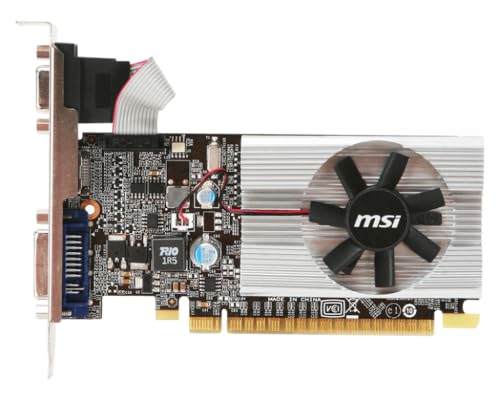
MSI GeForce 210 1GB DDR3 Low Profile
Best for: basic display output in small cases
- Memory Type
- DDR3 (what this guide is about)
- Graphics Processor
- GeForce 210
- Memory Size
- 1 GB
- PCIe Interface
- PCI Express 2.0
- Slot Width
- 1-slot
- Dimensions
- 5.7 × 3.3 × 0.7 inches
View on Amazon: MSI GeForce 210 1GB DDR3 Low Profile Affiliate link
This MSI card uses DDR3 memory, the oldest type in this guide. It has 1024 MB of VRAM and a 256-bit bus. The card is small, measuring 5.7 inches long and 0.7 inches high. It fits in slim cases. You need it only for basic display output or very light tasks. It is not for modern gaming.
Pros
- Low profile design for small cases
- Supports MSI Afterburner utility
- Compact 5.7-inch length
Cons
- DDR3 memory is slower than GDDR5, GDDR6, or GDDR6X
- Only 1024 MB of video memory
- PCI-Express 2.0 interface
Good fit if
- You need a display adapter for an old PC
- You have a small form factor case
- You only need basic desktop display output
Skip if
- You want to play modern games
- You need high frame rates
- You require fast memory bandwidth
Verdict: MSI GeForce 210 1GB DDR3 is a basic display card with slow DDR3 memory. It fits only users who need a simple video output for legacy systems or small cases.
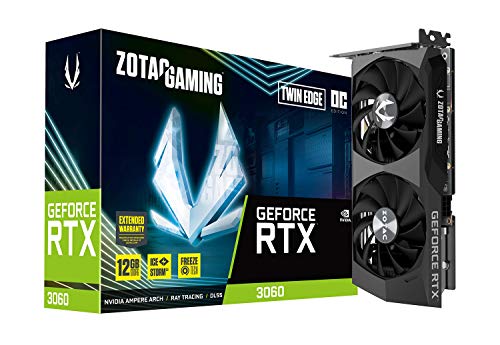
ZOTAC GeForce RTX 3060 Twin Edge 12GB
Best for: 1080p and 1440p gaming with high textures
- Memory Type
- GDDR6 (what this guide is about)
- Graphics Processor
- GeForce RTX 3060
- Memory Size
- 12GB
- Memory Bus Width
- 192-bit
- PCIe Interface
- PCIe 4.0
- Use
- Gaming
View on Amazon: ZOTAC GeForce RTX 3060 Twin Edge 12GB Affiliate link
This ZOTAC card features a GeForce RTX 3060 GPU paired with 12GB of GDDR6 memory. The 192-bit bus width and 15 Gbps memory speed define its bandwidth capabilities. It connects via PCIe 4.0. The 192-bit bus is narrower than the 256-bit bus found on the RTX 3070 in this list. This configuration suits you if you prioritize video memory capacity for modern gaming textures.
Pros
- 12GB GDDR6 memory capacity
- 15 Gbps memory speed
- PCIe 4.0 interface support
- Compact 8.8-inch length
Cons
- 192-bit memory bus is narrower than the 256-bit bus on the RTX 3070
- Fewer CUDA cores than the RTX 3090 in this list
- GDDR6 bandwidth is lower than GDDR6X options
Good fit if
- You need 12GB of VRAM for high-resolution textures
- You use a PCIe 4.0 motherboard
- You want a compact card for smaller cases
Skip if
- You require the highest possible memory bandwidth
- You need more than 12GB of VRAM
- You prefer GDDR6X memory technology
Verdict: ZOTAC RTX 3060 12GB GDDR6 offers ample VRAM for 1080p and 1440p gaming. It fits you if you value memory capacity over maximum bus width.

ASUS TUF RTX 4070 Ti Super BTF White
Best for: BTF motherboard users needing 16GB VRAM
- Memory Type
- GDDR6X (what this guide is about)
- Graphics Processor
- GeForce RTX 4070 Ti Super
- Memory Size
- 16GB
- PCIe Interface
- PCIe 4.0
- Use
- Gaming
- Weight
- 2.87 pounds
View on Amazon: ASUS TUF RTX 4070 Ti Super BTF White Affiliate link
This ASUS card uses GDDR6X memory with a 16GB capacity. It connects via PCIe 4.0 and features a white finish. The design requires a compatible motherboard with BTF support. You get high-speed memory for gaming tasks. The build weighs 2.87 pounds. It suits users who need ample VRAM and specific motherboard compatibility.
Pros
- 16GB GDDR6X memory capacity
- PCIe 4.0 interface
- White color finish
- RTX 4070 Ti Super processor
Cons
- Requires a motherboard with BTF support
- Heavier build at 2.87 pounds
- Limited to PCIe 4.0 interface
Good fit if
- You need 16GB of VRAM for high-resolution gaming
- You have a motherboard with BTF support
- You prefer a white graphics card
Skip if
- You do not have a BTF-compatible motherboard
- You are using a PCIe 3.0 system
- You need a lighter card under 2 pounds
Verdict: ASUS RTX 4070 Ti Super BTF White 16GB offers 16GB of GDDR6X memory for users with BTF motherboards. It fits gamers who need high VRAM and specific board compatibility.
Specifications side by side
| Spec | ZOTAC GeForce RTX 3070 Twin Edge OC 8GB | EVGA GeForce RTX 3090 24GB | XFX RX 580 GTS XXX 8GB | MSI GeForce 210 1GB DDR3 Low Profile | ZOTAC GeForce RTX 3060 Twin Edge 12GB | ASUS TUF RTX 4070 Ti Super BTF White |
|---|---|---|---|---|---|---|
| Graphics Processor | GeForce RTX 3070 | GeForce RTX 3090 | Radeon RX 580 | GeForce 210 | GeForce RTX 3060 | GeForce RTX 4070 Ti Super |
| Memory Size | 8GB | 24GB | 8GB | 1 GB | 12GB | 16GB |
| Memory Type | GDDR6 | GDDR6X | GDDR5 | DDR3 | GDDR6 | GDDR6X |
| Boost Clock | 1755 MHz | 1800MHz | 1386MHz | not stated | not stated | not stated |
| Memory Bus Width | 256-bit | not stated | not stated | not stated | 192-bit | not stated |
| PCIe Interface | PCIE 4.0 | PCIe 4 | not stated | PCI Express 2.0 | PCIe 4.0 | PCIe 4.0 |
| Slot Width | not stated | not stated | not stated | 1-slot | not stated | not stated |
| Memory | 8GB | 24GB | 8GB | not stated | 12GB | 16GB |
| GPU | not stated | GeForce RTX 3090 | Radeon RX 580 | not stated | GeForce RTX 3060 | not stated |
| Interface | PCIe 4.0 | PCIe 4.0 | not stated | not stated | PCIe 4.0 | PCIe 4.0 |
| Use | Gaming | Gaming | not stated | not stated | Gaming | Gaming |
| Dimensions | not stated | 11.8 × 5.38 × 0.1 inches | 10.6 × 1.57 × 4.88 inches | 5.7 × 3.3 × 0.7 inches | 8.8 × 4.6 × 1.5 inches | not stated |
| Weight | not stated | 2.5 pounds | 2.7 pounds | 13.6 ounces | not stated | 2.87 pounds |
| Size | not stated | not stated | RX 580 | not stated | not stated | RTX4070Ti Super|OC|Only support BTF MB |
| Model | not stated | not stated | FBA_RX-580P8DFD6-cr | N210-MD1G/D3 | not stated | not stated |
| Color | not stated | not stated | not stated | not stated | not stated | White |
Frequently asked questions
What is the difference between GDDR5 and GDDR6 memory?
GDDR6 offers significantly higher bandwidth and better power efficiency than GDDR5. This allows for faster data transfer rates, which is crucial for high-resolution gaming. GDDR5 remains a viable option for mid-range tasks, but GDDR6 is preferred for modern 1440p and 4K workloads due to its superior speed.
Does GDDR6X provide better performance than standard GDDR6?
Yes, GDDR6X delivers higher bandwidth than standard GDDR6. This is evident in cards like the EVGA RTX 3090, which uses 24GB of GDDR6X for massive data throughput. It is ideal for users handling large 4K textures or complex rendering tasks that require maximum memory speed and capacity.
Is DDR3 memory suitable for modern gaming?
No, DDR3 is not suitable for modern gaming. It is a basic memory type found in entry-level cards like the MSI GeForce 210. This memory offers very slow speeds and is only appropriate for basic display output in legacy systems or small form factor cases where gaming is not the goal.
How much VRAM do I need for 1440p gaming?
You typically need at least 8GB to 12GB of VRAM for 1440p gaming. Cards like the ZOTAC RTX 3070 with 8GB GDDR6 or the RTX 3060 with 12GB GDDR6 handle this resolution well. Higher memory capacity ensures smooth performance when using high-quality textures without bottlenecking the GPU.
Why is memory type important for 4K gaming?
Memory type determines the bandwidth available to move large 4K texture files. GDDR6X, as seen in the RTX 3090, provides the high bandwidth necessary for 4K workloads. Without sufficient memory speed and capacity, you may experience stuttering or reduced frame rates when rendering high-resolution images.
Can I use a GDDR6 card for professional work?
Yes, GDDR6 cards are capable of professional work depending on the VRAM size. The ZOTAC RTX 3060 offers 12GB of GDDR6, providing ample buffer for creative tasks. While not as high-bandwidth as GDDR6X, it remains a practical choice for users who value memory capacity over peak speed.
Does BTF motherboard compatibility affect memory performance?
BTF motherboard compatibility ensures proper connection for specific high-end cards like the ASUS TUF RTX 4070 Ti Super. This card features 16GB of GDDR6X memory. While the motherboard interface does not change the memory speed itself, it ensures the card functions correctly with specialized board designs for clean cable management.