Best Graphics Cards for Workstation in 2026: 12 Picks Ranked by Specs
As an Amazon Associate we earn from qualifying purchases. Links on this page are affiliate links.
Finding the right graphics card for workstation tasks depends heavily on your physical chassis dimensions, display connections, and compute requirements. To help you choose, we compared 12 products based on the specifications published on the listings.
The AMD Radeon Pro WX 4100 4GB Low-Profile earns the top position because its compact single-slot design delivers four Mini DisplayPort connections in a slim 2.5-inch height. This guide helps you decide which card fits your available expansion slots, video output setup, and target memory size.
Quick picks
The best fit for you
- You need multi-display output in a slim chassis AMD Radeon Pro WX 4100 4GB Low-Profile Its single-slot low-profile build provides four Mini DisplayPort connections for tight spaces.
- You require maximum memory for massive workstation projects PNY NVIDIA RTX PRO 6000 Max-Q 96GB The card provides a 96GB pool of GDDR7 memory to handle heavy datasets.
- You do heavy 3D rendering needing high compute AMD Radeon Pro W7900 48GB It delivers 61 TFLOPS of compute power alongside 48GB of memory.
- You want PCIe 5.0 speed with ECC memory NVIDIA RTX Pro 4000 24GB Blackwell GPU It features 24GB of GDDR7 ECC memory and PCIe 5.0 connectivity.
Our 12 picks

AMD Radeon Pro WX 4100 4GB Low-Profile
Best for: compact multi-display low-profile workstations
- Use
- Workstation (what this guide is about)
- Graphics Processor
- Radeon Pro WX 4100
- Memory Size
- 4GB
- Memory Type
- GDDR5
- Boost Clock
- 1.20 GHz
- Memory Bus Width
- 128-bit
The AMD Radeon Pro WX 4100 is a single-slot, low-profile workstation graphics card. You get 4 GB of GDDR5 memory on a 128-bit bus, a 1.20 GHz boost clock, and four Mini DisplayPort video outputs. Its half-length footprint fits compact chassis without taking extra expansion slots. It suits you if you run multi-monitor Linux or PC workstations needing OpenCL 2.0, OpenGL 4.5, and DirectX 12 support in tight spaces.
Pros
- Single-slot, half-length low-profile design
- Four Mini DisplayPort outputs
- 1.20 GHz boost clock speed
- DirectX 12, OpenGL 4.5, OpenCL 2.0, and Vulkan 1.0 support
Cons
- Limited to 4 GB GDDR5 memory
- Requires adapters for standard DisplayPort or HDMI cables
- Uses PCI Express 3.0 interface
Good fit if
- You need a single-slot, low-profile card for a compact workstation.
- You run up to four displays from a single graphics board.
- You work with OpenGL 4.5, OpenCL 2.0, or Vulkan 1.0 applications.
Skip if
- You need more than 4 GB of video memory for complex workstation tasks.
- You require full-size DisplayPort or HDMI ports without using adapters.
Verdict: AMD Radeon Pro WX 4100 4GB provides multi-display capability for space-constrained workstation chassis. Its single-slot, low-profile build delivers four Mini DisplayPort connections without occupying extra slot space.
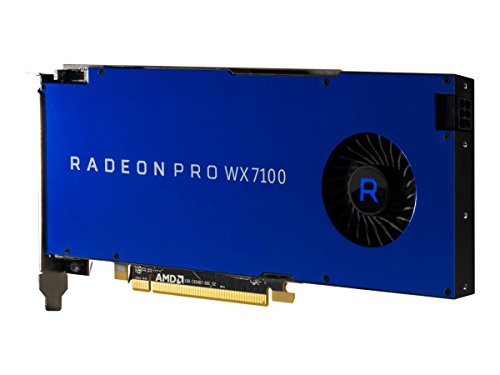
AMD Radeon Pro WX 7100 8GB Workstation GPU
Best for: workstations requiring 8GB GDDR5 memory
- Use
- Workstation (what this guide is about)
- Graphics Processor
- Radeon Pro WX 7100
- Memory Size
- 8GB
- Memory Type
- GDDR5
- Memory Bus Width
- 256-bit
- PCIe Interface
- PCI Express 3.0 x16
The AMD Radeon Pro WX 7100 8GB is a dedicated workstation graphics card designed for professional computing tasks. It provides 8GB of GDDR5 memory across a 256-bit memory bus to handle your production workloads. The card connects to your motherboard via a PCI Express 3.0 x16 interface. This card suits you if you need reliable 8GB memory capacity on a standard PCIe 3.0 slot for routine workstation applications without higher memory requirements.
Pros
- 8GB GDDR5 memory
- 256-bit memory bus width
- PCI Express 3.0 x16 bus interface
Cons
- Uses GDDR5 memory instead of newer GDDR6 or GDDR7 standards
- Limited to PCI Express 3.0 interface speeds
Good fit if
- You need a workstation card equipped with 8GB of GDDR5 memory.
- You have a compatible PCI Express 3.0 x16 slot on your motherboard.
Skip if
- You require more than 8GB of VRAM for large dataset processing.
- You need newer memory generations such as GDDR6 or GDDR7.
Verdict: AMD Radeon Pro WX 7100 8GB delivers 8GB of GDDR5 memory on a 256-bit bus for standard workstation installations. It gives you stable hardware specifications using a PCI Express 3.0 x16 slot.
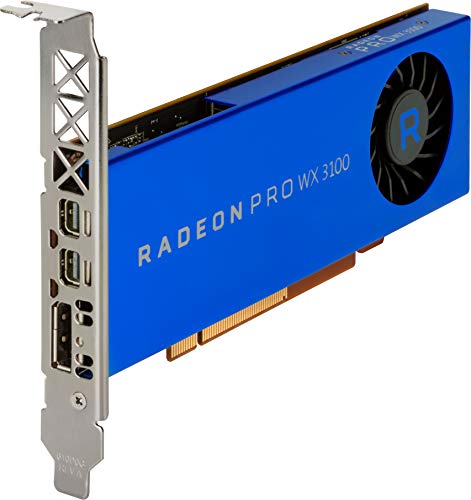
HP Radeon Pro WX 3100 4GB Low Profile
Best for: compact workstations needing multi-display output
- Use
- Workstation (what this guide is about)
- Graphics Processor
- Radeon Pro WX 3100
- Memory Size
- 4 GB
- Memory Type
- GDDR5
- Form Factor
- Low Profile
- Dimensions
- 7.48 × 9.45 × 2.36 inches
The HP Radeon Pro WX 3100 4GB Low Profile is a dedicated workstation graphics card built for compact systems. It provides 4 GB of GDDR5 memory and features one DisplayPort alongside two Mini DisplayPorts for multi-monitor setups. Its low-profile form factor allows it to install into slim computer cases where standard cards cannot fit. This setup suits you if you run multi-display workstation tasks requiring basic GPU acceleration.
Pros
- Low-profile form factor fits slim workstation chassis
- Three video outputs: one DisplayPort and two Mini DisplayPorts
- 4 GB of dedicated GDDR5 memory
Cons
- Limited to 4 GB of memory capacity
- Uses older GDDR5 memory rather than GDDR6 or GDDR7
Good fit if
- You need a low-profile card for a slim workstation case.
- You require connectivity for up to three displays using DisplayPort and Mini DisplayPort.
- You run workstation tasks that require 4 GB of dedicated video memory.
Skip if
- You need memory capacities larger than 4 GB for heavy datasets.
- You require newer GDDR6 or GDDR7 memory standards.
Verdict: HP Radeon Pro WX 3100 4GB Low Profile delivers essential display connectivity and dedicated memory in a compact format. It is a solid choice when you must fit a workstation card into a slim chassis.

NVIDIA Quadro RTX 6000 24GB GPU
Best for: workstation tasks requiring 24GB GDDR6 memory
- Use
- Workstation (what this guide is about)
- Graphics Processor
- Quadro RTX-6000
- Memory Size
- 24GB
- Memory Type
- GDDR6
The Nvidia Quadro RTX 6000 24GB is a dedicated workstation graphics card built for heavy compute tasks. You get 24GB of GDDR6 memory to load large datasets and 3D scenes. The card features an active cooled design to manage heat during continuous workstation workloads. If you need extensive memory capacity for professional applications, this unit provides the essential hardware specifications for your desktop setup.
Pros
- 24GB memory capacity
- GDDR6 memory configuration
- Active cooling solution
- Dedicated workstation profile
Cons
- Uses GDDR6 memory rather than newer GDDR7
- Listing omits video output ports and physical dimensions
Good fit if
- You need 24GB of dedicated memory for workstation tasks.
- You require an actively cooled graphics card.
Skip if
- You need newer GDDR7 memory technology.
- You require verified display connector specifications before purchasing.
Verdict: Nvidia Quadro RTX 6000 24GB delivers 24GB of GDDR6 memory with active cooling for heavy workstation compute jobs.

AMD Radeon Pro W7900 48GB
Best for: high-end 3D rendering and large AI workloads
- Use
- Workstation (what this guide is about)
- Graphics Processor
- AMD Radeon Pro W7900
- Memory Size
- 48GB
- Memory Type
- GDDR6
- Dimensions
- 11 × 38.7 × 17.6 inches
- Weight
- 3 pounds
The AMD Radeon Pro W7900 48GB is a workstation graphics card built for heavy professional workflows. It features 48GB of GDDR6 memory, 96 compute units, and delivers 61 TFLOPS of FP32 compute power. You get hardware AV1 encoding and decoding, alongside support for up to 12K display output using DSC. This card suits you if you run demanding 3D rendering, AI computation, or multi-display video editing setups.
Pros
- 48GB GDDR6 memory for large project assets and complex scenes
- 96 compute units delivering 61 TFLOPS FP32 compute performance
- Supports up to four 4K 120Hz displays or a single 12K 60Hz display with DSC
- Hardware-level AV1 encoding and decoding support
Cons
- Uses standard GDDR6 rather than newer GDDR7 memory
- Three-pound weight requires sturdy chassis mounting
Good fit if
- You need 48GB of VRAM for complex 3D scenes, simulation, or AI tasks.
- You run ultra-high-resolution setups such as an 8K display or four 4K monitors.
- You work in professional software like DaVinci Resolve, Maya, Houdini, or Unreal Engine.
Skip if
- You only require basic graphics output for light office tasks.
- You require GDDR7 memory architecture for your workstation.
Verdict: AMD Radeon Pro W7900 48GB delivers massive memory capacity and 61 TFLOPS of compute power for demanding creative applications. It is a capable choice if your daily workstation tasks require extensive VRAM and multi-display output.

AMD Radeon Pro W7800 32GB Workstation GPU
Best for: high-resolution multi-display workstations and 3D rendering
- Use
- Workstation (what this guide is about)
- Graphics Processor
- AMD Radeon Pro W7800
- Memory Size
- 32GB
- Memory Type
- GDDR6
- Dimensions
- 11 × 38.7 × 13.5 inches
- Weight
- 2.7 pounds
The AMD Radeon Pro W7800 is a dedicated workstation graphics card equipped with 32GB of GDDR6 memory and 70 compute units delivering 45 TFLOPS of FP32 compute power. It features DisplayPort 2.1 connectivity with support for quad 4K monitors or a single 12K display using DSC. This card suits you if you run heavy 3D rendering, video editing, or multi-display production environments in applications like DaVinci Resolve, Maya, and Unreal Engine.
Pros
- 32GB GDDR6 memory for demanding datasets
- 70 compute units delivering 45 TFLOPS FP32 performance
- DisplayPort 2.1 support for up to four 4K displays at 120Hz
- Hardware AV1 encoding and decoding support
Cons
- Measures 11 inches long and weighs 2.7 pounds, requiring adequate chassis clearance
- Requires Display Stream Compression to output 12K at 60Hz or 8K at 120Hz
Good fit if
- You need 32GB GDDR6 memory for large 3D rendering or AI workloads.
- You use workstation applications like DaVinci Resolve, Maya, or Unreal Engine.
- You run multi-monitor workstations up to four 4K displays at 120Hz.
Skip if
- You have a compact computer case that cannot accommodate an 11-inch card.
- You do not need 32GB VRAM or multi-display output capabilities.
Verdict: AMD Radeon Pro W7800 32GB Graphics Card provides substantial 32GB memory capacity, 45 TFLOPS FP32 performance, and DisplayPort 2.1 support for intensive workstation workflows. It gives creators and engineers multi-display versatility alongside broad application compatibility.

NVIDIA RTX 4000 SFF Ada Low Profile
Best for: compact workstations needing modern Ada Lovelace acceleration
- Use
- Workstation (what this guide is about)
- Graphics Processor
- RTX 4000 SFF Ada Generation
- Slot Width
- Dual Slot
- Form Factor
- Low Profile
The NVIDIA RTX 4000 SFF Ada Low Profile is a dual-slot workstation graphics card designed for compact systems. It features the Ada Lovelace architecture, supporting fast FP8 precision calculations and offering twice the FP32 throughput of prior generations. If you manage 3D processing, architectural design assessments, or AI workloads inside a space-constrained computer chassis, this low-profile hardware provides workstation-grade processing capabilities.
Pros
- Low-profile dual-slot form factor for compact workstations
- Ada Lovelace architecture with FP8 precision data support
- Twice the FP32 compute speed of previous generations
- Double the AI performance throughput over prior architecture
Cons
- Specific memory capacity in gigabytes is not listed in specifications
- Requires two expansion slots despite low-profile height
- Display output port types and quantities are omitted from specs
Good fit if
- You need a low-profile card for small form factor workstation cases.
- You run workloads utilizing FP8 precision data or FP32 calculations.
- You produce complex 3D simulations or architectural design prototypes.
Skip if
- You require a single-slot card to fit your expansion layout.
- You need verified exact video memory capacity figures before buying.
Verdict: NVIDIA RTX 4000 SFF Ada Low Profile delivers Ada Lovelace architecture and FP8 calculation acceleration in a compact dual-slot design. It is built for professional 3D simulation and AI computing inside slim workstation enclosures.

Empowered PC RTX PRO 6000 Blackwell 96GB
Best for: large-scale AI modeling and enterprise 3D simulation
- Use
- Workstation (what this guide is about)
- Graphics Processor
- RTX PRO 6000 Blackwell
- Memory Size
- 96 GB
- Memory Type
- GDDR7
- PCIe Interface
- PCIe Gen 5
- Dimensions
- 17 × 10 × 5 inches
The Empowered PC RTX PRO 6000 Blackwell is a dedicated workstation graphics card built for heavy compute workloads. It gives you 96 GB of GDDR7 memory with 1.8 TB/s bandwidth, PCIe Gen 5 support, and a double-flow-through cooler designed for 600W power loads. It suits you if you train large AI models locally, develop complex 3D simulations, or need multi-instance GPU partitioning across intensive enterprise tasks.
Pros
- 96 GB GDDR7 memory with 1.8 TB/s bandwidth
- DisplayPort 2.1 output supporting up to 16K at 60 Hz
- PCIe Gen 5 connectivity and Universal MIG partitioning
- 5th Gen Tensor Cores with FP4 precision support
Cons
- High power draw designed for 600W power loads
- Large 17-inch length requires significant case clearance
- Ships in bulk OEM packaging without retail box
Good fit if
- You need 96 GB of GDDR7 memory for local AI fine-tuning or massive 3D scenes.
- You require DisplayPort 2.1 to drive displays up to 16K at 60 Hz.
- You run multiple isolated instances using Universal MIG resource partitioning.
Skip if
- You have a compact chassis that cannot fit a 17-inch long card.
- You lack the workstation power supply capacity needed for 600W GPU loads.
Verdict: Empowered PC RTX PRO 6000 Blackwell 96GB delivers massive memory capacity and PCIe Gen 5 throughput for enterprise compute. It is a capable choice if your workstation demands high-bandwidth local AI modeling and heavy simulation workflows.
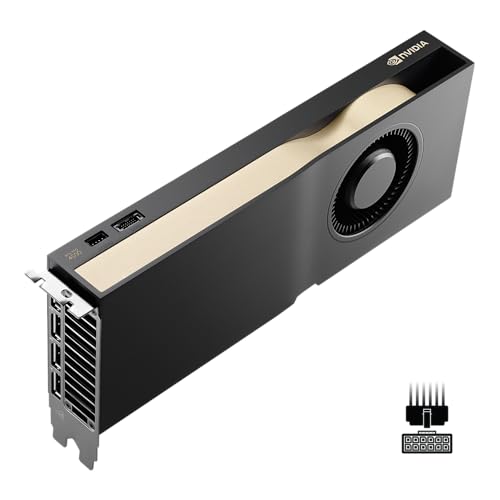
PNY NVIDIA RTX Pro 4500 Blackwell
Best for: Blackwell workstation builds with 9.5-inch clearance
- Use
- Workstation (what this guide is about)
- Graphics Processor
- RTX Pro 4500
- Length
- 9.5 inches
- Width
- 9.5 inches
- Weight
- 2.2 pounds
The PNY NVIDIA RTX Pro 4500 Blackwell is a dedicated workstation graphics card designed for professional systems. It measures 9.5 inches in length and 9.5 inches in width, with a listed height of under 0.04 inches. At approximately 2.2 pounds, this card suits you if you need a Blackwell-generation workstation GPU that fits standardized chassis bays requiring a 9.5-inch clearance profile.
Pros
- Blackwell workstation architecture
- Square 9.5-inch by 9.5-inch footprint
- Manageable 2.2-pound overall weight
Cons
- VRAM capacity not listed in specifications
- Display output port types and counts omitted
- Cooling solution details not specified
Good fit if
- You need an NVIDIA Blackwell workstation card for professional tasks.
- You have a PC chassis with room for a 9.5-inch card.
Skip if
- You require verified VRAM capacity before making a purchase.
- You need confirmed display output counts for multiple monitors.
Verdict: PNY NVIDIA RTX Pro 4500 Blackwell delivers modern workstation hardware in a 9.5-inch form factor. It provides a solid option if your workstation build matches this specific layout.

NVIDIA RTX Pro 4000 24GB Blackwell GPU
Best for: AI workstations requiring 24GB GDDR7 ECC memory
- Use
- Workstation (what this guide is about)
- Graphics Processor
- RTX PRO 4000 Blackwell
- Memory Size
- 24GB
- Memory Type
- GDDR7 ECC
- PCIe Interface
- PCIe 5.0 x16
- Slot Width
- Single Slot
The NVIDIA RTX Pro 4000 24GB Blackwell GPU is a dedicated workstation graphics card built on NVIDIA's Blackwell architecture. It provides 24GB of GDDR7 ECC memory to safeguard against data corruption during intensive tasks. The card supports a PCIe 5.0 x16 interface and includes four DisplayPort 2.1b outputs. It suits you if you handle complex AI workstation tasks, ray tracing workloads, or multi-display technical setups that require high memory capacity.
Pros
- 24GB of GDDR7 ECC memory
- PCIe 5.0 x16 interface support
- Four DisplayPort 2.1b display connections
- Blackwell architecture with hardware ray tracing support
Cons
- Card length of 9.5 inches requires sufficient chassis space
- No native HDMI display outputs provided
Good fit if
- You need 24GB of GDDR7 ECC memory for AI and workstation computing.
- You operate up to four monitors using DisplayPort 2.1b connections.
- Your system provides an available PCIe 5.0 x16 slot.
Skip if
- You need direct HDMI connections for your displays.
- Your workstation case cannot fit a 9.5-inch graphics card.
Verdict: NVIDIA RTX Pro 4000 24GB Blackwell GPU delivers 24GB of GDDR7 ECC memory and modern PCIe 5.0 connectivity for professional compute tasks. It equips your workstation with four DisplayPort 2.1b outputs in a 9.5-inch form factor.

ASRock Intel Arc Pro B60 24GB Graphics Card
Best for: AI inference and dual-engine video export
- Use
- Workstation (what this guide is about)
- Graphics Processor
- Intel Arc Pro B60
- Memory Size
- 24GB
- Memory Type
- GDDR6
- Memory Bus Width
- 192-bit
- PCIe Interface
- PCIe 5.0
The ASRock Intel Arc Pro B60 Creator is a dual-slot workstation graphics card built on Intel Xe2-HPG architecture. It pairs 24GB of GDDR6 memory across a 192-bit bus with a PCIe 5.0 interface and a 200W TDP. You get 160 XMX engines for AI acceleration and twin media transcoders supporting AV1, H.264, and HEVC. This card suits you if you run memory-heavy AI inference, video encoding, or 3D design workflows.
Pros
- 24GB GDDR6 memory with 456 GB/s bandwidth on a 192-bit bus
- PCIe 5.0 x16 interface support
- Dual-encode media transcoders for AV1, H.264, and HEVC
- 20 Xe cores and 160 XMX engines delivering 197 INT8 TOPS
Cons
- 200W TDP requires a dedicated 8-pin power connector
- 192-bit memory bus is narrower than standard 256-bit workstation tiers
- Card length of 271mm requires a chassis with standard clearance
Good fit if
- You need 24GB VRAM for large language models, AI inference, or 3D rendering.
- You export multi-format video using dual AV1, H.264, and HEVC hardware encoders.
- You have a PCIe 5.0 workstation platform with standard dual-slot spacing.
Skip if
- You need a compact low-profile card for small form factor enclosures.
- You require a wider 256-bit or 384-bit memory bus for heavier memory bandwidth.
Verdict: ASRock Intel Arc Pro B60 24GB Graphics Card delivers high-capacity 24GB VRAM and dedicated AI hardware in a dual-slot, 200W design. It provides solid capability for video export and generative workflows on modern PCIe 5.0 platforms.

PNY NVIDIA RTX PRO 6000 Max-Q 96GB
Best for: workstations requiring massive 96GB GDDR7 memory
- Use
- Workstation (what this guide is about)
- Graphics Processor
- NVIDIA RTX PRO 6000
- Memory Size
- 96GB
- Memory Type
- GDDR7
- Dimensions
- 3.1 × 14.2 × 0.1 inches
- Weight
- 3.35 pounds
The PNY NVIDIA RTX PRO 6000 Max-Q 96GB is a dedicated workstation graphics card built for heavy compute tasks. It features 96GB of high-speed GDDR7 memory alongside a dual-fan cooling system to handle operational heat. The card measures 14.2 inches wide and weighs 3.35 pounds. It suits you if you run memory-intensive workstation software and have adequate space inside your PC chassis.
Pros
- 96GB GDDR7 high-speed memory
- Dual-fan cooling solution
- Dedicated workstation architecture
Cons
- 14.2-inch width requires a large chassis
- Display output ports not specified in data
Good fit if
- You need 96GB of GDDR7 memory for massive datasets.
- You have a spacious chassis that fits a 14.2-inch card.
Skip if
- You use a compact workstation case with limited clearance.
- You need confirmed display connector types prior to purchase.
Verdict: PNY NVIDIA RTX PRO 6000 Max-Q 96GB delivers a huge 96GB pool of GDDR7 memory for demanding workstation workloads. Its 14.2-inch width requires substantial case clearance, making it best paired with full-sized enclosures.
Specifications side by side
| Spec | AMD Radeon Pro WX 4100 4GB Low-Profile | AMD Radeon Pro WX 7100 8GB Workstation GPU | HP Radeon Pro WX 3100 4GB Low Profile | NVIDIA Quadro RTX 6000 24GB GPU | AMD Radeon Pro W7900 48GB | AMD Radeon Pro W7800 32GB Workstation GPU | NVIDIA RTX 4000 SFF Ada Low Profile | Empowered PC RTX PRO 6000 Blackwell 96GB | PNY NVIDIA RTX Pro 4500 Blackwell | NVIDIA RTX Pro 4000 24GB Blackwell GPU | ASRock Intel Arc Pro B60 24GB Graphics Card | PNY NVIDIA RTX PRO 6000 Max-Q 96GB |
|---|---|---|---|---|---|---|---|---|---|---|---|---|
| Graphics Processor | Radeon Pro WX 4100 | Radeon Pro WX 7100 | Radeon Pro WX 3100 | Quadro RTX-6000 | AMD Radeon Pro W7900 | AMD Radeon Pro W7800 | RTX 4000 SFF Ada Generation | RTX PRO 6000 Blackwell | RTX Pro 4500 | RTX PRO 4000 Blackwell | Intel Arc Pro B60 | NVIDIA RTX PRO 6000 |
| Memory Size | 4GB | 8GB | 4 GB | 24GB | 48GB | 32GB | not specified | 96 GB | not specified | 24GB | 24GB | 96GB |
| Memory Type | GDDR5 | GDDR5 | GDDR5 | GDDR6 | GDDR6 | GDDR6 | not specified | GDDR7 | not specified | GDDR7 ECC | GDDR6 | GDDR7 |
| Boost Clock | 1.20 GHz | not specified | not specified | not specified | not specified | not specified | not specified | not specified | not specified | not specified | not specified | not specified |
| Memory Bus Width | 128-bit | 256-bit | not specified | not specified | not specified | not specified | not specified | not specified | not specified | not specified | 192-bit | not specified |
| PCIe Interface | PCI Express 3.0 | PCI Express 3.0 x16 | not specified | not specified | not specified | not specified | not specified | PCIe Gen 5 | not specified | PCIe 5.0 x16 | PCIe 5.0 | not specified |
| Slot Width | Single Slot | not specified | not specified | not specified | not specified | not specified | Dual Slot | not specified | not specified | Single Slot | 2-slot | not specified |
| Memory | not specified | 8GB | 4GB | 24GB | not specified | not specified | not specified | not specified | not specified | not specified | 24GB | not specified |
| Interface | not specified | not specified | not specified | not specified | not specified | not specified | not specified | not specified | not specified | PCIe 5.0 | PCIe 5.0 | not specified |
| Form Factor | not specified | not specified | Low Profile | not specified | not specified | not specified | Low Profile | not specified | not specified | not specified | not specified | not specified |
| Use | Workstation | Workstation | Workstation | Workstation | Workstation | Workstation | Workstation | Workstation | Workstation | Workstation | Workstation | Workstation |
| Dimensions | 9.75 × 6.5 × 2.5 inches | 2.87 × 15 × 9.49 inches | 7.48 × 9.45 × 2.36 inches | not specified | 11 × 38.7 × 17.6 inches | 11 × 38.7 × 13.5 inches | not specified | 17 × 10 × 5 inches | not specified | not specified | not specified | 3.1 × 14.2 × 0.1 inches |
| Weight | 7.83 ounces | 1.54 pounds | not specified | not specified | 3 pounds | 2.7 pounds | not specified | 4 pounds | 2.2 pounds | 1.85 pounds | not specified | 3.35 pounds |
| Length | not specified | not specified | not specified | not specified | not specified | not specified | not specified | not specified | 9.5 inches | 9.5 inches | 10.7 inches | not specified |
| Width | not specified | not specified | not specified | not specified | not specified | not specified | not specified | not specified | 9.5 inches | 4.4 inches | 4.41 inches | not specified |
| Model | 100-506008 | 100-505826 | 2TF08AA | not specified | 100-300000074 | 100-300000075 | 900-5G192-2571-000 | NVD RTX PRO 6000 Blackwell | VCNRTXPRO4500-PB | VCNRTXPRO4000B-PB | 90-GA60ZZ-00UANZ | VCNRTXPRO6000BQ-PB |
| Color | not specified | Blue | not specified | not specified | Blue | Blue | Black | Black | not specified | not specified | not specified | not specified |
| Size | not specified | not specified | not specified | not specified | not specified | not specified | not specified | RTX PRO 6000 | not specified | not specified | B60 | not specified |
Is a workstation graphics card worth it?
Workstation cards provide specialized hardware specifications built for professional workloads. Features on these models include ECC memory support, enterprise PCIe 5.0 connectivity, and dedicated AI hardware. They deliver high FP32 compute power up to 61 TFLOPS and FP8 calculation acceleration. Cards in this category also offer multi-display output via DisplayPort 2.1 standards, dual-engine video export, and verified application compatibility. Choosing a dedicated workstation GPU ensures you have the compute features required for simulation and modeling workflows.
Worth it if
- You need hardware features such as ECC memory or FP8 calculation acceleration for compute stability.
- You run professional workloads that rely on broad application compatibility and PCIe 5.0 bandwidth.
- You require high FP32 compute ratings up to 61 TFLOPS or dual-engine video export hardware.
Skip it if
- You do not run enterprise simulation, local AI modeling, or heavy compute workflows.
- You only need basic display connectivity without specialized requirements for ECC memory or high FP32 performance.
How We Picked Workstation Cards
To find graphics cards for workstation tasks, we identify models directly through published product listings. A card qualifies when its Amazon listing states workstation use in the title or feature list. We evaluate only one variant from each product family. We do not physically handle or test the hardware. All details come strictly from the specifications provided on the listing.
You can compare these models by reviewing published specifications such as memory capacity, memory type, interface support, and card dimensions. The guide places products in stock first. This approach ensures you see verified hardware specifications for your workstation build.
How to Choose a Workstation Graphics Card
-
Select the Right Form Factor
You must confirm the physical card profile fits your chassis dimensions. Small form factor systems require low-profile designs that occupy minimal vertical slot height. Standard desktop towers accommodate full-height cards that take up one or two slot brackets. For example, the NVIDIA RTX 4000 SFF Ada Low Profile uses a dual-slot, low-profile configuration suited for slim enclosures. Before purchasing, verify whether your workstation case accepts standard expansion brackets or requires low-profile brackets to secure the card properly to the rear panel.
-
Check PCIe Interface Generation
You should examine the PCIe generation listed for the card and match it to your motherboard. Current workstation hardware includes PCIe 3.0 and newer PCIe 5.0 connections. A modern card such as the ASRock Intel Arc Pro B60 24GB Graphics Card features a PCIe 5.0 interface. While PCIe slots remain backwards and forwards compatible, pairing a PCIe 5.0 card with an older motherboard limits data throughput to the speed of the slot. Inspect your motherboard manual to identify which PCIe revision your primary x16 expansion slot supports.
-
Measure Physical Clearance Length
You must measure the interior clearance of your case before selecting a card. Workstation graphics cards vary significantly in overall length, ranging from compact 9.5-inch cards up to full-length models. The Empowered PC RTX PRO 6000 Blackwell 96GB measures 17 inches in length. Cards with extensive length can obstruct drive bays, front-mounted intake fans, or power supply cabling in mid-tower cases. Measure the exact space between your rear PCIe expansion slot and any front-mounted case obstructions to confirm your computer chassis can house the card without physical interference.
-
Review Display Output Ports
You need to verify that the video ports on the card align with your monitors and cabling. Compact workstation cards often utilize Mini DisplayPort connectors to deliver multi-monitor output from a single bracket. For instance, the AMD Radeon Pro WX 4100 4GB Low-Profile provides four Mini DisplayPort outputs. If you use standard DisplayPort cables, you will need adapter cables or dedicated adapters to attach your displays. Check your monitor inputs and plan your cable setup to ensure every display connects directly without signal conversion issues.
-
Identify Memory Technology Standards
You should pay attention to the memory generation rather than just capacity. Workstation models implement different standards, including GDDR5, GDDR6, and GDDR7 memory. The NVIDIA Quadro RTX 6000 24GB GPU uses GDDR6 memory, whereas older entry models rely on GDDR5. Newer generations offer greater memory bandwidth, which speeds up asset loading and processing during complex workloads. If your workstation runs memory-bandwidth-sensitive tasks like video encoding, real-time rendering, or scientific computing, selecting a card with GDDR6 or GDDR7 memory provides faster communication between the GPU and local memory.
-
Assess Compute Performance Specs
You should inspect the raw compute ratings when choosing a card for simulation and rendering. Product specifications define compute performance using floating-point metrics such as FP32 TFLOPS. For example, the AMD Radeon Pro W7800 32GB Workstation GPU delivers 45 TFLOPS FP32 performance. Higher FP32 compute ratings indicate greater execution speed when processing complex mathematical models, physics simulations, or 3D scene renderings. If your workstation primarily handles light CAD drafting or desktop displays, heavy compute ratings are unnecessary, but intensive calculation jobs benefit directly from higher rated TFLOPS.
Frequently asked questions
What makes a low-profile graphics card suitable for small workstation enclosures?
Low-profile workstation cards use compact physical dimensions to fit inside slim computer cases. For example, the AMD Radeon Pro WX 4100 measures 2.5 inches in height and operates in a single slot, while the HP Radeon Pro WX 3100 stands 2.36 inches tall. These cards deliver dedicated display ports and multi-monitor output without occupying the depth or vertical clearance required by standard full-height hardware.
Which workstation graphics card offers the highest compute performance in this guide?
The AMD Radeon Pro W7900 provides the highest single-precision compute rating on this list at 61 TFLOPS. This card pairs its compute performance with GDDR6 memory to execute demanding workstation operations. By comparison, the AMD Radeon Pro W7800 delivers 45 TFLOPS FP32 compute power. These metrics reflect raw calculation throughput for heavy 3D rendering jobs and complex professional applications.
How does PCIe 5.0 interface support benefit modern workstation setups?
A PCIe 5.0 interface doubles the potential bus bandwidth over PCIe 4.0 between your motherboard and GPU. Options like the ASRock Intel Arc Pro B60 and NVIDIA RTX Pro 4000 Blackwell utilize this PCIe 5.0 connection to stream large datasets rapidly. High bus throughput prevents bottlenecks when you transfer massive project assets, high-resolution video frames, or complex AI training batches into system memory.
What display outputs are standard on professional workstation graphics cards?
Workstation cards primarily use standard DisplayPort or Mini DisplayPort outputs to connect multiple displays. The AMD Radeon Pro WX 4100 provides four Mini DisplayPort connections in a single slot. More recent releases, including the AMD Radeon Pro W7800 and the NVIDIA RTX Pro 4000 24GB Blackwell, feature DisplayPort 2.1 or 2.1b connections. These modern interfaces support high-resolution multi-monitor setups across professional engineering and design environments.
Can you run AI inference and video rendering on Intel workstation GPUs?
Yes, you can run AI inference and video workloads using Intel workstation hardware. The ASRock Intel Arc Pro B60 features 24GB of GDDR6 memory, dedicated AI hardware, and a dual-engine video export architecture within a 200W dual-slot profile. This combination gives you sufficient local memory capacity and hardware acceleration to process generative workflows and export high-resolution video timelines reliably.
Why is GDDR7 memory used in newer workstation cards?
GDDR7 memory provides higher data transfer speeds and increased memory bandwidth compared to earlier GDDR6 and GDDR5 generations. Workstation cards like the NVIDIA RTX Pro 4000 Blackwell use 24GB of GDDR7 ECC memory to maintain data integrity under heavy computational loads. Large enterprise models such as the PNY NVIDIA RTX PRO 6000 Max-Q deploy 96GB of GDDR7 to process huge data pools without memory bottlenecks.
How do you check if a workstation graphics card fits your PC case?
You check fit by comparing your computer chassis clearance against the card's published dimensions. The Empowered PC RTX PRO 6000 Blackwell requires 17 inches of length and 5 inches of height, demanding a roomy case. In contrast, cards like the PNY NVIDIA RTX Pro 4500 measure 9.5 inches in length. Always verify internal bracket clearance and slot height before selecting a card for your workstation.