What Is GPU? A Guide for Graphics Cards Buyers (2026)
As an Amazon Associate we earn from qualifying purchases. Links on this page are affiliate links.
Understanding the GPU Specification
The Graphics Processing Unit is the primary chip on a video card. It handles all visual calculations for your computer. This includes rendering 3D models, processing video, and managing display output. When you look at a graphics card, the GPU is the most important component. It determines what tasks the card can perform and how well it performs them.
Specs for this part are labeled clearly on product pages. You will see names like GeForce RTX 4090 or Radeon RX 7900 XT. These names indicate the manufacturer and the specific model tier. Higher numbers usually mean more power and better performance. The architecture generation, such as Ada Lovelace or RDNA 3, also matters. Newer architectures often offer better efficiency and features.
Buyers care about this spec because it defines the card’s capability. If you play modern games, you need a powerful GPU. If you edit 4K video, you need strong processing cores. The GPU explained in this guide helps you match your needs to the right hardware. You should check the core count and clock speeds. These numbers show how many processing units exist and how fast they run.
Memory bandwidth and cache size are also tied to the GPU. They affect how quickly data moves between the chip and video memory. A stronger GPU handles higher resolutions and frame rates. It supports advanced features like ray tracing and upscaling. This guide focuses on the core chip. Other parts like cooling and power connectors support the GPU. They do not change the raw computational power. Choose a GPU that meets your resolution and refresh rate goals. This ensures your system runs smoothly without bottlenecks.
Compare these GPU models
GeForce RTX 4080
This GPU targets high-end 4K gaming and large case compatibility. The ASUS ROG Strix version offers 16GB of video memory, which helps manage high-resolution textures without stuttering. Its physical dimensions are substantial, measuring 14.1 inches in length. You need a spacious computer case to accommodate this card. It prioritizes raw performance over compact design. This choice suits users who want strong visual fidelity and have the physical space required for larger cooling solutions and power delivery systems.
GeForce RTX 4090
The RTX 4090 provides top-tier specifications for demanding creators and gamers. The Gigabyte Windforce variant includes 24GB of GDDR6X memory, ensuring ample buffer for complex scenes. It is designed for high-end 4K workloads. However, it requires ample power and space. The card measures 13 inches long and weighs 4.4 pounds. You must verify your case can fit this size and your power supply meets the high wattage demands. It is not suitable for compact builds, but it delivers maximum performance for those with the necessary infrastructure.
GeForce RTX 4070
This card balances 1440p gaming performance with modern feature support. The ASUS Dual OC model features 12GB of GDDR6X memory and PCIe 4.0 interface support. It is ideal for users who prioritize DLSS 3 technology for enhanced frame rates. The card measures 10.5 inches long and weighs 2.1 pounds, fitting well in mid-size cases. It offers a practical compromise between high-end power and manageable physical size. You get strong performance at 1440p resolution without the extreme footprint of flagship models, making it a versatile choice for many gaming setups.
GeForce RTX 4060
The RTX 4060 focuses on efficient 1080p gaming with a compact form factor. The Gigabyte Windforce version includes 8GB of GDDR6 memory. It measures only 7.56 inches long and 1.61 inches thick, making it easy to install in small cases. This card suits users who prioritize low power draw and space savings over maximum memory bandwidth. You get solid performance for standard gaming resolutions. The trade-off is less video memory compared to higher-end cards, but for 1080p gaming, it remains a practical and efficient option for compact builds.
Radeon RX 7900 XT
This GPU offers strong specs for high-end AMD gaming, highlighted by 20GB of GDDR6 memory. The Sapphire model is designed for users who prioritize memory size and AMD architecture. It measures 14.5 inches long and 3 inches high, requiring a spacious case. This card fits users who want a powerful single-card solution without needing multiple cards. The large size accommodates robust cooling for sustained performance. You get significant video memory for future-proofing and high-resolution texture handling, making it a strong contender for high-end gaming and content creation tasks.
Radeon RX 7600
The RX 7600 delivers efficient 1080p gaming with 8GB of GDDR6 memory. The XFX Speedster version measures 9.49 inches long and weighs under 2 pounds. It is designed for compact cases where space is limited. This card suits users who prioritize standard frame rates over high-resolution texture storage. You get a reliable performance level for common gaming resolutions. The trade-off is the modest memory capacity, but for 1080p gaming, it provides a balanced solution. Its compact dimensions and light weight make it an easy fit for small form factor builds.
Is a Powerful GPU Worth It
Who needs it
You should prioritize a high-performance graphics processing unit if you plan to play modern titles at high resolutions. Models like the RTX 4080 or Radeon RX 7900 XT provide the necessary computational power for 4K gaming. These chips handle complex lighting, ray tracing, and large texture files without bottlenecks. If you engage in video editing, 3D rendering, or machine learning tasks, the extra memory and core count on these cards significantly reduce render times. The substantial physical size of these cards also indicates robust cooling solutions required for sustained heavy loads. You need this power to maintain high frame rates and visual fidelity in demanding applications. Without it, you will experience stuttering or have to lower settings drastically.
Who can skip it
You can ignore high-end specifications if you only play older games or use your computer for basic office tasks. Integrated graphics or entry-level cards like the GTX 1650 or Radeon RX 550 are sufficient for web browsing, document editing, and light media consumption. Spending on a flagship chip offers no visible benefit for these workloads. Instead, prioritize a reliable power supply and adequate case airflow. Focus on storage speed and system memory for general productivity. A modest GPU allows you to allocate your budget toward other components that improve overall system responsiveness. You do not need excessive video memory or core counts for simple display output. Save your resources for areas that impact daily computing speed rather than visual complexity.
GPU Specs Glossary
GPU
The main chip on the card. It handles all visual calculations, including 3D rendering and video processing for your display.
Memory
The amount of video RAM on the card. More memory helps manage high-resolution textures without stuttering during gaming or editing.
Memory Type
The technology used for the video RAM. Modern cards use GDDR6 or GDDR6X, which offer higher bandwidth for faster data access.
Interface
The connection standard between the card and the motherboard. Most modern cards use PCIe 4.0 or 5.0 for high-speed data transfer.
Form Factor
The physical size and layout of the card. Standard models fit most cases, while compact versions are designed for smaller builds.
Use
The intended purpose of the graphics card. Common uses include gaming, video editing, 3D modeling, or professional workstation tasks.
Length
The physical measurement of the card along its longest axis. You must check this to ensure it fits inside your computer case.
Connector Angle
The orientation of the power cable plug. A 90-degree angle helps manage cable routing in tight spaces behind the motherboard tray.
Quick picks
| # | Product | Best for | Price |
|---|---|---|---|
| 1 | ASUS ROG Strix GeForce RTX 4080 Renewed | Large cases and 4K gaming | Check price of ASUS ROG Strix GeForce RTX 4080 Renewed on Amazon |
| 2 | Gigabyte GeForce RTX 4090 Windforce V2 | High-end 4K gaming and creation | Check price of Gigabyte GeForce RTX 4090 Windforce V2 on Amazon |
| 3 | ASUS Dual GeForce RTX 4070 OC | 1440p gaming with 12GB VRAM needs | Check price of ASUS Dual GeForce RTX 4070 OC on Amazon |
| 4 | Gigabyte GeForce RTX 4060 Windforce 8GB | compact 1080p gaming builds | Check price of Gigabyte GeForce RTX 4060 Windforce 8GB on Amazon |
| 5 | Sapphire Radeon RX 7900 XT 20GB | High-end AMD gaming with 20GB VRAM | Check price of Sapphire Radeon RX 7900 XT 20GB on Amazon |
| 6 | XFX Speedster SWFT210 Radeon RX 7600 | 1080p gaming in compact cases | Check price of XFX Speedster SWFT210 Radeon RX 7600 on Amazon |
Our 6 picks

ASUS ROG Strix GeForce RTX 4080 Renewed
Best for: Large cases and 4K gaming
- GPU
- GeForce RTX 4080 (what this guide is about)
- Use
- Gaming
- Dimensions
- 14.1 × 5.87 × 2.75 inches
- Weight
- 5.5 pounds
View on Amazon: ASUS ROG Strix GeForce RTX 4080 Renewed Affiliate link
This ASUS ROG Strix GeForce RTX 4080 is a renewed gaming graphics card. It features 16GB of VRAM and measures 14.1 inches in length. The card weighs 5.5 pounds and includes a 2.75-inch height. You should consider this GPU if you need high-end performance for modern titles. Its large physical size requires a spacious case. The 16GB buffer handles high-resolution textures well.
Pros
- 16GB VRAM for high-resolution gaming
- GeForce RTX 4080 GPU architecture
- ROG Strix cooling design
- 14.1-inch length for airflow
Cons
- 14.1-inch length may not fit small cases
- 5.5-pound weight requires strong mounting support
- 2.75-inch height occupies three slots
Good fit if
- You have a large ATX or E-ATX case
- You play games at 4K resolution
- You want high VRAM for future titles
Skip if
- You have a small form factor PC
- You need a single-slot card
- You are on a limited budget
Verdict: ASUS ROG Strix RTX 4080 16GB delivers strong 4K performance. It fits users with large cases who need ample VRAM.

Gigabyte GeForce RTX 4090 Windforce V2
Best for: High-end 4K gaming and creation
- GPU
- GeForce RTX 4090 (what this guide is about)
- Graphics Processor
- GeForce RTX 4090
- Memory Size
- 24GB
- Memory Type
- GDDR6X
- Memory Bus Width
- 384-bit
- Dimensions
- 13 × 5.35 × 2.2 inches
View on Amazon: Gigabyte GeForce RTX 4090 Windforce V2 Affiliate link
This graphics card uses the GeForce RTX 4090 GPU with 24GB of GDDR6X memory on a 384-bit bus. It measures 13 inches long and weighs 4.4 pounds. The Windforce cooling system includes three fans. You need a large case and strong power supply. It suits users who want maximum performance for high-resolution gaming and heavy creative workloads.
Pros
- 24GB GDDR6X memory capacity
- 384-bit memory bus width
- Three-fan Windforce cooling design
- GeForce RTX 4090 processor
Cons
- 13-inch length requires spacious cases
- 4.4-pound weight needs sturdy mounting
- 2.2-inch height occupies three slots
Good fit if
- You have a large PC case
- You need maximum rendering speed
- You play at 4K resolution
Skip if
- You have a small form factor case
- You only play at 1080p
- You need a compact build
Verdict: Gigabyte RTX 4090 24GB delivers top-tier specs for demanding users. It fits only those with ample space and power.

ASUS Dual GeForce RTX 4070 OC
Best for: 1440p gaming with 12GB VRAM needs
- GPU
- GeForce RTX 4070 (what this guide is about)
- Graphics Processor
- GeForce RTX 4070 Super
- Memory Size
- 12GB
- Memory Type
- GDDR6X
- PCIe Interface
- PCIe 4.0
- Slot Width
- 2.56-Slot
View on Amazon: ASUS Dual GeForce RTX 4070 OC Affiliate link
The ASUS Dual GeForce RTX 4070 Super OC Edition features 12GB of GDDR6X memory and a PCIe 4.0 interface. This graphics card measures 10.5 inches long and weighs 2.1 pounds. It fits into a 2.56-slot width. You get DLSS 3 support and HDMI 2.1 connectivity. This model suits users who want solid 1440p performance without excessive bulk.
Pros
- 12GB GDDR6X memory for high-resolution textures
- DLSS 3 technology for improved frame rates
- HDMI 2.1 port for next-gen displays
- 2.56-slot width saves case space
Cons
- 10.5-inch length requires spacious cases
- 2.1-pound weight needs sturdy mounting
- 2.56-slot width is bulkier than standard 2-slot cards
Good fit if
- You need 12GB VRAM for 1440p gaming
- You want DLSS 3 support
- You have a mid-size case
Skip if
- You require more than 12GB VRAM
- You need a compact 2-slot card
- You have a small form factor PC
Verdict: ASUS Dual RTX 4070 Super 12GB offers balanced 1440p performance with 12GB VRAM and DLSS 3. It fits users with mid-size cases who prioritize modern features over compact dimensions.

Gigabyte GeForce RTX 4060 Windforce 8GB
Best for: compact 1080p gaming builds
- GPU
- GeForce RTX 4060 (what this guide is about)
- Graphics Processor
- GeForce RTX 4060
- Memory Size
- 8GB
- Memory Type
- GDDR6
- Memory Bus Width
- 128-bit
- Dimensions
- 7.56 × 4.72 × 1.61 inches
View on Amazon: Gigabyte GeForce RTX 4060 Windforce 8GB Affiliate link
This Gigabyte graphics card uses the GeForce RTX 4060 processor with 8GB of GDDR6 memory on a 128-bit bus. It measures 7.56 inches long and 1.61 inches high, fitting standard cases. The dual-fan Windforce cooling system helps manage heat. You will get solid 1080p performance for gaming and creative tasks without needing excessive power.
Pros
- GeForce RTX 4060 GPU architecture
- 8GB GDDR6 memory capacity
- Compact 1.61-inch height design
- Dual Windforce fan cooling
Cons
- 128-bit memory bus limits high-resolution texture streaming
- 8GB VRAM may restrict future AAA titles at higher settings
- No triple-fan option for quieter operation
Good fit if
- You need a compact card for small form factor builds
- You target 1080p gaming at high frame rates
- You want efficient power consumption for daily use
Skip if
- You require 1440p or 4K gaming performance
- You need more than 8GB of video memory
- You prefer triple-fan cooling solutions
Verdict: Gigabyte RTX 4060 Windforce 8GB delivers efficient 1080p gaming for users who prioritize compact size and low power draw over maximum memory bandwidth.
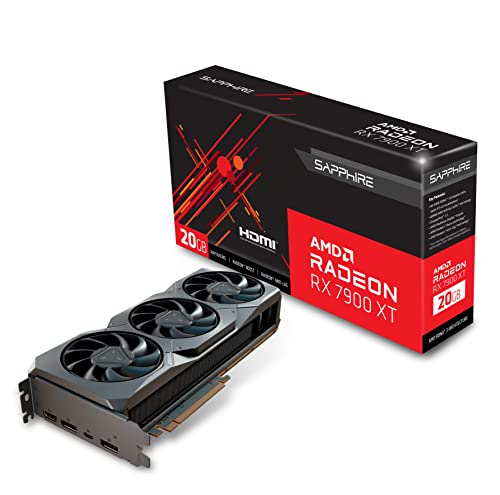
Sapphire Radeon RX 7900 XT 20GB
Best for: High-end AMD gaming with 20GB VRAM
- GPU
- Radeon RX 7900 XT (what this guide is about)
- Graphics Processor
- AMD Radeon RX 7900 XT
- Memory Size
- 20 GB
- Memory Type
- GDDR6
- Memory Bus Width
- 320-bit
- PCIe Interface
- PCI-Express 4.0
View on Amazon: Sapphire Radeon RX 7900 XT 20GB Affiliate link
This Sapphire graphics card uses the AMD Radeon RX 7900 XT chip with 20 GB of GDDR6 memory. It connects via a 320-bit interface and PCIe 4.0. The card is 14.5 inches long and takes up three slots. You should choose this if you need high-end gaming performance with ample video memory for modern titles.
Pros
- 20 GB GDDR6 memory capacity
- 320-bit memory interface width
- Supports PCIe 4.0 standard
- Includes USB-C and DisplayPort outputs
Cons
- Requires three expansion slots
- 14.5-inch length may not fit small cases
- Only one HDMI output port
Good fit if
- You want high-end AMD gaming performance
- You need 20 GB of video memory
- Your case can fit a large card
Skip if
- You have a small form factor case
- You prefer NVIDIA GeForce cards
- You need more than one HDMI port
Verdict: Sapphire Radeon RX 7900 XT 20GB offers strong specs for gamers who prioritize memory size and AMD architecture. It fits users with spacious cases who want a powerful single-card solution.

XFX Speedster SWFT210 Radeon RX 7600
Best for: 1080p gaming in compact cases
- GPU
- Radeon RX 7600 (what this guide is about)
- Graphics Processor
- AMD RX 7600
- Memory Size
- 8GB
- Memory Type
- GDDR6
- Boost Clock
- Up to 2655 MHz
- Dimensions
- 9.49 × 5.16 × 1.61 inches
View on Amazon: XFX Speedster SWFT210 Radeon RX 7600 Affiliate link
This XFX card uses the AMD Radeon RX 7600 GPU with 8GB of GDDR6 memory. It features a boost clock up to 2655 MHz and a dual-fan cooling solution. The build measures 9.49 inches long and weighs 1.98 pounds. It suits gamers who want solid 1080p performance without needing excessive VRAM or a massive chassis.
Pros
- 8GB GDDR6 memory capacity
- High boost clock of 2655 MHz
- Dual-fan cooling system
- Compact 1.61-inch height
Cons
- Limited to 8GB of VRAM
- Single PCIe slot width
- No mention of HDMI 2.1 support
Good fit if
- You play games at 1080p resolution
- You have a small form factor case
- You want a reliable dual-fan design
Skip if
- You require 16GB of VRAM for 4K gaming
- You need triple-fan cooling for extreme loads
- You plan to use the GPU for heavy AI workloads
Verdict: XFX Radeon RX 7600 8GB delivers efficient 1080p gaming for users who prioritize standard frame rates over high-resolution texture storage. It fits well in compact builds where space is limited.
Specifications side by side
| Spec | ASUS ROG Strix GeForce RTX 4080 Renewed | Gigabyte GeForce RTX 4090 Windforce V2 | ASUS Dual GeForce RTX 4070 OC | Gigabyte GeForce RTX 4060 Windforce 8GB | Sapphire Radeon RX 7900 XT 20GB | XFX Speedster SWFT210 Radeon RX 7600 |
|---|---|---|---|---|---|---|
| Graphics Processor | not stated | GeForce RTX 4090 | GeForce RTX 4070 Super | GeForce RTX 4060 | AMD Radeon RX 7900 XT | AMD RX 7600 |
| Memory Size | not stated | 24GB | 12GB | 8GB | 20 GB | 8GB |
| Memory Type | not stated | GDDR6X | GDDR6X | GDDR6 | GDDR6 | GDDR6 |
| Boost Clock | not stated | not stated | not stated | not stated | not stated | Up to 2655 MHz |
| Memory Bus Width | not stated | 384-bit | not stated | 128-bit | 320-bit | not stated |
| PCIe Interface | not stated | not stated | PCIe 4.0 | not stated | PCI-Express 4.0 | not stated |
| Slot Width | not stated | not stated | 2.56-Slot | not stated | 3 slot | not stated |
| Memory | not stated | not stated | 12GB | 8GB | 20GB | 8GB |
| GPU | GeForce RTX 4080 | GeForce RTX 4090 | GeForce RTX 4070 | GeForce RTX 4060 | Radeon RX 7900 XT | Radeon RX 7600 |
| Interface | not stated | not stated | PCIe 4.0 | not stated | not stated | not stated |
| Use | Gaming | not stated | not stated | not stated | Gaming | not stated |
| Dimensions | 14.1 × 5.87 × 2.75 inches | 13 × 5.35 × 2.2 inches | not stated | 7.56 × 4.72 × 1.61 inches | 14.5 × 7.75 × 3 inches | 9.49 × 5.16 × 1.61 inches |
| Weight | 5.5 pounds | 4.4 pounds | 2.1 pounds | not stated | 4.08 pounds | 1.98 pounds |
| Length | not stated | not stated | 10.5 inches | not stated | not stated | not stated |
| Width | not stated | not stated | 5.27 inches | not stated | not stated | not stated |
| Size | Black | not stated | RTX4070|OC|Black | not stated | not stated | not stated |
| Color | ROG-STRIX-RTX4080-O16G-GAMING | not stated | BLACK | not stated | black | not stated |
| Model | not stated | not stated | not stated | GV-N4060WF2OC-8GD-cr | 21323-01-20G | RX-76PSWFTFY |
Frequently asked questions
What does VRAM do for gaming performance?
VRAM stores textures and frame data for your display. Higher amounts allow you to use high-resolution assets without stuttering. For example, the RTX 4080 includes 16GB of memory, which supports 4K gaming. The RTX 4060 has 8GB, which suits 1080p titles. Choose based on your target resolution.
How do I check if a graphics card fits my case?
Measure the internal length of your computer case. Compare this to the card’s physical length specification. The RTX 4090 measures 13 inches long. The RTX 4060 is much shorter at 7.56 inches. Ensure you have enough clearance for the card’s width and height as well.
Is PCIe 4.0 necessary for modern graphics cards?
PCIe 4.0 provides higher bandwidth than older versions. The RTX 4070 uses this interface for efficient data transfer. Most modern motherboards support it. It ensures your GPU communicates quickly with your system. Check your motherboard specs to confirm compatibility with PCIe 4.0 slots.
What is the difference between GDDR6 and GDDR6X memory?
GDDR6X offers higher bandwidth than standard GDDR6. The RTX 4090 and RTX 4070 use GDDR6X for faster data access. The RTX 4060 and RX 7600 use GDDR6. Higher bandwidth helps with high-resolution gaming. Select the memory type that matches your performance needs.
Which GPU is best for 1440p gaming?
The RTX 4070 is optimized for 1440p gaming. It offers 12GB of VRAM for modern textures. The RTX 4060 Ti also handles this resolution well. These cards balance performance and power for mid-range builds. They fit users who want high frame rates at 1440p.
Do I need a large case for high-end GPUs?
High-end cards like the RTX 4080 are very long. The ASUS ROG Strix version is 14.1 inches long. You need a spacious case to accommodate this length. Smaller cards like the RTX 4060 are under 8 inches. Check your case dimensions before buying a large card.