6 Best Computer Cables Under $30, Compared
As an Amazon Associate we earn from qualifying purchases. Links on this page are affiliate links.
Choosing the best computer cables under $30 requires matching your case size to the correct interface version. We compared 6 options using only the specifications published on the listings. The top pick is the GLOTRENDS 200mm Right-Angle PCIe 4.0 Riser Cable. It leads because it delivers full PCIe 4.0 bandwidth for vertical GPU mounts in mid-tower cases. This guide helps you decide which length and connector angle fit your specific build constraints.
Quick picks
The best fit for you
- You need a vertical GPU mount for a mid-tower case GLOTRENDS 200mm Right-Angle PCIe 4.0 Riser Cable The 200mm length and 90-degree connector fit vertical installations in mid-tower cases.
- You want the most compact PCIe 4.0 riser cable LINKUP Ultra PCIe 4.0 15cm White Riser Cable Its 15cm length provides the shortest footprint for tight cases among PCIe 4.0 options.
- You need PCIe 5.0 bandwidth for a server build Glotrends PA17 Straight PCIe 5.0 Riser It supports PCIe 5.0 interface speeds for maximum data transfer rates.
- You need a long cable for full-tower cases with older GPUs GLOTRENDS 250mm PCIe 3.0 x16 90-Degree Riser Cable The 250mm length accommodates taller cases while providing PCIe 3.0 x16 connectivity.
- You need to extend low-bandwidth peripherals in tight spaces SinLoon 50cm 90-Degree PCIe 4.0 x1 Riser Cable The PCIe 4.0 x1 interface suits low-bandwidth devices in small form factor builds.
Our 6 picks

GLOTRENDS 200mm Right-Angle PCIe 4.0 Riser Cable
Best for: Vertical GPU mounts in mid-tower cases
- Interface Standard
- PCIe 4.0
- Slot Configuration
- x16
- Cable Length
- 200mm
- Connector Angle
- 90 Degree Right Angle
- Maximum Bandwidth
- 32GB/s
- Shielding Type
- foil-wrapped
View on Amazon: GLOTRENDS 200mm Right-Angle PCIe 4.0 Riser Cable Affiliate link
This GLOTRENDS riser cable offers a 200mm length with a 90-degree right-angle connector, designed for vertical GPU mounts in standard mid-tower cases. It supports PCIe 4.0 x16 bandwidth up to 32GB/s and features individually foil-wrapped shielding for stable signal integrity. The cable uses 30AWG silver-plated copper and requires no drivers or external power. It is backward compatible with PCIe 3.0 slots, making it suitable for users needing extra slack for routing behind the motherboard tray.
Pros
- 200mm length provides extra slack for routing behind the motherboard tray
- 90-degree right-angle connector fits standard vertical GPU mounts
- Individually foil-wrapped shielding protects against EMI interference
- Supports PCIe 4.0 x16 bandwidth up to 32GB/s
- Backward compatible with PCIe 3.0 slots and GPUs
Cons
- Hot swapping is not supported
- Requires direct CPU-connected PCIe 4.0 x16 slot for full speed
- Older setups will operate at reduced PCIe 3.0 speed
Good fit if
- You need a 200mm cable for vertical GPU mounting
- You want EMI shielding for stable 4K or 8K output
- You have a mid-tower case with space behind the motherboard tray
Skip if
- You require hot swapping capabilities
- Your motherboard slot is not directly connected to the CPU
- You need a straight 180-degree connector angle
Verdict: GLOTRENDS 200mm PCIe 4.0 Riser is a shielded solution for users with mid-tower cases who need a 90-degree connector for vertical GPU installation. It delivers full PCIe 4.0 bandwidth when connected directly to the CPU, ensuring stable performance for modern graphics cards.

GLOTRENDS 250mm PCIe 3.0 x16 90-Degree Riser Cable
Best for: Full-tower cases with PCIe 3.0 GPUs
- Interface Standard
- PCIe 3.0
- Slot Configuration
- x16
- Cable Length
- 250mm
- Connector Angle
- 90 Degree Right Angle
- Maximum Bandwidth
- 16GB/s
- Shielding Type
- EMI Shielded
View on Amazon: GLOTRENDS 250mm PCIe 3.0 x16 90-Degree Riser Cable Affiliate link
This GLOTRENDS riser cable connects your GPU to the motherboard via a PCIe 3.0 x16 slot. It features a 250mm length and a 90-degree right-angle connector. The shielded ribbon design helps maintain signal stability for 4K gaming. It supports Gen3 GPUs like the RTX 20 series. You need to set your motherboard to Gen 3 mode if using newer cards. It requires no drivers or external power.
Pros
- 250mm length fits full-tower cases
- 90-degree right-angle connector
- EMI-shielded ribbon design
- Up to 16GB/s bandwidth
Cons
- Limited to PCIe 3.0 bandwidth
- Hot swapping not supported
- Requires BIOS adjustment for PCIe 4.0 GPUs
Good fit if
- You have a full-tower case
- You use a PCIe 3.0 GPU
- You need a right-angle connection
Skip if
- You need PCIe 4.0 speeds
- You plan to hot swap
- You have a small form factor case
Verdict: GLOTRENDS 250mm PCIe 3.0 Riser is a stable option for full-tower builds using older GPUs. It fits users who need a right-angle connection and do not require PCIe 4.0 bandwidth.

LINKUP Ultra PCIe 4.0 15cm White Riser Cable
Best for: compact vertical GPU mounting
- Interface Standard
- PCIe 4.0
- Slot Configuration
- X16
- Cable Length
- 15cm
- Connector Angle
- Universal 90 Degree
- Maximum Bandwidth
- Over 64GB/s
- Shielding Type
- Individual laneway shielding
View on Amazon: LINKUP Ultra PCIe 4.0 15cm White Riser Cable Affiliate link
This LINKUP riser cable supports PCIe 4.0 x16 with over 64GB/s bandwidth. It features a 15cm length and a universal 90-degree connector. Individual laneway shielding helps reduce interference. The design includes dedicated power lines for signal integrity. It is suitable for vertical GPU mounting in most cases. You get a reconditioned unit with a one-year warranty.
Pros
- Supports PCIe 4.0 x16 interface
- Over 64GB/s bidirectional bandwidth
- Individual laneway shielding for EMI/RFI protection
- Universal 90-degree connector angle
Cons
- Short 15cm cable length
- Sold as a reconditioned unit
- Screws are not recommended for installation
Good fit if
- You need a short vertical riser
- You require PCIe 4.0 performance
- You want shielded signal integrity
Skip if
- You need a longer cable reach
- You prefer new condition products
- You plan to use mounting screws
Verdict: LINKUP 15cm PCIe 4.0 Riser Cable fits users who need a compact, shielded vertical GPU mount. It is a practical option for tight cases requiring PCIe 4.0 speeds.

Glotrends PA17 Straight PCIe 5.0 Riser
Best for: straight-angle PCIe 5.0 server risers
- Interface Standard
- PCIe 5.0
- Slot Configuration
- x16
- Connector Angle
- Straight Angle
- Weight
- 1.76 ounces
View on Amazon: Glotrends PA17 Straight PCIe 5.0 Riser Affiliate link
This GLOTRENDS PA17 is a straight-angle PCIe 5.0 x16 riser adapter card. It raises your motherboard slot 200mm to clear shrouds and drive cages. The card passes signals straight through without enhancement. It works with PCIe 4.0 and 3.0 devices at lower speeds. You need a CPU, motherboard, and GPU all supporting PCIe 5.0 for full speed. It weighs 1.76 ounces.
Pros
- Supports PCIe 5.0 x16 full bandwidth
- 200mm height clears shrouds and drive cages
- Backward compatible with PCIe 4.0 and 3.0
- Straight angle design for 1U/2U rack servers
Cons
- Requires all components to support PCIe 5.0 for full speed
- No hot-plugging support; requires power off for installation
- Does not enhance or upgrade signal protocols
Good fit if
- You need a straight-angle PCIe 5.0 riser for a server rack
- You want a 200mm height to clear motherboard shrouds
- You have a full PCIe 5.0 system setup
Skip if
- You need a 90-degree right-angle cable
- You are using a PCIe 4.0 or older system and want max speed
- You need hot-plugging capability
Verdict: GLOTRENDS PA17 PCIe 5.0 Riser is a straight-angle riser for 1U/2U servers. It fits users with full PCIe 5.0 systems needing 200mm clearance.

SinLoon 50cm 90-Degree PCIe 4.0 x1 Riser Cable
Best for: Low-bandwidth peripheral extensions in tight spaces
- Interface Standard
- PCIe 4.0
- Slot Configuration
- X1
- Cable Length
- 50CM
- Connector Angle
- 90 Degree
- Maximum Bandwidth
- up to 16Gbps
View on Amazon: SinLoon 50cm 90-Degree PCIe 4.0 x1 Riser Cable Affiliate link
This SinLoon PCIe 4.0 x1 riser cable extends your connection by 50cm with a 90-degree right angle. It delivers up to 16Gbps bandwidth and remains backwards compatible with older PCIe standards. The gold-plated contacts and durable TPE jacket support various expansion cards like capture or RAID adapters. It suits users needing a flexible, angled extension for low-bandwidth peripherals in tight cases.
Pros
- PCIe 4.0 x1 interface with up to 16Gbps bandwidth
- 90-degree right angle connector for compact layouts
- 50cm cable length for flexible positioning
- Gold-plated contacts for reliable electrical performance
- Backwards compatible with PCIe 3.0, 2.0, and 1.0
Cons
- Limited to x1 slot speed, not suitable for GPUs
- Does not support hot-plugging
- Shorter than the 200mm options on this list
Good fit if
- You need a right-angle extension for small form factor builds
- You are connecting low-bandwidth cards like capture or RAID adapters
- You require a 50cm extension with flexible routing
Skip if
- You need to connect a graphics card
- You require high bandwidth for x4 or x16 devices
- You need hot-plugging capability
Verdict: SinLoon PCIe 4.0 X1 Riser Cable 50CM is a practical extension for low-bandwidth peripherals. It fits users who need a right-angle connection for small form factor builds or specific adapter cards.
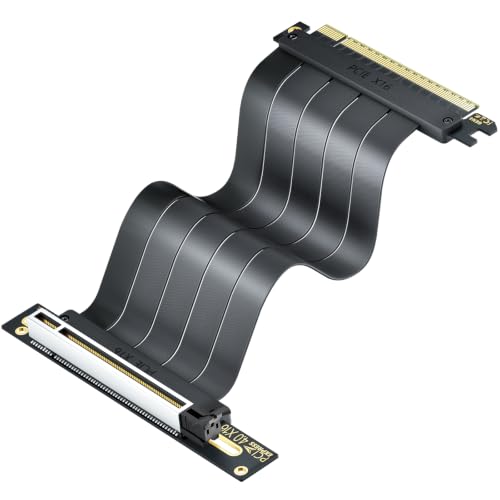
ELECNEXUS 200mm PCIe 4.0 x16 Riser Cable
Best for: Vertical GPU mounts with EMI concerns
- Interface Standard
- PCIe 4.0
- Slot Configuration
- x16
- Cable Length
- 200mm
- Maximum Bandwidth
- 64GB/s
- Shielding Type
- Triple EMI
- GPU
- GeForce RTX 4090
View on Amazon: ELECNEXUS 200mm PCIe 4.0 x16 Riser Cable Affiliate link
This 200mm PCIe 4.0 x16 riser cable supports up to 64GB/s bandwidth for RTX 40 and RX 7000 series GPUs. It features triple-layer EMI shielding to reduce interference and a flat design for easy routing. The 75W power delivery ensures stable operation during demanding workloads. You get a reliable extension for vertical GPU mounts that maintains signal integrity through gold-plated contacts.
Pros
- Supports PCIe 4.0 x16 with 64GB/s bandwidth
- Triple-layer EMI shielding minimizes signal degradation
- Flat cable design aids clean cable routing
- Gold-plated contacts ensure long-term connection stability
Cons
- Limited to a 200mm length
- Only available in black color
- Heavier build at 3.17 ounces compared to standard cables
Good fit if
- You need a vertical GPU mount
- You want to minimize electromagnetic interference
- You are building with RTX 40 or RX 7000 series cards
Skip if
- You require a white cable option
- You need a longer cable reach
- You are using a PCIe 3.0 system only
Verdict: ELECNEXUS 20cm PCIe 4.0 Riser provides stable 64GB/s bandwidth and robust shielding for vertical GPU installations. It suits builders prioritizing signal integrity and clean aesthetics in mid-sized cases.
Specifications side by side
| Spec | GLOTRENDS 200mm Right-Angle PCIe 4.0 Riser Cable | GLOTRENDS 250mm PCIe 3.0 x16 90-Degree Riser Cable | LINKUP Ultra PCIe 4.0 15cm White Riser Cable | Glotrends PA17 Straight PCIe 5.0 Riser | SinLoon 50cm 90-Degree PCIe 4.0 x1 Riser Cable | ELECNEXUS 200mm PCIe 4.0 x16 Riser Cable |
|---|---|---|---|---|---|---|
| Interface Standard | PCIe 4.0 | PCIe 3.0 | PCIe 4.0 | PCIe 5.0 | PCIe 4.0 | PCIe 4.0 |
| Slot Configuration | x16 | x16 | X16 | x16 | X1 | x16 |
| Cable Length | 200mm | 250mm | 15cm | not stated | 50CM | 200mm |
| Connector Angle | 90 Degree Right Angle | 90 Degree Right Angle | Universal 90 Degree | Straight Angle | 90 Degree | not stated |
| Maximum Bandwidth | 32GB/s | 16GB/s | Over 64GB/s | not stated | up to 16Gbps | 64GB/s |
| Shielding Type | foil-wrapped | EMI Shielded | Individual laneway shielding | not stated | not stated | Triple EMI |
| GPU | GeForce RTX 4090 | not stated | GeForce RTX 4090 | not stated | not stated | GeForce RTX 4090 |
| Interface | PCIe 4.0 | PCIe 3.0 | PCIe 4.0 | PCIe 5.0 | PCIe 4.0 | PCIe 4.0 |
| Use | not stated | not stated | Gaming | not stated | not stated | not stated |
| Dimensions | 9.84 × 4.72 × 4.72 inches | not stated | not stated | not stated | not stated | not stated |
| Weight | 4.97 ounces | not stated | not stated | 1.76 ounces | not stated | 3.17 ounces |
| Size | 200mm | 250mm | 15cm (reconditioned) | not stated | 50CM | 20cm |
| Color | Black | Black | White | not stated | not stated | Black |
| Model | PCIE40-X16-200MM-0090D | PCIE30-X16-250MM-0090D | not stated | PA17 | not stated | PCIE4.0-200-H |
How to choose the right one
-
Match the interface version
Check the interface specification first. PCIe 4.0 risers, such as the GLOTRENDS 200mm model, deliver full bandwidth for modern graphics cards. PCIe 3.0 options, like the GLOTRENDS 250mm, may bottleneck newer GPUs. Select the version that matches your motherboard and graphics card capabilities. Using an older interface with a high-end card limits performance. Ensure the cable standard aligns with your system's current generation to avoid unnecessary data transfer restrictions.
-
Select the connector angle
Decide between straight and right-angle connectors based on your case layout. Right-angle connectors, found on the GLOTRENDS 200mm and 250mm models, are ideal for vertical GPU mounts. They allow the card to sit parallel to the side panel. Straight connectors, like the GLOTRENDS PA17, suit server racks or specific clearance needs. Choose the angle that fits your physical installation requirements without straining the slot or blocking airflow in your chassis.
-
Measure the required length
Length determines fit within your case. The GLOTRENDS 200mm riser fits mid-tower cases with vertical mounts. The LINKUP 15cm option is best for compact builds needing minimal space. The SinLoon 50cm cable suits low-bandwidth peripherals in tight spaces. Measure the distance between your motherboard slot and the GPU mount point. Select a cable that is long enough to connect but not so long that it creates excess slack or interferes with other components.
-
Check the slot width
Verify the slot width specification. Most risers use x16 slots for graphics cards, such as the GLOTRENDS and ELECNEXUS PCIe 4.0 options. However, the SinLoon 50cm cable is an x1 riser. This is suitable for low-bandwidth peripherals, not modern GPUs. Ensure the slot width matches your device. Using an x1 riser for a graphics card will severely limit performance. Always check the attributes to confirm the electrical width before purchasing for a video card.
-
Consider shielding for EMI
Shielding helps maintain signal integrity. The GLOTRENDS 200mm and ELECNEXUS 20cm models are shielded solutions. This protects against electromagnetic interference, which is crucial for stable performance in vertical mounts. Unshielded cables may suffer from signal degradation over distance. If you prioritize signal quality and clean aesthetics, choose a shielded option. This is particularly important for high-bandwidth interfaces like PCIe 4.0 where data integrity is vital for consistent rendering and gaming performance.
Frequently asked questions
Is a PCIe 3.0 riser cable fast enough for modern graphics cards?
It depends on your GPU. The GLOTRENDS 250mm PCIe 3.0 riser is stable for older cards in full-tower cases. However, it may bottleneck newer graphics cards that require PCIe 4.0 bandwidth. You should check your motherboard and GPU specifications first. If you have a modern card, choose a PCIe 4.0 or 5.0 option instead.
What is the difference between a 90-degree and a straight riser cable?
The connector angle changes how the card sits in your case. A 90-degree riser, like the GLOTRENDS 200mm model, bends the card vertically for mid-tower mounts. A straight riser, such as the GLOTRENDS PA17 PCIe 5.0, keeps the card parallel to the motherboard. You should choose the angle that fits your specific case layout and clearance requirements.
Which PCIe riser cable is best for compact or small form factor builds?
The LINKUP Ultra PCIe 4.0 15cm White Riser Cable is the most compact option. Its 15cm length provides the shortest footprint for tight cases among the PCIe 4.0 choices. It offers shielded performance for vertical GPU mounting. This makes it a practical choice if you have limited space inside your computer chassis.
Can I use a PCIe 4.0 riser with a PCIe 3.0 motherboard?
Yes, the connectors are backward compatible. However, the link speed will drop to PCIe 3.0 levels. The ELECNEXUS 200mm PCIe 4.0 riser provides stable 64GB/s bandwidth when used with compatible hardware. If your motherboard only supports PCIe 3.0, you will not get the full speed of the 4.0 cable. Check your motherboard specifications to confirm the supported version.
Are these riser cables shielded against interference?
Yes, the listed options include shielding for signal integrity. The GLOTRENDS 200mm and LINKUP 15cm models are described as shielded solutions. The ELECNEXUS 200mm riser also features robust shielding for vertical GPU installations. This helps prevent electromagnetic interference, which is important for maintaining stable performance with modern graphics cards.
What length is best for a mid-tower case with a vertical GPU mount?
A 200mm length is ideal for most mid-tower cases. The GLOTRENDS 200mm and ELECNEXUS 200mm risers both fit this category. They provide enough clearance for the card while keeping the build neat. If your case is smaller, consider the 15cm LINKUP option. Always measure your internal space before purchasing to ensure a proper fit.
Is there a riser cable for high-end servers or PCIe 5.0 systems?
The GLOTRENDS PA17 is designed for PCIe 5.0 systems. It is a straight-angle riser intended for 1U or 2U servers. It requires 200mm of clearance to function correctly. This option is suitable if you have a full PCIe 5.0 setup. It is not designed for standard desktop vertical mounts.