8 Best Graphics Cards with 2GB, Compared
As an Amazon Associate we earn from qualifying purchases. Links on this page are affiliate links.
A dedicated graphics card with 2GB gives your desktop essential display capability, whether you need multi-monitor outputs or light media processing. We compared 8 products based strictly on the specifications published on their listings. The Gigabyte GeForce GTX 1050 2GB leads the group because it features a 128-bit memory bus paired with GDDR5 memory.
Memory types, card dimensions, and video ports differ across each model. This guide helps you identify the right card size, slot profile, and display connectivity for your PC build.
Quick picks
The best fit for you
- You build a standard desktop for 1080p gaming. Gigabyte GeForce GTX 1050 2GB It features a 128-bit memory bus and 2GB GDDR5 memory with DirectX 12 support.
- You want silent operation in a media PC. ASUS GeForce GT 1030 2GB Passive Card The card has a fanless passive design with a 1506MHz boost clock.
- You run four HDMI monitors from one computer. Xynsviu GT 740 4-HDMI Low Profile Card This low-profile model delivers four display outputs without requiring external power cables.
- You manage an expansive six-monitor workstation setup. VisionTek Radeon HD 7750 2GB Six-Display Card This model delivers six-monitor support and 4K output across 2GB GDDR5 memory.
Our 8 picks

Gigabyte GeForce GTX 1050 2GB
Best for: standard desktop 1080p gaming builds
- Memory
- 2GB (what this guide is about)
- Graphics Processor
- Geforce GTX 1050
- Memory Size
- 2GB
- Memory Type
- GDDR5
- Memory Bus Width
- 128 Bit
- PCIe Interface
- PCI-E
The Gigabyte GeForce GTX 1050 2GB GDDR5 is a renewed desktop graphics card built on NVIDIA Pascal architecture. It features 2GB of GDDR5 memory on a 128-bit bus and connects through PCI-E. The card supports DirectX 12 features and targets 1080p gaming at 60 FPS. This hardware suits you if you need dedicated video memory for a standard desktop chassis.
Pros
- 128-bit GDDR5 memory interface
- DirectX 12 feature support
- Rated for 1080p performance at 60 FPS
- Minimum 90-day warranty included
Cons
- Full 9.02-inch length requires standard case clearance
- Renewed product that may ship in a generic box
Good fit if
- You need a 128-bit GDDR5 memory interface for 1080p output
- You have room for a 9.02-inch card in your computer chassis
Skip if
- You require a brand-new factory-sealed component
- You need a low-profile card for slim desktop cases
Verdict: Gigabyte GeForce GTX 1050 2GB GDDR5 delivers Pascal-based architecture with a 128-bit memory bus for standard desktop builds. It provides full DirectX 12 support within a 9.02-inch footprint.

MSI GeForce GT 710 2GB Low Profile
Best for: compact PCs needing dual-display legacy video output
- Memory
- 2GB (what this guide is about)
- Graphics Processor
- GeForce GT 710
- Memory Size
- 2GB
- Memory Type
- DDR3
- Memory Bus Width
- 64-bit
- PCIe Interface
- PCI Express 2.0
The MSI GeForce GT 710 2GB Low Profile is a compact graphics card designed for basic video output and multi-monitor setups. It features 2GB of DDR3 memory on a 64-bit bus and connects via a PCI Express 2.0 x16 slot operating at x8 speeds. With HDMI, DVI-D, and VGA ports, it supports up to two simultaneous displays. This card suits you if you need reliable display connectivity in a small desktop enclosure.
Pros
- Low-profile form factor measuring 5.75 inches long
- Offers HDMI, DVI-D, and legacy VGA video outputs
- Supports up to two displays simultaneously
- HDMI output supports resolutions up to 4096 x 2160 at 24Hz
Cons
- Uses DDR3 memory rather than GDDR5
- Limited to a maximum of two concurrent displays
- Requires a 300W system power supply
Good fit if
- You need VGA, DVI, and HDMI connections on a single card.
- You have a small PC case that requires a low-profile card.
- You run a basic multi-display setup with up to two monitors.
Skip if
- You plan to run three or more monitors simultaneously.
- You need high-refresh 4K video, as the HDMI port maxes out at 24Hz.
Verdict: MSI GeForce GT 710 2GB Low Profile delivers flexible legacy and digital monitor connections in a compact form factor. It provides a straightforward dual-display solution for systems with at least a 300W power supply.
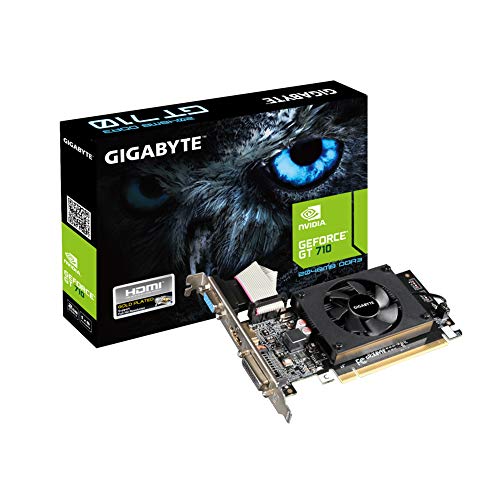
Gigabyte 2GB DDR3 Low Profile Graphics Card
Best for: compact desktops needing legacy video outputs
- Memory
- 2GB (what this guide is about)
- Memory Size
- 2GB
- Memory Type
- DDR3 SDRAM
- Dimensions
- 1.34 × 6.06 × 8.9 inches
- Weight
- 6.7 ounces
This Gigabyte graphics card gives you 2GB of DDR3 memory and a 954 MHz core clock in a compact, low-profile form factor. For display connections, it features Dual-link DVI-D, D-Sub, and HDMI ports. It suits you if you need basic display output for an everyday desktop PC with multiple monitor connector options without taking up extra interior case space.
Pros
- Low-profile form factor fits compact desktop cases
- Three display outputs: Dual-link DVI-D, D-Sub, and HDMI
- Core clock speed of 954 MHz
- Lightweight build at approximately 0.42 pounds
Cons
- Uses slower DDR3 memory rather than GDDR5
- No DisplayPort output included
Good fit if
- You need a low-profile card for a compact desktop system.
- You require legacy video outputs like D-Sub alongside HDMI and DVI-D.
Skip if
- You require modern DisplayPort connectivity for your monitor.
- You need the higher bandwidth of GDDR5 memory.
Verdict: Gigabyte 2GB DDR3 Low Profile Graphics Card delivers straightforward desktop display capability with versatile HDMI, DVI-D, and D-Sub outputs in a compact build. It is a practical fit when you need basic multi-port video support in a small chassis.

ASUS GeForce GT 1030 2GB Passive Card
Best for: silent home theater PC builds
- Memory
- 2GB (what this guide is about)
- Graphics Processor
- GeForce GT 1030
- Memory Size
- 2GB
- Memory Type
- GDDR5
- Boost Clock
- 1506MHz
- Dimensions
- 6.8 × 2.7 × 0.1 inches
The ASUS GeForce GT 1030 Passive 2GB provides silent video output for compact systems. It features 2GB of GDDR5 memory, a 1506MHz boost clock in OC mode, and a completely passive heatsink. You get DirectX 12 support on Windows 10 alongside GPU Tweak II utility software. This low-profile card fits your needs if you want zero fan noise for home theater tasks or basic desktop computing in a slim enclosure.
Pros
- Passive heatsink design allows completely silent cooling
- 1506MHz boost clock speed in OC mode
- 2GB GDDR5 memory on NVIDIA Pascal architecture
- Low-profile form factor measuring 6.8 inches long
Cons
- Relies entirely on passive system airflow without an integrated cooling fan
- Limited to 2GB GDDR5 memory capacity
Good fit if
- You need a completely silent graphics card with zero fan noise.
- You build a low-profile home theater PC running Windows 10.
- You want 2GB GDDR5 memory with a 1506MHz boost clock.
Skip if
- You require an active cooling fan for heavy thermal loads.
- You need more than 2GB of video memory for demanding applications.
Verdict: ASUS GeForce GT 1030 Passive 2GB delivers quiet multimedia performance through its fanless design and 1506MHz boost clock. It is a dependable choice when you need a compact, silent card for home theater or general computing.

AMD Radeon Pro W2100 2GB Low Profile
Best for: single-slot low-profile desktop builds
- Memory
- 2GB (what this guide is about)
- Graphics Processor
- Radeon Pro W2100
- Memory Size
- 2 GB
- Memory Type
- GDDR5
- Slot Width
- Single Slot
- Form Factor
- Low Profile
The AMD Radeon Pro W2100 is a compact workstation graphics card. You get 2GB of GDDR5 memory paired with a low-profile design that requires only a single slot of space inside your chassis. At 9.5 inches long and 2.5 inches high, it fits into tight desktop enclosures. This card suits you if you need dedicated 2GB video memory for basic visual tasks without consuming multiple expansion slots.
Pros
- 2GB GDDR5 memory
- Low-profile form factor
- Requires only single slot space
- Slim 2.5-inch card height
Cons
- Length reaches 9.5 inches
- Display output types not listed in published specifications
Good fit if
- You need a graphics card that occupies only one expansion slot.
- You require 2GB GDDR5 video memory for a low-profile chassis.
- You have clearance for a 9.5-inch long card.
Skip if
- You need more than 2GB of video memory for your applications.
- You have a small case that cannot fit cards up to 9.5 inches long.
Verdict: AMD Radeon Pro W2100 2GB Low Profile provides 2GB of GDDR5 memory in a slim single-slot form factor. It gives your compact system dedicated graphics capabilities while preserving adjacent motherboard slots.

Maxsun GeForce GT 1030 Low Profile
Best for: compact small-form-factor PCIe 3.0 setups
- Memory
- 2GB (what this guide is about)
- Graphics Processor
- GeForce GT 1030
- Memory Size
- 2GB
- Memory Type
- GDDR5
- Boost Clock
- up to 1468 MHz
- Memory Bus Width
- 64-Bit
This Maxsun graphics card features 2GB of GDDR5 memory on a 64-bit bus with a PCIe 3.0 interface. It delivers boost clock speeds up to 1468 MHz and memory speeds up to 6000 MHz. The low-profile form factor includes a dedicated bracket for small-form-factor builds. It suits you if you need a compact video card with HDMI and DVI outputs for slim ITX enclosures.
Pros
- PCIe 3.0 interface with 6000 MHz GDDR5 memory
- GPU boost clock speeds up to 1468 MHz
- Low-profile bracket included for small-form-factor cases
- Provides both HDMI and DVI display outputs
Cons
- Limited to a 64-bit memory interface
- Lacks a DisplayPort output
Good fit if
- You need a low-profile PCIe 3.0 card for a slim ITX chassis.
- You use displays that connect via HDMI or DVI.
Skip if
- You require a wider memory interface than 64-bit.
- You need native DisplayPort connectivity.
Verdict: Maxsun GeForce GT 1030 Low Profile provides reliable PCIe 3.0 connectivity and 2GB GDDR5 memory in a compact form factor. It gives you capable clock speeds and essential digital display outputs for small systems.

Xynsviu GT 740 4-HDMI Low Profile Card
Best for: quad-display office and trading workstations
- Memory
- 2GB (what this guide is about)
- Graphics Processor
- GT 740
- Memory Size
- 2GB
- Memory Type
- GDDR5
- Slot Width
- two expansion-slot
- Form Factor
- Low Profile
You get a dedicated low-profile graphics card built for multi-display productivity. The card provides 2GB of GDDR5 memory and features four HDMI ports to drive four monitors at once. It runs directly on 60W PCIe slot power without supplementary cables. Because the cooler measures 1.57 inches thick, you need two expansion slots free in your compact desktop or small form factor workstation.
Pros
- Four HDMI ports support up to four simultaneous displays
- Draws up to 60W directly from PCIe slot with no extra cables
- Equipped with 2GB GDDR5 video memory
- Half-height design fits compatible small form factor systems
Cons
- Card thickness of 1.57 inches requires two expansion slots
- No DisplayPort, DVI, or VGA video outputs
Good fit if
- You need to connect up to four HDMI displays to one card.
- You lack auxiliary PCIe power cables from your power supply.
- You have two available expansion slots in your desktop chassis.
Skip if
- You only have clearance for a single-slot card.
- You require DisplayPort or analog VGA connections.
Verdict: Xynsviu GT 740 4-HDMI Low Profile Card provides four display outputs and 2GB GDDR5 memory without requiring external power cables. Its dual-slot width requires two available bracket spaces in your chassis.
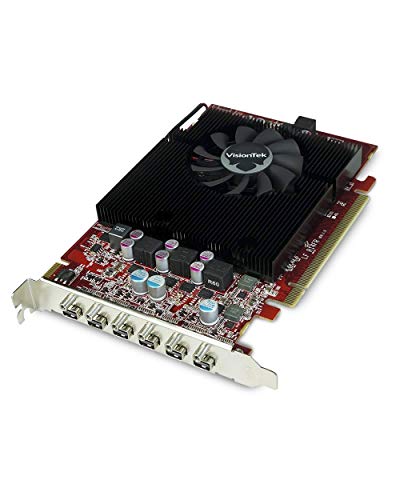
VisionTek Radeon HD 7750 2GB Six-Display Card
Best for: six-monitor commercial and multi-display desktop setups
- Memory
- 2GB (what this guide is about)
- Graphics Processor
- Radeon HD 7750
- Memory Size
- 2GB
- Memory Type
- GDDR5
- Use
- Gaming
- Dimensions
- 10.5 × 8 × 2.5 inches
View on Amazon: VisionTek Radeon HD 7750 2GB Six-Display Card
The VisionTek Radeon HD 7750 2GB Six-Display Card is a multi-display graphics card built with 2GB of GDDR5 memory. It supports up to six independent monitors and outputs 4K resolution up to 4096 x 2160 at 60Hz. You also get integrated 7.1 surround sound and driver support spanning Windows XP through Windows 10. This card suits you if you need an extensive multi-monitor work setup.
Pros
- Drives up to 6 displays simultaneously
- Supports 4K resolution up to 4096 x 2160 at 60Hz
- Equipped with 2GB GDDR5 video memory
- Supports 7.1 surround sound audio pass-through
- Compatible with legacy Windows operating systems back to XP
Cons
- Large card footprint measuring 10.5 inches long and 2.5 inches thick
- Requires mini display connections rather than standard full-size ports
- Lacks listed compatibility for Windows 11
Good fit if
- You need to run up to six independent monitors from one card.
- You require 4K output up to 4096 x 2160 at 60Hz.
- You operate systems on legacy OS versions such as Windows XP, 7, or 8.
Skip if
- You have a small form factor case unable to fit a 10.5-inch card.
- You need standard full-size display connections without mini adapters.
- You require an officially validated Windows 11 graphics card.
Verdict: VisionTek Radeon HD 7750 2GB Six-Display Card delivers rare six-monitor support and 4K output on a 2GB GDDR5 board. It is a capable choice for expansive multi-display workstation environments.
Specifications side by side
| Spec | Gigabyte GeForce GTX 1050 2GB | MSI GeForce GT 710 2GB Low Profile | Gigabyte 2GB DDR3 Low Profile Graphics Card | ASUS GeForce GT 1030 2GB Passive Card | AMD Radeon Pro W2100 2GB Low Profile | Maxsun GeForce GT 1030 Low Profile | Xynsviu GT 740 4-HDMI Low Profile Card | VisionTek Radeon HD 7750 2GB Six-Display Card |
|---|---|---|---|---|---|---|---|---|
| Graphics Processor | Geforce GTX 1050 | GeForce GT 710 | not specified | GeForce GT 1030 | Radeon Pro W2100 | GeForce GT 1030 | GT 740 | Radeon HD 7750 |
| Memory Size | 2GB | 2GB | 2GB | 2GB | 2 GB | 2GB | 2GB | 2GB |
| Memory Type | GDDR5 | DDR3 | DDR3 SDRAM | GDDR5 | GDDR5 | GDDR5 | GDDR5 | GDDR5 |
| Boost Clock | not specified | not specified | not specified | 1506MHz | not specified | up to 1468 MHz | not specified | not specified |
| Memory Bus Width | 128 Bit | 64-bit | not specified | not specified | not specified | 64-Bit | not specified | not specified |
| PCIe Interface | PCI-E | PCI Express 2.0 | not specified | not specified | not specified | PCIe 3.0 | not specified | not specified |
| Recommended PSU | not specified | 300w | not specified | not specified | not specified | not specified | not specified | not specified |
| Slot Width | not specified | not specified | not specified | not specified | Single Slot | not specified | two expansion-slot | not specified |
| Memory | 2GB | 2GB | 2GB | 2GB | 2GB | 2GB | 2GB | 2GB |
| Interface | not specified | not specified | not specified | not specified | not specified | PCIe 3.0 | not specified | not specified |
| Form Factor | not specified | Low Profile | not specified | not specified | Low Profile | Low Profile | Low Profile | not specified |
| Use | not specified | Gaming | not specified | not specified | not specified | not specified | not specified | Gaming |
| Dimensions | 9.02 × 4.65 × 1.57 inches | 5.75 × 0.75 × 2.72 inches | 1.34 × 6.06 × 8.9 inches | 6.8 × 2.7 × 0.1 inches | 9.5 × 6.4 × 2.5 inches | not specified | 7.09 × 4.72 × 0.1 inches | 10.5 × 8 × 2.5 inches |
| Weight | not specified | 5.12 ounces | 6.7 ounces | 1.75 pounds | 1.01 pounds | 5.93 ounces | 14.1 ounces | 1.6 pounds |
| Length | not specified | not specified | not specified | not specified | not specified | 6.5 inches | not specified | not specified |
| Width | not specified | not specified | not specified | not specified | not specified | 2.72 inches | not specified | not specified |
| Size | 2GB | 2GB | Standard | GT 1030 2GB Low Profile | not specified | not specified | not specified | 2GB |
| Model | GV-N1050WF2OC-2GD R | GT 710 2GD3 LP | GV-N710D3-2GL REV2.0 | GT1030-2G-CSM | 100-506001 | GT 1030 | GT740 2G 4HDMI | 900614 |
| Color | not specified | Multicolor | Black | not specified | not specified | not specified | GT740 2G 4HDMI | Information Not Available |
Is a 2GB Graphics Card Worth It for Your PC?
A 2GB frame buffer provides dedicated hardware resources for everyday display processing. Offloading monitor duties from system RAM ensures consistent desktop rendering across single or multi-screen workstations. Depending on the card architecture, 2GB supports multi-display setups running up to six monitors or outputting at 4K resolution. It provides adequate memory bandwidth for standard office productivity, dual-display setups, and lightweight 3D tasks using DirectX 12. For systems lacking integrated display outputs or needing straightforward hardware expansion without heavy power requirements, 2GB dedicated memory covers essential video operational demands.
Worth it if
- You need dedicated video memory to drive multiple displays, up to six monitors on a single card.
- You run standard desktop tasks, media playback, or entry-level DirectX 12 applications without needing external power cables.
Skip it if
- You require large frame buffers for high-resolution 3D workloads beyond entry-level 1080p gaming.
- You run complex compute or creative rendering applications that exceed 2GB of video memory.
You can evaluate the best case fans for graphics card to maintain proper operating temperatures in your case.
How We Picked These Cards
To choose the 8 cards for this 2026 guide, you look for models with 2GB of memory stated in listing titles or feature lists. Only one variant from each product family appears. All details come directly from specifications published on Amazon listings. Products are not physically handled.
Products in stock appear first, then by Amazon sales rank so better-selling products place first. The order also evaluates how many guide criteria each model meets using specifications such as memory type and form factor. Inventory status refreshes at least daily on the page.
How to Choose a 2GB Graphics Card
-
Check Slot Width Clearance
You should check how many expansion brackets the card occupies inside your computer chassis. Some low-profile cards require a dual-slot footprint, while others fit into a single expansion space. If your compact system has adjacent PCIe slots or components that you need to use, choose a single-slot card. The AMD Radeon Pro W2100 2GB Low Profile utilizes a slim single-slot format. This layout leaves nearby motherboard expansion slots open for additional add-in cards or airflow in tight desktop enclosures.
-
Count Display Output Ports
Check the total number and types of monitor outputs on the graphics card bracket before buying. If you plan to build a commercial workstation or multi-monitor setup, make sure the card provides enough independent video connections without splitters. Some boards offer dual outputs, while dedicated multi-display models handle significantly more screens. For example, the VisionTek Radeon HD 7750 2GB Six-Display Card supports up to six displays with 4K output. Matching port count to your workspace avoids complex display adapters.
-
Verify Power Supply Capacity
Review the minimum system power supply wattage listed for the card against your computer power supply unit. Many compact office desktops use lower-wattage power supplies that cannot support power-hungry hardware. Checking the published wattage requirement ensures your desktop runs reliably under display loads without unexpected shutdowns. The MSI GeForce GT 710 2GB Low Profile specifies a minimum 300W power supply. Checking this specification helps you confirm compatibility before installation, especially when you upgrade an older office computer with limited factory power headroom.
-
Inspect Legacy Display Connectors
Examine the physical connector types if you intend to connect older office displays or projectors. While modern setups use digital DisplayPort or HDMI connections, older monitors frequently require analog D-Sub or DVI inputs. Choosing a card with native legacy ports eliminates the need for active signal converters. The Gigabyte 2GB DDR3 Low Profile Graphics Card incorporates HDMI, DVI-D, and D-Sub outputs directly on the board. This variety ensures direct hardware compatibility with both legacy analog monitors and newer digital desktop screens.
-
Check External Power Requirements
Confirm whether the card requires supplemental power leads from your power supply. Small-form-factor systems and OEM office desktops frequently lack extra 6-pin or 8-pin PCIe power cables. Selecting a card that operates entirely on slot power simplifies installation and avoids replacing your existing power hardware. The Xynsviu GT 740 4-HDMI Low Profile Card delivers multi-display capabilities without requiring external power cables. This design allows you to install the card directly into an open PCIe slot without routing additional power cables across your chassis.
-
Match Motherboard PCIe Generation
Look at the PCIe interface version listed on the graphics card specifications. Matching the card bus specification to your motherboard PCIe slot ensures standard data transfer rates and proper hardware recognition. If your desktop supports PCIe 3.0, choosing a card built for that generation ensures the device communicates efficiently with the host system. The Maxsun GeForce GT 1030 Low Profile features a PCIe 3.0 interface. Verifying PCIe version compatibility helps you avoid bandwidth restrictions and ensures the card operates properly across modern desktop motherboard architectures.
Frequently asked questions
Which 2GB graphics card supports connecting up to six monitors?
The VisionTek Radeon HD 7750 2GB Six-Display Card is built specifically to power six independent screens. It features GDDR5 memory and supports 4K visual output for expansive workstation configurations. You can use it in commercial or trading environments where viewing multiple high-resolution feeds simultaneously across individual displays is required.
Do you need dedicated power cables from the power supply for a 2GB graphics card?
Most 2GB graphics cards draw all operating power straight from the motherboard PCIe slot. For instance, the Xynsviu GT 740 4-HDMI card functions without requiring external power cables from your power supply. However, you should still verify overall system capacity; models like the MSI GeForce GT 710 specify a minimum 300W desktop power supply.
Can a 2GB graphics card fit into a single expansion slot?
Yes, specific models are engineered strictly as single-slot cards. The AMD Radeon Pro W2100 2GB Low Profile occupies just one bracket position on your desktop case, leaving adjacent motherboard slots open for other add-in cards. In contrast, cards like the Xynsviu GT 740 require dual-slot space to accommodate their physical dimensions and port layouts.
Which 2GB graphics card offers legacy analog VGA connectivity?
The Gigabyte 2GB DDR3 Low Profile Graphics Card provides direct legacy video output using a native D-Sub connector alongside DVI-D and HDMI ports. This setup lets you attach older analog computer monitors without requiring active signal adapters. It allows legacy hardware integration while providing DDR3 memory for daily desktop operating tasks.
Are there silent, fanless 2GB graphics cards available?
Yes, fanless designs exist for zero-noise computing environments. The ASUS GeForce GT 1030 2GB Passive Card uses a heatsink-only cooling structure that produces no fan noise during operation. It retains full operational performance with a 1506MHz boost clock and fast GDDR5 memory, making it suitable for noise-sensitive spaces or home theater configurations.
What interface connection does the Maxsun GeForce GT 1030 use?
The Maxsun GeForce GT 1030 Low Profile connects using a standard PCIe 3.0 bus interface. This connection provides reliable bandwidth for its 2GB of GDDR5 video memory and digital display outputs. It installs into compatible small-form-factor desktop motherboards without requiring specialty interface converters or supplemental board connections.