Best Graphics Cards with GDDR6 in 2026: 15 Picks Ranked by Specs
As an Amazon Associate we earn from qualifying purchases. Links on this page are affiliate links.
Finding the right graphics card with GDDR6 depends on your display setup, chassis clearance, and memory bandwidth needs. We compared 15 options using the specifications published on their listings to rank the top choices for 2026. The ZOTAC GeForce RTX 3070 Twin Edge OC 8GB takes the top spot because its wide 256-bit memory bus and 1755 MHz boost clock deliver higher throughput than narrower alternatives.
This guide helps you choose the right balance of memory capacity, card dimensions, and interface speeds for your desktop build.
Quick picks
The best fit for you
- You want balanced 1440p gaming with multi-monitor support ZOTAC GeForce RTX 3070 Twin Edge OC 8GB It pairs an 8GB GDDR6 pool and 256-bit bus with connectivity for up to four displays.
- You need maximum GDDR6 capacity for compact cases ASUS Phoenix GeForce RTX 3060 12GB It fits 12GB of GDDR6 memory into a short 7-inch chassis profile.
- You need dedicated GDDR6 memory for workstation systems HP Nvidia Quadro T1000 8GB It provides 8GB of GDDR6 memory with Mini Display connectivity for professional hardware setups.
Our 15 picks

ZOTAC GeForce RTX 3070 Twin Edge OC 8GB
Best for: wide-bus 1440p gaming and multi-monitor setups
- Memory Type
- GDDR6
- Graphics Processor
- GeForce RTX 3070
- Memory Size
- 8GB
- Boost Clock
- 1755 MHz
- Memory Bus Width
- 256-bit
- PCIe Interface
- PCIE 4.0
The ZOTAC GeForce RTX 3070 Twin Edge is a dedicated gaming graphics card built on NVIDIA Ampere architecture. For memory bandwidth, you get 8GB of GDDR6 running across a 256-bit memory bus at 14 Gbps, paired with a 1755 MHz boost clock and PCIe 4.0 support. It suits you if you need multi-monitor capability with three DisplayPort 1.4a outputs and one HDMI 2.1 port for high-resolution displays.
Pros
- 256-bit memory bus width
- 1755 MHz boost clock
- Four display outputs via three DisplayPort 1.4a and one HDMI 2.1
- IceStorm 2.0 cooling with FREEZE fan stop and metal backplate
Cons
- 8GB VRAM capacity rather than 12GB
- 14 Gbps memory clock rather than 15 Gbps
Good fit if
- You need a wide 256-bit bus for higher memory throughput.
- You run up to four displays using HDMI 2.1 and DisplayPort 1.4a.
Skip if
- You require more than 8GB of VRAM.
- You want memory transfer speeds higher than 14 Gbps.
Verdict: ZOTAC GeForce RTX 3070 Twin Edge pairs a wide 256-bit bus with 8GB GDDR6 memory and a 1755 MHz boost clock. It delivers balanced gaming specs and connects up to four displays over PCIe 4.0.

ASUS Dual GeForce RTX 4060 8GB
Best for: compact PC builds needing GDDR6 memory
- Memory Type
- GDDR6
- Graphics Processor
- GeForce RTX 4060
- Memory Size
- 8GB
- PCIe Interface
- PCIe 4.0
- Slot Width
- 2-Slot
- Dimensions
- 7.96 × 4.73 × 0.1 inches
The ASUS Dual GeForce RTX 4060 8GB gives you a compact graphics card built on the PCIe 4.0 interface. It pairs 8GB of GDDR6 memory with DisplayPort 1.4a and HDMI 2.1a video outputs. At 7.96 inches long with a 2-slot design, it fits easily into smaller computer cases without crowding adjacent slots. You will find this card suitable if you want current-generation DLSS 3 support and dedicated GDDR6 memory in a manageable footprint.
Pros
- 8GB GDDR6 memory capacity
- Compact 7.96-inch length fits smaller enclosures
- PCIe 4.0 bus interface
- Modern DisplayPort 1.4a and HDMI 2.1a display connections
- Hardware support for DLSS 3
Cons
- 8GB memory capacity offers less headroom than 12GB alternatives
- Occupies two full expansion slots in your chassis
Good fit if
- You need a card under 8 inches long for a smaller chassis.
- You want 8GB of GDDR6 memory on a PCIe 4.0 interface.
- You use modern displays requiring HDMI 2.1a or DisplayPort 1.4a.
Skip if
- You need more than 8GB of video memory for your software.
- You have a slim chassis that requires a single-slot card.
Verdict: ASUS Dual GeForce RTX 4060 8GB delivers modern PCIe 4.0 connectivity and 8GB of GDDR6 memory in a compact 7.96-inch profile. It is a solid dual-slot choice for space-constrained computer cases.

Sapphire Pulse AMD Radeon RX 6600 8GB (Renewed)
Best for: 1080p gaming on AMD RDNA 2 architecture
- Memory Type
- GDDR6
- Graphics Processor
- Radeon RX 6600
- Memory Size
- 8GB
- Use
- Gaming
- Length
- 10.5 inches
- Width
- 6.5 inches
View on Amazon: Sapphire Pulse AMD Radeon RX 6600 8GB (Renewed)
The Sapphire Pulse Radeon RX 6600 8GB GDDR6 (Renewed) provides dedicated graphics hardware for 1080p gaming setups. Built on AMD RDNA 2 architecture, it pairs 8GB of GDDR6 memory with DirectX 12 Ultimate hardware ray tracing support. Measuring 10.5 inches long and using Sapphire Pulse cooling, this card suits you if you need dedicated GDDR6 memory for 1080p gaming.
Pros
- 8GB GDDR6 memory for high-resolution textures
- AMD RDNA 2 architecture with hardware ray tracing
- DirectX 12 Ultimate feature support
- Dedicated Sapphire Pulse cooling solution
Cons
- Renewed hardware rather than a factory-new unit
- 10.5-inch length requires clearance in compact cases
Good fit if
- You focus on 1080p resolution gaming.
- You want 8GB GDDR6 on AMD RDNA 2 architecture.
- You are satisfied purchasing professionally renewed hardware.
Skip if
- You require brand-new, unopened retail hardware.
- You need more than 8GB of video memory.
Verdict: Sapphire Pulse Radeon RX 6600 8GB GDDR6 (Renewed) delivers solid 1080p gaming capability with RDNA 2 architecture and dedicated cooling. It offers a practical GDDR6 configuration if you accept renewed hardware.

Sapphire Pulse AMD Radeon RX 6600 XT 8GB
Best for: gaming systems needing 8GB GDDR6 memory
- Memory Type
- GDDR6
- Graphics Processor
- Radeon RX 6600 XT
- Memory Size
- 8GB
- Use
- Gaming
- Dimensions
- 11.3 × 6.5 × 3.5 inches
The Sapphire Pulse Radeon RX 6600 XT 8GB is a dedicated desktop gaming graphics card built on AMD RDNA 2 architecture. It provides 8GB of GDDR6 memory for gaming applications. The card measures 11.25 inches in length, 6.5 inches in width, and 3.5 inches in height. This card suits you if you need dedicated GDDR6 memory and have a desktop case with enough interior space to house an 11.25-inch card.
Pros
- 8GB GDDR6 memory
- AMD RDNA 2 architecture
- Designed for gaming workloads
Cons
- 11.25-inch length requires substantial case clearance
- 3.5-inch height occupies significant vertical enclosure space
Good fit if
- You need 8GB of GDDR6 memory for gaming.
- You have a PC chassis with over 11.25 inches of graphics card clearance.
Skip if
- You need more than 8GB of video memory for your system.
- You have a compact case unable to accommodate an 11.25-inch card.
Verdict: Sapphire Pulse Radeon RX 6600 XT 8GB delivers 8GB of GDDR6 memory on AMD RDNA 2 architecture for dedicated gaming setups. It provides solid dedicated memory specifications provided your chassis accommodates its 11.25-inch length.

GIGABYTE RTX 4060 Ti WINDFORCE 8GB
Best for: compact GeForce RTX 4060 Ti builds
- Memory Type
- GDDR6
- Graphics Processor
- GeForce RTX 4060 Ti
- Memory Size
- 8GB
- Memory Bus Width
- 128-bit
- Dimensions
- 7.91 × 4.72 × 1.61 inches
This unit features the GeForce RTX 4060 Ti GPU paired with 8GB of GDDR6 memory across a 128-bit interface. Cooling relies on two WINDFORCE fans within a body measuring 7.91 inches long, 4.72 inches wide, and 1.61 inches high. You get dedicated GDDR6 memory in a compact form. It suits you if you want a dual-fan graphics card that fits tighter case layouts without exceeding an eight-inch card clearance.
Pros
- GeForce RTX 4060 Ti graphics processor
- 8GB GDDR6 memory
- Two WINDFORCE cooling fans
- Compact 7.91-inch length
- 128-bit memory interface
Cons
- 8GB memory capacity offers less buffer than 12GB cards
- 128-bit bus width provides less bus width than 192-bit or 256-bit alternatives
Good fit if
- You want a GeForce RTX 4060 Ti GPU with 8GB of GDDR6 memory.
- You need a card under 8 inches long to fit smaller chassis dimensions.
Skip if
- You require more than 8GB of video memory.
- You need a memory bus wider than 128-bit.
Verdict: GIGABYTE RTX 4060 Ti WINDFORCE 8GB provides a GeForce RTX 4060 Ti GPU with 8GB of GDDR6 memory in a 7.91-inch dual-fan format. It serves builds requiring standard dual-slot dimensions with sub-eight-inch length limits.

Gigabyte GeForce RTX 4060 Windforce 8GB
Best for: compact PC cases needing GDDR6 graphics
- Memory Type
- GDDR6
- Graphics Processor
- GeForce RTX 4060
- Memory Size
- 8GB
- Memory Bus Width
- 128-bit
- Dimensions
- 7.56 × 4.72 × 1.61 inches
This graphics card pairs an NVIDIA GeForce RTX 4060 GPU with 8GB of GDDR6 memory across a 128-bit memory interface. Cooling is handled by two fans on a compact card measuring 7.56 inches in length and 1.61 inches in height. If you need a modern GDDR6 setup that fits smaller computer cases, this hardware suits your build.
Pros
- 8GB GDDR6 memory
- Compact 7.56-inch card length
- Dual-fan WINDFORCE cooling
- 128-bit memory bus
Cons
- 128-bit bus is narrower than cards with 192-bit or 256-bit interfaces
- 8GB capacity is lower than 12GB GDDR6 alternatives
Good fit if
- You want an NVIDIA GeForce RTX 4060 GPU with 8GB of GDDR6 memory.
- You have a compact chassis that requires a card length under 7.6 inches.
Skip if
- You need more than 8GB of video memory.
- You require a wider 192-bit or 256-bit memory bus.
Verdict: GIGABYTE GeForce RTX 4060 8GB provides 8GB of GDDR6 memory and dual-fan cooling in a card measuring under eight inches long. It delivers a space-efficient GeForce RTX 4060 layout for smaller chassis builds.
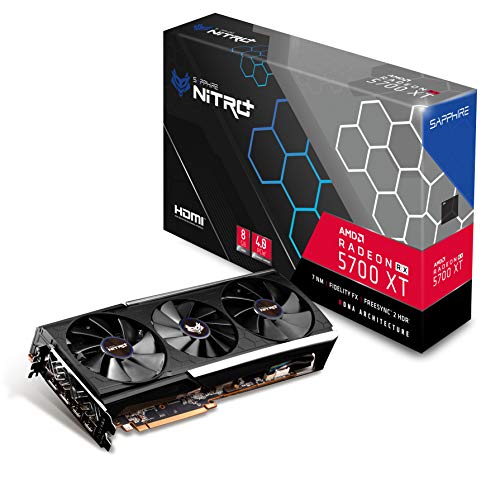
Sapphire NITRO+ Radeon RX 5700 XT 8GB
Best for: multi-monitor setups in large cases
- Memory Type
- GDDR6
- Graphics Processor
- Radeon RX 5700 XT
- Memory Size
- 8GB
- PCIe Interface
- PCIe 4.0
- Dimensions
- 17 × 9.5 × 3.5 inches
The Sapphire Nitro+ Radeon RX 5700 XT provides 8GB of GDDR6 memory on a PCIe 4.0 interface. For video output, it features two HDMI ports and two DisplayPort connections. At 17 inches long, 9.5 inches wide, and 3.5 inches high, this card requires substantial clearance inside your PC case. It suits you if you need reliable GDDR6 memory allocation and four display outputs for multi-monitor setups.
Pros
- 8GB GDDR6 video memory
- PCIe 4.0 system interface
- Four display outputs via two HDMI and two DisplayPort ports
Cons
- Large footprint at 17 inches in length
- Requires 3.5 inches of vertical clearance
Good fit if
- You need four display outputs using two HDMI and two DisplayPort connections.
- You have a full-size computer chassis with at least 17 inches of card clearance.
Skip if
- You have a compact or small-form-factor case with limited clearance.
- You require more than 8GB of video memory for your workload.
Verdict: Sapphire Nitro+ Radeon RX 5700 XT 8GB delivers 8GB of GDDR6 memory and four video connections for multi-display workstations. Its 17-inch length requires a spacious enclosure.
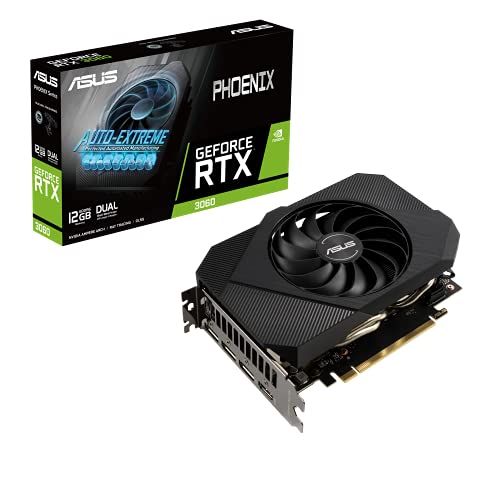
ASUS Phoenix GeForce RTX 3060 12GB
Best for: compact PC cases needing 12GB GDDR6 memory
- Memory Type
- GDDR6
- Graphics Processor
- GeForce RTX 3060
- Memory Size
- 12GB
- PCIe Interface
- PCIe 4.0
- Use
- Gaming
- Length
- 7 inches
The ASUS Phoenix GeForce RTX 3060 12GB is a compact gaming card built for standard PCIe 4.0 slots. It features 12GB of GDDR6 memory, giving you ample video memory capacity. With a physical length of 7 inches and a weight of 0.75 pounds, it suits space-conscious setups. You get DisplayPort 1.4a and HDMI video outputs for your monitors.
Pros
- 12GB GDDR6 memory
- Compact 7-inch card length
- Lightweight build at 0.75 pounds
- PCIe 4.0 interface
Cons
- Only one HDMI port listed in the specifications
- No clock speed ratings provided in product data
Good fit if
- You need 12GB of GDDR6 memory for gaming.
- You require a card 7 inches long or shorter for a smaller case.
- You use a motherboard with a PCIe 4.0 expansion slot.
Skip if
- You need multiple HDMI ports for your display setup.
- You want detailed clock frequency specifications listed upfront.
Verdict: ASUS Phoenix GeForce RTX 3060 12GB delivers 12GB of GDDR6 memory and PCIe 4.0 support in a 7-inch package. It provides solid memory capacity for builds with limited clearance.

HP Nvidia Quadro T1000 8GB
Best for: compact workstations needing 8GB GDDR6 memory
- Memory Type
- GDDR6
- Graphics Processor
- Quadro T1000
- Memory Size
- 8GB
- Dimensions
- 9 × 7.3 × 2.6 inches
- Weight
- 0.76 ounces
The HP Nvidia Quadro T1000 8GB GDDR6 is a workstation graphics card built for compact systems. It features 8GB of GDDR6 memory and connects via a PCIe interface. At 2.6 inches tall, 7.3 inches wide, and 9 inches long, with a weight of 0.76 ounces, it fits tight spaces. This card suits you if you need dedicated GDDR6 memory and Mini Display connectivity for multi-display setups in 2026.
Pros
- 8GB GDDR6 memory
- Low 2.6-inch height profile
- Lightweight 0.76-ounce design
- Mini Display outputs
Cons
- Requires Mini Display adapters for full-size DisplayPort or HDMI cables
- Configured for PCIe 4X interface width
Good fit if
- You need 8GB GDDR6 memory in a slim 2.6-inch height card.
- You run monitors via Mini Display connections.
- You require a lightweight card weighing 0.76 ounces.
Skip if
- You need full-size HDMI or standard DisplayPort outputs natively.
- You require a card with a standard PCIe x16 lane width.
Verdict: HP Nvidia Quadro T1000 8GB GDDR6 provides 8GB GDDR6 memory inside a 2.6-inch tall card. It fits small workstations that rely on Mini Display outputs.

ZOTAC GeForce RTX 3060 Twin Edge 12GB
Best for: high-VRAM 1080p and 1440p gaming setups
- Memory Type
- GDDR6
- Graphics Processor
- GeForce RTX 3060
- Memory Size
- 12GB
- Memory Bus Width
- 192-bit
- PCIe Interface
- PCIe 4.0
- Use
- Gaming
The ZOTAC GeForce RTX 3060 Twin Edge 12GB is a dedicated gaming graphics card using a PCIe 4.0 interface. It delivers 12GB of GDDR6 memory across a 192-bit memory bus with a 15 Gbps memory speed. Measuring 8.8 inches long, 4.6 inches wide, and 1.5 inches high, it fits standard mid-tower setups. You get ample VRAM capacity for gaming workloads that exceed standard 8GB limits.
Pros
- 12GB GDDR6 memory capacity
- 192-bit memory bus width
- 15 Gbps memory clock speed
- PCIe 4.0 interface support
- Compact 8.8-inch overall card length
Cons
- 192-bit memory bus narrower than 256-bit alternatives
- Display output port configuration not specified in data
- Requires 1.5-inch vertical slot clearance
Good fit if
- You need 12GB of GDDR6 memory for high-allocation gaming tasks.
- You use a system with a PCIe 4.0 expansion slot.
- You have a PC chassis that fits an 8.8-inch card.
Skip if
- You require a wider 256-bit memory bus.
- You build in an ultra-slim enclosure under 1.5 inches of clearance.
Verdict: ZOTAC GeForce RTX 3060 Twin Edge 12GB provides 12GB of GDDR6 memory with a 192-bit interface for mid-tier gaming setups. Its 8.8-inch length ensures broad chassis compatibility while maintaining a 15 Gbps memory speed.

EVGA GeForce RTX 3060 XC Dual-Fan 12GB
Best for: compact gaming builds needing 12GB GDDR6
- Memory Type
- GDDR6
- Graphics Processor
- GeForce RTX 3060
- Memory Size
- 12GB
- Boost Clock
- 1882 Mhz
- Use
- Gaming
- Dimensions
- 7.94 × 1.54 × 4.33 inches
The EVGA GeForce RTX 3060 XC Gaming is a dedicated graphics card built for gaming with 12GB of GDDR6 memory. It provides an 1882 MHz real boost clock and dual-fan cooling with a metal backplate. At 7.94 inches in length and 0.75 pounds, it suits smaller desktop cases. You will find it useful if you want real-time ray tracing and high memory capacity in a compact card.
Pros
- 12GB GDDR6 memory capacity
- 1882 MHz real boost clock
- Compact 7.94-inch length
- Dual cooling fans with a metal backplate
Cons
- Renewed product rather than brand-new
- Specific video output ports are not listed in data
Good fit if
- You need 12GB of GDDR6 memory for gaming.
- You have a compact case that requires a card under 8 inches long.
- You want an 1882 MHz boost clock paired with dual-fan cooling.
Skip if
- You prefer a brand-new factory-sealed card over a renewed model.
- You need confirmed video output port types before purchasing.
Verdict: EVGA GeForce RTX 3060 XC Gaming 12GB delivers 12GB of GDDR6 memory and an 1882 MHz boost clock inside a compact 7.94-inch design. It is a capable choice if you need ample video memory for gaming in space-constrained PC cases.

ASUS Dual AMD Radeon RX 6600 XT 8GB
Best for: compact PCIe 4.0 gaming systems
- Memory Type
- GDDR6
- Graphics Processor
- Radeon RX 6600 XT
- Memory Size
- 8GB
- PCIe Interface
- PCIe 4.0
- Use
- Gaming
- Dimensions
- 9.6 × 5.3 × 1.9 inches
The ASUS Dual AMD Radeon RX 6600 XT 8GB is a dedicated gaming graphics card built on AMD RDNA 2 architecture. For your build, it provides 8GB of GDDR6 memory alongside a PCIe 4.0 interface. Its physical dimensions measure 9.6 inches long, 5.3 inches wide, and 1.9 inches high, with a weight of 0.75 pounds. This card suits you if you want modern GDDR6 memory and high-speed bus connectivity in a standard mid-sized chassis.
Pros
- 8GB GDDR6 video memory
- PCIe 4.0 interface support
- 9.6-inch length fits standard cases
- Lightweight design at 0.75 pounds
Cons
- 1.9-inch thickness takes up multiple case slots
- 8GB memory limit may constrain memory-heavy setups
Good fit if
- You need 8GB of GDDR6 memory on a PCIe 4.0 motherboard.
- You have at least 9.6 inches of clearance inside your PC case.
Skip if
- You need more than 8GB of video memory for your applications.
- You have a slim case unable to accommodate a 5.3-inch card width.
Verdict: ASUS Dual AMD Radeon RX 6600 XT 8GB combines 8GB of GDDR6 memory with a PCIe 4.0 interface for your gaming setup. Its sub-10-inch length and 0.75-pound weight make it a practical fit for standard towers.

Gigabyte GeForce GTX 1650 4GB GDDR6
Best for: small cases needing basic GDDR6 graphics
- Memory Type
- GDDR6
- Graphics Processor
- GeForce GTX 1650
- Memory Size
- 4GB
- Memory Bus Width
- 128-Bit
- Dimensions
- 7.52 × 4.41 × 1.42 inches
This Gigabyte graphics card features an entry-level GeForce GTX 1650 GPU paired with 4GB of GDDR6 memory across a 128-bit interface. It measures 7.52 inches long, 4.41 inches wide, and 1.42 inches high, cooled by two Windforce fans. If you need a compact video card that fits inside smaller computer cases while using GDDR6 VRAM for everyday computing and lighter graphical workloads, this dual-fan model directly suits your hardware requirements.
Pros
- 4GB GDDR6 memory on a 128-bit bus
- Dual Windforce cooling fan system
- Compact length of 7.52 inches fits small cases
Cons
- Limited to 4GB of VRAM compared to 8GB or 12GB alternatives
- Narrower 128-bit memory bus compared to wider memory interfaces
Good fit if
- You need a compact graphics card under 7.6 inches long.
- You want 4GB of GDDR6 memory for modest graphical workloads.
Skip if
- You require 8GB or more of VRAM for heavy graphics tasks.
- You need a wider 192-bit or 256-bit memory bus.
Verdict: Gigabyte GeForce GTX 1650 4GB GDDR6 delivers a 7.52-inch footprint and dual cooling fans for space-limited setups requiring GDDR6 memory. Its 4GB memory capacity and 128-bit interface suit basic desktop installations rather than memory-heavy workloads.
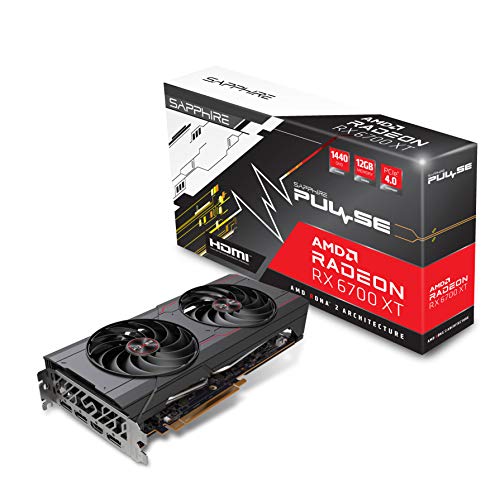
Sapphire Pulse Radeon RX 6700 XT 12GB
Best for: 12GB GDDR6 AMD RDNA 2 gaming
- Memory Type
- GDDR6
- Graphics Processor
- AMD Radeon RX 6700 XT
- Memory Size
- 12GB
- Use
- Gaming
- Dimensions
- 12.5 × 8.5 × 2.75 inches
- Weight
- 2.31 pounds
The Sapphire Pulse Radeon RX 6700 XT 12GB is a dedicated gaming graphics card built on AMD RDNA 2 architecture. It features 12GB of GDDR6 video memory to handle modern game textures and assets. Measuring 12.5 inches long and 2.75 inches thick, this card demands substantial internal chassis space. It suits your build if you want an RX 6700 XT GPU with a large memory capacity inside a spacious PC enclosure.
Pros
- 12GB of GDDR6 memory
- Built on AMD RDNA 2 architecture
- Dedicated Radeon RX 6700 XT graphics processor
Cons
- Long 12.5-inch card length requires a large chassis
- Height of 2.75 inches occupies multiple expansion slots
Good fit if
- You want 12GB of GDDR6 memory for gaming workloads.
- You have a PC chassis with over 12.5 inches of clearance.
Skip if
- You have a compact computer case that cannot fit long cards.
- You need a slim dual-slot form factor.
Verdict: Sapphire Pulse Radeon RX 6700 XT 12GB delivers 12GB of GDDR6 memory on the AMD RDNA 2 architecture for spacious desktop gaming systems.
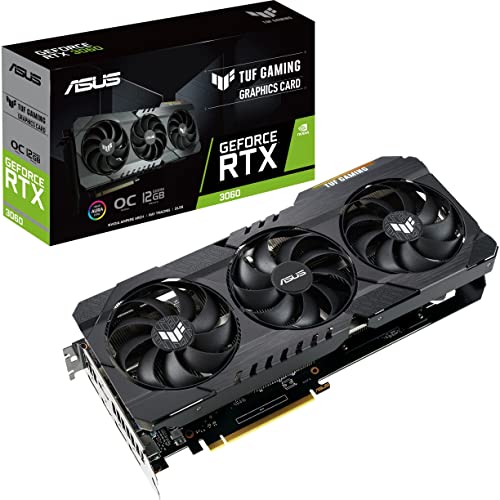
ASUS TUF Gaming GeForce RTX 3060 OC 12GB
Best for: 12GB GDDR6 gaming with factory overclocks
- Memory Type
- GDDR6
- Graphics Processor
- GeForce RTX 3060
- Memory Size
- 12GB
- Boost Clock
- 1882 MHz
- PCIe Interface
- PCIe 4.0
- Use
- Gaming
The ASUS TUF Gaming GeForce RTX 3060 12GB is a gaming graphics card built on NVIDIA Ampere architecture. You get 12GB of GDDR6 memory, PCIe 4.0 connectivity, and a factory boost clock reaching up to 1882 MHz in OC mode. It includes 2nd Gen RT Cores and 3rd Gen Tensor Cores for ray tracing and DLSS processing. This setup fits you if you want high GDDR6 capacity for gaming.
Pros
- 12GB GDDR6 video memory
- Boost clock reaches 1882 MHz in OC mode
- Reinforced SafeSlot PCIe 4.0 design
- 3rd Gen Tensor Cores supporting up to 8K resolution
Cons
- Boost clock drops to 1852 MHz in standard Gaming mode
- Requires avoiding unofficial software to manage clock profiles safely
Good fit if
- You want 12GB of GDDR6 memory for gaming.
- You want factory overclocking profiles reaching 1882 MHz.
- You have a motherboard with a PCIe 4.0 slot.
Skip if
- You do not want to use software modes to reach the highest boost clock.
- You need complete display output port counts specified before buying.
Verdict: ASUS TUF Gaming GeForce RTX 3060 12GB provides 12GB GDDR6 memory and up to an 1882 MHz boost clock on a PCIe 4.0 interface. It delivers Ampere ray tracing and Tensor cores for your gaming build.
Specifications side by side
| Spec | ZOTAC GeForce RTX 3070 Twin Edge OC 8GB | ASUS Dual GeForce RTX 4060 8GB | Sapphire Pulse AMD Radeon RX 6600 8GB (Renewed) | Sapphire Pulse AMD Radeon RX 6600 XT 8GB | GIGABYTE RTX 4060 Ti WINDFORCE 8GB | Gigabyte GeForce RTX 4060 Windforce 8GB | Sapphire NITRO+ Radeon RX 5700 XT 8GB | ASUS Phoenix GeForce RTX 3060 12GB | HP Nvidia Quadro T1000 8GB | ZOTAC GeForce RTX 3060 Twin Edge 12GB | EVGA GeForce RTX 3060 XC Dual-Fan 12GB | ASUS Dual AMD Radeon RX 6600 XT 8GB | Gigabyte GeForce GTX 1650 4GB GDDR6 | Sapphire Pulse Radeon RX 6700 XT 12GB | ASUS TUF Gaming GeForce RTX 3060 OC 12GB |
|---|---|---|---|---|---|---|---|---|---|---|---|---|---|---|---|
| Graphics Processor | GeForce RTX 3070 | GeForce RTX 4060 | Radeon RX 6600 | Radeon RX 6600 XT | GeForce RTX 4060 Ti | GeForce RTX 4060 | Radeon RX 5700 XT | GeForce RTX 3060 | Quadro T1000 | GeForce RTX 3060 | GeForce RTX 3060 | Radeon RX 6600 XT | GeForce GTX 1650 | AMD Radeon RX 6700 XT | GeForce RTX 3060 |
| Memory Size | 8GB | 8GB | 8GB | 8GB | 8GB | 8GB | 8GB | 12GB | 8GB | 12GB | 12GB | 8GB | 4GB | 12GB | 12GB |
| Memory Type | GDDR6 | GDDR6 | GDDR6 | GDDR6 | GDDR6 | GDDR6 | GDDR6 | GDDR6 | GDDR6 | GDDR6 | GDDR6 | GDDR6 | GDDR6 | GDDR6 | GDDR6 |
| Boost Clock | 1755 MHz | not specified | not specified | not specified | not specified | not specified | not specified | not specified | not specified | not specified | 1882 Mhz | not specified | not specified | not specified | 1882 MHz |
| Memory Bus Width | 256-bit | not specified | not specified | not specified | 128-bit | 128-bit | not specified | not specified | not specified | 192-bit | not specified | not specified | 128-Bit | not specified | not specified |
| PCIe Interface | PCIE 4.0 | PCIe 4.0 | not specified | not specified | not specified | not specified | PCIe 4.0 | PCIe 4.0 | not specified | PCIe 4.0 | not specified | PCIe 4.0 | not specified | not specified | PCIe 4.0 |
| Slot Width | not specified | 2-Slot | not specified | not specified | not specified | not specified | not specified | not specified | not specified | not specified | not specified | not specified | not specified | not specified | not specified |
| Memory | 8GB | 8GB | 8GB | 8GB | 8GB | 8GB | 8GB | 12GB | 8GB | 12GB | 12GB | 8GB | not specified | 12GB | 12GB |
| GPU | not specified | not specified | not specified | not specified | GeForce RTX 4060 Ti | GeForce RTX 4060 | not specified | GeForce RTX 3060 | not specified | GeForce RTX 3060 | GeForce RTX 3060 | not specified | GeForce GTX 1650 | Radeon RX 6700 XT | GeForce RTX 3060 |
| Interface | PCIe 4.0 | PCIe 4.0 | not specified | not specified | not specified | not specified | PCIe 4.0 | PCIe 4.0 | not specified | PCIe 4.0 | not specified | PCIe 4.0 | not specified | not specified | PCIe 4.0 |
| Use | Gaming | not specified | Gaming | Gaming | not specified | not specified | not specified | Gaming | not specified | Gaming | Gaming | Gaming | not specified | Gaming | Gaming |
| Dimensions | not specified | 7.96 × 4.73 × 0.1 inches | not specified | 11.3 × 6.5 × 3.5 inches | 7.91 × 4.72 × 1.61 inches | 7.56 × 4.72 × 1.61 inches | 17 × 9.5 × 3.5 inches | not specified | 9 × 7.3 × 2.6 inches | 8.8 × 4.6 × 1.5 inches | 7.94 × 1.54 × 4.33 inches | 9.6 × 5.3 × 1.9 inches | 7.52 × 4.41 × 1.42 inches | 12.5 × 8.5 × 2.75 inches | 5 × 5 × 5 inches |
| Weight | not specified | 1.2 pounds | 1.59 pounds | not specified | not specified | not specified | not specified | 12 ounces | 0.76 ounces | not specified | 12 ounces | 12 ounces | not specified | 2.31 pounds | 12 ounces |
| Length | not specified | not specified | 10.5 inches | not specified | not specified | not specified | not specified | 7 inches | not specified | not specified | not specified | not specified | not specified | not specified | not specified |
| Width | not specified | not specified | 6.5 inches | not specified | not specified | not specified | not specified | 5 inches | not specified | not specified | not specified | not specified | not specified | not specified | not specified |
| Size | not specified | RTX4060|V2|OC | not specified | not specified | not specified | not specified | 8 | 2"x5"x7" | not specified | not specified | not specified | 1.9"x5.3"x9.6" | not specified | not specified | not specified |
| Color | not specified | BLACK | black | not specified | not specified | not specified | not specified | not specified | not specified | not specified | not specified | not specified | not specified | not specified | not specified |
| Model | not specified | not specified | not specified | not specified | not specified | GV-N4060WF2OC-8GD-cr | not specified | not specified | N02454-001 | not specified | not specified | not specified | not specified | not specified | TUF-RTX3060-O12G-V2-GAMING |
Is GDDR6 memory worth it?
GDDR6 provides dedicated video memory across capacities ranging from 4GB to 12GB. On these cards, it operates across memory interfaces between 128-bit and 256-bit, with transfers reaching speeds up to 15 Gbps. This dedicated memory architecture feeds gaming graphics processors and workstation hardware without drawing from system RAM. Whether you operate multi-monitor workstation layouts or run modern RDNA 2 and GeForce gaming pipelines, GDDR6 supplies the dedicated frame buffer and bandwidth required to drive up to four displays smoothly.
Worth it if
- You need dedicated video memory between 8GB and 12GB for gaming or workstation software.
- You plan to connect up to four displays using a wide 192-bit or 256-bit memory interface.
Skip it if
- You only require a basic desktop installation with a 4GB memory capacity on a 128-bit bus.
- You run memory-heavy workloads that demand a frame buffer larger than 12GB.
If you plan to run higher frame rates on a compact screen, you can pair this hardware with a 120Hz portable monitor.
How We Picked These Cards
To build this 2026 guide of 15 graphics cards, we identify models strictly by memory type. A card qualifies when its listing confirms GDDR6 memory in the title or feature list. Only one variant from each product family is included. All details come directly from published specifications, as products are not physically handled.
The selections are ordered with products in stock first, then by Amazon sales rank (better-selling products first). This setup lets you evaluate published hardware specifications like memory capacity, interface standards, and card dimensions across available models to find the right match for your desktop build.
Key Specs for Choosing GDDR6 Graphics Cards
-
Choose your memory capacity
GDDR6 graphics cards offer memory pools ranging from 4GB to 12GB. Basic desktop tasks and older titles function well on 4GB. Modern gaming typically requires 8GB to handle high-resolution texture packs smoothly. If you run heavily modded games or demanding creative workloads, step up to a 12GB configuration like the ASUS Phoenix GeForce RTX 3060 12GB. Checking the dedicated memory capacity ensures your card holds necessary assets without frame drops.
-
Check memory bus width
Memory bus width determines how much data moves between the graphics processor and the GDDR6 memory per cycle. A 128-bit bus suits standard 1080p gaming, but higher resolutions demand wider bandwidth. A 192-bit or 256-bit interface delivers faster data pathways for intense rendering tasks. The ZOTAC GeForce RTX 3070 Twin Edge OC 8GB features a 256-bit bus, which provides wide data channels for smooth 1440p gaming. Match the bus width to your target display resolution to prevent data flow bottlenecks.
-
Verify PCIe interface compatibility
Graphics cards connect to your motherboard via specific PCI Express lane configurations and interface generations. Most modern GDDR6 cards use standard PCIe 4.0 slots that provide high transfer speeds across modern motherboards. However, specialized hardware uses different lane allocations. For instance, the HP Nvidia Quadro T1000 8GB requires a PCIe 4X slot configuration. Examine your motherboard expansion slots before buying to confirm you have an available physical slot and lane allotment that matches the interface specifications of your chosen card.
-
Count display connector options
Review the display connections on the rear bracket if you use multiple monitors. Cards in this category typically offer multi-display support, but connector types and total supported monitors vary. Models like the Sapphire NITRO+ Radeon RX 5700 XT 8GB provide four video connections for multi-display setups. Other cards feature compact Mini Display connectors that require specific adapters or cables. Check the number of ports and connector styles against your monitors to ensure direct compatibility without extra adapter hardware.
-
Compare boost clock ratings
Clock speed indicates how fast the graphics processor calculates rendering instructions. Base clocks show standard operating speeds, while boost clocks show peak speeds under demanding loads. Higher clock frequencies provide quicker frame processing within the same GPU family. For example, cards like the EVGA GeForce RTX 3060 XC Dual-Fan 12GB reach an 1882 MHz boost clock. When you compare two cards built on identical graphics chips, checking published boost frequencies helps identify which model provides higher factory operational speeds.
-
Match architecture to workload
Graphics cards are engineered for specific workloads, ranging from workstation tasks to gaming. Dedicated gaming models utilize specialized architectures like AMD RDNA 2 to deliver optimized texture rendering and visual effects. The Sapphire Pulse AMD Radeon RX 6600 8GB (Renewed) provides RDNA 2 processing tailored specifically for gaming. In contrast, workstation lines target enterprise reliability and specialized CAD applications. Identifying whether your primary task involves professional design work or gaming ensures you select hardware tuned to your daily software demands.
Frequently asked questions
What bus width options are available on GDDR6 graphics cards?
GDDR6 graphics cards feature different memory bus widths that dictate how quickly data moves between the GPU core and VRAM. In this guide, interfaces range from 128-bit on entry-level models like the Gigabyte GeForce GTX 1650 up to a wide 256-bit bus on the ZOTAC GeForce RTX 3070 Twin Edge. Mid-tier models like the ZOTAC GeForce RTX 3060 Twin Edge utilize a 192-bit bus.
Can you run multiple monitors with an 8GB GDDR6 graphics card?
Yes, you can easily run multi-monitor configurations using 8GB GDDR6 graphics cards. Models such as the ZOTAC GeForce RTX 3070 Twin Edge, Sapphire NITRO+ Radeon RX 5700 XT, and XFX Speedster SWFT 210 Radeon RX 6600 provide connectivity for up to four displays simultaneously. Workstation options like the HP Nvidia Quadro T1000 also offer dedicated Mini Display connections to drive multi-screen workflows efficiently.
Which GDDR6 graphics cards use the PCIe 4.0 interface?
Several GDDR6 graphics cards utilize the PCIe 4.0 interface to connect to your motherboard. Examples include the ZOTAC GeForce RTX 3070 Twin Edge, ASUS Dual GeForce RTX 4060, Sapphire NITRO+ Radeon RX 5700 XT, and ASUS Dual AMD Radeon RX 6600 XT. Using PCIe 4.0 ensures high connection bandwidth between your graphics card and compatible modern system boards.
What boost clock speeds do GDDR6 graphics cards reach?
Boost clock speeds vary significantly depending on the specific GPU and board design. For instance, the EVGA GeForce RTX 3060 XC Dual-Fan 12GB achieves an 1882 MHz boost clock, while the ZOTAC GeForce RTX 3070 Twin Edge OC reaches a 1755 MHz boost clock out of the box. Higher boost frequencies allow the graphics processor to run faster during heavy processing demands.
What GDDR6 graphics card works best for workstation multi-monitor setups?
The HP Nvidia Quadro T1000 8GB is tailored specifically for professional workstation use. It combines 8GB of dedicated GDDR6 memory with Mini Display connectivity for multi-monitor arrangements. Designed for specialized builds, it requires PCIe 4X hardware and features a lightweight 0.0475-pound build measuring 9 inches long and 7.3 inches wide, making it distinct from standard desktop gaming cards.
How does cooling design differ among sub-eight-inch GDDR6 graphics cards?
Compact GDDR6 graphics cards under eight inches frequently utilize dual-fan cooling systems to fit into small chassis without overheating. For example, the Gigabyte GeForce RTX 4060 Windforce measures 7.56 inches with dual fans, while the EVGA GeForce RTX 3060 XC Dual-Fan measures 7.94 inches. The GIGABYTE RTX 4060 Ti WINDFORCE also employs a 7.91-inch dual-fan layout within standard dual-slot space.
Which GDDR6 graphics cards feature AMD RDNA 2 architecture?
Multiple GDDR6 cards in this guide feature AMD RDNA 2 graphics architecture. You can find this design in the Sapphire Nitro+ Radeon RX 6700 XT 12GB, the Sapphire Pulse Radeon RX 6600 XT 8GB, and the XFX Speedster SWFT 210 Radeon RX 6600 8GB. The renewed Sapphire Pulse Radeon RX 6600 8GB also uses RDNA 2 to deliver dedicated 1080p gaming performance.