Best Graphics Cards with GDDR6X: 15 Spec-Based Picks
As an Amazon Associate we earn from qualifying purchases. Links on this page are affiliate links.
Choosing a graphics card with GDDR6X gives your system high-speed memory bandwidth for demanding gaming setups. This guide evaluates 15 models based strictly on the specifications published on their listings. The EVGA GeForce RTX 3090 24GB leads the list because it features 10,496 CUDA cores, 24GB of GDDR6X memory, and an 1800MHz boost clock.
You can use these spec comparisons to evaluate memory capacities, physical dimensions, and interface requirements to decide which option fits your case and gaming build.
Quick picks
The best fit for you
- You want maximum CUDA cores for heavy gaming workloads EVGA GeForce RTX 3090 24GB It delivers 10,496 CUDA cores and 24GB of GDDR6X memory with an 1800MHz boost clock.
- You want a wide bus on modern 40-series hardware Gigabyte GeForce RTX 4090 Windforce V2 This GeForce RTX 4090 graphics card pairs 24GB of GDDR6X memory with a 384-bit bus.
- You are building inside a dedicated white BTF chassis ASUS TUF RTX 4070 Ti Super BTF White This white model requires a BTF motherboard to run its 16GB of GDDR6X memory.
- You need a compact card for multi-display setups ZOTAC Gaming RTX 3070 Ti Trinity 8GB At a 9.1-inch length, it provides four display outputs alongside 8GB of GDDR6X memory.
Our 15 picks

EVGA GeForce RTX 3090 24GB
Best for: high-memory gaming builds
- Memory Type
- GDDR6X
- Graphics Processor
- GeForce RTX 3090
- Memory Size
- 24GB
- Boost Clock
- 1800MHz
- PCIe Interface
- PCIe 4
- Use
- Gaming
This EVGA GeForce RTX 3090 graphics card provides 24GB of GDDR6X memory on a PCIe 4.0 interface. It features 10,496 CUDA cores, an 1800MHz boost clock, and a triple-fan cooling system. You get expansive high-speed video memory and ARGB LED lighting in an 11.81-inch frame. This card suits you if you want high-capacity memory and high GPU core counts for gaming.
Pros
- 24GB of GDDR6X memory
- 10,496 CUDA cores with 1800MHz boost clock
- Triple-fan cooling setup
- PCIe 4.0 interface
Cons
- Long 11.81-inch footprint requires substantial case clearance
- Display output port types are not specified in the data
Good fit if
- You need 24GB of high-speed GDDR6X memory for gaming.
- You have space for an 11.81-inch card in your PC chassis.
- You want integrated ARGB LED lighting with a three-fan cooler.
Skip if
- You have a compact case with under 11.81 inches of GPU clearance.
- You need verified display port specifications before purchasing.
Verdict: EVGA GeForce RTX 3090 24GB delivers 10,496 CUDA cores and 24GB GDDR6X memory for demanding gaming setups. Its triple-fan design and 1800MHz boost clock support sustained performance over PCIe 4.0.

ASUS TUF RTX 4070 Ti Super BTF White
Best for: white BTF motherboard gaming builds
- Memory Type
- GDDR6X
- Graphics Processor
- GeForce RTX 4070 Ti Super
- Memory Size
- 16GB
- PCIe Interface
- PCIe 4.0
- Use
- Gaming
- Weight
- 2.87 pounds
The ASUS TUF RTX 4070 Ti Super BTF White is a gaming graphics card built with 16GB of GDDR6X memory and a PCIe 4.0 interface. This model features an all-white finish and factory overclocking. Because it exclusively supports BTF motherboards, it suits you if you are building a clean, cable-hidden desktop around compatible BTF components.
Pros
- 16GB of GDDR6X video memory
- PCIe 4.0 interface
- Factory overclocked edition
- White design finish
Cons
- Exclusively supports BTF motherboards
- Physical clearance dimensions are not specified
Good fit if
- You use a compatible BTF motherboard.
- You want 16GB of GDDR6X memory for gaming.
- You are planning an all-white desktop PC build.
Skip if
- You have a standard motherboard without BTF connector support.
- You need exact physical dimensions to verify case clearance.
Verdict: ASUS TUF RTX 4070 Ti Super BTF White provides 16GB of GDDR6X memory for gaming PCs using specialized BTF hardware. Its strict BTF motherboard requirement means you cannot use it in standard motherboard configurations.

Gigabyte GeForce RTX 4090 Windforce V2
Best for: maximum GDDR6X memory capacity and bandwidth
- Memory Type
- GDDR6X
- Graphics Processor
- GeForce RTX 4090
- Memory Size
- 24GB
- Memory Bus Width
- 384-bit
- Dimensions
- 13 × 5.35 × 2.2 inches
- Weight
- 4.4 pounds
The Gigabyte GeForce RTX 4090 Windforce V2 24GB provides you with a GeForce RTX 4090 GPU and 24GB of GDDR6X memory. It uses a 384-bit memory interface and features three Windforce cooling fans. This graphics card suits you if you need high-capacity GDDR6X video memory and have a PC chassis large enough for its 13.03-inch length, 5.35-inch width, 2.2-inch height, and 4.4-pound total weight.
Pros
- 24GB of GDDR6X video memory
- Wide 384-bit memory interface
- GeForce RTX 4090 GPU
- Three Windforce cooling fans
Cons
- Long card length at 13.03 inches
- Heavy build weighing 4.4 pounds
- Thick profile measuring 2.20 inches tall
Good fit if
- You need 24GB of GDDR6X memory operating on a 384-bit bus.
- You have a PC chassis that fits a 13.03-inch graphics card.
- You prefer a triple-fan cooling system.
Skip if
- You have a compact PC case unable to house a 13.03-inch, 4.4-pound card.
- You do not require 24GB of GDDR6X memory.
Verdict: Gigabyte GeForce RTX 4090 Windforce V2 24GB provides 24GB of GDDR6X memory on a 384-bit bus with triple Windforce fan cooling. It is designed for setups that can handle its 13.03-inch length and 4.4-pound weight.

ASUS ROG Strix GeForce RTX 3090 24GB
Best for: High-VRAM gaming and heavy graphical loads
- Memory Type
- GDDR6X
- Graphics Processor
- GeForce RTX 3090
- Memory Size
- 24GB
- Use
- Gaming
- Dimensions
- 31.9 × 14 × 57.8 inches
- Weight
- 3.97 pounds
The ASUS ROG Strix GeForce RTX 3090 24GB provides a high-capacity option on this 15-card list. It pairs an NVIDIA GeForce RTX 3090 GPU with 24GB of high-speed GDDR6X memory and an Axial-tech fan configuration. This massive memory buffer suits your demanding gaming setups where memory-intensive rendering and high-resolution assets are standard. Weighing nearly four pounds, it delivers substantial hardware for heavy graphics workloads.
Pros
- 24GB of GDDR6X video memory
- Axial-tech cooling fan design
- Factory overclocked OC Edition profile
Cons
- Heavy card weight at roughly 3.97 pounds
- Substantial physical dimensions require a large chassis
Good fit if
- You need a large 24GB GDDR6X memory buffer for high-demand gaming.
- You want an OC Edition RTX 3090 with Axial-tech cooling fans.
Skip if
- You have a compact computer chassis with strict space limits.
- You do not require 24GB of GDDR6X VRAM for your games.
Verdict: ASUS ROG Strix GeForce RTX 3090 24GB delivers massive 24GB GDDR6X capacity and Axial-tech cooling for memory-heavy gaming setups. It offers robust hardware specifications if your system case can accommodate its physical size and weight.

Gigabyte RTX 4070 Super Windforce 12GB
Best for: compact triple-fan GDDR6X mid-tower builds
- Memory Type
- GDDR6X
- Graphics Processor
- GeForce RTX 4070 Super
- Memory Size
- 12GB
- Memory Bus Width
- 192-bit
- Dimensions
- 10.3 × 5 × 0.1 inches
The Gigabyte RTX 4070 Super Windforce OC 12GB provides 12GB of GDDR6X memory on a 192-bit bus width. For heat dissipation, you get three Windforce fans built into a 10.3-inch shroud. This card suits your setup if you need modern high-speed video memory for graphic workloads without taking up excessive chassis length. Its 5-inch width and 2-inch thickness fit standard mid-tower computer cases easily.
Pros
- 12GB GDDR6X video memory
- Triple Windforce cooling fan design
- 10.3-inch length fits common mid-tower cases
- 192-bit memory interface
Cons
- Lower memory capacity than 16GB or 24GB alternatives
- Narrower 192-bit memory bus width
Good fit if
- You need high-speed GDDR6X memory in a 12GB capacity.
- You have a PC case with at least 10.3 inches of GPU clearance.
Skip if
- You require 16GB or 24GB of VRAM for memory-heavy tasks.
- You want a wider 256-bit or 384-bit memory bus width.
Verdict: Gigabyte RTX 4070 Super Windforce OC 12GB balances modern GDDR6X performance with a triple-fan cooling system. It fits mid-range builds that do not require massive 24GB framebuffers.

ASUS ROG Strix RTX 3080 OC 10GB
Best for: budget-focused GDDR6X gaming builds
- Memory Type
- GDDR6X
- Graphics Processor
- GeForce RTX 3080
- Memory Size
- 10GB
- PCIe Interface
- PCIe 4.0
- Slot Width
- 2.9-Slot
- Use
- Gaming
The ASUS ROG Strix RTX 3080 10GB is a dedicated gaming graphics card built with high-speed GDDR6X memory and a PCIe 4.0 interface. It features 10GB of video memory to handle modern gaming workloads. Measuring 12.5 inches long and 2.3 inches thick, it requires ample space inside your PC chassis. This card suits you if you want GDDR6X memory performance in a standard desktop setup without stepping up to larger capacities.
Pros
- 10GB of high-speed GDDR6X memory
- PCIe 4.0 interface support
- Dedicated design for gaming use
- Lightweight construction at 0.75 pounds
Cons
- 10GB VRAM capacity is lower than 12GB, 16GB, or 24GB alternatives
- Length of 12.5 inches requires substantial case clearance
Good fit if
- You want GDDR6X memory and PCIe 4.0 connectivity for gaming.
- You have a PC chassis with clearance for a 12.5-inch card.
Skip if
- You require more than 10GB of video memory for your workloads.
- You use a compact case that cannot fit a 12.5-inch, 2.3-inch thick card.
Verdict: ASUS ROG Strix RTX 3080 10GB delivers GDDR6X memory and PCIe 4.0 bandwidth for dedicated gaming setups. It is a practical fit if your chassis accommodates its 12.5-inch length.

ZOTAC Gaming GeForce RTX 3090 24GB
Best for: high-memory gaming builds in spacious cases
- Memory Type
- GDDR6X
- Graphics Processor
- GeForce RTX 3090
- Memory Size
- 24GB
- Memory Bus Width
- 384-bit
- PCIe Interface
- PCIE 4.0
- Use
- Gaming
The ZOTAC GeForce RTX 3090 Trinity 24GB provides high-capacity GDDR6X memory running on a 384-bit bus at 19.5 Gbps. Built for gaming on a PCIe 4.0 interface, it supplies 24GB of dedicated VRAM alongside IceStorm cooling hardware. This card suits you if your setup handles its 16.75-inch length and you require maximum memory bandwidth for demanding graphical tasks.
Pros
- 24GB of high-speed GDDR6X video memory
- Wide 384-bit memory bus running at 19.5 Gbps
- Fast PCIe 4.0 system interface support
- Equipped with IceStorm cooling technology
Cons
- Long form factor measuring 16.75 inches
- Wide footprint at 11.5 inches across
Good fit if
- You want 24GB of GDDR6X memory on a 384-bit bus for gaming.
- You have a PC chassis with over 16.75 inches of clearance.
- You run a motherboard supporting the PCIe 4.0 standard.
Skip if
- You build inside a compact case unable to fit a 16.75-inch card.
- You need a card under 4 inches in total height.
Verdict: ZOTAC GeForce RTX 3090 Trinity 24GB delivers massive GDDR6X memory bandwidth and capacity for high-demand gaming rigs. Its 16.75-inch length requires a spacious enclosure to ensure a proper fit.

ASUS Dual GeForce RTX 4070 OC
Best for: PCIe 4.0 builds needing 12GB GDDR6X
- Memory Type
- GDDR6X
- Graphics Processor
- GeForce RTX 4070 Super
- Memory Size
- 12GB
- PCIe Interface
- PCIe 4.0
- Slot Width
- 2.56-Slot
- Length
- 10.5 inches
This ASUS graphics card features a GeForce RTX 4070 GPU paired with 12GB of GDDR6X memory. It uses a PCIe 4.0 interface and connects via HDMI 2.1 and DisplayPort outputs. At 10.51 inches long and 2.1 pounds, it fits mid-sized cases easily. It suits you if you need modern DLSS 3 support and high-speed GDDR6X memory for demanding applications without extra hardware bulk.
Pros
- 12GB GDDR6X memory
- PCIe 4.0 bus interface
- HDMI 2.1 and DisplayPort connectivity
- DLSS 3 support
Cons
- Lower memory capacity than 16GB or 24GB models
- Card length exceeds 10.5 inches
Good fit if
- You need 12GB of GDDR6X memory for graphics tasks.
- You want DLSS 3 support on a PCIe 4.0 motherboard.
- You have chassis space for a 10.51-inch card.
Skip if
- You need 16GB or 24GB of video memory.
- You have a compact case with under 10.5 inches of clearance.
Verdict: ASUS Dual GeForce RTX 4070 12GB delivers 12GB of GDDR6X memory with DLSS 3 support over a PCIe 4.0 interface. It provides solid mid-tier performance in a 10.51-inch dual-slot form factor.

ASUS TUF Gaming GeForce RTX 4070 Ti 12GB
Best for: GeForce RTX 4070 Ti gaming builds
- Memory Type
- GDDR6X
- Graphics Processor
- GeForce RTX 4070 Ti
- Memory Size
- 12GB
- PCIe Interface
- PCIe 4.0
- Use
- Gaming
- Length
- 5.43 inches
This ASUS TUF Gaming card features the GeForce RTX 4070 Ti GPU paired with 12GB of GDDR6X memory. It runs on a PCIe 4.0 interface and supplies modern display connectivity through HDMI 2.1a and DisplayPort 1.4a ports. At 3.53 pounds, it delivers high-bandwidth memory for your gaming setup. It suits you if you want dedicated GDDR6X performance without stepping up to larger 16GB or 24GB cards.
Pros
- 12GB GDDR6X video memory
- GeForce RTX 4070 Ti graphics processor
- PCIe 4.0 bus interface
- HDMI 2.1a and DisplayPort 1.4a connectivity
Cons
- 12GB capacity is lower than 16GB or 24GB alternatives on the list
- Card weight reaches 3.53 pounds
Good fit if
- You want a GeForce RTX 4070 Ti card with 12GB of fast GDDR6X memory.
- You require HDMI 2.1a or DisplayPort 1.4a monitor connections.
- You have a PC build with a PCIe 4.0 expansion slot.
Skip if
- You need 16GB or 24GB of VRAM for heavier workloads.
- You require a lightweight card under 3 pounds.
Verdict: ASUS TUF Gaming GeForce RTX 4070 Ti 12GB delivers high-speed GDDR6X memory and PCIe 4.0 bandwidth for gaming. It is a focused option if you need 4070 Ti processing with standard display outputs.

ZOTAC GeForce RTX 3080 Trinity 10GB
Best for: gaming PCs needing fast 320-bit GDDR6X throughput
- Memory Type
- GDDR6X
- Graphics Processor
- GeForce RTX 3080
- Memory Size
- 10GB
- Memory Bus Width
- 320-bit
- PCIe Interface
- PCIE 4.0
- Use
- Gaming
The Zotac GeForce RTX 3080 Trinity OC 10GB gives you high-speed GDDR6X video memory paired with a 320-bit bus width. Running across a PCIe 4.0 interface at 19 Gbps, this card targets gaming setups that need fast throughput. With dimensions measuring 17 inches long, 12 inches wide, and weighing 3.09 pounds, it suits desktop systems with sufficient clearance. You get dedicated graphics processing built around high-bandwidth memory for demanding titles.
Pros
- 10GB of high-speed GDDR6X memory
- Wide 320-bit memory bus
- Fast 19 Gbps memory clock speed
- PCIe 4.0 interface compatibility
Cons
- 17-inch length requires a very large PC case
- 10GB capacity provides less buffer than 12GB or 24GB options
Good fit if
- You need 19 Gbps GDDR6X memory on a 320-bit bus.
- You have a PC chassis with over 17 inches of clearance.
Skip if
- You require more than 10GB of VRAM for your workload.
- You build in a compact PC enclosure with tight dimensions.
Verdict: Zotac GeForce RTX 3080 Trinity OC 10GB delivers 19 Gbps GDDR6X speeds across a 320-bit bus for PCIe 4.0 systems. Its physical footprint requires a roomy chassis to handle its 17-inch length.

Gigabyte AORUS GeForce RTX 3080 Ti 12GB
Best for: 384-bit GDDR6X high-resolution ATX builds
- Memory Type
- GDDR6X
- Graphics Processor
- GeForce RTX 3080 Ti
- Memory Size
- 12GB
- Memory Bus Width
- 384-bit
- Dimensions
- 12.6 × 5.51 × 2.76 inches
- Weight
- 3 pounds
The GIGABYTE AORUS GeForce RTX 3080 Ti 12GB is an ATX graphics card built with 12GB of GDDR6X memory across a 384-bit interface. It features NVIDIA Ampere architecture with second-generation RT Cores and third-generation Tensor Cores. With a maximum digital resolution of 7680x4320, this card suits you if you need wide memory bus bandwidth and high-resolution output for demanding visual workloads or gaming setups.
Pros
- 12GB GDDR6X memory on a wide 384-bit interface
- Digital maximum resolution support up to 7680x4320
- 2nd Generation RT Cores and 3rd Generation Tensor Cores
- Standard ATX form factor compatibility
Cons
- Length of 12.56 inches requires significant case space
- Height of 2.76 inches occupies multiple expansion slots
- Card weight reaches 3 pounds
Good fit if
- You want a 384-bit memory bus paired with 12GB of GDDR6X memory.
- You run high-resolution display setups up to 7680x4320.
- You have an ATX case that accommodates a 12.56-inch card length.
Skip if
- You need more than 12GB of VRAM for memory-intensive workloads.
- You have a compact computer chassis with tight clearance limits.
Verdict: GIGABYTE AORUS GeForce RTX 3080 Ti 12GB delivers high-bandwidth GDDR6X performance over a 384-bit bus for high-resolution displays. Its physical footprint requires substantial chassis space and adequate clearance.

ZOTAC GeForce RTX 3080 Trinity 10GB
Best for: high-bandwidth gaming across multi-display setups
- Memory Type
- GDDR6X
- Graphics Processor
- GeForce RTX 3080
- Memory Size
- 10GB
- Boost Clock
- 1710 MHz
- Memory Bus Width
- 320-bit
- PCIe Interface
- PCIE 4.0
The ZOTAC GeForce RTX 3080 Trinity 10GB is a high-performance card built with 10GB of 320-bit GDDR6X memory running at 19 Gbps. It features NVIDIA Ampere architecture, a 1710 MHz boost clock, and PCIe 4.0 connectivity. IceStorm 2.0 cooling keeps temperatures regulated during heavy loads. You get three DisplayPort 1.4a outputs and one HDMI 2.1 port, supporting up to four displays. This card suits you if you need reliable GDDR6X bandwidth for gaming.
Pros
- 10GB 320-bit GDDR6X memory at 19 Gbps
- 1710 MHz boost clock
- Triple DisplayPort 1.4a and single HDMI 2.1 port
- IceStorm 2.0 cooling with Freeze Fan Stop
Cons
- 10GB capacity is lower than 12GB or 24GB alternatives
- 12.5-inch card length requires substantial case clearance
- Provides only one HDMI 2.1 port
Good fit if
- You need fast 19 Gbps memory throughput on a 320-bit bus.
- You want to connect up to four concurrent monitors.
- You have a PC chassis that fits a 12.5-inch card.
Skip if
- You require more than 10GB of video memory.
- You have a compact case with tight length limitations.
- You need multiple native HDMI ports.
Verdict: ZOTAC GeForce RTX 3080 Trinity 10GB delivers 19 Gbps memory speeds and quad-display support for demanding gaming setups. Its IceStorm 2.0 cooling and 320-bit interface provide steady performance if your chassis accommodates its 12.5-inch length.
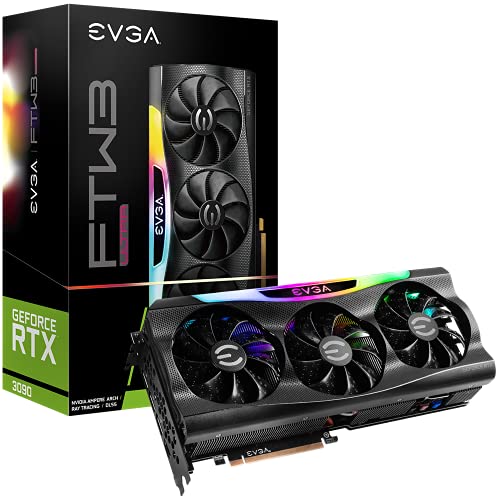
EVGA GeForce RTX 3090 FTW3 24GB
Best for: ultra-high-resolution gaming and memory-intensive workflows
- Memory Type
- GDDR6X
- Graphics Processor
- GeForce RTX 3090
- Memory Size
- 24GB
- Boost Clock
- 1800 MHz
- Use
- Gaming
- Dimensions
- 15.1 × 12 × 5 inches
The EVGA GeForce RTX 3090 FTW3 Ultra Gaming gives you 24GB of high-speed GDDR6X memory paired with an 1800 MHz boost clock. Its triple HDB fans and nine iCX3 thermal sensors manage operating temperatures across the card, while an all-metal backplate adds structural rigidity. This card suits you if you handle heavy rendering tasks or high-resolution 7680 x 4320 displays that demand extensive video memory bandwidth.
Pros
- 24GB of high-capacity GDDR6X memory
- Real boost clock of 1800 MHz
- Triple HDB cooling fans with nine iCX3 thermal sensors
- Solid all-metal backplate with adjustable ARGB
Cons
- Heavy build weighing 4.65 pounds
- Long 15.1-inch footprint requires substantial chassis clearance
Good fit if
- You need 24GB of GDDR6X memory for heavy creative applications or gaming.
- You want precise temperature tracking via nine dedicated hardware sensors.
- You run high-resolution displays up to 7680 x 4320.
Skip if
- You have a compact computer case that cannot accommodate a 15.1-inch card.
- You prefer a lightweight GPU to minimize strain on the motherboard slot.
Verdict: EVGA GeForce RTX 3090 FTW3 Ultra Gaming provides a large 24GB GDDR6X buffer and an 1800 MHz boost clock backed by comprehensive sensor-monitored cooling. It serves you well if your system can accommodate its 15.1-inch frame and 4.65-pound weight.

ZOTAC Gaming RTX 3070 Ti Trinity 8GB
Best for: quad-display setups needing 8GB GDDR6X memory
- Memory Type
- GDDR6X
- Graphics Processor
- GeForce RTX 3070 Ti
- Memory Size
- 8GB
- Boost Clock
- 1770 MHz
- Memory Bus Width
- 256-bit
- PCIe Interface
- PCIE 4.0
This graphics card provides 8GB of GDDR6X memory on a 256-bit bus running at 19 Gbps. It features NVIDIA Ampere architecture with a 1770 MHz boost clock and PCIe 4.0 connectivity. For display setups, it includes three DisplayPort 1.4a outputs and one HDMI 2.1 port, supporting up to four displays. It suits you if you want GDDR6X memory speeds in an 8GB configuration equipped with IceStorm 2.0 cooling.
Pros
- 8GB GDDR6X memory running at 19 Gbps across a 256-bit bus
- Boost clock speed of 1770 MHz
- Four video outputs: three DisplayPort 1.4a and one HDMI 2.1
- IceStorm 2.0 cooling with FREEZE Fan Stop and active fan control
Cons
- Lower memory capacity at 8GB compared to 10GB, 12GB, 16GB, or 24GB models
- Single HDMI port limits setups requiring multiple native HDMI connections
Good fit if
- You need an 8GB GDDR6X graphics card with a 1770 MHz boost clock.
- You run up to four displays using DisplayPort 1.4a and HDMI 2.1 connections.
Skip if
- You require more than 8GB of VRAM for your graphics workloads.
- You need multiple HDMI ports directly on the card.
Verdict: ZOTAC Gaming RTX 3070 Ti Trinity 8GB delivers 19 Gbps GDDR6X performance with a 1770 MHz boost clock and four display outputs. It provides essential high-speed Ampere architecture features within an 8GB memory configuration.

ZOTAC Gaming GeForce RTX 3090 Trinity OC 24GB
- Memory Type
- GDDR6X
- Graphics Processor
- GeForce RTX 3090
- Memory Size
- 24GB
- Boost Clock
- 1710 MHz
- Memory Bus Width
- 384-bit
- PCIe Interface
- PCIE 4.0
View on Amazon: ZOTAC Gaming GeForce RTX 3090 Trinity OC 24GB
Specifications side by side
| Spec | EVGA GeForce RTX 3090 24GB | ASUS TUF RTX 4070 Ti Super BTF White | Gigabyte GeForce RTX 4090 Windforce V2 | ASUS ROG Strix GeForce RTX 3090 24GB | Gigabyte RTX 4070 Super Windforce 12GB | ASUS ROG Strix RTX 3080 OC 10GB | ZOTAC Gaming GeForce RTX 3090 24GB | ASUS Dual GeForce RTX 4070 OC | ASUS TUF Gaming GeForce RTX 4070 Ti 12GB | ZOTAC GeForce RTX 3080 Trinity 10GB | Gigabyte AORUS GeForce RTX 3080 Ti 12GB | ZOTAC GeForce RTX 3080 Trinity 10GB | EVGA GeForce RTX 3090 FTW3 24GB | ZOTAC Gaming RTX 3070 Ti Trinity 8GB | ZOTAC Gaming GeForce RTX 3090 Trinity OC 24GB |
|---|---|---|---|---|---|---|---|---|---|---|---|---|---|---|---|
| Graphics Processor | GeForce RTX 3090 | GeForce RTX 4070 Ti Super | GeForce RTX 4090 | GeForce RTX 3090 | GeForce RTX 4070 Super | GeForce RTX 3080 | GeForce RTX 3090 | GeForce RTX 4070 Super | GeForce RTX 4070 Ti | GeForce RTX 3080 | GeForce RTX 3080 Ti | GeForce RTX 3080 | GeForce RTX 3090 | GeForce RTX 3070 Ti | GeForce RTX 3090 |
| Memory Size | 24GB | 16GB | 24GB | 24GB | 12GB | 10GB | 24GB | 12GB | 12GB | 10GB | 12GB | 10GB | 24GB | 8GB | 24GB |
| Memory Type | GDDR6X | GDDR6X | GDDR6X | GDDR6X | GDDR6X | GDDR6X | GDDR6X | GDDR6X | GDDR6X | GDDR6X | GDDR6X | GDDR6X | GDDR6X | GDDR6X | GDDR6X |
| Boost Clock | 1800MHz | not specified | not specified | not specified | not specified | not specified | not specified | not specified | not specified | not specified | not specified | 1710 MHz | 1800 MHz | 1770 MHz | 1710 MHz |
| Memory Bus Width | not specified | not specified | 384-bit | not specified | 192-bit | not specified | 384-bit | not specified | not specified | 320-bit | 384-bit | 320-bit | not specified | 256-bit | 384-bit |
| PCIe Interface | PCIe 4 | PCIe 4.0 | not specified | not specified | not specified | PCIe 4.0 | PCIE 4.0 | PCIe 4.0 | PCIe 4.0 | PCIE 4.0 | not specified | PCIE 4.0 | not specified | PCIE 4.0 | PCIE 4.0 |
| Recommended PSU | not specified | not specified | not specified | not specified | not specified | not specified | not specified | not specified | not specified | not specified | not specified | not specified | not specified | not specified | 750W |
| Slot Width | not specified | not specified | not specified | not specified | not specified | 2.9-Slot | not specified | 2.56-Slot | not specified | not specified | not specified | not specified | not specified | not specified | 2.5 slot |
| Memory | 24GB | 16GB | not specified | 24GB | 12GB | not specified | 24GB | 12GB | 12GB | not specified | 12GB | not specified | 24GB | 8GB | 24GB |
| GPU | GeForce RTX 3090 | not specified | GeForce RTX 4090 | GeForce RTX 3090 | not specified | not specified | GeForce RTX 3090 | GeForce RTX 4070 | GeForce RTX 4070 Ti | not specified | not specified | not specified | GeForce RTX 3090 | not specified | not specified |
| Interface | PCIe 4.0 | PCIe 4.0 | not specified | not specified | not specified | PCIe 4.0 | PCIe 4.0 | PCIe 4.0 | PCIe 4.0 | PCIe 4.0 | not specified | PCIe 4.0 | not specified | PCIe 4.0 | PCIe 4.0 |
| Use | Gaming | Gaming | not specified | Gaming | not specified | Gaming | Gaming | not specified | Gaming | Gaming | not specified | Gaming | Gaming | Gaming | Gaming |
| Dimensions | 11.8 × 5.38 × 0.1 inches | not specified | 13 × 5.35 × 2.2 inches | 31.9 × 14 × 57.8 inches | 10.3 × 5 × 0.1 inches | 16 × 9.2 × 3.5 inches | 16.8 × 11.5 × 4 inches | not specified | not specified | 17 × 12 × 4 inches | 12.6 × 5.51 × 2.76 inches | not specified | 15.1 × 12 × 5 inches | not specified | 12.5 × 4.75 × 2.28 inches |
| Weight | 2.5 pounds | 2.87 pounds | 4.4 pounds | 3.97 pounds | not specified | 12 ounces | not specified | 2.1 pounds | 3.53 pounds | 3.09 pounds | 3 pounds | not specified | 4.65 pounds | 2 pounds | not specified |
| Length | not specified | not specified | not specified | not specified | not specified | not specified | not specified | 10.5 inches | 5.43 inches | not specified | not specified | 12.5 inches | not specified | 9.1 inches | not specified |
| Width | not specified | not specified | not specified | not specified | not specified | not specified | not specified | 5.27 inches | 2.56 inches | not specified | not specified | 11.5 inches | not specified | 5.6 inches | not specified |
| Size | not specified | RTX4070Ti Super|OC|Only support BTF MB | not specified | not specified | 2" x 5" x 10.3" | 2.3"x5.5"x12.5" | not specified | RTX4070|OC|Black | Standard Edition | not specified | not specified | not specified | one_SIZE | not specified | not specified |
| Color | not specified | White | not specified | not specified | Black | BLACK | not specified | BLACK | Black | not specified | not specified | not specified | one_color | not specified | not specified |
| Model | not specified | not specified | not specified | not specified | not specified | not specified | not specified | not specified | not specified | not specified | GV-N308TAORUS M-12GD | ZT-A30800D-10P | 24G-P5-3987-KR | ZT-A30710D-10P | ZT-A30900J-10P |
Is GDDR6X Memory Worth It for Your Build?
GDDR6X memory provides transfer rates between 19 Gbps and 22.4 Gbps across memory buses ranging from 256-bit to 384-bit. In daily use, this bandwidth supports demanding gaming setups, high-resolution displays, and multi-display configurations over PCIe 4.0 interfaces. Cards with this memory provide framebuffers from 8GB to 24GB for heavy graphical loads. Opting for GDDR6X ensures your system maintains rapid data flow between the processor and VRAM, especially when outputting to quad-display setups or processing heavy graphical assets.
Worth it if
- You run high-resolution games or quad-display setups over PCIe 4.0.
- You need memory bandwidth backed by 19 Gbps to 22.4 Gbps transfer speeds on buses up to 384 bits.
- You require large VRAM capacities between 16GB and 24GB for heavy graphical loads.
Skip it if
- You have a compact case that cannot accommodate cards measuring between 10.3 and 17 inches in length.
- You use a standard motherboard and select a model that strictly requires a BTF motherboard.
How We Picked These Cards
To select the 15 graphics cards for this guide, we identified Amazon listings that specify GDDR6X memory in their title or feature list. We did not physically test these components. Instead, you get comparisons based strictly on published manufacturer specifications. Each entry focuses on hardware attributes like memory capacity, interface type, and physical dimensions.
Products are ordered with in-stock models first, followed by Amazon sales rank so you see better-selling products first. We show only one size or variant per product family to give you a clear range of choices. Stock data refreshes at least daily to keep your information current.
How to Choose the Best GDDR6X Graphics Card
-
Motherboard Ecosystem Requirements
You must check motherboard compatibility before buying specialized hardware. Most cards use standard PCIe slots, but specific designs require matching motherboards. For example, the ASUS TUF RTX 4070 Ti Super BTF White explicitly requires a BTF motherboard to supply power without standard exposed cables. If you install this card into a conventional motherboard layout, it will not function. Verify that your motherboard supports BTF architecture before choosing this card, or stick to standard PCIe designs if you use a conventional system setup.
-
Multi-Display Configuration Needs
You should verify the external display support if you plan to connect several monitors simultaneously. Different graphics processors cater to distinct display configurations based on their output design. For example, the ZOTAC Gaming RTX 3070 Ti Trinity 8GB supports quad-display setups, allowing you to run four independent monitors directly from the card. If your work or gaming station uses three or four screens, ensure the card explicitly lists multi-monitor capabilities. This prevents the need for external adapters or extra display hubs.
-
Memory Bus Width Selection
You should evaluate the memory bus width when comparing cards for high-resolution graphics performance. The bus width determines how much data moves between the GPU core and the GDDR6X memory per clock cycle. For example, the Gigabyte AORUS GeForce RTX 3080 Ti 12GB features a wide 384-bit memory bus, moving more data simultaneously than narrower alternatives. If you drive high-resolution displays or intensive graphical workloads, choose a card with a broader bus width like 384-bit rather than narrower configurations.
-
Physical Weight and Sag
You must check physical weight when selecting heavy triple-fan graphics hardware. Large heatsinks and sturdy shrouds add substantial mass that puts strain on your motherboard PCIe slot. For example, the EVGA GeForce RTX 3090 FTW3 24GB weighs 4.65 pounds. When installing a card of this size, you should install a GPU support bracket or horizontal brace to prevent GPU sag and avoid damaging your motherboard interface over time. Lighter cards weighing under three pounds require far less structural support.
-
Form Factor and Slots
You should check how many expansion slots a graphics card occupies inside your chassis. Compact cases cannot fit thick coolers that cover three or more vertical slots. For instance, the ASUS Dual GeForce RTX 4070 OC uses a dual-slot form factor measuring 10.51 inches in length. This design leaves room for other expansion cards on your motherboard and fits comfortably into mid-tower builds. If you have restricted space, prioritize dual-slot cards over oversized multi-slot alternatives.
-
Factory Boost Clock Speeds
You should examine the factory boost clock speed to understand the baseline core clock rate under load. Higher clock frequencies deliver faster GPU cycle performance during heavy gaming sessions. For example, the EVGA GeForce RTX 3090 24GB provides an 1800MHz boost clock alongside its 10,496 CUDA cores. If your goal is maximum rendering throughput straight out of the box without manual adjustments, compare boost clocks across identical GPU tiers to select the model with higher factory tuning.
Frequently asked questions
What PCIe interface do GDDR6X graphics cards require?
GDDR6X graphics cards in this guide use the PCIe 4.0 interface to connect to your motherboard. This interface provides high-speed bandwidth between the GPU and your system. While most cards use standard PCIe slots, specialized hardware like the ASUS TUF RTX 4070 Ti Super BTF White strictly requires a compatible BTF motherboard to function properly in your build.
How much GDDR6X memory capacity do you need for gaming?
Your memory requirements depend on workload intensity, with available GDDR6X cards offering between 8GB and 24GB. An 8GB card like the ZOTAC Gaming RTX 3070 Ti Trinity fits baseline gaming setups. For larger data sets and demanding games, mid-tier cards offer 12GB to 16GB, while the EVGA GeForce RTX 3090 provides 24GB of total capacity.
Which graphics cards feature a 384-bit GDDR6X memory bus?
Models like the Gigabyte GeForce RTX 4090 Windforce V2 and Gigabyte AORUS GeForce RTX 3080 Ti feature a 384-bit memory bus. A wider 384-bit bus allows more data to pass between the GPU and the GDDR6X modules each clock cycle. This architecture supports high-resolution gaming and heavy graphical loads requiring substantial continuous memory throughput.
Can you run quad-display setups on GDDR6X graphics cards?
Yes, select GDDR6X graphics cards include hardware support for up to four simultaneous displays. The ZOTAC GeForce RTX 3080 Trinity and ZOTAC Gaming RTX 3070 Ti Trinity both feature quad-display output support. This enables you to connect multiple monitors directly to the card for expanded desktop workspace or multi-screen gaming configurations without needing extra adapters.
What cooling setups are available on GDDR6X graphics cards?
GDDR6X graphics cards feature various multi-fan configurations to dissipate heat during operation. Models like the Gigabyte RTX 4070 Super Windforce and EVGA GeForce RTX 3090 use triple-fan layouts. Other designs include ASUS Axial-tech cooling on ROG Strix cards and IceStorm 2.0 cooling systems on ZOTAC models, providing dedicated thermal management across the GPU core and memory.
What memory clock speeds do GDDR6X graphics cards reach?
Published memory transfer rates for GDDR6X graphics cards typically reach between 19 Gbps and 22.4 Gbps. For example, the ZOTAC Gaming GeForce RTX 4080 operates with 22.4 Gbps memory speeds across a 256-bit bus. Meanwhile, models like the ZOTAC GeForce RTX 3080 Trinity operate at 19 Gbps over a 320-bit bus width.
Which GDDR6X graphics cards feature DLSS 3 support?
Modern 40-series cards with GDDR6X memory, such as the ASUS Dual GeForce RTX 4070 OC, include published support for DLSS 3. This specification enables hardware-accelerated frame generation capabilities on compatible games. If your gaming library leverages DLSS 3 technology, selecting a 40-series card ensures hardware support over older architectures like the RTX 30-series.