Best Graphics Cards Under $1000 in 2026: 12 Picks Ranked by Specs
As an Amazon Associate we earn from qualifying purchases. Links on this page are affiliate links.
Finding the right graphics card under 1000 requires balancing memory capacity, physical dimensions, and interface standards. This guide compares 12 models based on specifications published on the listings.
The ASUS TUF RTX 4070 Ti Super BTF White leads the ranking by pairing 16GB of GDDR6X memory with PCIe 4.0 connectivity for compatible BTF motherboards. You can use this breakdown of memory size, card dimensions, and hardware compatibility to decide which model fits your system build.
Quick picks
The best fit for you
- You have a BTF motherboard for a white build ASUS TUF RTX 4070 Ti Super BTF White It provides specialized BTF motherboard compatibility with 16GB of GDDR6X memory in a white finish.
- You want triple fan cooling for a shorter case Gigabyte RTX 4070 Super Windforce 12GB Its 10.3-inch frame includes triple-fan cooling and 12GB of GDDR6X memory across a 192-bit bus.
- You need USB Type-C connectivity for your VR headset ASUS GeForce RTX 2080 Ti Dual-Fan 11GB It supplies a built-in USB Type-C port along with 11GB of GDDR6 memory for display hardware.
- You run multiple displays requiring high memory bus bandwidth ZOTAC Gaming GeForce RTX 3080 Ti Trinity OC 12GB It features a 384-bit memory bus and 19 Gbps GDDR6X memory for heavy data throughput.
Our 12 picks

ASUS TUF RTX 4070 Ti Super BTF White
Best for: BTF motherboard owners building white gaming PCs
- Graphics Processor
- GeForce RTX 4070 Ti Super
- Memory Size
- 16GB
- Memory Type
- GDDR6X
- PCIe Interface
- PCIe 4.0
- Use
- Gaming
- Weight
- 2.87 pounds
The ASUS TUF RTX 4070 Ti Super BTF White is a dedicated gaming card built around 16GB of fast GDDR6X memory and a PCIe 4.0 interface. It features a factory overclock and a distinct white design. Because this card uses the BTF layout, you must pair it with a BTF-compatible motherboard. It suits you if you want high-bandwidth memory for modern gaming and use hidden-connector desktop components.
Pros
- 16GB of high-speed GDDR6X memory
- PCIe 4.0 interface support
- Factory overclocked profile
- White exterior finish
Cons
- Requires a specialized BTF motherboard
- Card dimensions not provided in listing specifications
Good fit if
- You own or plan to build around a BTF-compatible motherboard.
- You want 16GB of GDDR6X memory for high-demand gaming.
- You are assembling an all-white desktop build.
Skip if
- You use a traditional motherboard without BTF connector routing.
- You need verified clearance dimensions before purchase.
Verdict: ASUS TUF RTX 4070 Ti Super BTF White delivers 16GB GDDR6X performance and PCIe 4.0 connectivity for clean desktop builds. Make sure your system uses a compatible BTF motherboard before selecting it.

Gigabyte RTX 4070 Super Windforce 12GB
Best for: balanced thermal control and triple-fan cooling
- Graphics Processor
- GeForce RTX 4070 Super
- Memory Size
- 12GB
- Memory Type
- GDDR6X
- Memory Bus Width
- 192-bit
- Dimensions
- 10.3 × 5 × 0.1 inches
The Gigabyte RTX 4070 Super Windforce 12GB is a desktop graphics card equipped with a GeForce RTX 4070 Super processor. It provides 12GB of GDDR6X video memory across a 192-bit interface alongside a triple Windforce fan cooling configuration. Its 10.3-inch length and 5-inch width allow installation in standard desktop chassis. You will appreciate this configuration if you balance multi-fan heat dissipation with modern memory bandwidth for intensive graphical tasks.
Pros
- 12GB of high-speed GDDR6X memory
- Triple Windforce cooling fan configuration
- 192-bit memory bus interface
- Standard 10.3-inch card length
Cons
- 192-bit bus is narrower than 256-bit alternatives
- 12GB capacity is lower than 16GB options
Good fit if
- You want 12GB of GDDR6X memory for modern software demands.
- You prefer a triple-fan cooling system for sustained thermal management.
- You have a PC case with at least 10.3 inches of horizontal clearance.
Skip if
- You require 16GB of video memory or more for your specific workloads.
- You need a wider 256-bit or 320-bit memory bus for higher bus throughput.
- You use a compact chassis that cannot clear a 10.3-inch card length.
Verdict: Gigabyte RTX 4070 Super Windforce 12GB delivers reliable thermal headroom and fast GDDR6X memory across a 192-bit bus. It provides a balanced spec profile for standard desktop systems requiring dedicated triple-fan cooling.

ASUS TUF Gaming GeForce RTX 4070 Ti 12GB
Best for: high-speed GDDR6X gaming on PCIe 4.0
- Graphics Processor
- GeForce RTX 4070 Ti
- Memory Size
- 12GB
- Memory Type
- GDDR6X
- PCIe Interface
- PCIe 4.0
- Use
- Gaming
- Length
- 5.43 inches
The ASUS TUF Gaming GeForce RTX 4070 Ti 12GB is a dedicated gaming graphics card equipped with 12GB of high-speed GDDR6X memory and a PCIe 4.0 interface. For video output, it includes modern HDMI 2.1a and DisplayPort 1.4a connections. At roughly 3.5 pounds, it suits your gaming rig if you need modern display standards, fast memory throughput, and standard PCIe 4.0 compatibility without needing more than 12GB of VRAM.
Pros
- 12GB GDDR6X video memory
- PCIe 4.0 interface
- HDMI 2.1a and DisplayPort 1.4a display outputs
Cons
- 12GB memory capacity is lower than 16GB options
- Heavier build at over 3.5 pounds
Good fit if
- You need high-bandwidth GDDR6X memory for gaming.
- You use display setups requiring HDMI 2.1a or DisplayPort 1.4a.
- You run a motherboard supporting PCIe 4.0.
Skip if
- You need a card with 16GB of video memory or higher.
- You need a lightweight build under 3.5 pounds.
Verdict: ASUS TUF Gaming GeForce RTX 4070 Ti 12GB delivers high-speed GDDR6X memory and current-generation video connectivity for standard PCIe 4.0 systems. It is a solid gaming card if 12GB of VRAM meets your workflow requirements.

MSI RTX 4070 Super Ventus 12GB
Best for: gaming rigs with ample chassis clearance
- Graphics Processor
- NVIDIA RTX 4070 Super
- Memory Size
- 12GB
- Memory Type
- GDRR6X
- Boost Clock
- 2520 MHz
- Memory Bus Width
- 192-Bit
- Use
- Gaming
The MSI RTX 4070 Super Ventus 12GB is a gaming graphics card built on NVIDIA RTX 4070 Super hardware. You get 12GB of memory paired with a 192-bit interface and a 2520 MHz boost clock. At 12.1 inches in length and 2.6 pounds, it requires a chassis that can accommodate longer components. This hardware suits you if you build a full-size PC focused on gaming.
Pros
- 12GB memory capacity
- 2520 MHz boost clock
- 192-bit memory interface
- Solid black enclosure
Cons
- Long 12.1-inch length restricts use in small cases
- Weighs 2.6 pounds, requiring firm slot support
Good fit if
- You have a PC chassis with over 12.1 inches of card clearance.
- You want 12GB of dedicated memory for gaming.
- You target a boost clock reaching 2520 MHz.
Skip if
- You build inside a compact small-form-factor case.
- You need more than 12GB of onboard video memory.
Verdict: MSI RTX 4070 Super Ventus 12GB delivers a 2520 MHz boost clock and 12GB of memory for gaming setups. Its 12.1-inch profile requires a spacious computer case.
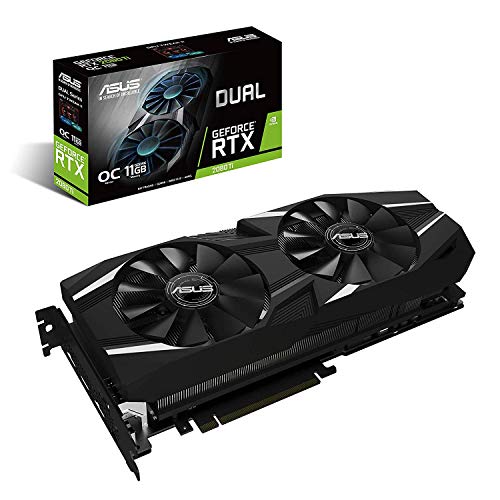
ASUS GeForce RTX 2080 Ti Dual-Fan 11GB
Best for: USB-C VR headsets and multi-display setups
- Graphics Processor
- GeForce RTX 2080Ti
- Memory Size
- 11GB
- Memory Type
- GDDR6
- Boost Clock
- 1650 MHz
- Dimensions
- 16 × 3.5 × 9.2 inches
- Weight
- 1.98 pounds
The ASUS GeForce RTX 2080 Ti Dual-Fan 11GB is a desktop graphics card built on NVIDIA Turing architecture. It delivers 4,352 CUDA cores, an 11GB GDDR6 memory pool, and a 1650 MHz boost clock in OC mode. You get connectivity for up to four displays through DisplayPort 1.4, HDMI 2.0, and USB Type-C. It suits you if you need hardware VR headset support and 7680x4320 maximum resolution capability.
Pros
- 4352 CUDA cores with 11GB GDDR6 memory
- Dedicated USB Type-C port for VR headsets
- IP5X dust-resistant fans with 0 dB silent profile below 55C
- Reinforced aluminum backplate prevents PCB flex
Cons
- Uses HDMI 2.0 instead of newer HDMI revisions
- Requires 16 inches of length clearance inside the case
Good fit if
- You connect a VR headset via USB Type-C directly to your GPU.
- You need to drive up to four monitors at resolutions up to 7680x4320.
- You want fans that stop spinning completely during low-load operation.
Skip if
- You have a compact chassis that cannot clear a 16-inch card length.
- You require an HDMI 2.1 port for your display setup.
Verdict: ASUS GeForce RTX 2080 Ti Dual-Fan 11GB pairs 4352 CUDA cores with 11GB of GDDR6 memory and rare USB Type-C VR connectivity. It remains a capable four-display option if your PC case has the 16 inches of clearance required.
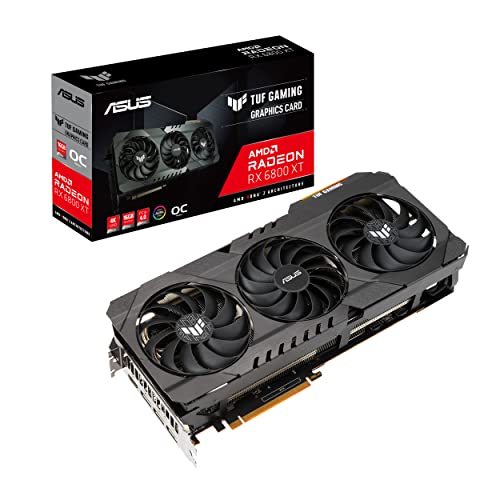
ASUS TUF Radeon RX 6800 XT 16GB
Best for: high-memory gaming in spacious PC cases
- Graphics Processor
- AMD Radeon RX 6800 XT
- Memory Size
- 16GB
- Memory Type
- GDDR6
- PCIe Interface
- PCIe 4.0
- Use
- Gaming
- Dimensions
- 12.6 × 5.52 × 2.3 inches
The ASUS TUF Gaming Radeon RX 6800 XT 16GB is a PCIe 4.0 gaming graphics card built for high-demand setups. It features 16GB of GDDR6 memory and an AMD Radeon RX 6800 XT graphics processor. Cooling relies on axial-tech fans with dual ball bearings and an aluminum shroud. You get standard HDMI 2.1 and DisplayPort connectivity. This card suits you if you need large video memory and sturdy metal construction for demanding games.
Pros
- 16GB GDDR6 video memory
- PCIe 4.0 interface
- All-aluminum shroud, reinforced frame, and metal backplate
- Axial-tech fans with dual ball bearings
Cons
- Large footprint at 12.6 inches long and 2.3 inches thick
- Heavy build weighing 3.75 pounds
Good fit if
- You have a PC chassis that fits a 12.6-inch long card.
- You want 16GB of GDDR6 memory for gaming.
- You prefer a cooling build with dual ball fan bearings and an aluminum shroud.
Skip if
- You build inside a compact case with clearance under 12.6 inches.
- You need a lightweight card to prevent PCIe slot strain.
Verdict: ASUS TUF Gaming Radeon RX 6800 XT 16GB delivers 16GB of GDDR6 memory and durable metal cooling hardware across a 12.6-inch PCIe 4.0 design. It provides substantial memory capacity and rugged build quality for standard and large computer cases.
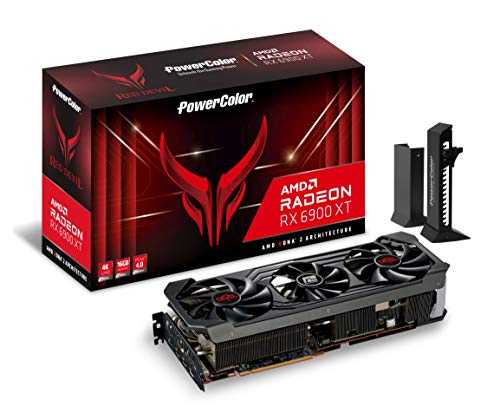
PowerColor Red Devil AMD Radeon RX 6900 XT 16GB
Best for: large PC builds needing 16GB VRAM
- Graphics Processor
- AMD Radeon RX 6900 XT
- Memory Size
- 16GB
- Memory Type
- GDDR6
- PCIe Interface
- PCI Express 4.0
- Use
- Gaming
- Dimensions
- 13.1 × 6.02 × 2.44 inches
View on Amazon: PowerColor Red Devil AMD Radeon RX 6900 XT 16GB
The PowerColor Red Devil Radeon RX 6900 XT 16GB is a dedicated gaming graphics card built on AMD silicon. You get 16GB of GDDR6 memory running at 16.0 Gbps, 5120 stream processors, and a game clock reaching 2105 MHz in OC mode. It connects via PCI Express 4.0 and supports resolutions up to 7680×4320. This card suits you if you need high compute capacity and substantial video memory for high-resolution gaming setups.
Pros
- 16GB GDDR6 memory with 16.0 Gbps speed
- 5120 stream processors
- Dual clock modes reaching up to 2105 MHz game clock
- Maximum digital resolution of 7680×4320
Cons
- Large card length of 13.1 inches
- Heavy physical weight of 5.29 pounds
Good fit if
- You need 16GB VRAM and support for 7680×4320 resolution.
- You have a PC case with at least 13.1 inches of GPU clearance.
- You want switchable clock profiles up to 2105 MHz.
Skip if
- You build in a compact enclosure that cannot clear 13.1 inches.
- You need a lightweight graphics card under 5.29 pounds.
Verdict: PowerColor Red Devil Radeon RX 6900 XT 16GB provides 5120 stream processors and 16GB GDDR6 memory for demanding setups. Its 13.1-inch length and 5.29-pound weight require a spacious, sturdy PC case.

Sapphire Nitro+ Radeon RX 6900 XT 16GB
Best for: 4K gaming with large VRAM needs
- Graphics Processor
- AMD Radeon RX 6900 XT
- Memory Size
- 16GB
- Memory Type
- GDDR6
- Boost Clock
- Up to 2285 MHz
- PCIe Interface
- PCIe 4.0
- Use
- Gaming
The Sapphire Nitro+ AMD Radeon RX 6900 XT 16GB is a dedicated graphics card built for high-resolution gaming. You get 16GB of GDDR6 memory, a boost clock reaching up to 2285 MHz, and a PCIe 4.0 interface. It also supports video streaming up to 8K and high-performance 4K gaming. This card suits you if you need substantial memory capacity and fast clock speeds for demanding workloads.
Pros
- 16GB GDDR6 video memory
- Boost clock reaches up to 2285 MHz
- Supports video streaming up to 8K
- External RGB LED synchronization feature
Cons
- Large 17-inch length requires significant chassis clearance
- Uses GDDR6 memory rather than GDDR6X
Good fit if
- You run games at 4K resolution.
- You want 16GB of GDDR6 memory for large asset pools.
- You plan to connect external RGB synchronization.
Skip if
- You have a small PC case unable to fit a 17-inch card.
- You specifically require GDDR6X memory bandwidth.
Verdict: Sapphire Nitro+ AMD Radeon RX 6900 XT 16GB pairs a 2285 MHz boost clock with 16GB of GDDR6 memory for 4K gaming setups. Its physical 17-inch length requires a large chassis with ample clearance.

PowerColor Red Devil Radeon RX 6800 XT 16GB
Best for: high-resolution gaming in large PC cases
- Graphics Processor
- AMD Radeon RX 6800 XT
- Memory Size
- 16GB
- Memory Type
- GDDR6
- PCIe Interface
- PCI Express 4.0
- Use
- Gaming
- Dimensions
- 13.1 × 6.02 × 2.44 inches
The PowerColor Red Devil Radeon RX 6800 XT 16GB provides 16GB of GDDR6 memory and 4608 stream processors on the AMD RDNA platform. You get dual BIOS operating modes, featuring a 2090 MHz game clock in OC mode and 2015 MHz in silent mode. Measuring 13.1 inches long and weighing 4.41 pounds, it suits your build if you have a spacious PC case and prioritize high VRAM capacity with 7680×4320 display support.
Pros
- 16GB GDDR6 memory with 16.0 Gbps speed
- 4608 stream processors
- Dual BIOS profiles with up to 2090 MHz OC game clock
- Supports digital resolutions up to 7680×4320
Cons
- Long 13.1-inch profile requires extensive case clearance
- Substantial weight at 4.41 pounds
Good fit if
- You need 16GB of GDDR6 memory for high-resolution graphics setups.
- You have a large computer chassis that accommodates a 13.1-inch card length.
- You want switchable clock profiles between 2090 MHz OC and 2015 MHz silent modes.
Skip if
- You use a compact or small-form-factor PC chassis.
- You require a lightweight card under four pounds.
Verdict: PowerColor Red Devil Radeon RX 6800 XT 16GB pairs 16GB GDDR6 memory with 4608 stream processors for high-resolution output. Its 13.1-inch length and 4.41-pound build require a spacious chassis with solid structural clearance.
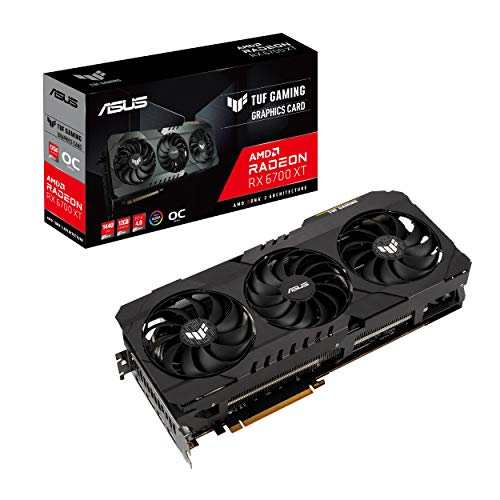
ASUS TUF Gaming Radeon RX 6700 XT 12GB
Best for: systems needing 12GB GDDR6 and metal construction
- Graphics Processor
- AMD Radeon RX 6700 XT
- Memory Size
- 12GB
- Memory Type
- GDDR6
- PCIe Interface
- PCIe 4.0
- Use
- Gaming
- Dimensions
- 5.98 × 2.28 × 12.7 inches
The ASUS TUF Gaming Radeon RX 6700 XT 12GB is a dedicated gaming graphics card built on AMD RDNA 2 architecture. It features 12GB of GDDR6 memory, a PCIe 4.0 interface, and an aluminum shroud with dual ball bearing Axial-tech fans. If you want a card with a reinforced frame, MaxContact heat spreader, and HDMI 2.1 support for your gaming setup, this card fits systems with space for its 12.7-inch clearance.
Pros
- 12GB GDDR6 memory for gaming setups
- Dual ball fan bearings designed for longevity
- All-aluminum shroud with reinforced frame and metal backplate
- MaxContact heat spreader for improved thermal transfer
Cons
- Large 12.7-inch measurement requires substantial case space
- Total weight of 4.85 pounds adds strain to expansion slots
Good fit if
- You need 12GB of GDDR6 memory and a PCIe 4.0 connection.
- You want durable hardware with dual ball fan bearings and an aluminum shroud.
- You have a PC chassis that fits a 12.7-inch, 4.85-pound card.
Skip if
- You use a compact computer case that cannot fit a 12.7-inch card.
- You need a lightweight graphics card under 4.85 pounds.
Verdict: ASUS TUF Gaming Radeon RX 6700 XT 12GB delivers 12GB of GDDR6 memory alongside an all-aluminum cooling frame and dual ball bearing fans. It serves as a solid PCIe 4.0 option if your PC case has clearance for its 12.7-inch length.
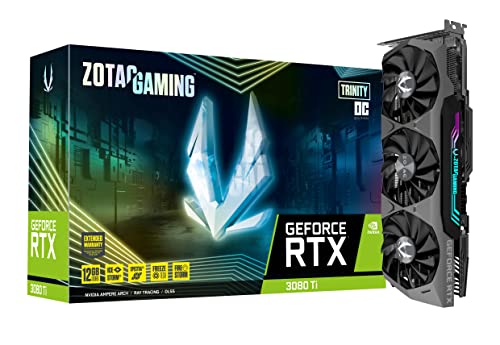
ZOTAC Gaming GeForce RTX 3080 Ti Trinity OC 12GB
Best for: high-bandwidth 4K and 8K multi-display setups
- Graphics Processor
- GeForce RTX 3080 Ti
- Memory Size
- 12GB
- Memory Type
- GDDR6X
- Boost Clock
- 1695 MHz
- Memory Bus Width
- 384-bit
- PCIe Interface
- PCIe 4.0
View on Amazon: ZOTAC Gaming GeForce RTX 3080 Ti Trinity OC 12GB
The ZOTAC GeForce RTX 3080 Ti Trinity OC 12GB gives you a 384-bit memory bus paired with 12GB of GDDR6X memory running at 19 Gbps. It features a boost clock of 1695 MHz and uses IceStorm 2.0 cooling with fan-stop capability. With three DisplayPort 1.4a outputs and one HDMI 2.1 port, it suits you if you need wide memory bandwidth and multi-monitor output up to 8K resolution.
Pros
- Wide 384-bit memory bus with 19 Gbps GDDR6X memory
- Four video outputs: three DisplayPort 1.4a and one HDMI 2.1
- IceStorm 2.0 cooling with FREEZE fan-stop mode
- Supports digital resolutions up to 7680x4320
Cons
- Large 12.5-inch length and 2.5-inch thickness require ample case clearance
- Card weight of 4 pounds requires substantial structural support
Good fit if
- You need high memory bandwidth provided by a 384-bit GDDR6X interface.
- You run up to four displays or require an 8K (7680x4320) display setup.
Skip if
- You have a compact PC case unable to fit a 12.5-inch long, 2.5-inch thick card.
- You want more than 12GB of video memory for your setup.
Verdict: ZOTAC GeForce RTX 3080 Ti Trinity OC 12GB delivers high memory throughput via its 384-bit bus and 19 Gbps GDDR6X configuration. Its 12.5-inch frame and 1695 MHz boost clock provide substantial processing capability for high-resolution four-display systems.

GIGABYTE AORUS GeForce RTX 3070 Ti 8GB
Best for: High-resolution gaming in spacious ATX cases
- Graphics Processor
- GeForce RTX 3070 Ti
- Memory Size
- 8GB
- Memory Type
- GDDR6X
- Memory Bus Width
- 256-bit
- Dimensions
- 12.8 × 5.59 × 2.76 inches
- Weight
- 5.73 pounds
The GIGABYTE AORUS RTX 3070 Ti 8GB is an Ampere-based desktop graphics card built for high-resolution displays. You get 8GB of fast GDDR6X memory running across a 256-bit bus, paired with second-generation RT Cores and third-generation Tensor Cores. It supports digital resolutions up to 7680x4320. This card suits you if you have a full ATX case with clearance for a 12.8-inch, 5.73-pound card and want high-bandwidth GDDR6X memory.
Pros
- 8GB GDDR6X memory on a 256-bit bus
- Digital maximum resolution up to 7680x4320
- Equipped with 2nd Gen RT Cores and 3rd Gen Tensor Cores
- MAX-Covered cooling system
Cons
- 8GB memory capacity limits headroom versus larger VRAM options
- Heavier physical build at 5.73 pounds
- Requires 12.8 inches of clearance in your PC case
Good fit if
- You have an ATX chassis that accommodates a 12.8-inch graphics card.
- You need ultra-high digital display output up to 7680x4320.
- You want fast GDDR6X throughput over a 256-bit bus width.
Skip if
- You need more than 8GB of video memory for your applications.
- You have a compact case that cannot fit a card 2.76 inches thick.
Verdict: GIGABYTE AORUS RTX 3070 Ti 8GB delivers high-speed GDDR6X throughput and 7680x4320 resolution support in a robust Ampere package. Its 12.8-inch length and 8GB memory ceiling require ample chassis clearance and realistic VRAM requirements.
Specifications side by side
| Spec | ASUS TUF RTX 4070 Ti Super BTF White | Gigabyte RTX 4070 Super Windforce 12GB | ASUS TUF Gaming GeForce RTX 4070 Ti 12GB | MSI RTX 4070 Super Ventus 12GB | ASUS GeForce RTX 2080 Ti Dual-Fan 11GB | ASUS TUF Radeon RX 6800 XT 16GB | PowerColor Red Devil AMD Radeon RX 6900 XT 16GB | Sapphire Nitro+ Radeon RX 6900 XT 16GB | PowerColor Red Devil Radeon RX 6800 XT 16GB | ASUS TUF Gaming Radeon RX 6700 XT 12GB | ZOTAC Gaming GeForce RTX 3080 Ti Trinity OC 12GB | GIGABYTE AORUS GeForce RTX 3070 Ti 8GB |
|---|---|---|---|---|---|---|---|---|---|---|---|---|
| Graphics Processor | GeForce RTX 4070 Ti Super | GeForce RTX 4070 Super | GeForce RTX 4070 Ti | NVIDIA RTX 4070 Super | GeForce RTX 2080Ti | AMD Radeon RX 6800 XT | AMD Radeon RX 6900 XT | AMD Radeon RX 6900 XT | AMD Radeon RX 6800 XT | AMD Radeon RX 6700 XT | GeForce RTX 3080 Ti | GeForce RTX 3070 Ti |
| Memory Size | 16GB | 12GB | 12GB | 12GB | 11GB | 16GB | 16GB | 16GB | 16GB | 12GB | 12GB | 8GB |
| Memory Type | GDDR6X | GDDR6X | GDDR6X | GDRR6X | GDDR6 | GDDR6 | GDDR6 | GDDR6 | GDDR6 | GDDR6 | GDDR6X | GDDR6X |
| Boost Clock | not specified | not specified | not specified | 2520 MHz | 1650 MHz | not specified | not specified | Up to 2285 MHz | not specified | not specified | 1695 MHz | not specified |
| Memory Bus Width | not specified | 192-bit | not specified | 192-Bit | not specified | not specified | not specified | not specified | not specified | not specified | 384-bit | 256-bit |
| PCIe Interface | PCIe 4.0 | not specified | PCIe 4.0 | not specified | not specified | PCIe 4.0 | PCI Express 4.0 | PCIe 4.0 | PCI Express 4.0 | PCIe 4.0 | PCIe 4.0 | not specified |
| Memory | 16GB | 12GB | 12GB | 12GB | not specified | 16GB | 16GB | 16GB | 16GB | 12GB | 12GB | 8GB |
| GPU | not specified | not specified | GeForce RTX 4070 Ti | not specified | not specified | not specified | not specified | not specified | not specified | Radeon RX 6700 XT | not specified | not specified |
| Interface | PCIe 4.0 | not specified | PCIe 4.0 | not specified | not specified | PCIe 4.0 | not specified | PCIe 4.0 | not specified | PCIe 4.0 | PCIe 4.0 | not specified |
| Use | Gaming | not specified | Gaming | Gaming | not specified | Gaming | Gaming | Gaming | Gaming | Gaming | Gaming | not specified |
| Weight | 2.87 pounds | not specified | 3.53 pounds | 2.6 pounds | 1.98 pounds | 3.75 pounds | 5.29 pounds | not specified | 4.41 pounds | 4.85 pounds | 4 pounds | 5.73 pounds |
| Dimensions | not specified | 10.3 × 5 × 0.1 inches | not specified | 12.1 × 4.7 × 0.1 inches | 16 × 3.5 × 9.2 inches | 12.6 × 5.52 × 2.3 inches | 13.1 × 6.02 × 2.44 inches | 17 × 9.5 × 3.5 inches | 13.1 × 6.02 × 2.44 inches | 5.98 × 2.28 × 12.7 inches | 12.5 × 2.5 × 4.8 inches | 12.8 × 5.59 × 2.76 inches |
| Length | not specified | not specified | 5.43 inches | not specified | not specified | not specified | not specified | not specified | not specified | not specified | not specified | not specified |
| Width | not specified | not specified | 2.56 inches | not specified | not specified | not specified | not specified | not specified | not specified | not specified | not specified | not specified |
| Size | RTX4070Ti Super|OC|Only support BTF MB | 2" x 5" x 10.3" | Standard Edition | 1.7" x 4.7" x 12.1" | not specified | one_size | not specified | not specified | not specified | not specified | not specified | not specified |
| Color | White | Black | Black | Black | not specified | one_color | not specified | not specified | not specified | not specified | not specified | not specified |
| Model | not specified | not specified | not specified | not specified | DUAL-RTX2080TI-O11G | TUF-RX6800XT-O16G-GAMING | AXRX 6900XT 16GBD6-3DHE/OC | 11308-01-20G | AXRX 6800XT 16GBD6-3DHE/OC | TUF-RX6700XT-O12G-GAMING | ZT-A30810J-10P | GV-N307TAORUS M-8GD |
Spec Trade-Offs to Expect Under $1000
When exploring cards Under $1000, you face defined specification ceilings. Maximum memory capacity stops at 16GB, while other options drop to 12GB, 11GB, or 8GB. Listed models cap connection speeds at the PCIe 4.0 interface. You also encounter GDDR6 memory configurations instead of GDDR6X on multiple cards. Furthermore, form factor constraints are present; the leading model requires a specialized BTF motherboard, and physical lengths reach up to 17 inches.
- Memory capacity caps at 16GB VRAM, with some models offering 8GB
- Interface standard stops at PCIe 4.0 across all models
- Memory type limited to GDDR6 on several cards instead of GDDR6X
- Form factor requires BTF motherboard support on the top pick
If you need auxiliary power to keep your desktop computer running during an electrical blackout, you can compare the output ratings of a generator under 1000.
How We Picked These Cards
You find the best graphics cards for your setup by evaluating published hardware specifications. We curate this list of 12 options by scanning Amazon listings matching Under $1000 in 2026. To keep your choices distinct, we include only one variant per product family. We do not physically handle hardware; all information comes directly from published specifications and feature sheets.
Listings appear with products in stock first, then by Amazon sales rank, placing better-selling products first. Live pricing and stock update at least daily on the page. Because market listings fluctuate, products enter or leave this Under $1000 guide as their prices shift. This system keeps your comparisons accurate and current.
How to Choose the Right Graphics Card
-
Match VRAM to Resolution
Select memory capacity based on your target resolution. High-resolution titles and 4K workloads demand greater capacity. If you target 4K output, cards with 16GB like the PowerColor Red Devil AMD Radeon RX 6900 XT provide adequate room for high-resolution textures. If your setup runs 1440p displays, 12GB models handle modern assets effectively. Lower tiers with 8GB suit standard workloads but offer less headroom. Check listed VRAM values before choosing to prevent memory bottlenecks in demanding games.
-
Choose Memory Type Wisely
Check whether the memory standard is GDDR6 or GDDR6X. GDDR6X provides higher data transmission rates across identical bus widths. For instance, the ZOTAC Gaming GeForce RTX 3080 Ti Trinity OC utilizes GDDR6X on a 384-bit interface for substantial throughput. Standard GDDR6 offers lower operating temperatures and dependable bandwidth for everyday gaming. Review memory type specifications to determine if raw memory transmission speed matches your gaming demands or if standard GDDR6 efficiency meets your goals.
-
Account for Cooler Weight
Check the physical weight specification before securing your card inside a desktop case. Heavy thermal designs can cause structural strain on your motherboard slot over time. The GIGABYTE AORUS GeForce RTX 3070 Ti 8GB reaches 5.73 pounds due to its substantial heatsink assembly. For hardware weighing over four pounds, install a dedicated support bracket or vertical GPU mount. Verifying the weight spec helps you prepare appropriate case stabilization hardware before installing your card into the chassis.
-
Verify PCIe Interface Support
Look at the interface specification listed for your card. Many modern selections, such as the ASUS TUF Gaming GeForce RTX 4070 Ti 12GB, use a PCIe 4.0 interface to transfer graphics data to your motherboard. PCIe standards remain backward compatible with older PCIe 3.0 slots, but bandwidth throttles to previous interface speeds. Check your motherboard manual to confirm that your primary expansion slot supports PCIe 4.0 transfer rates so you utilize the full data lane capabilities of your hardware.
-
Check Specialized Port Options
Inspect the output port types if you run distinct peripheral hardware or multi-monitor configurations. Standard options provide DisplayPort and HDMI outputs, but select hardware offers specialized connections. The ASUS GeForce RTX 2080 Ti Dual-Fan 11GB features dedicated USB Type-C VR connectivity alongside standard ports to handle compatible headsets and up to four displays. Examine the published port details to verify the card can run your external monitors and hardware directly without requiring signal converters or third-party adapters.
-
Compare Processing Core Counts
Compare the published stream processor or CUDA core counts to evaluate rendering hardware resources. The PowerColor Red Devil AMD Radeon RX 6900 XT provides 5120 stream processors, which marks a step up from lower-tier alternatives. More compute units improve parallel calculations for high-load gaming environments. Inspect the core numbers listed on hardware sheets when choosing between models within the same architecture to pinpoint which card delivers greater raw computational power for demanding tasks.
Frequently asked questions
What does a BTF graphics card require for installation?
You must install a BTF graphics card into a compatible BTF motherboard. Standard motherboards do not have the specialized back-side power connectors needed to seat these components. For example, the ASUS TUF RTX 4070 Ti Super BTF White lists explicit compatibility only for BTF motherboards, eliminating visible front power cables in your desktop chassis.
Which graphics cards support direct USB Type-C VR headset connections?
Graphics cards equipped with a dedicated VirtualLink USB Type-C port support direct VR headset connections without multiple breakout cables. Among these selections, the ASUS GeForce RTX 2080 Ti Dual-Fan 11GB includes this rare USB Type-C video output alongside its 4352 CUDA cores. This lets you power compatible hardware and manage up to four displays directly from the rear bracket.
What is the difference between CUDA cores and stream processors?
CUDA cores and stream processors represent the fundamental compute units on graphics processors, differing primarily by manufacturer naming conventions. NVIDIA designs utilize CUDA cores, such as the 4352 cores on the ASUS GeForce RTX 2080 Ti. AMD uses stream processors, found on cards like the PowerColor Red Devil RX 6900 XT with 5120 processors and the RX 6800 XT with 4608 processors.
How does memory bus width affect graphics card bandwidth?
A wider memory bus transfers more data per clock cycle between the GPU core and video memory. For instance, the ZOTAC Gaming GeForce RTX 3080 Ti Trinity OC features a 384-bit bus operating at 19 Gbps, maximizing throughput for demanding workloads. In comparison, the Gigabyte RTX 4070 Super Windforce operates across a 192-bit bus to feed its 12GB GDDR6X configuration.
Can graphics cards under 1000 run games at 8K resolution?
Yes, select graphics cards provide physical display pipeline support up to 7680x4320 resolution. The GIGABYTE AORUS GeForce RTX 3070 Ti 8GB explicitly supports 7680x4320 output over its high-speed GDDR6X configuration. However, managing extreme resolutions also relies heavily on available memory capacity, so 8GB models require careful setting adjustments compared to configurations with higher frame buffer allocations.
Why does graphics card weight matter during PC installation?
Heavy graphics cards exert mechanical leverage on the motherboard PCIe slot and case bracket, potentially causing hardware sagging or slot strain. Models like the GIGABYTE AORUS RTX 3070 Ti weigh 5.73 pounds, and the PowerColor Red Devil RX 6900 XT weighs 5.29 pounds. You should install dedicated support brackets or horizontal braces to secure these heavier units inside your chassis.
What cooling design features improve graphics card reliability?
Physical construction materials and fan bearing designs directly influence cooling endurance under continuous gaming loads. For example, the ASUS TUF Gaming Radeon RX 6700 XT 12GB incorporates an all-aluminum cooling frame combined with dual ball bearing fans to stabilize structural integrity and extend fan life. Similarly, the ASUS TUF Radeon RX 6800 XT employs dedicated metal cooling hardware across its 12.6-inch footprint.