Best Graphics Cards with DDR3 in 2026: 9 Picks Ranked by Specs
As an Amazon Associate we earn from qualifying purchases. Links on this page are affiliate links.
A dedicated graphics card with DDR3 provides essential video connectivity and multi-monitor support for compact desktop systems. Choosing the right card ensures reliable display connections without demanding excessive power from your system. This comparison ranks 9 products based strictly on the specifications published on their listings.
The ZOTAC GeForce GT 730 4GB DDR3 takes the top position because it delivers triple-display capability and 4GB memory capacity in a compact 25-watt envelope. This guide helps you decide which card fits your available expansion slots, port requirements, and display setup.
Quick picks
The best fit for you
- You need triple-display output in a low-power build ZOTAC GeForce GT 730 4GB DDR3 It provides triple-display output up to 4K resolution within a 25-watt power envelope.
- You need a low-profile card with legacy display ports Gigabyte 2GB DDR3 Low Profile Graphics Card It provides DVI-D, D-Sub, and HDMI connectivity with a 954 MHz core clock.
- You want a compact card for four monitors Glorto GeForce GT 730 4GB DDR3 Low Profile It features four-screen output and 4GB of DDR3 memory in a low-profile form factor.
- You want a card with a 128-bit memory bus SOYO GeForce GT 740 4GB Low Profile It features a 128-bit memory bus and 4GB of memory across three display connectors.
Our 9 picks

ZOTAC GeForce GT 730 4GB DDR3
Best for: low-power multi-display setups
- Memory Type
- DDR3 (what this guide is about)
- Graphics Processor
- GeForce GT 730
- Memory Size
- 4GB
- Memory Bus Width
- 64-bit
- PCIe Interface
- PCI Express 2.0
- Recommended PSU
- 300-watt
The ZOTAC GeForce GT 730 4GB DDR3 provides dedicated video output using 4GB of DDR3 memory on a 64-bit bus. You get 384 processor cores, a 902 MHz engine clock, and support for three simultaneous displays across HDMI, VGA, and DL-DVI-D ports. It consumes up to 25 watts of power. This card suits you if you need multi-display output or 4K digital resolution in low-profile systems.
Pros
- Supports three simultaneous displays via HDMI, VGA, and DL-DVI-D
- Low 25-watt maximum power consumption
- Includes low-profile brackets for VGA, DVI, and HDMI
- Offers 4GB DDR3 memory with 384 processor cores
Cons
- Limited to a 64-bit memory bus width
- Operates across PCI Express 2.0 x8 lanes instead of x16
- Requires a 300-watt recommended system power supply
Good fit if
- You need triple simultaneous displays from HDMI, VGA, and DVI ports.
- You require low-profile brackets included directly in the package.
- You want 4GB of dedicated DDR3 memory with a 25-watt power ceiling.
Skip if
- You need full PCI Express x16 interface bandwidth.
- You require a wider 128-bit memory bus.
Verdict: ZOTAC GeForce GT 730 4GB DDR3 delivers triple-display capability and 4GB capacity in a compact 25-watt envelope. It provides multi-monitor output up to 4K resolution using included low-profile brackets.
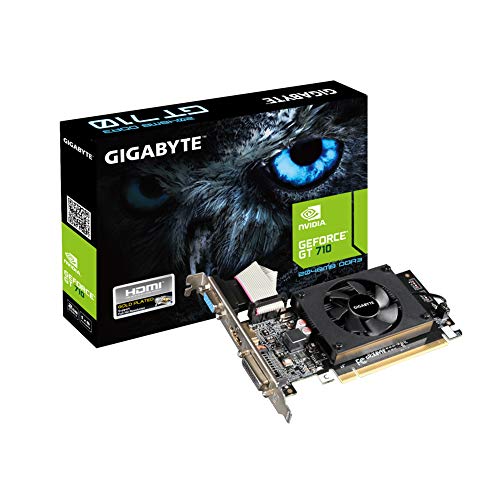
Gigabyte 2GB DDR3 Low Profile Graphics Card
Best for: compact desktops needing 2GB DDR3 memory
- Memory Type
- DDR3 (what this guide is about)
- Memory Size
- 2GB
- Dimensions
- 1.34 × 6.06 × 8.9 inches
- Weight
- 6.7 ounces
This GIGABYTE card delivers 2GB of DDR3 memory and operates at a 954 MHz core clock. Designed with a low-profile form factor, it easily fits into smaller desktop enclosures. It features Dual-link DVI-D, D-Sub, and HDMI ports to give you flexible display compatibility for various monitors. If you need dedicated DDR3 video memory and multiple video outputs in a compact frame, this card suits your basic desktop needs.
Pros
- 954 MHz core clock speed
- Low profile design for compact enclosures
- Equipped with Dual-link DVI-D, D-Sub, and HDMI ports
- 2GB DDR3 dedicated video memory
Cons
- 2GB memory capacity is lower than 4GB DDR3 alternatives
- No DisplayPort output provided
Good fit if
- You need a low-profile card for a compact desktop case.
- You require D-Sub, Dual-link DVI-D, or HDMI connections.
- You want 2GB of dedicated DDR3 memory for daily computing.
Skip if
- You need 4GB of video memory for larger workloads.
- You require a DisplayPort connection for your monitor.
Verdict: GIGABYTE 2GB DDR3 Low Profile Graphics Card delivers multi-port output and a 954 MHz core clock for slim desktop builds. It offers a practical 2GB DDR3 configuration when you need DVI-D, D-Sub, and HDMI support.

XFX AMD Radeon R7 240 4GB DDR3
Best for: multi-monitor legacy display setups
- Memory Type
- DDR3 (what this guide is about)
- Graphics Processor
- AMD R7 240
- Memory Size
- 4GB
- Dimensions
- 5.91 × 1.5 × 4.38 inches
- Weight
- 1 pounds
The XFX AMD Radeon R7 240 provides 4GB of DDR3 memory paired with a 720 MHz GPU clock. It features three display outputs: HDMI, SL-DVI-D, and VGA, alongside multi-monitor support. At 5.91 inches long and 1.5 inches wide, the card fits standard cases. This card suits you if you need a dedicated AMD DDR3 graphics card with legacy display outputs.
Pros
- 4GB DDR3 memory capacity
- HDMI, SL-DVI-D, and VGA ports
- Multi-monitor support
- Compact 5.91-inch length
Cons
- No DisplayPort output
- 720 MHz GPU clock speed
Good fit if
- You need legacy VGA and SL-DVI-D connections.
- You want 4GB of dedicated DDR3 memory.
- You run a multi-monitor display configuration.
Skip if
- You require modern DisplayPort connectivity.
- You need a GPU clock higher than 720 MHz.
Verdict: XFX AMD Radeon R7 240 4GB DDR3 Graphics Card delivers 4GB DDR3 memory and versatile legacy video outputs. It serves multi-display setups that rely on HDMI, DVI-D, and VGA interfaces.

QTHREE GeForce GT 210 Low Profile Graphics Card
Best for: compact PCs running older Windows versions
- Memory Type
- DDR3 (what this guide is about)
- Graphics Processor
- GeForce GT 210
- Memory Size
- 1024 MB
- Memory Bus Width
- 64 Bit
- PCIe Interface
- PCI Express 2.0 x16
- Form Factor
- Low Profile
View on Amazon: QTHREE GeForce GT 210 Low Profile Graphics Card
The QTHREE GeForce GT 210 Low Profile is an entry-level graphics card equipped with 1024 MB of 64-bit DDR3 memory and a 589MHz core clock. Designed for compact slim or ITX systems, it includes a low profile bracket and runs entirely off the PCI Express 2.0 slot without external power cables. It suits you if you need reliable dual-monitor output across HDMI and VGA for everyday desktop tasks on systems running Windows 10 or older.
Pros
- Includes low profile bracket for slim and ITX cases
- Requires no external power supply connection
- Dual-monitor support via HDMI and VGA ports
- Uses solid-state capacitors for low power consumption
Cons
- Incompatible with Windows 11
- Limited to 1024 MB memory capacity and a 64-bit bus width
- Older PCI Express 2.0 interface
Good fit if
- You need a compact display adapter for a slim or ITX chassis
- You run Windows 10, 8, 7, Vista, or XP
- You want dual-display output using HDMI and VGA without extra power cables
Skip if
- You run Windows 11
- You plan to play AAA video games
- You need more than 1024 MB of video memory
Verdict: QTHREE GeForce GT 210 Low Profile provides basic dual-display output and easy installation for slim systems running legacy Windows versions. It delivers essential video connectivity without requiring external power connectors.

Glorto GeForce GT 730 4GB DDR3 Low Profile
Best for: quad-monitor setups in compact desktop systems
- Memory Type
- DDR3 (what this guide is about)
- Graphics Processor
- GeForce GT 730
- Memory Size
- 4G
- Memory Bus Width
- 64-bit
- PCIe Interface
- PCI Express 2.0 x8
- Form Factor
- Low Profile
This Glorto card is a low-profile graphics card equipped with 4GB of DDR3 memory on a 64-bit bus and a 902MHz core clock. It features four video outputs: two HDMI ports, one DisplayPort, and one VGA port, supporting up to four monitors at resolutions up to 2560x1600. It suits you if you need a compact multi-display upgrade for a small form factor PC or home theater system running Windows 11.
Pros
- Four video display outputs: two HDMI, one DisplayPort, and one VGA
- 4GB DDR3 memory with a 902MHz core clock
- Low profile design includes half-height and low-profile brackets
- Supports up to four simultaneous displays via NVIDIA Surround
Cons
- 64-bit memory bus width
- Does not fit micro form factor cases
- Maximum digital resolution capped at 2560x1600
Good fit if
- You need to run up to four displays from a single low-profile card.
- You want 4GB of DDR3 memory for multi-monitor desktop tasks in Windows 11.
- You have a small form factor or HTPC chassis with standard low-profile clearance.
Skip if
- You use a micro form factor case that cannot accommodate standard low-profile cards.
- You require 4K display output, as the HDMI and DisplayPort outputs max out at 2560x1600.
Verdict: Glorto GeForce GT 730 4GB DDR3 Low Profile delivers 4GB of DDR3 memory and versatile four-screen output for small form factor systems. Its broad port selection and low-profile bracket make it an effective choice for compact multi-monitor setups.

Glorto GeForce GT 610 Low Profile Card
Best for: small form factor PCs needing legacy video outputs
- Memory Type
- DDR3 (what this guide is about)
- Graphics Processor
- GeForce GT 610
- Memory Size
- 2G
- Memory Bus Width
- 64-bit
- PCIe Interface
- PCI Express 1.1 x16
- Form Factor
- Low Profile
The Glorto GeForce GT 610 2GB Low Profile is a dedicated graphics card built with 2048MB of DDR3 memory on a 64-bit bus. It features a 523MHz core clock, PCI Express 1.1 x16 connectivity, and includes HDMI and VGA video outputs supporting up to 2560x1600 resolution. With its half-height bracket design, this card suits you if you need basic display output for a standard desktop tower, small form factor PC, or home theater setup.
Pros
- Includes half-height and low-profile brackets for compact cases
- Offers HDMI up to 2560x1600 and VGA up to 2048x1536 resolution
- Supports DirectX 11, OpenCL, CUDA, and DirectCompute 5.0
- Compatible with Windows 11 without manual driver downloads
Cons
- Operates on older PCI Express 1.1 x16 bandwidth
- Offers only two display outputs
- Not compatible with micro form factor cases
Good fit if
- You need a low-profile card for a standard tower, HTPC, or small form factor system.
- You require HDMI and VGA display connections.
- You run Windows 11 and want automatic driver installation.
Skip if
- You need to fit a GPU into a micro form factor chassis.
- You require more than two monitors connected at once.
- You need a modern PCI Express 2.0 or higher interface.
Verdict: Glorto GeForce GT 610 2GB Low Profile provides essential dual-display output via HDMI and VGA for small form factor systems. Its 2048MB DDR3 memory and DirectX 11 support handle basic desktop tasks on Windows 11 without manual driver setup.

QTHREE GeForce GT 730 4GB Low Profile
Best for: multi-monitor office setups in compact PC cases
- Memory Type
- DDR3 (what this guide is about)
- Graphics Processor
- GeForce GT 730
- Memory Size
- 4GB
- PCIe Interface
- PCI Express X8
- Recommended PSU
- 300 Watt
- Form Factor
- Low Profile
The QTHREE GeForce GT 730 4GB Low Profile is a compact graphics card built on Kepler architecture. It features 4GB of DDR3 memory with a 1000 MHz clock and a 64-bit bus. With four video outputs—two HDMI, one DisplayPort, and one VGA—it runs up to four displays at once. Drawing 30W without external power connectors, this card suits you if you need multi-monitor support in a small-form-factor office PC.
Pros
- Supports up to four displays across two HDMI, DisplayPort, and VGA ports
- Low 30W power draw requires no external power cables
- Low-profile form factor fits compact and ITX cases
- 4GB DDR3 memory capacity for multi-display desktop use
Cons
- Narrow 64-bit memory bus width
- Uses DDR3 memory clocked at 1000 MHz
- Requires a minimum 300W system power supply
Good fit if
- You need to drive up to four monitors from a single low-profile card.
- You have an ITX or small chassis that lacks PCIe power connectors.
- You run Windows 11 and need DirectX 12 support for basic desktop tasks.
Skip if
- You require a wider 128-bit memory bus for higher bandwidth.
- You do not have an open PCIe slot with at least x8 lanes.
Verdict: QTHREE GeForce GT 730 4GB Low Profile delivers quad-display output and 4GB of DDR3 memory in a compact 30W package. It is a practical upgrade for space-constrained office computers needing multi-monitor productivity.

SOYO GeForce GT 740 4GB Low Profile
Best for: compact desktops needing triple display outputs
- Memory Type
- DDR3 (what this guide is about)
- Graphics Processor
- GeForce GT 740
- Memory Size
- 4GB
- Memory Bus Width
- 128-bit
- Form Factor
- Low Profile
The SOYO GeForce GT 740 4GB Low Profile gives you a dedicated graphics upgrade for compact desktop setups. It features 4GB of DDR3 memory paired with a 128-bit memory interface and 384 CUDA cores. You get HDMI, DVI-D, and VGA outputs to drive multiple displays without extra adapters. Because it draws power entirely through the PCIe slot, you can run it without upgrading your standard system power supply.
Pros
- 4GB DDR3 memory with a 128-bit bus width
- Triple display outputs featuring HDMI, DVI-D, and VGA
- Draws power directly from PCIe slot without external connectors
- Includes 384 CUDA cores with OpenGL 4.6 support
Cons
- DirectX 12 support limited to feature level 11_0
- Uses active fan cooling rather than silent passive cooling
- Lacks modern DisplayPort connections
Good fit if
- You need triple display outputs using HDMI, DVI-D, and VGA.
- You want 4GB of DDR3 on a 128-bit bus without external power cables.
- You are upgrading a compact legacy PC using a standard power supply.
Skip if
- You require DirectX 12 hardware feature levels higher than 11_0.
- You want a completely silent card with passive heatsink cooling.
- You need native DisplayPort connectivity for your monitors.
Verdict: SOYO GeForce GT 740 4GB Low Profile delivers 4GB VRAM and a 128-bit memory bus across three display connectors in small chassis. It provides a straightforward slot-powered option when upgrading older desktop machines.

Yeston GT 730 Quad HDMI Graphics Card
Best for: quad-monitor productivity setups
- Memory Type
- DDR3 (what this guide is about)
- Graphics Processor
- GT 730
- Memory Size
- 2GB
- Memory Bus Width
- 128bit
- PCIe Interface
- PCI-Express 2.0 x16
- Dimensions
- 6.69 × 4.21 × 0.1 inches
The Yeston GT 730 Quad HDMI Graphics Card gives you a multi-display solution built with 2GB of DDR3 memory and a 128-bit interface. It operates at a 993MHz core frequency and a 1600MHz memory clock across a PCI-Express 2.0 x16 slot. With four HDMI ports and no external power cable required, this card suits you if you need to run up to four monitors for everyday productivity setups.
Pros
- Four HDMI ports support up to four simultaneous displays
- Wide 128-bit memory interface
- Requires no external power supply connection
- 993MHz core frequency and 1600MHz memory frequency
Cons
- Limited to 2GB DDR3 video memory
- Uses older PCI-Express 2.0 bus standard
- Lists driver support only for Windows 7 and Windows 10
Good fit if
- You need to drive up to four HDMI monitors simultaneously.
- You want a card that operates without extra PCIe power cables.
- You use a system running Windows 7 or Windows 10.
Skip if
- You require more than 2GB of video memory for your workload.
- You need native DisplayPort or VGA video outputs.
Verdict: Yeston GT 730 Quad HDMI Graphics Card delivers four-display output and a 128-bit memory bus without needing supplemental power. It provides a straightforward multi-screen expansion for compatible desktop systems in 2026.
Specifications side by side
| Spec | ZOTAC GeForce GT 730 4GB DDR3 | Gigabyte 2GB DDR3 Low Profile Graphics Card | XFX AMD Radeon R7 240 4GB DDR3 | QTHREE GeForce GT 210 Low Profile Graphics Card | Glorto GeForce GT 730 4GB DDR3 Low Profile | Glorto GeForce GT 610 Low Profile Card | QTHREE GeForce GT 730 4GB Low Profile | SOYO GeForce GT 740 4GB Low Profile | Yeston GT 730 Quad HDMI Graphics Card |
|---|---|---|---|---|---|---|---|---|---|
| Graphics Processor | GeForce GT 730 | not specified | AMD R7 240 | GeForce GT 210 | GeForce GT 730 | GeForce GT 610 | GeForce GT 730 | GeForce GT 740 | GT 730 |
| Memory Size | 4GB | 2GB | 4GB | 1024 MB | 4G | 2G | 4GB | 4GB | 2GB |
| Memory Type | DDR3 | DDR3 SDRAM | DDR3 | DDR3 | DDR3 | DDR3 | DDR3 | DDR3 | DDR3 |
| Memory Bus Width | 64-bit | not specified | not specified | 64 Bit | 64-bit | 64-bit | not specified | 128-bit | 128bit |
| PCIe Interface | PCI Express 2.0 | not specified | not specified | PCI Express 2.0 x16 | PCI Express 2.0 x8 | PCI Express 1.1 x16 | PCI Express X8 | not specified | PCI-Express 2.0 x16 |
| Recommended PSU | 300-watt | not specified | not specified | not specified | not specified | not specified | 300 Watt | not specified | not specified |
| Memory | not specified | 2GB | not specified | not specified | not specified | not specified | not specified | not specified | not specified |
| Form Factor | not specified | not specified | not specified | Low Profile | Low Profile | Low Profile | Low Profile | Low Profile | not specified |
| Dimensions | 10.2 × 6.29 × 2.28 inches | 1.34 × 6.06 × 8.9 inches | 5.91 × 1.5 × 4.38 inches | not specified | 6.03 × 4.73 × 0.1 inches | 6.15 × 4.73 × 0.1 inches | not specified | not specified | 6.69 × 4.21 × 0.1 inches |
| Weight | 15.5 ounces | 6.7 ounces | 1 pounds | not specified | not specified | not specified | not specified | not specified | not specified |
| Size | 1.2" x 2.7" x 5.7" | Standard | not specified | not specified | not specified | not specified | not specified | not specified | 170*18*107 mm |
| Color | Information Not Available | Black | not specified | not specified | not specified | not specified | not specified | not specified | GT730 2G 4HDMI GA |
| Model | ZT-71115-20L | GV-N710D3-2GL REV2.0 | R7-240A-4NFR | GT 210 1G-2P | not specified | NVIDIA GeForce GT 610 | NVIDIA GeForce GT 730 | GT740 | not specified |
Is a DDR3 Graphics Card Worth It?
DDR3 graphics memory provides basic video frame buffering for slot-powered desktop expansion. Cards using DDR3 operate within low power envelopes, such as 25 or 30 watts, without requiring supplemental power connectors. Paired with 128-bit bus widths or a 954 MHz core clock, DDR3 provides up to 4GB of dedicated memory for basic desktop tasks and DirectX 11 environments. This memory type serves systems requiring low power draw.
Worth it if
- You need a slot-powered card running within a 25W or 30W envelope without supplemental power connectors.
- You require up to 4GB of dedicated memory for basic desktop tasks and DirectX 11 support.
Skip it if
- You run applications that demand more than 4GB of video memory.
- You need higher memory bandwidth than what DDR3 interfaces supply.
To control internal temperatures, you can compare airflow and CFM ratings across the best case fans for graphics card.
How We Picked These Cards
We identified DDR3 graphics cards by checking for the DDR3 memory specification in listing titles and published feature lists. The guide includes only one model per product family to keep your options clear and focused. All product details come directly from specifications published on original listings, and products are not physically handled.
This list displays products in stock first so you find available hardware without delay. When evaluating these 9 picks for 2026, we focused on published specifications such as memory capacity, available display outputs, and low-profile form factor compatibility. Availability updates continuously on the page to reflect current inventory.
How to Choose a DDR3 Graphics Card
-
Verify Form Factor and Brackets
Check the physical form factor and bracket options against your computer case specifications. Slim desktop towers require low-profile cards to fit inside narrow expansion slots, whereas standard desktop cases accept full-height cards. Some models include specialized half-height brackets to ensure proper physical mounting. For small form factor desktop builds, confirm the card lists a low-profile designation, such as the Glorto GeForce GT 730 4GB DDR3 Low Profile, so the metal bracket aligns properly with your chassis rear panel openings.
-
Compare GPU Core Clock Speeds
Examine the published GPU core clock speed to evaluate general desktop processing throughput. Core frequency directly influences how efficiently the graphics processor handles basic rendering tasks and desktop interface elements. For example, the Gigabyte 2GB DDR3 Low Profile Graphics Card lists a 954 MHz core clock. If you run multiple standard productivity applications or manage daily desktop rendering tasks, compare these MHz ratings across models to ensure the graphics processor provides adequate operating speeds for your daily computing workflow.
-
Check Physical Dimensions and Clearance
Measure the clear space around your PCIe slot before choosing a graphics card. Card length, width, and height vary across different models, which can impact fit in tight computer cases. For example, the XFX AMD Radeon R7 240 lists a length of 5.91 inches and a width of 1.5 inches. If your motherboard has tall heatsinks or compact drive cages situated near the PCIe slot, check these exact millimeter or inch measurements to prevent clearance conflicts during installation.
-
Match Display Connector Types
Inspect the physical display output ports to ensure they connect directly to your existing screens. Different DDR3 cards feature combinations of HDMI, DVI-D, and VGA or D-Sub ports. If you rely on an older monitor that only accepts analog video signals, choose a card that includes a native VGA connector to avoid separate adapters. Matching the card connectors to your display cables simplifies your desktop arrangement and guarantees native signal transmission to every screen in your setup.
-
Confirm Operating System Compatibility
Review the supported operating system versions and graphics API standards before making a choice. Certain entry-level models target vintage operating systems, while other models provide out-of-the-box functionality on current platforms. The Glorto GeForce GT 610 Low Profile Card provides DirectX 11 support and functions on Windows 11 without requiring manual driver setup. Verify whether your target PC runs legacy Windows or a modern operating system so the graphics hardware and driver package integrate smoothly with your installed system.
-
Check Power Consumption Requirements
Review the power ratings to confirm your computer power supply can support the card without supplemental cables. Most DDR3 graphics boards draw their electrical power straight from the motherboard PCIe slot without extra 6-pin or 8-pin leads. For instance, the ZOTAC GeForce GT 730 operates within a specified 25-watt envelope. If you are upgrading an OEM desktop with a low-wattage proprietary power supply, verify that the card specifies slot-powered operation and low wattage consumption to avoid overloading your hardware.
Frequently asked questions
Can you run modern games on a DDR3 graphics card?
DDR3 graphics cards do not meet the performance requirements for modern 3D gaming. They feature legacy architectures, low memory bandwidth, and modest core clocks, such as the 954 MHz clock on the Gigabyte GT 710. You can run older titles, retro emulators, or basic 2D games, but modern releases demand significantly faster GDDR5 or GDDR6 memory types to render playable frame rates.
What video outputs do DDR3 graphics cards typically feature?
Most DDR3 graphics cards offer legacy video interfaces alongside standard digital connectors. You will commonly find combinations of HDMI, DVI-D, and VGA ports, as seen on the XFX Radeon R7 240. Specialized models like the Yeston GT 730 provide four HDMI ports. These connection configurations let you link older analog monitors or modern digital displays without needing active conversion adapters.
Do DDR3 graphics cards need dedicated power cables from the power supply?
DDR3 graphics cards do not require supplemental PCIe power cables from your power supply unit. They draw all operating wattage directly through the motherboard PCIe slot. For example, the ZOTAC GeForce GT 730 operates within a 25-watt envelope, while the QTHREE GT 730 runs at 30 watts. This design ensures compatibility with standard factory office desktops that lack auxiliary power connectors.
Can a DDR3 graphics card support multi-monitor desktop setups?
Yes, DDR3 graphics cards routinely power multi-display desktop arrangements. Basic cards like the QTHREE GT 210 provide dual-display output, while cards such as the Glorto GeForce GT 730 and Yeston GT 730 drive up to four separate monitors simultaneously. Adding one of these dedicated cards allows you to extend desktop workspaces across multiple screens for office productivity without relying on integrated CPU graphics.
Will a DDR3 graphics card work in a modern PCI Express slot?
Yes, DDR3 graphics cards are backward and forward compatible with standard PCIe slots on modern motherboards. The DDR3 memory specification refers strictly to the dedicated VRAM on the graphics board, not your system's motherboard RAM. You can install a card like the SOYO GT 740 into any standard desktop motherboard with a functioning PCIe x16 slot regardless of your system RAM generation.
Does a DDR3 graphics card work with Windows 11?
Certain DDR3 graphics cards function reliably on Windows 11 using built-in system drivers. For example, the Glorto GeForce GT 610 includes DirectX 11 support and operates on Windows 11 without manual driver installation. However, you should check specific GPU architecture support before upgrading, as older models such as the GT 210 primarily target legacy operating systems like older Windows releases.