Interface Explained: What It Means for Graphics Cards
As an Amazon Associate we earn from qualifying purchases. Links on this page are affiliate links.
Graphics Card Interface Explained
The interface is the physical and digital bridge between your graphics card and the motherboard. It determines how data moves from your CPU to the GPU. You will see this spec listed as PCI Express, or PCIe, on every product page. This standard has evolved over years, but the physical slot remains largely consistent across generations. This backward compatibility means an older card can fit in a newer board, though performance may be limited by the board's capabilities. The two current standards you will encounter are PCIe 4.0 and PCIe 5.0. These numbers indicate the generation of the technology. Higher numbers generally mean faster data transfer speeds. This bandwidth is crucial for high-resolution gaming and professional workloads. When you look at listings, you might see terms like x16. This refers to the number of lanes available for data. Most modern graphics cards use a full x16 slot. The difference between PCIe 4.0 and PCIe 5.0 lies in the speed per lane. PCIe 5.0 offers roughly double the bandwidth of PCIe 4.0. For most users, PCIe 4.0 provides ample speed for current games. However, future titles and professional applications may benefit from the extra headroom of PCIe 5.0. Your motherboard must support the specific version to utilize its full potential. If your board only supports PCIe 4.0, a PCIe 5.0 card will still work. It will simply operate at the slower 4.0 speed. This is where interface explained becomes important for making informed choices. You need to check your motherboard specifications before buying. Ensure the slot matches or exceeds the card's requirement. This avoids unnecessary bottlenecks. The physical connector looks similar, but the electrical signaling is different. Always verify compatibility to get the best performance from your hardware investment.
PCIe 4.0 vs 5.0 Interface
PCIe 4.0
PCIe 4.0 offers a balanced connection for most current systems. It provides sufficient bandwidth for high-end gaming cards like the EVGA GeForce RTX 3090 or the ZOTAC GeForce RTX 3070. You get stable performance without needing the latest motherboard chipset. This interface suits users who prioritize proven compatibility and value. The trade-off is lower peak bandwidth compared to newer standards. However, for 1080p and 1440p gaming, the difference is rarely noticeable. You should choose this if your motherboard supports PCIe 4.0 and you want a reliable, cost-effective build. It remains the standard for many popular graphics cards in 2026.
PCIe 5.0
PCIe 5.0 doubles the bandwidth of the previous generation. This interface is found on newer cards like the MSI GeForce RTX 5060 or the GIGABYTE Radeon RX 9070 XT. It requires a compatible motherboard and CPU to function at full speed. This option suits users building future-proof systems or those with high-resolution 4K and 8K workflows. The trade-off is higher cost and the need for newer hardware components. You may not see immediate performance gains in current games. However, it prepares your system for next-generation data demands. Choose this if you want the latest technology and have a compatible platform ready for installation.
Is the Interface Upgrade Worth It
Who needs it
You should prioritize PCIe 5.0 if you plan to keep your graphics card for five years or more. The extra bandwidth ensures future compatibility with next-generation cards that may demand more data throughput. If you build a high-end workstation for heavy video editing or 3D rendering, the faster interface helps reduce data bottlenecks when moving large files between your CPU and GPU. It also provides peace of mind for enthusiasts who want their hardware to remain relevant longer. While current games rarely saturate PCIe 4.0, the 5.0 standard offers a safety net for upcoming titles and applications that will push hardware limits. This spec is ideal for long-term investment seekers who want maximum future-proofing.
Who can skip it
You can safely ignore PCIe 5.0 if you are buying a card for immediate use in a current system. Most modern games and applications run perfectly fine on PCIe 4.0 without any noticeable performance loss. If your budget is tight, spend your money on more VRAM or a stronger GPU core instead of paying for a newer interface standard that offers no immediate benefit. You will not see faster frame rates in today's titles because the current cards do not use the extra bandwidth. Focus on cooling solutions, clock speeds, and memory capacity for better real-world results. Wait for the next generation of cards to fully utilize PCIe 5.0 before making it a priority for your purchase.
Graphics Card Interface Glossary
PCI Express
The standard connection slot on your motherboard. It carries data between the CPU and GPU. Versions like 4.0 or 5.0 define the speed limit.
Bandwidth
The volume of data that can flow through the interface per second. Higher numbers allow faster communication, reducing bottlenecks during heavy rendering tasks.
Lanes
Individual data paths within the connection. A x16 slot has sixteen lanes. More lanes mean more data can travel simultaneously between components.
Backward Compatibility
The ability of newer interfaces to work with older slots. A PCIe 5.0 card fits in a PCIe 4.0 slot, though at reduced speeds.
Bottleneck
A slowdown caused by limited data transfer speed. An older interface may restrict a powerful GPU, preventing it from reaching its full potential.
Throughput
The actual amount of data successfully moved over time. It depends on both the interface version and the specific hardware capabilities of your system.
Slot Size
The physical length of the connector. Most GPUs use x16 slots. Smaller cards may use x1 or x4 slots for basic tasks.
Quick picks
| # | Product | Best for | Price |
|---|---|---|---|
| 1 | EVGA GeForce RTX 3090 24GB | High-resolution gaming with large VRAM needs | Check price of EVGA GeForce RTX 3090 24GB on Amazon |
| 2 | MSI GeForce RTX 5060 Ventus 2X OC | 1080p gaming with DLSS 4.0 | Check price of MSI GeForce RTX 5060 Ventus 2X OC on Amazon |
| 3 | ZOTAC GeForce RTX 3070 Twin Edge OC 8GB | 1440p gaming on PCIe 4.0 systems | Check price of ZOTAC GeForce RTX 3070 Twin Edge OC 8GB on Amazon |
| 4 | MSI GeForce RTX 5080 Ventus 3X White | PCIe 5.0 systems with white themes | Check price of MSI GeForce RTX 5080 Ventus 3X White on Amazon |
| 5 | ASUS Dual GeForce RTX 4060 8GB | Standard PCIe 4.0 systems | Check price of ASUS Dual GeForce RTX 4060 8GB on Amazon |
| 6 | GIGABYTE Radeon RX 9070 XT Gaming OC 16GB | PCIe 5.0 gaming builds | Check price of GIGABYTE Radeon RX 9070 XT Gaming OC 16GB on Amazon |
Our 6 picks

EVGA GeForce RTX 3090 24GB
Best for: High-resolution gaming with large VRAM needs
- Interface
- PCIe 4.0 (what this guide is about)
- Graphics Processor
- GeForce RTX 3090
- Memory Size
- 24GB
- Memory Type
- GDDR6X
- Boost Clock
- 1800MHz
- PCIe Interface
- PCIe 4
View on Amazon: EVGA GeForce RTX 3090 24GB Affiliate link
This EVGA GeForce RTX 3090 features 24GB of GDDR6X memory and a 1800MHz boost clock. It uses the PCIe 4.0 interface for high-speed data transfer. The card includes three fans and ARGB LED lighting. Its large 11.8-inch length and 2.5-pound weight require a spacious case. It is designed for demanding gaming workloads.
Pros
- 24GB GDDR6X memory capacity
- 1800MHz boost clock speed
- PCIe 4.0 interface support
- Triple fan cooling system
Cons
- Large 11.8-inch length limits fitment
- Heavy 2.5-pound build
- Older RTX 3090 architecture
Good fit if
- You need 24GB of video memory
- You have a spacious PC case
- You prioritize raw rasterization performance
Skip if
- You require PCIe 5.0 compatibility
- You have a small form factor case
- You want the latest GPU generation
Verdict: EVGA RTX 3090 24GB Gaming Card suits users needing massive VRAM for high-resolution textures. It fits best in large cases where its size and weight are manageable.
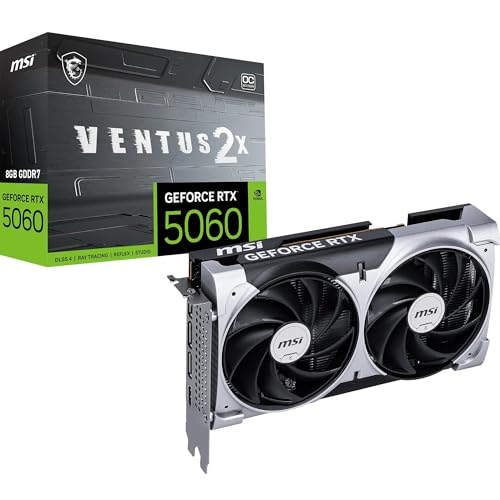
MSI GeForce RTX 5060 Ventus 2X OC
Best for: 1080p gaming with DLSS 4.0
- Interface
- PCIe 5.0 (what this guide is about)
- Graphics Processor
- GeForce RTX 5060
- Memory Size
- 8 GB
- Memory Type
- GDDR7
- Memory Bus Width
- 128-bit
- PCIe Interface
- PCIe 5.0
View on Amazon: MSI GeForce RTX 5060 Ventus 2X OC Affiliate link
This MSI graphics card uses the GeForce RTX 5060 GPU with 8GB of GDDR7 memory on a 128-bit bus. It connects via PCIe 5.0 x8. The card supports DLSS 4.0 and features DisplayPort 2.1b outputs. It is a 2-slot, factory-overclocked unit designed for 1080p gaming. You get a compact 197mm length and a recommended 550W power supply.
Pros
- 8GB GDDR7 memory with 28 Gbps speed
- PCIe 5.0 interface support
- DLSS 4.0 frame generation capability
- DisplayPort 2.1b for high refresh rates
Cons
- 128-bit memory bus limits high-resolution texture streaming
- PCIe 5.0 x8 lane count may bottleneck in some systems
- 8GB VRAM is small for modern 1440p titles
Good fit if
- You play games at 1080p resolution
- You want access to the latest DLSS 4.0 features
- You have a 550W power supply
Skip if
- You need more than 8GB of video memory
- You prefer a wider memory bus for higher bandwidth
- You require PCIe 5.0 x16 connectivity
Verdict: MSI RTX 5060 8GB VENTUS 2X OC offers entry-level 1080p performance with next-gen memory tech. It fits users prioritizing efficiency and new AI features over raw rasterization power.

ZOTAC GeForce RTX 3070 Twin Edge OC 8GB
Best for: 1440p gaming on PCIe 4.0 systems
- Interface
- PCIe 4.0 (what this guide is about)
- Graphics Processor
- GeForce RTX 3070
- Memory Size
- 8GB
- Memory Type
- GDDR6
- Boost Clock
- 1755 MHz
- Memory Bus Width
- 256-bit
View on Amazon: ZOTAC GeForce RTX 3070 Twin Edge OC 8GB Affiliate link
This ZOTAC GeForce RTX 3070 uses the NVIDIA Ampere architecture with 8GB of GDDR6 memory on a 256-bit bus. It supports PCIe 4.0 and reaches a boost clock of 1755 MHz. The card includes IceStorm 2.0 cooling and supports up to four displays. You will get 8K readiness and hardware-accelerated ray tracing. It suits gamers who want strong performance without needing the latest PCIe 5.0 interface.
Pros
- 8GB GDDR6 memory with 14 Gbps speed
- PCIe 4.0 interface for high bandwidth
- Boost clock up to 1755 MHz
- Supports up to four displays
Cons
- 8GB memory is smaller than competitors with 16GB or 24GB
- Uses PCIe 4.0 instead of the newer PCIe 5.0 standard
- Memory bus width is 256-bit, lower than some high-end models
Good fit if
- You want strong 1440p gaming performance
- You are using a PCIe 4.0 compatible system
- You need 8GB VRAM for current titles
Skip if
- You require PCIe 5.0 connectivity
- You need more than 8GB of video memory
- You are building a high-end 4K or 8K workstation
Verdict: ZOTAC RTX 3070 8GB PCIe 4.0 delivers solid Ampere performance for 1440p gaming. It fits users who prioritize proven PCIe 4.0 stability over next-generation interface speeds.
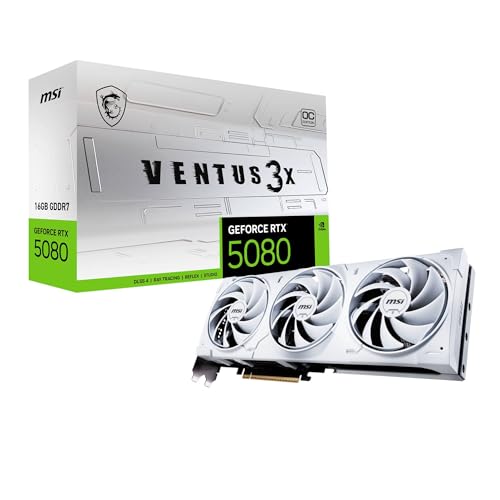
MSI GeForce RTX 5080 Ventus 3X White
Best for: PCIe 5.0 systems with white themes
- Graphics Processor
- GeForce RTX 5080
- Memory Size
- 16GB
- Memory Type
- GDDR7
- Boost Clock
- 2640 MHz
- Memory Bus Width
- 256-bit
- PCIe Interface
- PCIe 5
View on Amazon: MSI GeForce RTX 5080 Ventus 3X White Affiliate link
This MSI graphics card uses the GeForce RTX 5080 GPU with 16 GB of GDDR7 memory. It connects via PCIe 5.0, offering high bandwidth for modern systems. The card measures 11.9 inches long and weighs 3.31 pounds. You should choose this if you need a PCIe 5.0 interface and white aesthetics. It suits users building high-end systems that support the latest generation connection standard.
Pros
- PCIe 5.0 interface for maximum bandwidth
- 16 GB GDDR7 memory capacity
- White VENTUS 3X OC design
- GeForce RTX 5080 GPU
Cons
- 256-bit memory bus width is narrower than competitors with 384-bit or wider buses
- 11.9-inch length requires a spacious case
- 3.31-pound weight may need additional support
Good fit if
- You need a PCIe 5.0 compatible motherboard
- You want a white graphics card for your build
- You prioritize the latest GDDR7 memory technology
Skip if
- Your motherboard only supports PCIe 4.0
- You need more than 16 GB of video memory
- Your case cannot fit a 11.9-inch card
Verdict: MSI RTX 5080 16G VENTUS 3X OC White delivers PCIe 5.0 connectivity and GDDR7 memory. It fits users with compatible boards and spacious cases who want a white aesthetic.

ASUS Dual GeForce RTX 4060 8GB
Best for: Standard PCIe 4.0 systems
- Interface
- PCIe 4.0 (what this guide is about)
- Graphics Processor
- GeForce RTX 4060
- Memory Size
- 8GB
- Memory Type
- GDDR6
- PCIe Interface
- PCIe 4.0
- Slot Width
- 2-slot
View on Amazon: ASUS Dual GeForce RTX 4060 8GB Affiliate link
This card uses the GeForce RTX 4060 GPU with 8GB of GDDR6 memory. It connects via a PCIe 4.0 interface, which matches the standard for most modern systems. The 2-slot design helps it fit into smaller cases. You get HDMI 2.1a and DisplayPort 1.4a for display connections. It is a solid option for 1080p gaming.
Pros
- PCIe 4.0 interface for standard compatibility
- 8GB GDDR6 memory capacity
- Compact 2-slot physical design
- HDMI 2.1a connectivity
Cons
- PCIe 4.0 interface limits bandwidth compared to PCIe 5.0 options
- 8GB memory is smaller than 16GB or 24GB competitors
- GDDR6 memory is slower than GDDR6X found in higher-end models
Good fit if
- You need a standard PCIe 4.0 connection
- You have a case that fits 2-slot cards
- You want 1080p gaming performance
Skip if
- You require PCIe 5.0 bandwidth
- You need more than 8GB of video memory
- You plan to use high-resolution textures
Verdict: ASUS Dual RTX 4060 8GB is a practical choice for users who prioritize compatibility over raw bandwidth. It fits well in standard builds but lacks the memory and interface speed of the newer PCIe 5.0 cards on this list.

GIGABYTE Radeon RX 9070 XT Gaming OC 16GB
Best for: PCIe 5.0 gaming builds
- Interface
- PCIe 5.0 (what this guide is about)
- Graphics Processor
- Radeon RX 9070 XT
- Memory Size
- 16GB
- Memory Type
- GDDR6
- PCIe Interface
- PCIe 5.0
- Use
- Gaming
View on Amazon: GIGABYTE Radeon RX 9070 XT Gaming OC 16GB Affiliate link
This GIGABYTE graphics card features the Radeon RX 9070 XT GPU and 16GB of GDDR6 memory. It connects via the PCIe 5.0 interface, offering higher bandwidth than PCIe 4.0 options. The card uses a Windforce cooling system with server-grade thermal gel. It is a solid choice for gamers who want modern interface support and ample video memory for high-resolution textures.
Pros
- PCIe 5.0 interface for maximum data transfer speed
- 16GB GDDR6 memory capacity
- Windforce cooling system with Hawk Fans
- Server-grade thermal conductive gel for stability
Cons
- 11.3-inch length requires spacious cases
- Heavier build at 3.92 pounds
- Only 16GB memory compared to 24GB options
Good fit if
- You need a PCIe 5.0 compatible card
- You want 16GB of VRAM for gaming
- You have a large case for long cards
Skip if
- You only have PCIe 4.0 slots
- You prefer smaller form factors
- You need more than 16GB of memory
Verdict: GIGABYTE Radeon RX 9070 XT PCIe 5.0 suits users who need the latest interface and 16GB of VRAM for modern gaming tasks.
Specifications side by side
| Spec | EVGA GeForce RTX 3090 24GB | MSI GeForce RTX 5060 Ventus 2X OC | ZOTAC GeForce RTX 3070 Twin Edge OC 8GB | MSI GeForce RTX 5080 Ventus 3X White | ASUS Dual GeForce RTX 4060 8GB | GIGABYTE Radeon RX 9070 XT Gaming OC 16GB |
|---|---|---|---|---|---|---|
| Graphics Processor | GeForce RTX 3090 | GeForce RTX 5060 | GeForce RTX 3070 | GeForce RTX 5080 | GeForce RTX 4060 | Radeon RX 9070 XT |
| Memory Size | 24GB | 8 GB | 8GB | 16GB | 8GB | 16GB |
| Memory Type | GDDR6X | GDDR7 | GDDR6 | GDDR7 | GDDR6 | GDDR6 |
| Boost Clock | 1800MHz | not stated | 1755 MHz | 2640 MHz | not stated | not stated |
| Memory Bus Width | not stated | 128-bit | 256-bit | 256-bit | not stated | not stated |
| PCIe Interface | PCIe 4 | PCIe 5.0 | PCIE 4.0 | PCIe 5 | PCIe 4.0 | PCIe 5.0 |
| Recommended PSU | not stated | 550W | not stated | 850W | not stated | not stated |
| Slot Width | not stated | 2-slot | not stated | not stated | 2-slot | not stated |
| Memory | 24GB | 8GB | 8GB | 16GB | 8GB | 16GB |
| GPU | GeForce RTX 3090 | not stated | not stated | not stated | not stated | not stated |
| Interface | PCIe 4.0 | PCIe 5.0 | PCIe 4.0 | not stated | PCIe 4.0 | PCIe 5.0 |
| Use | Gaming | not stated | Gaming | Gaming | not stated | Gaming |
| Dimensions | 11.8 × 5.38 × 0.1 inches | not stated | not stated | not stated | 7.96 × 4.74 × 0.1 inches | 11.3 × 5.2 × 2.2 inches |
| Weight | 2.5 pounds | 1.13 pounds | not stated | 3.31 pounds | 1.2 pounds | 3.92 pounds |
| Length | not stated | 7.76 inches | not stated | 11.9 inches | not stated | not stated |
| Width | not stated | 4.72 inches | not stated | 4.76 inches | not stated | not stated |
| Color | not stated | Multicolour | not stated | Multicolour | BLACK | Black |
| Model | not stated | V537-002R | not stated | V531-062R | not stated | GV-R9070XTGAMING OC-16GD |
| Size | not stated | not stated | not stated | not stated | RTX4060|V2|OC | RADEON9070XT |
Frequently asked questions
Can a PCIe 5.0 card work in a PCIe 4.0 motherboard slot?
Yes, these cards are backward compatible. The MSI GeForce RTX 5080 and GIGABYTE Radeon RX 9070 XT both use PCIe 5.0 but will function in older slots. You will experience reduced data transfer speeds, but the card will still operate. This allows you to upgrade your GPU before replacing your entire system.
Does the interface type affect gaming performance significantly?
For most current games, the difference is minimal. High-end cards like the EVGA GeForce RTX 3090 use PCIe 4.0 and deliver excellent results. The interface becomes more critical for future-proofing. If you plan to keep your hardware for years, the higher bandwidth of PCIe 5.0 offers better long-term stability.
Which graphics cards in this list use the newest interface standard?
The MSI GeForce RTX 5060, MSI GeForce RTX 5080, and GIGABYTE Radeon RX 9070 XT all feature PCIe 5.0 interfaces. These cards are designed for modern motherboards that support the latest data transfer rates. You get next-generation connectivity, which supports faster communication between your CPU and GPU compared to older standards.
Is PCIe 4.0 still a good choice for new builds?
Absolutely. Many high-performing cards, including the ZOTAC GeForce RTX 3070 and ASUS Dual GeForce RTX 4060, rely on PCIe 4.0. This interface provides sufficient bandwidth for 1440p and high-resolution gaming. It remains a stable and proven option for users who prioritize compatibility and established performance over cutting-edge interface speeds.
How do I check if my motherboard supports PCIe 5.0?
You must consult your motherboard manual or product specifications. Look for the PCIe slot version listed near the graphics card slot. Cards like the MSI RTX 5060 require this specific support to run at full speed. If your board only lists PCIe 4.0, the card will still work but at lower bandwidth.
Will I need a new motherboard to use a PCIe 5.0 graphics card?
Not immediately, but it is recommended for optimal performance. While backward compatibility ensures the card works in PCIe 4.0 slots, you will not utilize the full potential. If you buy a card like the GIGABYTE Radeon RX 9070 XT, pairing it with a PCIe 5.0 compatible motherboard ensures you get the advertised data throughput.
Does the physical size of the card relate to the interface?
No, the interface is a digital connection standard, not a physical dimension. However, larger cards like the EVGA RTX 3090 or MSI RTX 5080 often pair with powerful interfaces to handle their performance needs. The interface spec tells you about data speed, while the physical specs like length and weight tell you about case compatibility.