How to Choose Computer Cables: A Complete Buying Guide for 2026
As an Amazon Associate we earn from qualifying purchases. Links on this page are affiliate links.
Finding the right connection for internal components or external expansion requires matching signal standards to your chassis layout. This computer cable buying guide helps you select the correct interface generation, connector orientation, and cable length for your build. You will learn how to evaluate specs like PCIe 3.0, 4.0, and 5.0 speeds, OCuLink data rates, and electromagnetic shielding to prevent performance drops or signal degradation.
After reading, you can decide whether your system demands a compact double-reverse layout, an extended straight run for test benches, or high-bandwidth OCuLink adapters for external hardware. The guide walks through essential compatibility factors such as physical clearance, power delivery, and PCIe version support. The 8 featured options were chosen strictly from their published specifications, ensuring you get accurate dimensions and transfer capabilities for your setup.
Our top pick: GLOTRENDS 200mm Right-Angle PCIe 4.0 Riser Cable.
Key Factors for Choosing Computer Cables
PCIe Generation and Bandwidth
You must match your cable interface generation to your motherboard and add-in card specifications to maintain full signal throughput. Products support different standards, ranging from PCIe 3.0 up to PCIe 5.0. PCIe 4.0 riser cables provide 32GB/s bandwidth, while PCIe 5.0 options scale to 64GB/s or up to 128GB/s bandwidth. A faster generation preserves maximum data transfer rates for high-speed hardware, whereas a PCIe 3.0 option handles older graphics cards without requiring external power. The trade-off centers on hardware requirements and system stability. Choosing a PCIe 5.0 interface gives you the highest throughput for current hardware, but running an older PCIe 3.0 card does not benefit from that extra bandwidth. For example, the GLOTRENDS 150mm PCIe 5.0 Riser Cable supports up to 64GB/s bandwidth along with 78W power delivery for demanding vertical setups. Ensure your components support the interface generation you select.
- Generation match for PCIe 3.0, PCIe 4.0, or PCIe 5.0
- Rated transfer rates from 32GB/s up to 128GB/s bandwidth
Cable Length and Reach
Selecting the correct physical length prevents mechanical tension on motherboard slots and eliminates excess slack inside your computer chassis. Cable measurements across available models range from short 15cm and 150mm runs up to 400mm or extended 90cm spans. Short lengths suit tightly packed hardware arrangements where extra cable bulk would crowd surrounding components. Longer cables provide the reach required to connect components situated across large enclosures or separate mounting zones. The trade-off involves routing clean lines against managing excess ribbon material. A cable that is too short will fail to reach the target bracket or strain the socket, while an overly long cable demands extra chassis space for folding. For example, the Thermaltake Dual 90° PCIe 4.0 400mm Riser Cable delivers extended 400mm reach for spaced-out chassis installations needing flat cable routing. Measure slot-to-slot distances before you decide.
- Exact distance between motherboard slot and mount point
- Length choices from 15cm up to 90cm reach
Connector Orientation and Angle
Connector orientation determines how directly the cable mates with your expansion card without forcing harsh bends at terminal joints. Available options include straight connectors, right-angle 90-degree plugs, dual 90-degree configurations, and double-reverse layouts. Right-angle designs help vertical graphics cards clear case frames and motherboard heatsinks cleanly. Double-reverse layouts route directly behind structural trays in specialized enclosures. Straight connectors line up directly into the slot without directional turns. The trade-off is mechanical fit versus enclosure adaptability. A straight connector requires open clearance directly above or below the slot, making it incompatible with standard vertical brackets that require a 90-degree entry. A right-angle or double-reverse plug solves clearance barriers but dictates a fixed insertion trajectory. For example, the LINKUP 19cm Double Reverse PCIe 5.0 Riser Cable uses a dedicated double-reverse layout engineered for tight vertical mounting positions. You must align the plug angle with your chassis bracket orientation.
- Right-angle or dual 90-degree plugs for vertical mounts
- Double-reverse or straight orientations matching bracket layout
Chassis Form Factor Compatibility
Your computer case form factor dictates the spacing, routing paths, and clearance constraints available for internal cabling. Compact Mini-ITX and small form factor sandwich enclosures isolate the graphics card behind the motherboard, demanding compact ribbons with specialized routing profiles. Mid-tower cases provide standard vertical bracket mounts that balance moderate cable lengths with adequate clearance around thick components. Full-tower enclosures and open test bench builds require extended reach to bridge distant mounting points without snagging other hardware. The trade-off lies between chassis compactness and installation flexibility. Small form factor setups require precise measurements because excess cable length cannot be hidden, while full-tower configurations cannot function with short cables designed for smaller frames. For example, the LINKUP 90cm Straight PCIe 5.0 Riser Cable supports open bench setups and large builds where standard short cables cannot span the required distance. Verify your chassis form factor specifications before selecting a cable model.
- Mini-ITX sandwich support for compact small form factor builds
- Chassis profile matching mid-tower, full-tower, or bench setups
Signal Shielding and Wiring Construction
High-frequency data lines inside modern computers are vulnerable to electromagnetic interference from adjacent power supplies, graphics cards, and case fans. Quality cables incorporate protective layers such as individual EMI foil shielding and foil-shielded 30AWG wiring to preserve signal integrity across high-speed connections. Robust shielding maintains clean data channels, which is critical when operating at PCIe 4.0 or PCIe 5.0 speeds where signal attenuation occurs rapidly over distance. The trade-off involves cable flexibility versus signal defense. Dense foil shielding and heavier 30AWG wire gauges protect high-speed throughput from electrical noise, but they increase cable rigidity. A stiffer ribbon assembly requires more effort to curve around case frame obstacles during installation. For example, the GLOTRENDS 200mm Right-Angle PCIe 4.0 Riser Cable incorporates individual EMI foil shielding to deliver reliable 32GB/s bandwidth in standard mid-tower enclosures. Look for dedicated shielding specifications to prevent signal loss across your graphics setup.
- Individual EMI foil shielding for electromagnetic interference protection
- Foil-shielded 30AWG wiring maintaining signal integrity across bends
Internal Risers Versus External Adapters
You must evaluate whether your setup requires a standard internal motherboard riser or an external interconnect adapter kit. Internal PCIe ribbon cables connect a motherboard x16 slot directly to a vertically mounted graphics card within the same chassis frame. External adapter solutions utilize alternative interfaces, such as M.2 slots adapted to OCuLink connections, delivering a 32 Gbps NVMe-based PCIe 4x link for external graphics cards and SSDs. The trade-off comes down to build architecture and bandwidth distribution. Internal riser cables retain full PCIe x16 lane widths directly from the primary expansion slot. An external OCuLink kit enables external GPU setups or external NVMe drive expansion from an internal M.2 socket, but it operates over a narrower four-lane PCIe link. For example, the Chenyang OCuLink M.2 to PCIe eGPU Cable Kit includes the host card, cable, and slot adapter in one package for supported external hardware systems. Identify your host port type before buying.
- Direct PCIe x16 slot ribbons versus M.2 OCuLink kits
- Included host card, cable, and slot adapter packages
Types of Graphics Card Cables
Right-Angle PCIe Riser Cables
Right-angle PCIe riser cables feature a 90-degree connector at the graphics card slot. This geometry directs the ribbon flat against chassis trays and fits standard vertical mounting brackets. You find options spanning PCIe 3.0 up to PCIe 5.0, such as the GLOTRENDS 200mm Right-Angle PCIe 4.0 Riser Cable. These cables suit standard mid-tower and full-tower vertical builds that require clean clearance around components without bending the cable base. Individual EMI foil shielding protects signals across lengths like 150mm or 200mm. The main trade-off is fixed connector direction. You cannot reorient the 90-degree bend if your case bracket requires straight vertical entry or opposing angles.
Straight PCIe Riser Cables
Straight PCIe riser cables provide direct linear connections on both ends without pre-formed bends. These cables handle extended reaches up to 90cm, as seen in the LINKUP 90cm Straight PCIe 5.0 Riser Cable. This layout suits test benches, open frames, and large custom chassis where graphics cards sit well away from motherboard expansion slots. High-bandwidth PCIe 5.0 lines remain stable over long distances through dedicated signal shielding. The primary trade-off is vertical clearance. The straight socket extension projects directly downward or outward from the graphics card. You need significant open space beneath the slot, making these cables incompatible with standard vertical brackets in typical enclosures.
Double-Reverse PCIe Riser Cables
Double-reverse PCIe riser cables feature opposing reversed connectors on each end. This specialized design targets compact Small Form Factor (SFF) and Mini-ITX sandwich enclosures, like the LINKUP 19cm Double Reverse PCIe 5.0 Riser Cable. The dual inverted orientation lets the ribbon wrap tightly behind the motherboard tray directly into back-to-back graphics card compartments. You maintain PCIe 5.0 high-speed bandwidth inside dense enclosures without putting unnatural physical stress on delicate solder joints. The main trade-off is extreme specialization. With short lengths like 19cm and fixed directional folds, you cannot repurpose a double-reverse cable inside standard ATX mid-tower chassis or setups with wider card spacing.
External OCuLink eGPU Cable Kits
External OCuLink cable kits route PCIe signals outside your computer enclosure. Products like the Chenyang OCuLink M.2 to PCIe eGPU Cable Kit use an M.2 host adapter card, an external cable, and a separate PCIe slot board. This design suits external graphics card enclosures linked to mini PCs, laptops, or handheld systems with accessible M.2 slots. It supplies a direct NVMe-based PCIe link without requiring integrated controller enclosures. The main trade-off is interface throughput. OCuLink configurations in this category provide a PCIe 4x link delivering up to 32 Gbps bandwidth, which is significantly narrower than full x16 internal riser cables.
Mistakes to Avoid When Choosing Cables
Using a single daisy-chained PCIe cable for multiple power headers
High-wattage graphics cards draw substantial power across each 8-pin connector. A single split cable can exceed the wire gauge rating, causing voltage drops or connector overheating under peak load. You should run separate, dedicated power cables directly from your power supply unit to each individual power socket on your card.
Bending high-density power cables too close to the connector terminal
Tight bends near 12V-2x6 or 12VHPWR plugs cause uneven contact resistance across internal pins. Unequal electrical load creates thermal hot spots and terminal deformation. You should leave at least thirty millimeters of straight cable before curving the wire harness toward your chassis side panel. Ensure the connector latches completely without lateral tension.
Pairing modern cards with outdated DisplayPort or HDMI revision cables
Modern graphics cards deliver high resolutions and refresh rates that overwhelm older cable revisions. Standard DisplayPort 1.2 or HDMI 1.4 cables lack the bandwidth for uncompressed 4K signals at high frame rates, causing black screens or flickering. You must check the video output specs and use certified DisplayPort 2.1 or HDMI 2.1 cables.
Mixing modular power supply cables between different brands or models
Power supply pinouts on the unit side are not standardized across manufacturers, even when the terminal shapes look identical. Plugging mismatched modular cables into your power supply can send twelve-volt power directly into ground lines, instantly damaging your graphics card. You should only use the original modular cables specified by your power supply manufacturer.
Ignoring power plug clearance between the graphics card and chassis
Wide graphics cards place power connectors close to side panels, leaving minimal room for stiff cable bundles. Forcing a thick cable against glass or metal puts mechanical strain on the board socket and solder joints. You should verify your chassis width specs and select recessed connectors or low-profile angled adapters.
Quick picks
Our 8 picks

GLOTRENDS 200mm Right-Angle PCIe 4.0 Riser Cable
Best for: mid-tower vertical PCIe 4.0 GPU mounting
- Interface Standard
- PCIe 4.0
- Slot Configuration
- x16
- Cable Length
- 200mm
- Connector Angle
- 90 Degree Right Angle
- Maximum Bandwidth
- up to 32GB/s
- Shielding Type
- individually foil-wrapped
View on Amazon: GLOTRENDS 200mm Right-Angle PCIe 4.0 Riser Cable
This is a 200mm PCIe 4.0 x16 GPU riser cable with a 90-degree connector designed for vertical graphics card mounting. It delivers up to 32GB/s bandwidth using 30AWG silver-plated copper wiring with individual foil shielding. You need no drivers or external power for setup. This cable suits you if you route a modern Gen4 graphics card inside a standard mid-tower or ATX chassis with clearance for radiators or thick GPU coolers.
Pros
- Delivers full PCIe 4.0 x16 bandwidth up to 32GB/s
- Individually foil-shielded pairs with 30AWG silver-plated copper
- 90-degree connector fits vertical GPU mounts in standard ATX cases
- Driverless slide-on setup with no external power required
Cons
- Does not support hot swapping
- Limited to PCIe 4.0 speeds rather than PCIe 5.0
Good fit if
- You need a 200mm right-angle cable for vertical GPU mounting in a mid-tower case.
- You run a PCIe 4.0 x16 GPU and want up to 32GB/s bandwidth without extra power wires.
Skip if
- You require PCIe 5.0 bandwidth for next-generation hardware.
- You need hot-plug or hot-swapping capability for your expansion cards.
Verdict: GLOTRENDS 200mm PCIe 4.0 Right-Angle Riser Cable provides reliable 32GB/s bandwidth and individual EMI foil shielding for vertical GPU installations. Its 200mm reach and right-angle connector fit standard mid-tower builds needing clean clearance around thick components.

Chenyang OCuLink M.2 to PCIe eGPU Cable Kit
Best for: eGPU setups using M.2 OCuLink connections
- Interface Standard
- PCI-E 3.0/4.0
- Maximum Bandwidth
- up to 32 Gbps
- Dimensions
- 3.94 × 3.94 × 0.39 inches
- Weight
- 0.71 ounces
This Chenyang adapter set links an external graphics card or NVMe SSD to your computer using an OCuLink SFF-8612 interface. It transmits PCI Express 4x signals over the NVMe 1.2 protocol at data transfer speeds up to 32 Gbps. The package provides an M.2 M-Key host card, an OCuLink cable, and a PCI-E x16 slot board. It suits you if you need eGPU connectivity on compatible Linux or Windows devices.
Pros
- Transfers data at speeds up to 32 Gbps
- Includes M.2 M-Key adapter, OCuLink cable, and PCIe x16 adapter board
- Supports NVMe 1.2 protocol over PCI Express 4x lines
- Compatible with Linux Kernel 4.3 and Windows 8.1 or 10
Cons
- Limits connection bandwidth to PCI Express 4x signals
- Requires an open M.2 M-Key slot or native SFF-8612 port
Good fit if
- You want to connect an external desktop GPU via an M.2 M-Key slot
- You run a compatible system on Windows 8.1, Windows 10, or Linux Kernel 4.3+
Skip if
- You need a standard internal motherboard PCIe x16 riser cable
- You require bandwidth higher than 32 Gbps or more than 4x PCIe lanes
Verdict: Chenyang OCuLink M.2 to PCIe eGPU Adapter Cable delivers a 32 Gbps NVMe-based PCIe 4x link for external graphics cards and SSDs. It includes the host card, cable, and slot adapter in one package for supported systems.

GLOTRENDS 250mm PCIe 3.0 x16 90-Degree Riser Cable
Best for: vertical Gen3 GPU builds in full-tower cases
- Interface Standard
- PCIe 3.0
- Slot Configuration
- x16
- Cable Length
- 250mm
- Connector Angle
- 90 Degree Right Angle
- Maximum Bandwidth
- up to 16GB/s
- Shielding Type
- shielded ribbon
View on Amazon: GLOTRENDS 250mm PCIe 3.0 x16 90-Degree Riser Cable
This GLOTRENDS riser cable connects your graphics card using a PCIe 3.0 x16 interface and a 90-degree right-angle plug. Its 250mm length gives you extra reach inside full-tower cases to route past thick CPU coolers, radiators, and cable combs. The EMI-shielded ribbon delivers up to 16GB/s bandwidth without external power cables or drivers. It suits you if you mount a Gen3 GPU vertically in a spacious chassis.
Pros
- 250mm length provides clearance for full-tower cases and thick radiators
- Delivers full PCIe 3.0 x16 bandwidth up to 16GB/s
- EMI-shielded ribbon design blocks signal interference
- Requires no external power cables or driver installation
Cons
- Limited to PCIe 3.0 speeds rather than PCIe 4.0 or 5.0
- Requires BIOS adjustment to Gen 3.0 mode if paired with PCIe 4.0 GPUs
- Does not support hot swapping
Good fit if
- You need a 250mm reach to mount a GPU vertically in a full-tower case.
- You run a native PCIe 3.0 graphics card like an RTX 20 or GTX 16 series card.
- You want an EMI-shielded ribbon cable with a 90-degree right-angle connector.
Skip if
- You require native PCIe 4.0 or PCIe 5.0 transfer speeds.
- You do not want to change motherboard BIOS settings for PCIe 4.0 GPUs.
- You need a straight 180-degree connector orientation.
Verdict: GLOTRENDS 250mm PCIe 3.0 90-Degree Riser Cable provides reliable Gen3 bandwidth and extended reach for vertical mounts in full-tower cases. It handles PCIe 3.0 graphics cards cleanly without requiring external power.
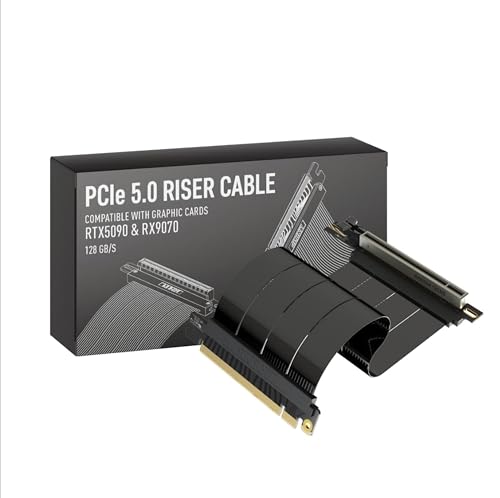
LINKUP 15cm PCIe 5.0 Right Angle Riser Cable
Best for: compact vertical GPU mounts needing PCIe 5.0
- Interface Standard
- PCIe 5.0
- Slot Configuration
- x16
- Cable Length
- 15cm
- Connector Angle
- Right Angle
- Maximum Bandwidth
- 128GB/s
- Shielding Type
- multilayer shielding
View on Amazon: LINKUP 15cm PCIe 5.0 Right Angle Riser Cable
This 15cm riser cable connects your graphics card to a PCIe slot using a right-angle orientation. It supports PCIe 5.0 x16 bandwidth up to 128GB/s, with backward compatibility for PCIe 4.0 systems. Multilayer EMI shielding preserves signal integrity around tight bends. If you are building inside an ITX chassis or installing a vertical graphics card mount that requires a short, flexible 15cm run, this cable suits your configuration.
Pros
- Delivers PCIe 5.0 x16 bandwidth up to 128GB/s
- Multilayer shielding prevents electromagnetic interference
- Right-angle connector enables compact vertical mounting
- Flexible construction allows bending in tight chassis layouts
Cons
- Short 15cm span limits routing in mid-tower or full-tower cases
- Mounting brackets and standoffs are not included
Good fit if
- You need a 15cm right-angle connection for a vertical GPU mount
- You require PCIe 5.0 x16 signal transfer rates up to 128GB/s
- You are building in a small-form-factor or ITX sandwich case
Skip if
- You need a cable longer than 15cm to reach your motherboard slot
- You require a straight or reverse-angle connector orientation
Verdict: LINKUP 15cm Right Angle PCIe 5.0 Riser Cable delivers up to 128GB/s bandwidth with robust EMI shielding for vertical graphics card setups. It is a precise fit for compact builds requiring a short 15cm right-angle connection.

LINKUP 19cm Double Reverse PCIe 5.0 Riser Cable
Best for: Mini-ITX sandwich cases requiring Gen5 speeds
- Interface Standard
- PCIe 5.0
- Slot Configuration
- x16
- Cable Length
- 19cm
- Connector Angle
- Double Reverse
- Maximum Bandwidth
- 128GB/s
- Shielding Type
- multilayer shielding
View on Amazon: LINKUP 19cm Double Reverse PCIe 5.0 Riser Cable
This cable is a 19-centimeter PCIe 5.0 x16 riser cable built for vertical graphics card mounting. It delivers up to 128 GB/s bandwidth with multilayer EMI shielding to prevent signal loss during tight bends. Designed with a double-reverse connector orientation, it targets compact Small Form Factor and Mini-ITX sandwich chassis. It suits you if you need PCIe 5.0 bandwidth in tight builds.
Pros
- Supports full PCIe 5.0 x16 bandwidth up to 128GB/s
- Double-reverse connector layout designed for ITX sandwich cases
- Multilayer shielding suppresses electromagnetic interference and crosstalk
- Backward-compatible with PCIe 4.0 and PCIe 3.0 motherboards and GPUs
Cons
- Short 19cm length is too brief for standard mid-tower or full-tower cases
- Double-reverse connector layout fits only specific ITX bracket configurations
Good fit if
- You build inside an ITX or SFF sandwich chassis requiring a double-reverse connector.
- You run high-bandwidth PCIe 5.0 hardware that requires full 128GB/s transfer speeds.
- You need a flexible 19cm riser cable designed to handle tight routing bends.
Skip if
- You need a straight or right-angle connector orientation instead of double-reverse.
- You mount a GPU in an ATX enclosure that requires a longer span than 19cm.
Verdict: LINKUP 19cm PCIe 5.0 Double Reverse Riser Cable delivers high-bandwidth Gen5 connectivity for compact Mini-ITX and SFF sandwich enclosures. Its dedicated double-reverse layout makes it ideal for tight, vertical mounting positions without sacrificing signal integrity.

LINKUP 90cm Straight PCIe 5.0 Riser Cable
Best for: long-reach vertical mounts and open bench setups
- Interface Standard
- PCIe 5.0
- Slot Configuration
- x16
- Cable Length
- 90cm
- Connector Angle
- Straight
- Maximum Bandwidth
- 128GB/s
- Shielding Type
- multilayer shielding
This is a 90cm PCIe 5.0 x16 riser cable designed for extended GPU mounting distances. It delivers full PCIe 5.0 bandwidth up to 128 GB/s while maintaining backward compatibility with PCIe 4.0 motherboards and cards. Multilayer shielding helps suppress EMI along its extended span. If you build inside large chassis, open test benches, or custom water-cooled systems requiring a straight connector layout across long routes, this cable fits your setup.
Pros
- Delivers PCIe 5.0 x16 bandwidth up to 128 GB/s
- 90cm length accommodates extra-long routing spans
- Multilayer shielding suppresses electromagnetic interference and crosstalk
- Backward compatible with PCIe 4.0 hardware
Cons
- Straight connector lacks a right-angle bend for standard vertical brackets
- 90cm length creates excess slack in compact or ITX cases
Good fit if
- You need a long 90cm span for open benches, server trays, or large chassis.
- You require PCIe 5.0 bandwidth with a straight connector orientation.
Skip if
- You need a right-angle connector for standard vertical GPU mounting brackets.
- You build inside a compact case where a 90cm cable creates clutter.
Verdict: LINKUP 90cm Straight PCIe 5.0 Riser Cable provides high-bandwidth PCIe 5.0 connectivity across an extended reach for large builds and test benches. Its straight connector design requires dedicated clearance without the right-angle bend found on standard vertical brackets.
GLOTRENDS 150mm PCIe 5.0 Riser Cable
Best for: vertical mid-tower PCIe 5.0 GPU setups
- Interface Standard
- PCIe 5.0
- Slot Configuration
- x16
- Cable Length
- 150mm
- Connector Angle
- 90 Degree Right Angle
- Maximum Bandwidth
- up to 64GB/s
- Shielding Type
- individually foil-wrapped
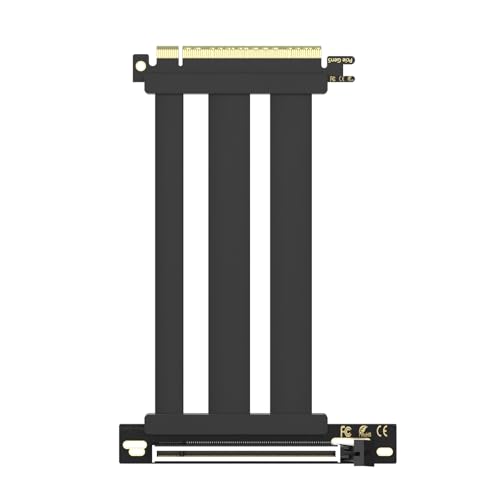
This GLOTRENDS riser cable connects your graphics card across a 150mm span with a 90-degree right-angle connector. It delivers PCIe 5.0 x16 bandwidth up to 64GB/s, backward compatibility with PCIe 4.0 and 3.0, and 78W power delivery across dedicated 12V pins. Shielded by 30AWG silver-plated copper wiring with foil EMI wrap, it suits you if you mount vertical GPUs inside mid-tower chassis without signal loss.
Pros
- Delivers full PCIe 5.0 x16 bandwidth up to 64GB/s
- Supplies up to 78W over 10 dedicated 12V pins
- 30AWG silver-plated copper wiring with individual foil EMI shielding
- Plug-and-play installation without driver or BIOS configuration
Cons
- 150mm length is too short for large cases or distant slots
- Does not support hot swapping
Good fit if
- You need a 150mm 90-degree cable for vertical mounting in a mid-tower case.
- You run a PCIe 5.0 GPU and motherboard requiring up to 64GB/s bandwidth.
- You want dedicated 78W power delivery through the PCIe slot connector.
Skip if
- You need a straight connector rather than a 90-degree right-angle mount.
- You require a cable run longer than 150mm for your case layout.
Verdict: GLOTRENDS 150mm PCIe 5.0 Right Angle Riser Cable delivers up to 64GB/s bandwidth and 78W power delivery for vertically mounted GPUs in mid-tower builds. It provides foil-shielded 30AWG wiring with standard plug-and-play setup.

Thermaltake Dual 90° PCIe 4.0 400mm Riser Cable
Best for: vertical GPU builds requiring extended reach
- Interface Standard
- PCIe 4.0
- Cable Length
- 400mm
- Connector Angle
- Dual 90-degree
- Maximum Bandwidth
- 16Gbps
- Shielding Type
- EMI Shielding
- Weight
- 9.52 ounces
View on Amazon: Thermaltake Dual 90° PCIe 4.0 400mm Riser Cable
This is a 400mm PCIe 4.0 riser cable from Thermaltake designed for vertical graphics card mounting. It features dual 90-degree connectors for a flat, space-efficient layout and integrates EMI shielding to block interference. The cable supports up to 16Gbps data transmission speeds on compatible AMD and Intel motherboards. It suits you if you need extended reach and angled connectors to route your GPU neatly inside a larger computer case.
Pros
- Dual 90-degree connectors provide a flat, space-efficient layout
- 400mm cable length offers extended reach for vertical GPU mounting
- Includes EMI shielding to prevent electromagnetic interference
- Transfers data at speeds up to 16Gbps over PCIe 4.0
Cons
- PCIe 4.0 interface lacks PCIe 5.0 bandwidth support
- Fixed dual 90-degree angle orientation restricts straight-in connection paths
Good fit if
- You need 400mm of cable length to bridge your motherboard and vertical GPU
- You require dual right-angle connectors for tight, flat cable routing
- You use an AMD or Intel motherboard running PCIe 4.0 hardware
Skip if
- You require a PCIe 5.0 connection for your setup
- You need straight connectors rather than dual 90-degree angles
Verdict: Thermaltake 400mm Dual 90° PCIe 4.0 Riser Cable delivers extended 400mm reach and EMI shielding for vertical graphics card installations. Its dual right-angle layout suits spaced-out chassis builds needing flat cable routing.
Specifications side by side
| Spec | GLOTRENDS 200mm Right-Angle PCIe 4.0 Riser Cable | Chenyang OCuLink M.2 to PCIe eGPU Cable Kit | GLOTRENDS 250mm PCIe 3.0 x16 90-Degree Riser Cable | LINKUP 15cm PCIe 5.0 Right Angle Riser Cable | LINKUP 19cm Double Reverse PCIe 5.0 Riser Cable | LINKUP 90cm Straight PCIe 5.0 Riser Cable | GLOTRENDS 150mm PCIe 5.0 Riser Cable | Thermaltake Dual 90° PCIe 4.0 400mm Riser Cable |
|---|---|---|---|---|---|---|---|---|
| Interface Standard | PCIe 4.0 | PCI-E 3.0/4.0 | PCIe 3.0 | PCIe 5.0 | PCIe 5.0 | PCIe 5.0 | PCIe 5.0 | PCIe 4.0 |
| Slot Configuration | x16 | not specified | x16 | x16 | x16 | x16 | x16 | not specified |
| Cable Length | 200mm | not specified | 250mm | 15cm | 19cm | 90cm | 150mm | 400mm |
| Connector Angle | 90 Degree Right Angle | not specified | 90 Degree Right Angle | Right Angle | Double Reverse | Straight | 90 Degree Right Angle | Dual 90-degree |
| Maximum Bandwidth | up to 32GB/s | up to 32 Gbps | up to 16GB/s | 128GB/s | 128GB/s | 128GB/s | up to 64GB/s | 16Gbps |
| Shielding Type | individually foil-wrapped | not specified | shielded ribbon | multilayer shielding | multilayer shielding | multilayer shielding | individually foil-wrapped | EMI Shielding |
| Interface | PCIe 4.0 | not specified | PCIe 3.0 | PCIe 4.0 | PCIe 5.0 | PCIe 5.0 | PCIe 5.0 | PCIe 4.0 |
| Form Factor | not specified | not specified | not specified | not specified | ITX | not specified | not specified | not specified |
| Dimensions | 9.84 × 4.72 × 4.72 inches | 3.94 × 3.94 × 0.39 inches | not specified | not specified | not specified | not specified | not specified | not specified |
| Weight | 4.97 ounces | 0.71 ounces | not specified | 4.23 ounces | not specified | 8.75 ounces | not specified | 9.52 ounces |
| Size | 200mm | not specified | 250mm | 15cm - v4 | 19cm - v2 | 90cm - v2 | 150mm | Compact |
| Color | Black | Black | Black | All Black | Black | Black | Black | Black |
| Model | PCIE40-X16-200MM-0090D | CY-SF-014+SF-061 | PCIE30-X16-250MM-0090D | AG-P5-33SR-015BK | AVA5 | AVA5 | PCIE50-X16-150MM-0090D-Black | AC-077-CO1OTN-C1 |
Frequently asked questions
How do you connect an external GPU using an M.2 slot?
You connect an external graphics card to an M.2 slot using a dedicated OCuLink adapter kit. The Chenyang OCuLink kit provides a 32 Gbps NVMe-based PCIe 4x link for external graphics cards or solid-state drives. It bundles the host card, connection cable, and slot adapter in one package so you can route internal bus lanes to an external enclosure.
When should you choose a double-reverse PCIe riser cable?
You choose a double-reverse cable when building inside a compact Mini-ITX sandwich case. The LINKUP 19cm Double Reverse PCIe 5.0 Riser Cable is tailored for SFF sandwich enclosures where the graphics card sits directly behind the motherboard. This inverted layout minimizes excess slack and prevents harsh cable strain in tight interior layouts.
What cable length works best for an open test bench?
You need an extended straight cable measuring up to 90cm for open test benches and oversized cases. The LINKUP 90cm Straight PCIe 5.0 Riser Cable delivers Gen5 connectivity across long spans without standard right-angle bends. This straight connector design gives you the freedom to position test hardware without clearance constraints from chassis brackets.
How much slot power does a PCIe riser cable deliver?
A PCIe riser cable typically delivers up to 78W of direct slot power to your add-in card. The GLOTRENDS 150mm PCIe 5.0 Riser Cable provides 78W power delivery alongside 64GB/s bandwidth using foil-shielded 30AWG wiring. High-draw graphics cards still require dedicated power cables from your power supply to run safely under heavy gaming loads.
What is the difference between a single right-angle and dual 90-degree riser cable?
A single right-angle riser turns 90 degrees at the expansion slot, while a dual 90-degree cable angles connectors at both ends. The Thermaltake Dual 90° PCIe 4.0 400mm Riser Cable uses dual right angles to keep the ribbon completely flat across wide case distances. This prevents awkward cable twists between your motherboard slot and GPU mount.
Can you use a PCIe 3.0 riser cable in a full-tower case?
You can install a PCIe 3.0 riser cable if your graphics card and motherboard operate within Gen3 bandwidth limits. The GLOTRENDS 250mm PCIe 3.0 90-Degree Riser Cable offers extended reach for vertical mounts in full-tower cases without needing external power. Matching your components to Gen3 ensures stable communication without paying for unused bandwidth.
What maximum bandwidth does a PCIe 5.0 riser cable support?
A full-bandwidth PCIe 5.0 riser cable supports speeds up to 128GB/s across compatible motherboards and cards. The LINKUP 15cm Right Angle PCIe 5.0 Riser Cable delivers up to 128GB/s bandwidth while utilizing EMI shielding to protect against electrical interference. Selecting this specification ensures zero throughput reduction for demanding modern hardware.