Memory Explained: What It Means for Graphics Cards
As an Amazon Associate we earn from qualifying purchases. Links on this page are affiliate links.
Memory Explained for Graphics Cards
Graphics card memory is a dedicated storage pool that holds textures, frame buffers, and other visual data. This memory sits directly on the GPU module, allowing the processor to access information much faster than it could from system RAM. When you render a complex scene or play a high-resolution game, the card needs to store many pixels and texture maps simultaneously. The available memory determines how much of this data can be kept close at hand.
The amount of video memory is measured in gigabytes. You will see listings specify values such as 2GB, 4GB, 6GB, 8GB, 12GB, 16GB, 20GB, or 24GB. These numbers represent the total capacity of the dedicated storage. A card with 24GB can hold significantly more high-resolution assets than a model with only 2GB. This capacity is critical for modern tasks. Higher resolutions like 4K or 8K require massive amounts of texture data. If the memory fills up, the system must swap data to the slower system RAM, which causes stuttering and reduced performance.
Understanding memory explained helps you match the hardware to your specific needs. Casual users or those playing older titles at 1080p may find 4GB or 6GB sufficient. However, enthusiasts working with 3D models, video editing, or playing at 1440p and 4K should look for 12GB, 16GB, or higher. The 20GB and 24GB options cater to professional workflows and future-proofing for the most demanding applications. It is not just about the size, but also how efficiently the card manages that space. Still, capacity remains the primary constraint for high-fidelity graphics. Always check the memory size before purchasing to ensure your games or software run smoothly without bottlenecks.
Graphics Card Memory Sizes
24GB
This capacity provides massive storage for textures and large datasets. It suits professionals handling complex 3D scenes or gamers playing at high resolutions. The EVGA RTX 3090 example shows this tier supports heavy workloads. However, such cards often require large cases and robust power supplies. You gain significant headroom for future-proofing but pay a premium in size and power draw. This amount is overkill for standard 1080p gaming but essential for workstation tasks involving large models.
16GB
This is a strong standard for modern high-end gaming. The ASUS TUF RTX 4070 Ti Super example demonstrates its suitability for demanding titles. It handles high-resolution textures well at 1440p and 4K. You benefit from enough VRAM to avoid stuttering in texture-heavy games. It balances performance and value for most enthusiasts. This capacity is future-proof for several years in gaming. It is less ideal for heavy professional workloads that exceed 16GB, but sufficient for most creative tasks and high-frame-rate gaming.
12GB
This option offers ample space for 1080p and 1440p gaming. The ZOTAC RTX 3060 example highlights its value for texture quality. It allows higher texture settings without running out of memory. You get good performance for the price. It is a practical choice for mainstream gamers. The trade-off is that it may struggle with ultra-high resolutions in very new titles. It remains a versatile option for most users who prioritize frame rates over extreme visual fidelity at 4K.
8GB
This is the baseline for modern 1440p gaming. The ZOTAC RTX 3070 example shows it delivers solid ray tracing performance. You can play most titles at medium to high settings. It may limit you in very demanding new games at higher resolutions. It is efficient and widely available. This capacity is suitable for gamers who do not need extreme texture buffers. You sacrifice some future-proofing for a lower price point. It remains a viable option for 1080p gaming and entry-level 1440p setups.
6GB
This capacity is common in professional and entry-level cards. The PNY RTX A2000 example shows its use in workstation tasks. It is sufficient for basic gaming and older titles. You may need to lower texture settings in modern games. It is ideal for users with specific professional needs rather than high-end gaming. This amount is compact and power-efficient. It suits users who prioritize other specs over raw gaming performance. It is a practical choice for budget builds or specialized workstation applications.
4GB
This is a low capacity by modern standards. The AMD Radeon Pro WX 3200 example shows its use in legacy professional tasks. It is suitable for basic display output or older games. You will likely need to lower settings significantly in modern titles. It is not recommended for new AAA gaming. This capacity is found in older or specialized cards. You should only consider it if your use case is very light or specific. It is best avoided for gaming unless you are playing older or less demanding titles.
Is More VRAM Worth It
Who needs it
You should prioritize higher memory capacities if you plan to render complex 3D scenes or play games at 4K resolution. The available options range from 2GB to 24GB, with larger pools like 16GB, 20GB, and 24GB handling heavy textures and large datasets efficiently. Professionals working with detailed models benefit significantly from the extra space, as it prevents bottlenecks during rendering. Gamers targeting high resolutions also find that 12GB or more ensures smooth performance without stuttering. If your workflow involves video editing or running multiple applications simultaneously, the 8GB and above tiers offer the stability needed for demanding tasks. Choosing a card with sufficient memory ensures you do not run out of space during intensive operations, keeping your system responsive and efficient over time.
Who can skip it
You can ignore high memory specs if you only play older titles or use your computer for basic desktop tasks. Cards with 2GB, 4GB, or 6GB of memory are sufficient for standard gaming at 1080p resolution or general productivity work. Spending extra for 12GB or 24GB is unnecessary if you do not encounter texture-related performance issues. Instead of focusing on capacity, you should prioritize core clock speeds and memory bandwidth, which directly impact frame rates and data transfer efficiency. For users who do not engage in heavy 3D modeling or 4K gaming, a smaller memory pool will not hinder your experience. Allocating your budget toward a faster processor or better cooling system may yield more noticeable improvements in daily use. Keep it simple and match the memory size to your actual resolution and application needs.
GPU Memory Glossary
GPU Memory
Dedicated storage on the card for textures and frame buffers. It allows the processor to access visual data much faster than system RAM, which is critical for high-resolution rendering.
Memory Type
The technology standard for the memory chips, such as GDDR6 or HBM. Newer types offer higher bandwidth and better efficiency, directly impacting how quickly data moves between the GPU and memory.
Memory Interface
The width of the data path between the GPU core and memory, measured in bits. A wider interface, like 256-bit, allows more data to transfer simultaneously, boosting performance in heavy workloads.
Memory Bandwidth
The total amount of data that can move between memory and the GPU per second. It is calculated by multiplying memory speed by interface width. Higher bandwidth reduces bottlenecks during texture streaming.
Form Factor
The physical shape and size standard of the graphics card, such as Full Height or Low Profile. This determines which cases the card fits into and how it mounts to the motherboard slot.
Card Length
The physical dimension of the graphics card from the bracket to the end. You must measure your case to ensure the card fits, as high-end models often exceed 300 millimeters in length.
Connector Angle
The orientation of the power or display ports on the back of the card. Some cards use angled connectors to improve cable management and reduce strain on the ports in tight spaces.
Primary Use
The intended application for the card, such as gaming, video editing, or AI processing. Specifications like memory size and core count are optimized differently depending on whether the focus is on rasterization or compute.
Quick picks
| # | Product | Best for | Price |
|---|---|---|---|
| 1 | ASUS TUF RTX 4070 Ti Super BTF White | High-end gaming with BTF motherboards | Check price of ASUS TUF RTX 4070 Ti Super BTF White on Amazon |
| 2 | ZOTAC GeForce RTX 3070 Twin Edge OC 8GB | 1440p ray tracing gaming | Check price of ZOTAC GeForce RTX 3070 Twin Edge OC 8GB on Amazon |
| 3 | ZOTAC GeForce RTX 3060 Twin Edge 12GB | 1080p gaming with high texture settings | Check price of ZOTAC GeForce RTX 3060 Twin Edge 12GB on Amazon |
| 4 | PNY NVIDIA RTX A2000 6GB Graphics Card | Professional tasks requiring 6GB VRAM | Check price of PNY NVIDIA RTX A2000 6GB Graphics Card on Amazon |
| 5 | EVGA GeForce RTX 3090 24GB | Users needing 24GB VRAM capacity | Check price of EVGA GeForce RTX 3090 24GB on Amazon |
| 6 | AMD Radeon Pro WX 3200 4GB | Professional workstation tasks with low VRAM needs | Check price of AMD Radeon Pro WX 3200 4GB on Amazon |
Our 6 picks

ASUS TUF RTX 4070 Ti Super BTF White
Best for: High-end gaming with BTF motherboards
- Memory
- 16GB (what this guide is about)
- Graphics Processor
- GeForce RTX 4070 Ti Super
- Memory Size
- 16GB
- Memory Type
- GDDR6X
- PCIe Interface
- PCIe 4.0
- Use
- Gaming
View on Amazon: ASUS TUF RTX 4070 Ti Super BTF White Affiliate link
This graphics card features the GeForce RTX 4070 Ti Super processor paired with 16GB of GDDR6X memory. It connects via PCIe 4.0, ensuring high bandwidth for data transfer. The white design suits clean builds, and the OC edition offers slightly higher clock speeds. You will find this card ideal for high-resolution gaming where ample video memory is necessary to handle modern textures without bottlenecks.
Pros
- 16GB GDDR6X memory capacity
- GeForce RTX 4070 Ti Super GPU
- PCIe 4.0 interface
- White aesthetic design
Cons
- Requires a compatible BTF motherboard
- Heavier build at 2.87 pounds
- Limited to gaming use cases
Good fit if
- You need 16GB of VRAM for 1440p or 4K gaming
- You are building a white-themed PC
- You have a motherboard supporting BTF standards
Skip if
- You do not have a BTF-compatible motherboard
- You require a black color scheme
- You are on a tight budget for lower-end gaming
Verdict: ASUS TUF RTX 4070 Ti Super 16GB White delivers robust 16GB GDDR6X memory for demanding gaming tasks. It fits users with BTF motherboards seeking high-end performance in a white chassis.

ZOTAC GeForce RTX 3070 Twin Edge OC 8GB
Best for: 1440p ray tracing gaming
- Memory
- 8GB (what this guide is about)
- Graphics Processor
- GeForce RTX 3070
- Memory Size
- 8GB
- Memory Type
- GDDR6
- Boost Clock
- 1755 MHz
- Memory Bus Width
- 256-bit
View on Amazon: ZOTAC GeForce RTX 3070 Twin Edge OC 8GB Affiliate link
This ZOTAC card uses the NVIDIA GeForce RTX 3070 GPU with 8GB of GDDR6 memory on a 256-bit bus. The 1755 MHz boost clock and PCIe 4.0 interface support high-speed data transfer. It includes IceStorm 2.0 cooling and supports up to four displays. You will get ray tracing and DLSS features. It is designed for gaming at 1440p resolution.
Pros
- 8GB GDDR6 memory on a 256-bit bus
- 1755 MHz boost clock speed
- PCIe 4.0 interface support
- IceStorm 2.0 advanced cooling system
Cons
- 8GB memory is smaller than the 12GB and 24GB options on this list
- Single card design may limit multi-GPU setups
- No mention of specific power supply requirements in data
Good fit if
- You want ray tracing performance at 1440p
- You need PCIe 4.0 compatibility
- You prefer a compact dual-fan design
Skip if
- You require 12GB or more VRAM for professional work
- You need 4K gaming with high settings
- You are building a multi-GPU workstation
Verdict: ZOTAC RTX 3070 8GB Gaming Card offers solid 1440p ray tracing performance. It fits gamers who prioritize efficiency over maximum VRAM capacity.
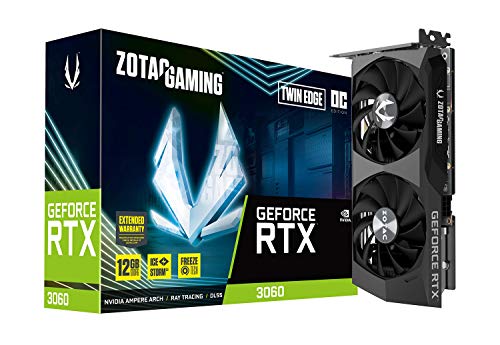
ZOTAC GeForce RTX 3060 Twin Edge 12GB
Best for: 1080p gaming with high texture settings
- Memory
- 12GB (what this guide is about)
- Graphics Processor
- GeForce RTX 3060
- Memory Size
- 12GB
- Memory Type
- GDDR6
- Memory Bus Width
- 192-bit
- PCIe Interface
- PCIe 4.0
View on Amazon: ZOTAC GeForce RTX 3060 Twin Edge 12GB Affiliate link
This ZOTAC card features the GeForce RTX 3060 GPU with 12GB of GDDR6 memory. The 192-bit bus and PCIe 4.0 interface provide solid bandwidth for modern gaming. You will benefit from the large VRAM capacity when running games at 1080p or 1440p. The Twin Edge design keeps the build compact for most standard cases.
Pros
- 12GB GDDR6 memory capacity
- 192-bit memory bus width
- PCIe 4.0 interface support
- Compact 8.8-inch length
Cons
- 192-bit bus limits bandwidth compared to 256-bit cards
- No mention of external power connectors in data
- Single fan cooling design may run warmer under load
Good fit if
- You need 12GB VRAM for texture-heavy games
- You have a mid-size PC case
- You play at 1080p or 1440p resolution
Skip if
- You require 24GB VRAM for professional workloads
- You need PCIe 5.0 support
- You prefer triple-fan cooling solutions
Verdict: ZOTAC RTX 3060 12GB Twin Edge offers ample VRAM for gamers who prioritize texture quality over raw bandwidth. It suits players who want a compact card that fits easily into standard builds without sacrificing memory capacity.

PNY NVIDIA RTX A2000 6GB Graphics Card
Best for: Professional tasks requiring 6GB VRAM
- Memory
- 6GB (what this guide is about)
- Graphics Processor
- RTX A2000
- Memory Size
- 6GB
- Memory Type
- GDDR6
- Length
- 6.57 inches
- Width
- 2.72 inches
View on Amazon: PNY NVIDIA RTX A2000 6GB Graphics Card Affiliate link
The PNY RTX A2000 features 6GB of GDDR6 memory. This card is designed for professional workloads rather than high-end gaming. Its full-height form factor and compact dimensions make it suitable for standard desktop cases. You should consider this card if you need reliable performance for CAD or light content creation tasks without requiring excessive video memory.
Pros
- 6GB GDDR6 memory capacity
- Compact 6.57-inch length
- Full-height design
- RTX A2000 processor
Cons
- 6GB memory is lower than the 24GB option on this list
- 6GB memory is lower than the 16GB option on this list
- 6GB memory is lower than the 12GB option on this list
Good fit if
- You need a professional card with 6GB of VRAM
- You have a standard desktop case with limited space
- You are running CAD or light creative applications
Skip if
- You require more than 6GB of video memory
- You are building a high-end gaming PC
- You need the maximum memory capacity available on this list
Verdict: PNY RTX A2000 6GB Graphics Card fits users who need a compact professional card with 6GB of VRAM for specific workstation tasks.

EVGA GeForce RTX 3090 24GB
Best for: Users needing 24GB VRAM capacity
- Memory
- 24GB (what this guide is about)
- Graphics Processor
- GeForce RTX 3090
- Memory Size
- 24GB
- Memory Type
- GDDR6X
- Boost Clock
- 1800MHz
- PCIe Interface
- PCIe 4
View on Amazon: EVGA GeForce RTX 3090 24GB Affiliate link
This EVGA GeForce RTX 3090 card features 24GB of GDDR6X memory. It includes 10496 CUDA cores and a 1800MHz boost clock. The card uses the PCIe 4.0 interface. It measures 11.8 inches long and weighs 2.5 pounds. You should choose this if you need large video memory for high-resolution textures. It suits users who prioritize raw memory capacity over compact size.
Pros
- 24GB GDDR6X memory capacity
- 10496 CUDA cores for parallel processing
- 1800MHz boost clock speed
- PCIe 4.0 interface support
Cons
- Large 11.8-inch length may not fit small cases
- Heavy 2.5-pound build requires strong support
- No mention of specific fan noise levels
Good fit if
- You need 24GB of VRAM for 4K gaming or professional workloads
- You have a large case that fits 11.8-inch cards
- You want GDDR6X memory bandwidth
Skip if
- You have a small form factor case
- You only need 8GB or less of VRAM
- You prefer a lighter, more compact card
Verdict: EVGA RTX 3090 24GB GDDR6X offers massive 24GB GDDR6X memory for users with large cases who need high VRAM capacity. It fits those prioritizing memory size over compact dimensions.

AMD Radeon Pro WX 3200 4GB
Best for: Professional workstation tasks with low VRAM needs
- Memory
- 4GB (what this guide is about)
- Graphics Processor
- Radeon Pro WX 3200
- Memory Size
- 4GB
- Memory Type
- GDDR5
- Dimensions
- 9.84 × 2.6 × 8.27 inches
- Weight
- 12.7 ounces
View on Amazon: AMD Radeon Pro WX 3200 4GB Affiliate link
The AMD Radeon Pro WX 3200 features 4GB of GDDR5 memory. This graphics card is designed for professional workloads rather than high-end gaming. It has a full-height form factor with a length of 9.84 inches. The 4GB buffer handles basic display tasks and older applications. It suits users needing reliable professional graphics with limited system space.
Pros
- 4GB GDDR5 memory capacity
- Full-height design fits standard cases
- 9.84 inches length for compatibility
Cons
- 4GB memory is limited for modern high-resolution gaming
- GDDR5 is slower than GDDR6 or GDDR6X standards
- No mention of display output ports in data
Good fit if
- You need a professional graphics card for older software
- You have a small case with space constraints
- You require a full-height card for workstation use
Skip if
- You want to play modern AAA titles at high settings
- You need 8GB or more VRAM for heavy rendering
- You require the latest GDDR6 memory technology
Verdict: The AMD Radeon Pro WX 3200 4GB is a specialized card for professional tasks. It fits users who need stable performance for legacy applications rather than gamers.
Specifications side by side
| Spec | ASUS TUF RTX 4070 Ti Super BTF White | ZOTAC GeForce RTX 3070 Twin Edge OC 8GB | ZOTAC GeForce RTX 3060 Twin Edge 12GB | PNY NVIDIA RTX A2000 6GB Graphics Card | EVGA GeForce RTX 3090 24GB | AMD Radeon Pro WX 3200 4GB |
|---|---|---|---|---|---|---|
| Graphics Processor | GeForce RTX 4070 Ti Super | GeForce RTX 3070 | GeForce RTX 3060 | RTX A2000 | GeForce RTX 3090 | Radeon Pro WX 3200 |
| Memory Size | 16GB | 8GB | 12GB | 6GB | 24GB | 4GB |
| Memory Type | GDDR6X | GDDR6 | GDDR6 | GDDR6 | GDDR6X | GDDR5 |
| Boost Clock | not stated | 1755 MHz | not stated | not stated | 1800MHz | not stated |
| Memory Bus Width | not stated | 256-bit | 192-bit | not stated | not stated | not stated |
| PCIe Interface | PCIe 4.0 | PCIE 4.0 | PCIe 4.0 | not stated | PCIe 4 | not stated |
| Memory | 16GB | 8GB | 12GB | 6GB | 24GB | 4GB |
| GPU | not stated | not stated | GeForce RTX 3060 | not stated | GeForce RTX 3090 | not stated |
| Interface | PCIe 4.0 | PCIe 4.0 | PCIe 4.0 | not stated | PCIe 4.0 | not stated |
| Use | Gaming | Gaming | Gaming | not stated | Gaming | not stated |
| Weight | 2.87 pounds | not stated | not stated | 1.17 pounds | 2.5 pounds | 12.7 ounces |
| Dimensions | not stated | not stated | 8.8 × 4.6 × 1.5 inches | not stated | 11.8 × 5.38 × 0.1 inches | 9.84 × 2.6 × 8.27 inches |
| Length | not stated | not stated | not stated | 6.57 inches | not stated | not stated |
| Width | not stated | not stated | not stated | 2.72 inches | not stated | not stated |
| Size | RTX4070Ti Super|OC|Only support BTF MB | not stated | not stated | not stated | not stated | not stated |
| Color | White | not stated | not stated | not stated | not stated | not stated |
| Model | not stated | not stated | not stated | PG192 | not stated | VTR4J |
Frequently asked questions
Does 16GB of memory help with high-end gaming?
Yes, 16GB of GDDR6X memory supports demanding gaming tasks. The ASUS TUF RTX 4070 Ti Super uses this capacity to deliver robust performance. It fits users with BTF motherboards seeking high-end results in a white chassis. This amount of VRAM handles complex textures without bottlenecking the GPU.
Is 8GB of VRAM enough for 1440p ray tracing?
It offers solid performance for 1440p ray tracing gaming. The ZOTAC RTX 3070 8GB card demonstrates this balance. It prioritizes efficiency over maximum VRAM capacity. You get stable frame rates at this resolution, though you may need to adjust settings in the most demanding titles to maintain smooth gameplay.
How does 12GB of memory benefit 1080p gaming?
12GB provides ample VRAM for high texture settings at 1080p. The ZOTAC RTX 3060 Twin Edge uses GDDR6 to prioritize texture quality over raw bandwidth. This compact card fits easily into standard builds. You gain the ability to use higher-resolution textures without running out of dedicated video memory.
What is the advantage of 24GB of VRAM?
24GB of GDDR6X memory offers massive storage for large datasets. The EVGA RTX 3090 example shows this tier supports heavy workloads. It suits users with large cases who need high VRAM capacity. This capacity is ideal for professionals handling complex 3D scenes or gamers playing at very high resolutions.
Can 4GB of memory handle professional workstation tasks?
Yes, 4GB of GDDR5 memory fits specific professional needs. The AMD Radeon Pro WX 3200 is designed for stable performance in legacy applications. It suits users who do not need gaming capabilities. This card provides a specialized solution for workstation tasks that have lower VRAM requirements.
Is 6GB of memory suitable for professional use?
Six gigabytes of VRAM fits users needing a compact professional card. The PNY RTX A2000 provides this capacity for specific workstation tasks. It measures 6.57 inches in length, making it easy to install. This setup ensures you have enough dedicated memory for professional applications without requiring a massive graphics card.