Best GLOTRENDS Computer Cables: 5 Models Compared
As an Amazon Associate we earn from qualifying purchases. Links on this page are affiliate links.
You need the best GLOTRENDS computer cables for your specific build needs. This guide compares 5 models based on their published specifications. GLOTRENDS offers PCIe riser cables in various lengths, angles, and interfaces. The top pick is the GLOTRENDS 200mm Right-Angle PCIe 4.0 Riser Cable because it provides 32GB/s bandwidth for mid-tower vertical GPU mounts. We selected these options strictly by comparing data points like size, interface generation, and shielding. You can choose the right cable by matching these specs to your case and motherboard requirements.
Quick picks
| # | Product | Best for | Price |
|---|---|---|---|
| 1 | GLOTRENDS 200mm Right-Angle PCIe 4.0 Riser Cable Best overall | mid-tower vertical PCIe 4.0 GPU mounts | Check price of GLOTRENDS 200mm Right-Angle PCIe 4.0 Riser Cable on Amazon |
| 2 | GLOTRENDS 250mm PCIe 3.0 x16 90-Degree Riser Cable Also great | full-tower cases with Gen3 GPUs | Check price of GLOTRENDS 250mm PCIe 3.0 x16 90-Degree Riser Cable on Amazon |
| 3 | GLOTRENDS 150mm PCIe 5.0 Riser Cable Best premium | Vertical GPU mounts in mid-tower cases | Check price of GLOTRENDS 150mm PCIe 5.0 Riser Cable on Amazon |
| 4 | Glotrends PA17 Straight PCIe 5.0 Riser Best budget | low-profile 1U/2U rack server builds | Check price of Glotrends PA17 Straight PCIe 5.0 Riser on Amazon |
| 5 | GLOTRENDS Double Reverse PCIe 5.0 Riser Also great | Mini-ITX builds with high-end GPUs | Check price of GLOTRENDS Double Reverse PCIe 5.0 Riser on Amazon |
Our 5 picks

GLOTRENDS 200mm Right-Angle PCIe 4.0 Riser Cable
Best for: mid-tower vertical PCIe 4.0 GPU mounts
- Interface Standard
- PCIe 4.0
- Slot Configuration
- x16
- Cable Length
- 200mm
- Connector Angle
- 90 Degree Right Angle
- Maximum Bandwidth
- 32GB/s
- Shielding Type
- foil-wrapped
View on Amazon: GLOTRENDS 200mm Right-Angle PCIe 4.0 Riser Cable Affiliate link
This 200mm riser cable connects your graphics card to a PCIe 4.0 x16 slot using a 90-degree right-angle connector. It delivers up to 32GB/s bandwidth across foil-shielded 30AWG silver-plated copper wires. It fits your build if you mount a Gen4 GPU vertically in a standard ATX or mid-tower case and need routing slack.
Pros
- Delivers PCIe 4.0 x16 bandwidth up to 32GB/s
- Individually foil-wrapped 30AWG silver-plated copper wiring
- 90-degree right-angle connector for vertical GPU mounting
- Backward compatible with PCIe 3.0 hardware
Cons
- Limited to PCIe 4.0 speeds rather than PCIe 5.0
- Does not support hot swapping
Good fit if
- You need a 90-degree mount for a PCIe 4.0 graphics card.
- You route cabling inside a standard mid-tower or ATX chassis.
Skip if
- You require PCIe 5.0 bandwidth for your system.
- You need hot-swap capability for expansion cards.
Verdict: GLOTRENDS 200mm PCIe 4.0 x16 Right-Angle Riser Cable serves mid-tower builders who need 32GB/s Gen4 bandwidth and foil shielding for vertical graphics card installations.

GLOTRENDS 250mm PCIe 3.0 x16 90-Degree Riser Cable
Best for: full-tower cases with Gen3 GPUs
- Interface Standard
- PCIe 3.0
- Slot Configuration
- x16
- Cable Length
- 250mm
- Connector Angle
- 90 Degree Right Angle
- Maximum Bandwidth
- 16GB/s
- Shielding Type
- EMI Shielded
View on Amazon: GLOTRENDS 250mm PCIe 3.0 x16 90-Degree Riser Cable Affiliate link
This 250mm PCIe 3.0 x16 riser cable provides up to 16GB/s bandwidth for full-tower cases. The 90-degree right angle connector aids routing near thick coolers. EMI shielding stabilizes 4K output. It works with PCIe 2.0 and 1.0 slots. You should use it with Gen3 GPUs or set the motherboard to Gen3 mode for newer cards.
Pros
- 250mm length suits full-tower chassis
- Up to 16GB/s PCIe 3.0 x16 bandwidth
- EMI-shielded ribbon design for stable signals
- 90-degree right angle connector
Cons
- PCIe 3.0 interface limits newer GPU speeds
- Requires BIOS change for PCIe 4.0 GPUs
- Hot swapping not supported
Good fit if
- You need extra length for full-tower cases
- You use PCIe 3.0 compatible GPUs
- You want stable 4K output in gaming
Skip if
- You require PCIe 4.0 or 5.0 speeds
- You need hot swapping capability
- You have a compact mid-tower case
Verdict: GLOTRENDS 250mm PCIe 3.0 Riser Cable fits users with full-tower cases and Gen3 GPUs. It offers stable signal integrity but requires BIOS adjustments for newer hardware.
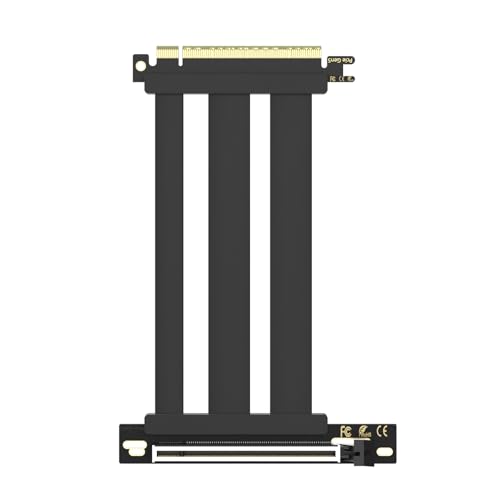
GLOTRENDS 150mm PCIe 5.0 Riser Cable
Best for: Vertical GPU mounts in mid-tower cases
- Interface Standard
- PCIe 5.0
- Slot Configuration
- x16
- Cable Length
- 150mm
- Connector Angle
- 90 Degree Right Angle
- Maximum Bandwidth
- 64GB/s
- Shielding Type
- individually foil-wrapped
View on Amazon: GLOTRENDS 150mm PCIe 5.0 Riser Cable Affiliate link
This 150mm PCIe 5.0 x16 riser cable supports up to 64GB/s bandwidth for vertical GPU mounts. It uses a 90-degree right-angle connector and includes 12V power delivery for stable operation. The double-grounded, foil-wrapped design protects signal integrity. It works with modern GeForce and Radeon cards on compatible motherboards.
Pros
- Supports PCIe 5.0 x16 with up to 64GB/s bandwidth
- 150mm length ideal for standard mid-tower vertical mounts
- 90-degree right-angle connector for tidy cable routing
- 12V power delivery up to 78W for flagship GPUs
- Double-grounded and foil-wrapped for EMI protection
Cons
- Shorter 150mm length limits use in larger cases
- Not suitable for hot-swapping during operation
- Requires a CPU-direct PCIe 5.0 x16 slot
Good fit if
- You need a riser for vertical GPU mounting
- You want maximum PCIe 5.0 bandwidth
- You have a mid-tower case with limited depth
Skip if
- You need a longer cable for deep cases
- Your motherboard only has PCIe 4.0 slots
- You require hot-swapping capabilities
Verdict: GLOTRENDS 150mm PCIe 5.0 Riser delivers full PCIe 5.0 bandwidth for vertical builds. It fits users with mid-tower cases who need a short, high-performance connection for modern GPUs.

Glotrends PA17 Straight PCIe 5.0 Riser
Best for: low-profile 1U/2U rack server builds
- Interface Standard
- PCIe 5.0
- Slot Configuration
- x16
- Connector Angle
- Straight Angle
- Weight
- 1.76 ounces
View on Amazon: Glotrends PA17 Straight PCIe 5.0 Riser Affiliate link
The GLOTRENDS PA17 is a straight-angle PCIe 5.0 x16 riser adapter card designed for 1U or 2U rack servers. It raises the motherboard slot by 200mm to clear drive cages and shrouds. The card passes signals directly without enhancement. It supports backward compatibility with PCIe 4.0 and 3.0 devices. You should choose this if you need a low-profile solution for tight server chassis spaces.
Pros
- Supports full PCIe 5.0 x16 bandwidth
- 200mm height clears adjacent components
- Backward compatible with PCIe 4.0/3.0
- Available in low-profile 1U/2U format
Cons
- Requires all system components to support PCIe 5.0 for full speed
- Does not support hot-plugging
- Only available in straight angle style
Good fit if
- You need a low-profile riser for 1U or 2U rack servers
- You require a straight-angle connection to clear drive cages
- You have a system-wide PCIe 5.0 compatible setup
Skip if
- You need a right-angle or left-angle cable
- You plan to hot-swap the card while the system is running
- Your system components do not support PCIe 5.0
Verdict: GLOTRENDS PA17 PCIe 5.0 Riser is a specialized low-profile adapter for server racks. It fits users who need a straight connection in tight 1U or 2U chassis.

GLOTRENDS Double Reverse PCIe 5.0 Riser
Best for: Mini-ITX builds with high-end GPUs
- Interface Standard
- PCIe 5.0
- Slot Configuration
- x16
- Cable Length
- 185mm
- Connector Angle
- double reverse
- Maximum Bandwidth
- 64GB/s
- Shielding Type
- individually foil-wrapped
View on Amazon: GLOTRENDS Double Reverse PCIe 5.0 Riser Affiliate link
This double reverse riser cable supports Mini-ITX motherboards and PCIe 5.0 x16 GPUs. It uses 30AWG silver-plated copper with individual foil wrapping for enhanced signal integrity. The 40-pin connector delivers up to 78W of power. You need Intel 13th Gen or Ryzen 7000 series CPUs for full bandwidth. It is built for high-end graphics cards like RTX 50 Series or RX 9000 Series.
Pros
- PCIe 5.0 x16 interface for theoretical 64GB/s bandwidth
- Double reverse design for Mini-ITX motherboard installation
- 30AWG silver-plated copper with individual foil shielding
- 40-pin connector providing up to 78W power delivery
Cons
- Requires specific high-end CPUs for PCIe 5.0 speeds
- Limited to Mini-ITX form factor compatibility
- No mention of included mounting hardware
Good fit if
- You are building a Mini-ITX PC with a large GPU
- You have an Intel 13th Gen or newer CPU
- You are using an RTX 50 Series or RX 9000 Series graphics card
Skip if
- You are using a standard ATX motherboard
- You have an older generation CPU that does not support PCIe 5.0
- You need a straight-angle cable for standard cases
Verdict: GLOTRENDS PCIe 5.0 ITX Riser Cable is a specialized solution for Mini-ITX builds requiring high bandwidth. It fits users with compatible high-end CPUs and GPUs who need a double reverse connection.
Specifications side by side
| Spec | GLOTRENDS 200mm Right-Angle PCIe 4.0 Riser Cable | GLOTRENDS 250mm PCIe 3.0 x16 90-Degree Riser Cable | GLOTRENDS 150mm PCIe 5.0 Riser Cable | Glotrends PA17 Straight PCIe 5.0 Riser | GLOTRENDS Double Reverse PCIe 5.0 Riser |
|---|---|---|---|---|---|
| Interface Standard | PCIe 4.0 | PCIe 3.0 | PCIe 5.0 | PCIe 5.0 | PCIe 5.0 |
| Slot Configuration | x16 | x16 | x16 | x16 | x16 |
| Cable Length | 200mm | 250mm | 150mm | not stated | 185mm |
| Connector Angle | 90 Degree Right Angle | 90 Degree Right Angle | 90 Degree Right Angle | Straight Angle | double reverse |
| Maximum Bandwidth | 32GB/s | 16GB/s | 64GB/s | not stated | 64GB/s |
| Shielding Type | foil-wrapped | EMI Shielded | individually foil-wrapped | not stated | individually foil-wrapped |
| GPU | GeForce RTX 4090 | not stated | not stated | not stated | not stated |
| Interface | PCIe 4.0 | PCIe 3.0 | PCIe 5.0 | PCIe 5.0 | PCIe 5.0 |
| Form Factor | not stated | not stated | not stated | not stated | ITX |
| Dimensions | 9.84 × 4.72 × 4.72 inches | not stated | not stated | not stated | not stated |
| Weight | 4.97 ounces | not stated | not stated | 1.76 ounces | not stated |
| Size | 200mm | 250mm | 150mm | not stated | not stated |
| Color | Black | Black | Black | not stated | Black |
| Model | PCIE40-X16-200MM-0090D | PCIE30-X16-250MM-0090D | PCIE50-X16-150MM-0090D-Black | PA17 | not stated |
GLOTRENDS Cable Models Compared
These five cables differ by interface speed and physical shape. You can choose between PCIe 3.0, 4.0, or 5.0 bandwidth depending on your motherboard generation. The GLOTRENDS 200mm Right-Angle PCIe 4.0 Riser Cable offers a balanced option for mid-tower builds. For older systems, the 250mm PCIe 3.0 model provides stable connectivity. If you need maximum throughput, the 150mm PCIe 5.0 Riser Cable supports the latest standards. Lengths vary from 150mm to 250mm, allowing you to match your case dimensions precisely. Angles include right-angle, straight, and double reverse designs. This variety ensures you find a cable that fits your specific chassis layout without strain.
Who GLOTRENDS Cables Suit
This range covers most standard vertical GPU setups. You can choose from 150mm to 250mm lengths. Options include right-angle and straight connectors. The lineup spans PCIe 3.0 through 5.0 interfaces. You find models for mid-tower cases, full-tower chassis, and Mini-ITX builds. Specialized low-profile adapters exist for server racks. However, the list lacks HDMI or DisplayPort cables. It also does not offer USB or power cables. If you need those, you must look elsewhere. This brand focuses strictly on PCIe extension needs.
For a related comparison, read grey computer workstation.
How to Choose the Right GLOTRENDS Cable
-
Match PCIe Generation
You must align the cable interface with your motherboard and GPU capabilities. The GLOTRENDS 150mm PCIe 5.0 Riser Cable provides the highest bandwidth for modern hardware. If your system uses older components, the 250mm PCIe 3.0 option may suffice. Check your motherboard specifications to determine the supported generation. Using a higher-generation cable on an older board works, but you lose potential speed. Always verify that both ends of the connection support the chosen standard.
-
Select Correct Length
Cable length determines fitment within your specific chassis. The 150mm model suits tight mid-tower vertical mounts where space is limited. The 200mm right-angle version offers flexibility for standard mid-tower cases. The 250mm cable accommodates full-tower builds requiring extra reach. Measure the distance between your motherboard slot and the GPU mount precisely. Choosing a cable that is too short prevents connection, while one that is too long creates clutter.
-
Check Connector Angle
The connector angle affects how the graphics card sits relative to the motherboard. The 200mm right-angle cable allows the GPU to sit parallel to the motherboard, saving vertical space. The straight PA17 model is designed for low-profile server racks where alignment must be direct. The double reverse configuration assists Mini-ITX builds by routing the connection differently. Ensure the angle matches your case layout to avoid physical interference with other components.
-
Consider Form Factor
Your case size dictates the appropriate riser solution. Mini-ITX builds often require specialized cables like the double reverse PCIe 5.0 model. These cables help manage cable routing in compact spaces. Mid-tower cases typically use standard right-angle or straight configurations. Full-tower cases benefit from longer cables to bridge greater distances. Verify that your chosen form factor aligns with your motherboard layout and case interior dimensions for a clean installation.
-
Verify Shielding Needs
Signal integrity is crucial for stable performance at high speeds. The 200mm PCIe 4.0 cable includes foil shielding to reduce interference. This feature is important for maintaining bandwidth over longer distances. While not all models explicitly list shielding details, higher-tier options often include it. Ensure your build environment does not have excessive electromagnetic noise. Proper shielding helps prevent data corruption and ensures your GPU operates at its rated speed consistently.
Frequently asked questions
What is the best GLOTRENDS riser cable for a mid-tower vertical GPU mount?
The GLOTRENDS 200mm Right-Angle PCIe 4.0 Riser Cable is the top choice. It provides 32GB/s Gen4 bandwidth and includes foil shielding. This model fits mid-tower builders who need a reliable connection for vertical graphics card installations. The right-angle design helps manage cable routing in standard cases.
Which GLOTRENDS cable is best for Mini-ITX builds?
The GLOTRENDS Double Reverse PCIe 5.0 Riser Cable is designed for Mini-ITX systems. It offers a double reverse connection to accommodate high-end GPUs in compact builds. This model supports PCIe 5.0 interfaces, ensuring you get the necessary bandwidth for modern hardware in tight spaces.
Does GLOTRENDS offer a PCIe 5.0 riser cable?
Yes, GLOTRENDS offers multiple PCIe 5.0 options. The 150mm version is ideal for mid-tower cases, while the PA17 is a straight adapter for low-profile server racks. Both models support the latest PCIe 5.0 standard, delivering maximum bandwidth for compatible motherboards and graphics cards.
What is the longest GLOTRENDS PCIe riser cable available?
The GLOTRENDS 250mm PCIe 3.0 x16 Riser Cable is the longest option in this lineup. It measures 250mm in length, making it suitable for full-tower cases. This cable provides stable signal integrity for Gen3 GPUs, though it may require BIOS adjustments for newer hardware.
Is there a GLOTRENDS cable for server rack builds?
The Glotrends PA17 Straight PCIe 5.0 Riser is built for server environments. It is a specialized low-profile adapter designed for 1U or 2U chassis. This straight connection fits users who need reliable PCIe 5.0 performance in tight server rack spaces without the bulk of standard risers.
What interface speed does the GLOTRENDS 200mm riser support?
The GLOTRENDS 200mm Right-Angle Riser Cable supports PCIe 4.0. It delivers 32GB/s of bandwidth, which is sufficient for most current-generation graphics cards. This model is shielded to reduce interference, making it a practical choice for vertical GPU mounts in mid-tower computer cases.
Can I use a PCIe 5.0 cable with a PCIe 3.0 motherboard?
You can physically connect them, but the cable will operate at the lower speed of your motherboard. For example, the GLOTRENDS 150mm PCIe 5.0 Riser will run at PCIe 3.0 speeds if paired with an older board. It is best to match the cable interface to your system's capabilities for optimal performance.