Looking Beyond the Cooler Master Vertical Graphics Card? 6 Alternatives Worth a Look
As an Amazon Associate we earn from qualifying purchases. Links on this page are affiliate links.
You might be looking for cooler master vertical graphics card alternatives because your build has specific constraints. The Cooler Master Vertical GPU Holder Kit V2 excels at showcasing your hardware in standard ATX cases. It features a modular design that allows you to adjust the GPU position for cable management. The kit includes a PCIe 4.0 riser cable and uses thick steel to support heavy cards. This makes it a solid choice for builders who want a clean, vertical display in a spacious chassis.
However, you might need something different. Perhaps your case is smaller, or you prefer a specific color like white. You might also want a dedicated extension cable instead of a full mounting kit. Or you may be building an external setup entirely. We selected these alternatives because their specifications overlap with the original product. Each option offers a different interface or form factor to suit your unique hardware needs. The list covers various sizes, colors, and connection types to help you find the right fit.
How each alternative compares
NZXT Vertical GPU Mounting Kit
The NZXT Vertical GPU Mounting Kit targets owners of H7 Series cases specifically. While the Cooler Master V2 fits any standard ATX chassis with seven slots, this NZXT mount is a specialized solution for a narrower ecosystem. It shares the PCIe 4.0 interface, ensuring high-speed data transfer just like the Cooler Master option. However, it weighs 1.76 pounds, which is significantly heavier than the 15.5-ounce Cooler Master kit. The NZXT version also comes in white, whereas the Cooler Master is black. You should choose the NZXT kit if you own an H7 case and prefer a white aesthetic, or if you need the robust steel support it provides for heavy graphics cards within that specific case design.
JMT 50cm PCIe 4.0 x16 Extension Cable
The JMT 50cm PCIe 4.0 x16 Extension Cable offers a flexible cable-based approach rather than a rigid mounting bracket. Unlike the Cooler Master V2, which includes a physical holder and a riser cable, the JMT product is just the cable itself. It measures 50cm in length and weighs only 5.28 ounces, making it much lighter and easier to route than the bulky Cooler Master kit. It also uses the PCIe 4.0 interface for compatibility. You should pick the JMT cable if you already have a mounting solution or prefer to keep your graphics card in a horizontal slot but further away from the motherboard. It is a cleaner alternative for users who want to relocate their card without adding significant weight or structural hardware to their build.
OwlTree PCIe 4.0 eGPU Dock
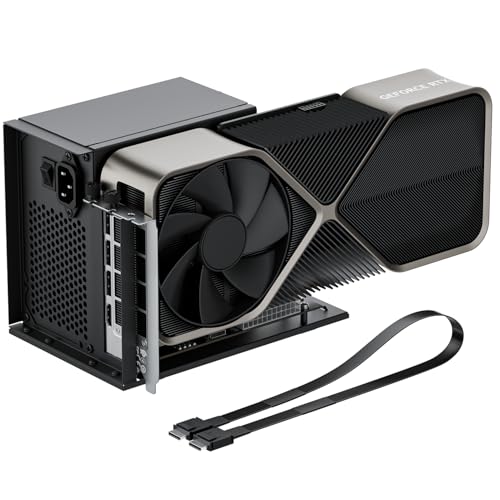
The OwlTree PCIe 4.0 eGPU Dock is designed for external large graphics card mounting. This is a fundamental difference from the Cooler Master V2, which is an internal chassis accessory. The OwlTree dock allows you to house your GPU outside the case, which is useful if you lack space or airflow inside. It also uses the PCIe 4.0 interface. The Cooler Master kit keeps your card internal and visible, while the OwlTree dock prioritizes physical compatibility and standard power supplies over internal aesthetics. You should choose the OwlTree dock if you need to mount a large graphics card externally or if you are building an external GPU setup. It is the better choice when internal case constraints prevent vertical mounting or when you want to keep the GPU out of the main airflow path entirely.
RGEEK OCuLink eGPU Dock
The RGEEK OCuLink eGPU Dock provides a high-bandwidth link for external graphics, differing significantly from the internal Cooler Master V2. While the Cooler Master kit uses a standard PCIe 4.0 riser cable, the RGEEK dock utilizes OCuLink technology for potentially higher data transfer speeds. It is extremely thin at 0.1 inches in height, compared to the bulkier Cooler Master mount. The RGEEK dock weighs nothing in the provided specs but is designed for stability in external setups. You should pick the RGEEK dock if you prioritize raw data transfer speeds and are building an external GPU rig. It is not a direct replacement for internal vertical mounting but offers a superior connectivity option for users who need maximum bandwidth and are willing to use an external enclosure for their graphics card.
EVGA GeForce RTX 3090 24GB
The EVGA GeForce RTX 3090 24GB is a graphics card, not a mounting accessory. It differs from the Cooler Master V2 by providing 24GB of GDDR6X memory and a PCIe 4.0 interface for gaming. The Cooler Master kit is a holder that supports any standard GPU, while the EVGA card is the actual component that does the processing. The EVGA card is large, measuring 11.8 inches in length and weighing 2.5 pounds, which requires a spacious case and potentially a vertical mount like the Cooler Master V2 to fit properly. You should choose the EVGA RTX 3090 if you need maximum VRAM and core count for heavy-duty gaming or content creation. It is the hardware you mount, whereas the Cooler Master kit is the tool you use to display it vertically.
ASUS TUF RTX 4070 Ti Super BTF White
The ASUS TUF RTX 4070 Ti Super BTF White is a specialized gaming card for users with BTF motherboards. Like the EVGA option, it is the GPU itself, not a mount. It features 16GB of GDDR6X memory and a PCIe 4.0 interface. The Cooler Master V2 is a universal holder for standard ATX cases, while this ASUS card requires specific BTF motherboard compatibility. It comes in white, matching the aesthetic of many modern builds. The card weighs 2.87 pounds, which is heavier than the 15.5-ounce Cooler Master mount. You should pick the ASUS TUF RTX 4070 Ti Super if you have a BTF motherboard and need 16GB of VRAM for gaming. It is the component that generates performance, while the Cooler Master kit is the accessory that allows you to display it vertically in a compatible case.
Quick picks
| # | Product | Best for | Price |
|---|---|---|---|
| 1 | Cooler Master Vertical GPU Holder Kit V2 Best overall | Showcasing GPUs in ATX cases | Check price of Cooler Master Vertical GPU Holder Kit V2 on Amazon |
| 2 | NZXT Vertical GPU Mounting Kit Also great | NZXT H7 Series case owners | Check price of NZXT Vertical GPU Mounting Kit on Amazon |
| 3 | JMT 50cm PCIe 4.0 x16 Extension Cable Best budget | Relocating existing graphics cards | Check price of JMT 50cm PCIe 4.0 x16 Extension Cable on Amazon |
| 4 | OwlTree PCIe 4.0 eGPU Dock Also great | External large graphics card mounting | Check price of OwlTree PCIe 4.0 eGPU Dock on Amazon |
| 5 | RGEEK OCuLink eGPU Dock Also great | high-bandwidth external GPU setups | Check price of RGEEK OCuLink eGPU Dock on Amazon |
| 6 | EVGA GeForce RTX 3090 24GB Best 24gb | Large cases needing 24GB VRAM | Check price of EVGA GeForce RTX 3090 24GB on Amazon |
| 7 | ASUS TUF RTX 4070 Ti Super BTF White Best premium | BTF motherboard users needing 16GB VRAM | Check price of ASUS TUF RTX 4070 Ti Super BTF White on Amazon |
Our 7 picks

Cooler Master Vertical GPU Holder Kit V2
Best for: Showcasing GPUs in ATX cases
- Interface
- PCIe 4.0
- Dimensions
- 7.24 × 5.59 × 4.76 inches
- Weight
- 15.5 ounces
View on Amazon: Cooler Master Vertical GPU Holder Kit V2 Affiliate link
This kit holds your graphics card vertically to display its design. It includes a PCIe 4.0 x16 riser cable and fits standard ATX cases with seven open slots. The steel bracket supports heavy GPUs without bending. You can adjust the GPU position to manage cables easily. This setup works well if you want to showcase your hardware in an open or closed chassis.
Pros
- Includes PCIe 4.0 x16 riser cable
- Fits standard ATX chassis with 7+ slots
- SGCC steel construction supports heavy GPUs
- Modular design allows cable routing adjustment
Cons
- Requires chassis with at least 7 open PCI slots
- Does not include the graphics card itself
- Adds 15.5 ounces to your build weight
Good fit if
- You have an ATX case with open side slots
- You want to display your GPU vertically
- You need a sturdy mount for heavy cards
Skip if
- You lack space for 7 open slots
- You prefer a horizontal card layout
- You want an all-in-one solution with a card
Verdict: Cooler Master Vertical GPU Holder V2 provides a secure, adjustable mount for vertical display. It suits builders with spacious ATX cases who want to showcase their hardware.

NZXT Vertical GPU Mounting Kit
Best for: NZXT H7 Series case owners
- PCIe Interface
- PCIe 4.0
- Dimensions
- 5.94 × 6 × 7 inches
- Weight
- 1.76 pounds
View on Amazon: NZXT Vertical GPU Mounting Kit Affiliate link
This NZXT vertical GPU mounting kit includes a 175 mm PCIe 4.0 riser cable and a sturdy steel bracket. The steel construction supports heavy graphics cards to prevent sagging. The riser cable ensures high-speed data transfer between the video card and motherboard. It is designed to fit NZXT H7 Series cases, allowing clearance for air and AIO cooling systems. This setup replaces standard horizontal mounting brackets for a clean vertical look.
Pros
- Sturdy steel bracket prevents graphics card sagging
- PCIe 4.0 riser cable supports high-speed data transfer
- Fits NZXT H7 Series cases with cooling clearance
- Replaces standard horizontal mounting bracket
Cons
- Limited to NZXT H7 Series case compatibility
- Only supports 175 mm graphics card length
- Requires separate purchase of compatible graphics card
Good fit if
- You own an NZXT H7 Series case
- You want to mount a heavy GPU vertically
- You need PCIe 4.0 bandwidth for your card
Skip if
- You use a case brand other than NZXT
- Your graphics card exceeds 175 mm in length
- You prefer horizontal GPU mounting
Verdict: NZXT Vertical GPU Mounting Kit is a specialized solution for NZXT H7 Series owners who need to support heavy graphics cards vertically. It provides robust steel support and PCIe 4.0 connectivity, ensuring your GPU remains stable and performs at high speeds within compatible cases.

JMT 50cm PCIe 4.0 x16 Extension Cable
Best for: Relocating existing graphics cards
- PCIe Interface
- PCIe 4.0
- Weight
- 5.28 ounces
View on Amazon: JMT 50cm PCIe 4.0 x16 Extension Cable Affiliate link
This JMT extension cable lets you relocate a graphics card away from the motherboard. It supports PCIe 4.0 with 32 GB/s bidirectional bandwidth. The 50 cm braided mesh harness offers flexibility for vertical mounting setups. You can choose from various angles and lengths. This solution works for GPU cards, accelerator cards, and other PCIe devices. It provides a clean alternative to bulky mounting kits.
Pros
- Supports PCIe 4.0 standard
- 32 GB/s bidirectional bandwidth
- Flexible 50 cm braided mesh design
- Available in multiple angles and orientations
Cons
- Requires a separate graphics card purchase
- Only extends connection, does not power the card
- No active signal boosting for long runs
Good fit if
- You need to move a GPU away from the motherboard
- You want a simple cable solution instead of a rigid bracket
- Your case supports vertical GPU mounting with space for the cable
Skip if
- You need a complete mounting kit with the graphics card included
- You require active signal amplification for distances over 50 cm
- You want a rigid metal bracket for maximum stability
Verdict: JMT PCIe 4.0 Riser Cable 50cm is a flexible extension solution for users who already have a graphics card and need to relocate it. It suits builders looking for a clean, cable-based alternative to rigid vertical mounting kits.
OwlTree PCIe 4.0 eGPU Dock
Best for: External large graphics card mounting
- Interface
- PCIe 4.0
View on Amazon: OwlTree PCIe 4.0 eGPU Dock Affiliate link
This OwlTree dock connects your desktop to an external graphics card via OCuLink. It supports PCIe 4.0 x4 for 64Gbps transfer speeds. The unit includes a 50cm SFF-8611 riser cable and requires a standard ATX power supply. It fits large cards like the RTX 4090. You need to power down the system to change connections. It is a practical solution for expanding GPU capabilities outside the case.
Pros
- PCIe 4.0 x4 interface with 64Gbps bandwidth
- Compatible with large graphics cards including RTX 4090
- Includes 50cm SFF-8611 male-to-male riser cable
- Supports standard ATX power supply with dual screw mounting
Cons
- PCIe interface does not support hot plugging
- Graphics card and power supply are not included
- Limited to PCIe 4.0 x4 bandwidth
Good fit if
- You need to mount a large graphics card outside your case
- You want to use a standard ATX power supply
- You prefer a detachable enclosure for easier storage
Skip if
- You need to swap graphics cards without turning off the computer
- You require the full bandwidth of a PCIe 4.0 x16 slot
- You want a complete kit with the graphics card included
Verdict: OwlTree PCIe 4.0 eGPU Dock is a sturdy option for users who need to house large graphics cards externally. It works well for those who prioritize physical compatibility and standard power supplies over maximum bandwidth.

RGEEK OCuLink eGPU Dock
Best for: high-bandwidth external GPU setups
- Interface
- PCIe 4.0
- Dimensions
- 7.8 × 5 × 0.1 inches
View on Amazon: RGEEK OCuLink eGPU Dock Affiliate link
This RGEEK enclosure converts an OCuLink SFF-8612 connection to a PCIe x16 slot. It supports PCIe 4.0 x4 with 64Gbps bandwidth. The dock fits graphics cards and requires an external ATX power supply. It includes a 50cm cable and LED indicators. You should use this if you need desktop GPU performance for a laptop or mini PC without the latency of other connection types.
Pros
- PCIe 4.0 x4 64Gbps bandwidth
- OCuLink to PCIe x16 conversion
- Supports RTX 4090 and RX 7900
- EMI shielding reduces interference
Cons
- Graphics card and power supply are not included
- Requires manual driver installation before first use
- Cannot hot-plug cables during operation
Good fit if
- You want higher bandwidth than Thunderbolt offers
- You use a laptop or mini PC with an OCuLink port
- You need to run heavy 3D modeling or AI tasks
Skip if
- You prefer a plug-and-play solution without driver setup
- You do not have an available ATX power supply
- You need to connect and disconnect the GPU frequently
Verdict: RGEEK OCuLink eGPU Dock provides a stable, high-bandwidth link for external graphics. It is best for users who prioritize raw data transfer speeds over convenience.

EVGA GeForce RTX 3090 24GB
Best for: Large cases needing 24GB VRAM
- Graphics Processor
- GeForce RTX 3090
- Memory Size
- 24GB
- Memory Type
- GDDR6X
- Boost Clock
- 1800MHz
- PCIe Interface
- PCIe 4
- Use
- Gaming
View on Amazon: EVGA GeForce RTX 3090 24GB Affiliate link
The EVGA GeForce RTX 3090 FTW3 Ultra provides 24GB of GDDR6X memory for high-resolution gaming. It features a 1800MHz boost clock and 10496 CUDA cores. The card measures 11.8 inches long and supports PCIe 4.0. This large GPU suits users needing substantial video memory for demanding tasks. It includes ARGB LED lighting and a triple-fan cooling design.
Pros
- 24GB GDDR6X memory capacity
- 1800MHz boost clock speed
- 10496 CUDA cores
- PCIe 4.0 interface support
Cons
- 11.8-inch length requires spacious cases
- 2.5-pound weight may stress riser cables
- No mention of specific power connector requirements
Good fit if
- You need 24GB of VRAM for 4K gaming
- You have a large case with strong support
- You want high CUDA core counts for compute
Skip if
- You use a small form factor PC
- Your riser cable cannot support heavy cards
- You only need 8GB of video memory
Verdict: EVGA RTX 3090 FTW3 Ultra 24GB is a high-end GPU for users with ample case space and heavy-duty cooling needs. It fits those prioritizing maximum VRAM and core count over compact dimensions.

ASUS TUF RTX 4070 Ti Super BTF White
Best for: BTF motherboard users needing 16GB VRAM
- Graphics Processor
- GeForce RTX 4070 Ti Super
- Memory Size
- 16GB
- Memory Type
- GDDR6X
- PCIe Interface
- PCIe 4.0
- Use
- Gaming
- Weight
- 2.87 pounds
View on Amazon: ASUS TUF RTX 4070 Ti Super BTF White Affiliate link
This ASUS TUF Gaming graphics card features a GeForce RTX 4070 Ti Super processor with 16GB of GDDR6X memory. It supports PCIe 4.0 interfaces for high-speed data transfer. The card is designed for gaming and comes in a white finish. It weighs 2.87 pounds. Note that this specific OC Edition only supports BTF motherboards, which limits its compatibility with standard systems.
Pros
- 16GB GDDR6X memory capacity
- GeForce RTX 4070 Ti Super graphics processor
- PCIe 4.0 interface support
- White color finish
Cons
- Requires a BTF compatible motherboard
- 2.87 pounds weight may require robust mounting
- Limited to BTF motherboard compatibility
Good fit if
- You have a BTF compatible motherboard
- You need 16GB of VRAM for gaming
- You prefer a white graphics card
Skip if
- You use a standard non-BTF motherboard
- You need more than 16GB of memory
- You prefer a black graphics card
Verdict: ASUS TUF RTX 4070 Ti Super BTF White is a specialized gaming card for users with BTF motherboards who need 16GB of VRAM. It fits those building a white-themed PC with compatible hardware.
Specifications side by side
| Spec | Cooler Master Vertical GPU Holder Kit V2 | NZXT Vertical GPU Mounting Kit | JMT 50cm PCIe 4.0 x16 Extension Cable | OwlTree PCIe 4.0 eGPU Dock | RGEEK OCuLink eGPU Dock | EVGA GeForce RTX 3090 24GB | ASUS TUF RTX 4070 Ti Super BTF White |
|---|---|---|---|---|---|---|---|
| Graphics Processor | not specified | not specified | not specified | not specified | not specified | GeForce RTX 3090 | GeForce RTX 4070 Ti Super |
| Memory Size | not specified | not specified | not specified | not specified | not specified | 24GB | 16GB |
| Memory Type | not specified | not specified | not specified | not specified | not specified | GDDR6X | GDDR6X |
| Boost Clock | not specified | not specified | not specified | not specified | not specified | 1800MHz | not specified |
| PCIe Interface | not specified | PCIe 4.0 | PCIe 4.0 | not specified | not specified | PCIe 4 | PCIe 4.0 |
| Memory | not specified | not specified | not specified | not specified | not specified | 24GB | 16GB |
| GPU | not specified | not specified | not specified | not specified | not specified | GeForce RTX 3090 | not specified |
| Interface | PCIe 4.0 | PCIe 4.0 | PCIe 4.0 | PCIe 4.0 | PCIe 4.0 | PCIe 4.0 | PCIe 4.0 |
| Use | not specified | not specified | not specified | not specified | not specified | Gaming | Gaming |
| Dimensions | 7.24 × 5.59 × 4.76 inches | 5.94 × 6 × 7 inches | not specified | not specified | 7.8 × 5 × 0.1 inches | 11.8 × 5.38 × 0.1 inches | not specified |
| Weight | 15.5 ounces | 1.76 pounds | 5.28 ounces | not specified | not specified | 2.5 pounds | 2.87 pounds |
| Color | Black | White | 16AD4 Right-Right | not specified | not specified | not specified | White |
| Model | MCA-U000R-KFVK02 | AB-RH175-W1 | 16AD4 | not specified | not specified | not specified | not specified |
| Size | not specified | 175 mm | 50cm | not specified | not specified | not specified | RTX4070Ti Super|OC|Only support BTF MB |
Frequently asked questions
What is the best vertical GPU mount for ATX cases?
The Cooler Master Vertical GPU Holder Kit V2 is the top choice for showcasing GPUs in standard ATX cases. It provides a secure, adjustable mount that fits spacious chassis. The kit features a PCIe 4.0 interface and measures 7.24 inches in length, ensuring compatibility with most modern graphics cards.
Which vertical GPU mount is best for NZXT cases?
The NZXT Vertical GPU Mounting Kit is designed specifically for NZXT H7 Series owners. It offers robust steel support to keep heavy graphics cards stable. This white mount includes PCIe 4.0 connectivity and measures 7 inches in height, providing a clean look within compatible cases.
Can I use a PCIe extension cable instead of a mount?
Yes, the JMT 50cm PCIe 4.0 x16 Extension Cable is a flexible alternative for relocating existing graphics cards. It suits builders who prefer a cable-based solution over rigid mounting kits. The 50cm length allows you to position your GPU vertically without needing a dedicated bracket.
What is the best external GPU dock for large cards?
The OwlTree PCIe 4.0 eGPU Dock is a sturdy option for housing large graphics cards externally. It prioritizes physical compatibility and standard power supplies. This dock supports PCIe 4.0 interfaces, making it suitable for users who need a reliable external housing solution for their hardware.
Which eGPU dock offers the highest bandwidth?
The RGEEK OCuLink eGPU Dock provides a stable, high-bandwidth link for external graphics setups. It is best for users who prioritize raw data transfer speeds over convenience. The dock measures 7.8 inches in length and supports PCIe 4.0, ensuring efficient performance for external GPU configurations.
What GPU has 24GB of VRAM for vertical mounting?
The EVGA GeForce RTX 3090 24GB is a high-end option for users with ample case space. It features 24GB of GDDR6X memory and a PCIe 4.0 interface. Measuring 11.8 inches in length, this card fits those prioritizing maximum VRAM and core count for gaming or professional tasks.
Is there a 16GB GPU for BTF motherboards?
The ASUS TUF RTX 4070 Ti Super BTF White is a specialized gaming card for users with BTF motherboards. It includes 16GB of GDDR6X memory and supports PCIe 4.0. This white-themed card fits builders needing compatible hardware, though it only supports BTF motherboards.