Best ZOTAC Graphics Cards with GDDR6: 8 Spec-Based Picks
As an Amazon Associate we earn from qualifying purchases. Links on this page are affiliate links.
Finding the right ZOTAC graphics card with GDDR6 comes down to matching memory bandwidth, clock speed, and card dimensions to your build. We evaluated 8 models based strictly on the specifications published on their listings.
The ZOTAC GeForce RTX 3070 Twin Edge OC 8GB leads because its 256-bit bus, 1755 MHz boost clock, and four-display support provide reliable desktop gaming performance. This guide helps you decide which card fits your case clearance, monitor setup, and memory requirements.
Quick picks
The best fit for you
- You need a 256-bit bus for 1440p gaming ZOTAC GeForce RTX 3070 Twin Edge OC 8GB This card features a 256-bit memory bus and a 1755 MHz boost clock for four-display setups.
- You want maximum memory capacity in a compact case ZOTAC GeForce RTX 3060 Twin Edge 12GB It provides 12GB of GDDR6 VRAM across a 192-bit bus within an 8.8-inch dual-fan design.
- You want DLSS 3 support for compact setups ZOTAC Gaming GeForce RTX 4060 Twin Edge OC This 8.7-inch model supports DLSS 3 and operates with 17 Gbps GDDR6 memory.
- You want a white graphics card for your build ZOTAC GeForce RTX 4060 Twin Edge OC White Its white enclosure measures 8.7 inches long and delivers a 2490 MHz boost clock.
Our 8 picks

ZOTAC GeForce RTX 3070 Twin Edge OC 8GB
Best for: wide-bus 1440p gaming and quad-display rigs
- Memory Type
- GDDR6 (what this guide is about)
- Graphics Processor
- GeForce RTX 3070
- Memory Size
- 8GB
- Boost Clock
- 1755 MHz
- Memory Bus Width
- 256-bit
- PCIe Interface
- PCIE 4.0
The ZOTAC GeForce RTX 3070 8GB Twin Edge OC is a dual-fan graphics card built on NVIDIA Ampere architecture. You get an 8GB GDDR6 memory configuration on a wide 256-bit bus running at 14 Gbps, paired with a 1755 MHz boost clock. It suits you if you want high memory bandwidth for multi-display setups, supporting four monitors through three DisplayPort 1.4a outputs and one HDMI 2.1 port.
Pros
- Wide 256-bit memory bus with 14 Gbps GDDR6
- Factory boost clock of 1755 MHz
- Supports four simultaneous displays via HDMI 2.1 and DisplayPort 1.4a
- IceStorm 2.0 cooling with FREEZE fan stop
Cons
- Video memory limited to 8GB GDDR6
- Lighting restricted to static white LED rather than RGB
Good fit if
- You need a 256-bit GDDR6 memory bus for high bandwidth.
- You run up to four displays using HDMI 2.1 and DisplayPort 1.4a.
Skip if
- You require more than 8GB of VRAM for heavy workloads.
- You prefer customizable RGB lighting inside your case.
Verdict: ZOTAC GeForce RTX 3070 8GB Twin Edge OC delivers 256-bit GDDR6 performance and four-display flexibility in a dual-fan form factor. It provides a reliable 1755 MHz boost clock for desktop gaming setups.

ZOTAC GeForce RTX 3060 Twin Edge 12GB
Best for: compact gaming builds needing 12GB VRAM
- Memory Type
- GDDR6 (what this guide is about)
- Graphics Processor
- GeForce RTX 3060
- Memory Size
- 12GB
- Memory Bus Width
- 192-bit
- PCIe Interface
- PCIe 4.0
- Use
- Gaming
The ZOTAC RTX 3060 Twin Edge OC 12GB provides dedicated graphics for gaming systems with a PCIe 4.0 interface. It features 12GB of GDDR6 memory operating on a 192-bit bus at 15 Gbps. Measuring 8.8 inches long, 4.6 inches wide, and 1.5 inches high, it fits inside compact cases. You get high memory capacity for heavy graphics tasks.
Pros
- 12GB GDDR6 memory capacity
- 192-bit bus operating at 15 Gbps
- Compact 8.8-inch total card length
- PCIe 4.0 interface support
Cons
- 192-bit bus narrower than 256-bit options
- Exact clock speeds omitted from specs
Good fit if
- You need 12GB of GDDR6 VRAM for gaming.
- You have a chassis limited to cards under 9 inches.
- You use a system supporting PCIe 4.0.
Skip if
- You require a wider 256-bit memory bus.
- You need a card under 8 inches for mini-ITX cases.
Verdict: ZOTAC RTX 3060 Twin Edge OC 12GB delivers 12GB of GDDR6 memory on a 192-bit bus within an 8.8-inch footprint. It suits space-constrained gaming builds requiring higher onboard memory capacity.

ZOTAC Gaming GeForce RTX 4060 Twin Edge OC
Best for: compact gaming rigs needing DLSS 3
- Memory Type
- GDDR6 (what this guide is about)
- Graphics Processor
- GeForce RTX 4060
- Memory Size
- 8GB
- Memory Bus Width
- 128-bit
- PCIe Interface
- PCIE 4.0
- Use
- Gaming
This ZOTAC GeForce RTX 4060 graphics card equips your rig with 8GB of GDDR6 memory operating on a 128-bit interface at 17 Gbps. Its compact footprint measures 8.7 inches long, 4.8 inches high, and 1.7 inches wide. You get PCIe 4.0 connectivity and DLSS 3 support inside a gun metal shroud. It suits you if you need modern architecture in small cases.
Pros
- High 17 Gbps GDDR6 memory speed
- Compact 8.7-inch length fits smaller enclosures
- Supports DLSS 3 technology and PCIe 4.0 interface
Cons
- Narrow 128-bit memory bus width
- 8GB VRAM pool is smaller than 12GB options
Good fit if
- You need a compact card under 9 inches for a small case.
- You want 17 Gbps GDDR6 memory speeds and DLSS 3 support.
Skip if
- You require more than 8GB of video memory.
- You need a wider memory bus than 128-bit.
Verdict: ZOTAC Gaming RTX 4060 8GB Twin Edge OC provides 17 Gbps GDDR6 memory and DLSS 3 in an 8.7-inch card. It fits modern architecture into builds with limited internal clearance.
ZOTAC GeForce RTX 3060 Twin Edge OC 12GB
Best for: 12GB GDDR6 setups in compact desktop cases
- Memory Type
- GDDR6 (what this guide is about)
- Graphics Processor
- GeForce RTX 3060
- Memory Size
- 12GB
- Boost Clock
- 1807 MHz
- Memory Bus Width
- 192-bit
- PCIe Interface
- PCIE 4.0
This ZOTAC graphics card features an NVIDIA GeForce RTX 3060 GPU with 12GB of GDDR6 memory on a 192-bit bus. Connected through a PCIe 4.0 interface, it provides an 1807 MHz boost clock and 15 Gbps memory speed. Four display outputs include three DisplayPort 1.4a ports and one HDMI 2.1 port. Measuring 8.8 inches long with IceStorm 2.0 cooling, it suits you if you need high VRAM capacity in a compact case.
Pros
- 12GB GDDR6 memory on a 192-bit bus
- Boost clock speed of 1807 MHz
- Compact length of 8.8 inches
- Supports up to 4 simultaneous displays with three DisplayPort 1.4a and one HDMI 2.1
Cons
- 192-bit memory interface is narrower than 256-bit models
- Includes only one HDMI port
Good fit if
- You want 12GB of GDDR6 VRAM on a 192-bit bus.
- You need a card under 9 inches in length for your system.
- You want to connect up to four monitors using DisplayPort and HDMI.
Skip if
- You require a wider 256-bit memory bus.
- You need more than one native HDMI port.
Verdict: ZOTAC GeForce RTX 3060 Twin Edge OC 12GB pairs 12GB of GDDR6 memory with an 1807 MHz boost clock in an 8.8-inch form factor. It gives you four display outputs and IceStorm 2.0 cooling for compact desktop setups.
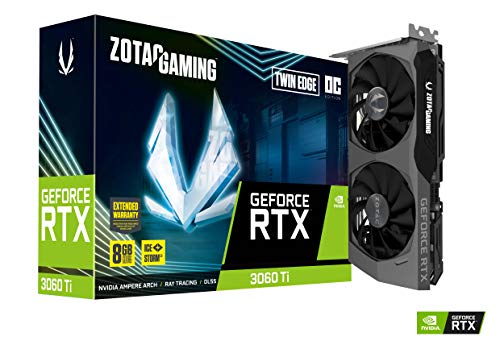
ZOTAC Gaming RTX 3060 Ti Twin Edge OC
Best for: compact dual-slot multi-display GDDR6 setups
- Memory Type
- GDDR6 (what this guide is about)
- Graphics Processor
- GeForce RTX 3060 Ti
- Memory Size
- 8GB
- Boost Clock
- 1695 MHz
- Memory Bus Width
- 256-bit
- PCIe Interface
- PCIE 4.0
The ZOTAC RTX 3060 Ti Twin Edge OC 8GB provides 8GB of GDDR6 memory across a wide 256-bit bus running at 14 Gbps. It features a boost clock of 1695 MHz, dual-slot thickness, and an 8.74-inch length. This card suits you if you want a compact Ampere board capable of driving up to four displays via three DisplayPort 1.4a ports and one HDMI 2.1 port with a 200W power draw.
Pros
- 256-bit memory bus with 14 Gbps GDDR6
- Compact 8.74-inch length and dual-slot profile
- Four video outputs including three DisplayPort 1.4a and one HDMI 2.1
- IceStorm 2.0 cooling with Freeze Fan Stop
Cons
- 200W power consumption specification
- 8GB GDDR6 capacity limit
- White-only LED logo lighting without RGB
Good fit if
- You need an 8.74-inch dual-slot card to fit smaller chassis dimensions.
- You want a 256-bit memory bus interface for 14 Gbps GDDR6 bandwidth.
- You plan to run up to four displays simultaneously.
Skip if
- You require more than 8GB of video memory.
- You need a card with power consumption below 200W.
Verdict: ZOTAC RTX 3060 Ti Twin Edge OC 8GB delivers a 256-bit GDDR6 memory configuration and 1695 MHz boost clock in a space-saving dual-slot frame. It offers solid multi-display connectivity with three DisplayPort 1.4a outputs and one HDMI 2.1 port.

ZOTAC GeForce RTX 4060 Ti Twin Edge 8GB
Best for: compact gaming builds needing DLSS 3
- Memory Type
- GDDR6 (what this guide is about)
- Graphics Processor
- GeForce RTX 4060 Ti
- Memory Size
- 8GB
- Boost Clock
- 2535 MHz
- Memory Bus Width
- 128-bit
- PCIe Interface
- PCIE 4.0
This graphics card gives you an Ada Lovelace GPU with 8GB of GDDR6 memory on a 128-bit bus running at 18 Gbps. It features a 2535 MHz boost clock and a dual-fan cooler measuring 8.9 inches long. You get support for up to four simultaneous displays via three DisplayPort 1.4a ports and one HDMI 2.1a port. It suits you if you need modern architecture in a compact chassis.
Pros
- 2535 MHz boost clock with 18 Gbps GDDR6 memory
- Compact 8.9-inch length fits smaller cases
- IceStorm 2.0 dual 90mm fans with FREEZE fan stop
- Four display outputs via three DisplayPort 1.4a and one HDMI 2.1a
Cons
- Narrow 128-bit memory bus width
- VRAM capacity capped at 8GB
Good fit if
- You have a compact case that requires a card under 9 inches long.
- You want DLSS 3 support with a 2535 MHz boost clock.
- You run a multi-monitor setup requiring up to four displays.
Skip if
- You need more than 8GB of video memory.
- You want a wider memory bus width than 128-bit.
Verdict: ZOTAC GeForce RTX 4060 Ti Twin Edge 8GB delivers high clock speeds and four display outputs in a compact dual-fan form factor. It is a solid choice if you need modern Ada Lovelace architecture inside a smaller enclosure.

ZOTAC GeForce RTX 4060 Twin Edge OC White
Best for: compact white-themed multi-display gaming builds
- Memory Type
- GDDR6 (what this guide is about)
- Graphics Processor
- GeForce RTX 4060
- Memory Size
- 8GB
- Boost Clock
- 2490 MHz
- Memory Bus Width
- 128-bit
- PCIe Interface
- PCIE 4.0
This graphics card gives you an Ada Lovelace RTX 4060 GPU wrapped in an 8.7-inch compact white shroud. It features 8GB of GDDR6 memory clocked at 17 Gbps across a 128-bit bus, paired with a 2490 MHz boost clock. With three DisplayPort 1.4a ports and one HDMI 2.1a port, it handles up to four displays simultaneously. It suits you if you need modern GDDR6 performance inside a compact white chassis.
Pros
- Fast 17 Gbps GDDR6 memory speed
- Compact 8.7-inch dual-fan design
- 2490 MHz factory boost clock
- Four video outputs: three DisplayPort 1.4a and one HDMI 2.1a
Cons
- Narrow 128-bit memory bus width
- 8GB memory capacity limits heavy VRAM workloads
Good fit if
- You need a compact dual-fan card measuring under nine inches long.
- You are building a white-themed PC setup.
- You connect up to four monitors using DisplayPort and HDMI.
Skip if
- You require a wider memory bus than 128-bit.
- You need more than 8GB of video memory for your applications.
Verdict: ZOTAC RTX 4060 Twin Edge OC White pairs 17 Gbps GDDR6 memory with a 2490 MHz boost clock in a compact dual-slot frame. It is a solid choice for four-display setups and white-themed compact cases.

ZOTAC GeForce RTX 3060 Twin Edge 12GB
Best for: Compact 12GB GDDR6 multi-display gaming systems
- Memory Type
- GDDR6 (what this guide is about)
- Graphics Processor
- GeForce RTX 3060
- Memory Size
- 12GB
- Boost Clock
- 1777 MHz
- Memory Bus Width
- 192-bit
- PCIe Interface
- PCIe 4.0
The ZOTAC GeForce RTX 3060 Twin Edge 12GB gives you an Ampere GPU paired with a 12GB GDDR6 memory buffer across a 192-bit bus. Running at a 1777 MHz boost clock, it features IceStorm 2.0 dual-fan cooling and four display outputs, including three DisplayPort 1.4a ports and one HDMI 2.1 port. It suits you if you need high VRAM capacity for multi-monitor gaming setups.
Pros
- 12GB GDDR6 memory capacity
- IceStorm 2.0 cooling with FREEZE fan stop
- Four display outputs via three DisplayPort 1.4a and one HDMI 2.1
- Compact 8.82-inch length with metal backplate
Cons
- Reference 1777 MHz boost clock without factory overclock
- 192-bit memory bus is narrower than 256-bit alternatives
- Only one HDMI port provided
Good fit if
- You need 12GB of GDDR6 memory for high-capacity memory workloads
- You have a compact case that requires a card under 9 inches long
- You run a multi-display desk setup with up to four monitors
Skip if
- You want an out-of-the-box factory overclocked core frequency
- You prefer a wider 256-bit memory bus configuration
Verdict: ZOTAC GeForce RTX 3060 Twin Edge 12GB delivers 12GB GDDR6 memory and compact dual-fan cooling for multi-monitor setups. It provides standard reference clock speeds and essential Ampere architecture features without extra bulk.
Specifications side by side
| Spec | ZOTAC GeForce RTX 3070 Twin Edge OC 8GB | ZOTAC GeForce RTX 3060 Twin Edge 12GB | ZOTAC Gaming GeForce RTX 4060 Twin Edge OC | ZOTAC GeForce RTX 3060 Twin Edge OC 12GB | ZOTAC Gaming RTX 3060 Ti Twin Edge OC | ZOTAC GeForce RTX 4060 Ti Twin Edge 8GB | ZOTAC GeForce RTX 4060 Twin Edge OC White | ZOTAC GeForce RTX 3060 Twin Edge 12GB |
|---|---|---|---|---|---|---|---|---|
| Graphics Processor | GeForce RTX 3070 | GeForce RTX 3060 | GeForce RTX 4060 | GeForce RTX 3060 | GeForce RTX 3060 Ti | GeForce RTX 4060 Ti | GeForce RTX 4060 | GeForce RTX 3060 |
| Memory Size | 8GB | 12GB | 8GB | 12GB | 8GB | 8GB | 8GB | 12GB |
| Memory Type | GDDR6 | GDDR6 | GDDR6 | GDDR6 | GDDR6 | GDDR6 | GDDR6 | GDDR6 |
| Boost Clock | 1755 MHz | not specified | not specified | 1807 MHz | 1695 MHz | 2535 MHz | 2490 MHz | 1777 MHz |
| Memory Bus Width | 256-bit | 192-bit | 128-bit | 192-bit | 256-bit | 128-bit | 128-bit | 192-bit |
| PCIe Interface | PCIE 4.0 | PCIe 4.0 | PCIE 4.0 | PCIE 4.0 | PCIE 4.0 | PCIE 4.0 | PCIE 4.0 | PCIe 4.0 |
| Slot Width | not specified | not specified | not specified | not specified | Dual Slot | not specified | not specified | not specified |
| Memory | 8GB | 12GB | 8GB | 12GB | 8GB | 8GB | 8GB | 12GB |
| GPU | not specified | GeForce RTX 3060 | GeForce RTX 4060 | GeForce RTX 3060 | not specified | GeForce RTX 4060 Ti | GeForce RTX 4060 | GeForce RTX 3060 |
| Interface | PCIe 4.0 | PCIe 4.0 | PCIe 4.0 | PCIe 4.0 | PCIe 4.0 | PCIe 4.0 | PCIe 4.0 | not specified |
| Use | Gaming | Gaming | Gaming | Gaming | Gaming | Gaming | Gaming | Gaming |
| Dimensions | not specified | 8.8 × 4.6 × 1.5 inches | 8.7 × 1.7 × 4.8 inches | 8.8 × 4.6 × 1.5 inches | 8.74 × 4.55 × 1.5 inches | 8.9 × 1.6 × 4.9 inches | 8.7 × 1.7 × 4.8 inches | 8.82 × 1.54 × 0.1 inches |
| Weight | not specified | not specified | not specified | 2 pounds | 2.29 pounds | 2.43 pounds | 4.41 pounds | 1.3 pounds |
| Color | not specified | not specified | Gun Metal | not specified | not specified | Gun Metal | White | Black |
| Size | not specified | not specified | not specified | AMD Ryzen 5 | not specified | not specified | not specified | 2 |
| Model | not specified | not specified | not specified | ZT-A30600H-10M | ZT-A30610H-10MLHR | ZT-D40610E-10M | ZT-D40600Q-10M | ZT-A30600E2-10A |
Choosing the Right ZOTAC GDDR6 Card
-
Compare Factory Boost Clocks
GPU core frequencies dictate how fast the processor handles frame rendering. Look at the factory boost clock measured in megahertz to gauge out-of-the-box speeds. Base models run around 1695 MHz to 1755 MHz, while aggressively tuned cards reach substantially higher frequencies. For example, the ZOTAC GeForce RTX 4060 Twin Edge OC White specifies a 2490 MHz boost clock. If your workload depends heavily on pure core clock throughput rather than memory width, prioritize a model with a higher published boost clock rating.
-
Verify Display Output Standards
Check the physical video outputs if you plan to connect several screens. Most models support up to four active monitors, but individual connector revisions differ across releases. You should match your monitors to the card's native ports to avoid using signal adapters. For example, the ZOTAC Gaming RTX 3060 Ti Twin Edge OC includes three DisplayPort 1.4a outputs and one HDMI 2.1 port. Make sure the graphics card provides the precise connector types and generation standards that your monitor setup requires.
-
Examine Memory Transfer Speeds
Total memory bandwidth depends on both the memory bus width and the memory pin speed. GDDR6 transfer rates vary between product generations. While older designs rely on standard GDDR6 speeds, newer units feature faster memory modules running up to 17 Gbps. For instance, the ZOTAC Gaming GeForce RTX 4060 Twin Edge OC uses 17 Gbps GDDR6 memory to feed data quickly through its pipeline. If you choose a card with a narrower memory bus, a higher memory transfer rate helps maintain swift data flow.
-
Check Slot Thickness Clearance
Physical dimensions extend beyond total card length. You must also check card thickness and height against your desktop chassis specifications. Most dual-fan models occupy a dual-slot footprint, but depths range from 1.5 inches to 1.7 inches. For example, the ZOTAC GeForce RTX 3060 Twin Edge 12GB measures 1.5 inches thick and 4.6 inches wide. Measuring your internal clearance prevents mechanical interference with adjacent expansion slots, internal case fans, or lower power supply shrouds inside tight microATX or mini-ITX desktop enclosures.
-
Evaluate GPU Architecture Generation
Underlying GPU architecture determines support for modern rendering techniques. The Ampere generation provides standard hardware ray tracing, while newer Ada Lovelace cards introduce support for features such as DLSS 3. For example, the ZOTAC GeForce RTX 4060 Ti Twin Edge 8GB features Ada Lovelace architecture with DLSS 3 capability. If you play newer titles that support frame generation, picking an Ada Lovelace model gives you access to those features. For older games or standard workloads, Ampere cards deliver proven gaming functionality.
-
Review Heatsink Cooling Technology
Sustaining high boost clocks over extended gaming sessions requires proper thermal hardware. Look for manufacturer-specific cooling features designed to disperse heat across dual fans and heatsinks. For instance, the ZOTAC GeForce RTX 3060 Twin Edge OC 12GB incorporates IceStorm 2.0 cooling hardware to manage thermal dissipation. When building inside a compact chassis with limited ambient airflow, choosing a card with an engineered cooling setup ensures the GPU maintains its boost frequency without running into thermal throttling limits.
Frequently asked questions
Which video output ports do ZOTAC GDDR6 cards feature?
ZOTAC GDDR6 cards typically offer four display outputs, consisting of three DisplayPort 1.4a connections and one HDMI 2.1 port. For instance, the ZOTAC Gaming RTX 3060 Ti Twin Edge OC uses this specific four-port arrangement. This interface selection allows you to drive multiple high-resolution monitors simultaneously from a single compact graphics card.
What is the highest boost clock found on these ZOTAC GDDR6 graphics cards?
The ZOTAC GeForce RTX 4060 Twin Edge OC White offers the highest factory boost clock at 2490 MHz. In comparison, older Ampere models feature lower rated frequencies, such as 1807 MHz on the RTX 3060 Twin Edge OC and 1695 MHz on the RTX 3060 Ti Twin Edge OC. Higher core clock frequencies directly accelerate graphic rendering workloads.
Which ZOTAC GDDR6 graphics cards support DLSS 3 technology?
Only the newer Ada Lovelace architecture models on the list support DLSS 3. Specifically, both the ZOTAC Gaming GeForce RTX 4060 Twin Edge OC and the ZOTAC GeForce RTX 4060 Ti Twin Edge 8GB feature DLSS 3 support. Older models from the RTX 3000 series, including the RTX 3070 and RTX 3060, do not list DLSS 3 capabilities.
What memory speed rating do ZOTAC RTX 4060 GDDR6 cards offer?
ZOTAC GeForce RTX 4060 GDDR6 models are rated for 17 Gbps memory speeds. Both the gun metal RTX 4060 Twin Edge OC and the RTX 4060 Twin Edge OC White specify this 17 Gbps GDDR6 memory transfer rate. Fast memory frequency helps maintain rapid data flow between the 8GB VRAM buffer and the graphics processor.
How many monitors can you run on a ZOTAC GDDR6 graphics card?
You can drive up to four monitors at once on several ZOTAC GDDR6 models. The RTX 3070 Twin Edge OC, RTX 3060 Twin Edge OC 12GB, RTX 4060 Ti Twin Edge, and RTX 4060 Twin Edge OC White all specify four display outputs. This multi-display support enables expansive desktop arrangements or multi-screen gaming without extra splitters.
What proprietary cooling technology is included on the ZOTAC RTX 3060 Twin Edge OC?
The ZOTAC GeForce RTX 3060 Twin Edge OC 12GB utilizes ZOTAC's IceStorm 2.0 dual-fan cooling system. This thermal design manages heat dissipation within an 8.8-inch by 4.6-inch dual-slot frame. It is engineered to keep operating temperatures stable while preserving a compact form factor that fits into cases with limited interior clearance.
Are ZOTAC GDDR6 graphics cards available in colors other than black?
Yes, ZOTAC manufactures cards in alternative colorways across its GDDR6 lineup. While options like the RTX 3060 Twin Edge come in Black, the RTX 4060 and RTX 4060 Ti feature Gun Metal shrouds. Additionally, you can choose the ZOTAC GeForce RTX 4060 Twin Edge OC White if you are assembling a white-themed PC build.