Best ARDIYES Graphics Cards: 2 Models Compared
As an Amazon Associate we earn from qualifying purchases. Links on this page are affiliate links.
You can find the best ARDIYES graphics cards by comparing 2 models based on their published specifications. This list includes low-profile and ITX cards designed for small cases. The ARDIYES GT 740 4GB Low-Profile GPU is the top pick because it supports quad-monitor office setups in tight spaces. Other options like the GT 730 offer DDR3 memory for basic multi-screen tasks. We focus only on what the data shows, such as memory type and form factor. These cards are built for office work and do not support gaming. You get clear facts to help you choose the right card for your desktop tower.
Quick picks
| # | Product | Best for | Price |
|---|---|---|---|
| 1 | ARDIYES GT 740 4GB Low-Profile GPU Best overall | quad-monitor office setups in small cases | Check price of ARDIYES GT 740 4GB Low-Profile GPU on Amazon |
| 2 | ARDIYES GT 730 4GB GDDR3 Best budget | multi-monitor office setups | Check price of ARDIYES GT 730 4GB GDDR3 on Amazon |
Our 2 picks
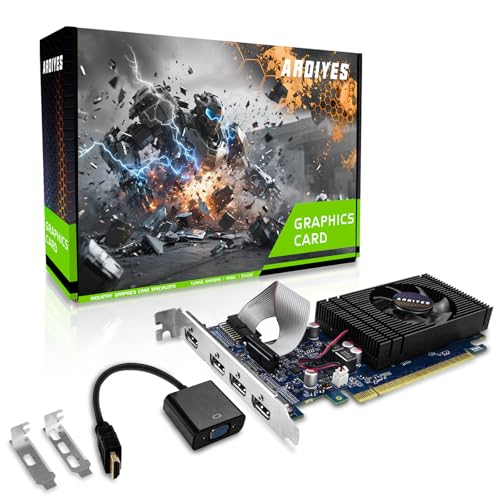
ARDIYES GT 740 4GB Low-Profile GPU
Best for: quad-monitor office setups in small cases
- Graphics Processor
- GT 740
- Memory Size
- 4GB
- Memory Type
- GDDR5
- PCIe Interface
- PCIe 3.0
- Form Factor
- Low Profile
View on Amazon: ARDIYES GT 740 4GB Low-Profile GPU Affiliate link
This ARDIYES GT 740 graphics card features 4GB of GDDR5 memory and a low-profile design. It includes four HDMI ports for quad-monitor setups. The card uses a PCIe 3.0 interface and includes both low and full-height brackets. It suits users needing multi-display support for office work or digital signage without requiring a large case.
Pros
- 4GB GDDR5 memory for daily tasks
- Four HDMI ports for quad displays
- Low-profile form factor fits small cases
- Includes low and full-height brackets
Cons
- GT 740 processor lacks gaming performance
- No displayPort or DVI outputs
- GDDR5 memory is older technology
Good fit if
- You need four monitors for office work
- You have a small form factor PC
- You want a quiet, low-power card
Skip if
- You play modern video games
- You need high-resolution gaming
- You require modern display outputs
Verdict: ARDIYES GT 740 4GB GDDR5 Low Profile suits users who need four screens for office tasks. It fits small cases but does not support gaming.

ARDIYES GT 730 4GB GDDR3
Best for: multi-monitor office setups
- Graphics Processor
- GT 730
- Memory Size
- 4 GB
- Memory Type
- GDDR3
- Memory Bus Width
- 64-bit
- Slot Width
- Single Slot
- Form Factor
- ITX
View on Amazon: ARDIYES GT 730 4GB GDDR3 Affiliate link
The ARDIYES GT 730 features 4GB of DDR3 memory and a standard-profile form factor. It includes four independent HDMI ports to support multi-monitor setups. The card draws power directly from the PCIe slot, requiring no external connectors. This design suits users needing expanded screen real estate for office work or digital signage. It is not suitable for small form factor cases.
Pros
- Four independent HDMI ports for multi-display setups
- 4GB DDR3 video memory
- No external power connectors required
- Standard-profile design for broad compatibility
Cons
- Uses older DDR3 memory instead of GDDR5
- Not suitable for small form factor (SFF) cases
- Standard-profile size may not fit all compact builds
Good fit if
- You need to drive four separate displays from one card
- You want a plug-and-play upgrade for a standard desktop PC
- You require a low-power solution without external power cables
Skip if
- You have a small form factor (SFF) case
- You need high-performance gaming graphics
- You prefer modern GDDR5 memory technology
Verdict: ARDIYES GT 730 4GB GDDR3 is a practical choice for users who need to connect four monitors to a standard desktop tower. It provides basic multi-screen functionality without requiring additional power hardware.
Specifications side by side
| Spec | ARDIYES GT 740 4GB Low-Profile GPU | ARDIYES GT 730 4GB GDDR3 |
|---|---|---|
| Graphics Processor | GT 740 | GT 730 |
| Memory Size | 4GB | 4 GB |
| Memory Type | GDDR5 | GDDR3 |
| Memory Bus Width | not stated | 64-bit |
| PCIe Interface | PCIe 3.0 | not stated |
| Slot Width | not stated | Single Slot |
| Memory | 4GB | not stated |
| Interface | PCIe 3.0 | not stated |
| Form Factor | Low Profile | ITX |
| Color | Blue | not stated |
ARDIYES Graphics Card Specs Compared
The ARDIYES lineup offers two distinct options for users needing display expansion without gaming performance. The top pick, the ARDIYES GT 740 4GB Low-Profile GPU, features 4GB of GDDR5 memory and a PCIe 3.0 interface. Its low-profile form factor allows it to fit into compact cases. This card is ideal for shoppers who require quad-monitor setups for office tasks in small form factor builds.
The second option is the ARDIYES GT 730 4GB GDDR3. It uses DDR3 memory and an ITX form factor. This model suits users who need basic multi-screen functionality for standard desktop towers. It connects four monitors without requiring additional power hardware. You should choose the GT 740 for better memory speed and the GT 730 for a simpler, power-free installation in larger cases.
Who ARDIYES Fits Best
ARDIYES targets users who need display expansion in compact spaces. The range includes low-profile and ITX form factors, designed specifically for small desktop towers or mini-ITX builds. You get options for quad-monitor office setups, with one model using GDDR5 memory and another using DDR3. Neither card supports gaming or requires additional power connections. The lineup covers basic multi-screen needs but does not offer high-performance graphics. If you require heavy gaming or professional rendering, this brand’s current models do not meet those demands. You should check if the included PCIe 3.0 interface meets your system's requirements.
How to choose the right ARDIYES graphics card
-
Check memory capacity
You need enough video memory to handle your display count. Both models in this guide include 4GB of VRAM. This amount is sufficient for driving multiple monitors with standard office applications. If you plan to run heavy graphics tasks, 4GB may limit your options. For simple text and web browsing, this capacity is adequate. Ensure your workload does not exceed the available buffer space for smooth operation.
-
Select memory type
Memory technology affects data transfer speed. The ARDIYES GT 740 uses GDDR5, which offers higher bandwidth than the GDDR3 found in the GT 730. GDDR5 is generally better for handling more complex display outputs. If you prioritize responsiveness across four screens, the GDDR5 model is the stronger choice. GDDR3 is still functional for basic tasks but may feel slower when updating multiple windows simultaneously.
-
Verify form factor
Physical dimensions determine if the card fits your case. The GT 740 features a low-profile design, making it ideal for slim office towers. The GT 730 is listed as an ITX form factor, which also suits compact builds. Measure your available slot space before purchasing. A low-profile card requires a specific bracket and slot width. An ITX card may have different height constraints. Match the physical size to your chassis to avoid installation issues.
-
Confirm interface standard
The connection standard must match your motherboard. The GT 740 utilizes a PCIe 3.0 interface. This is compatible with most modern desktop systems. Ensure your motherboard has an available PCIe slot. While backward compatibility exists, using a PCIe 3.0 card in an older slot may limit performance. Check your motherboard specifications to confirm slot availability. This ensures the card communicates correctly with your system components for stable output.
-
Match use case
Align the card with your primary task. These cards are designed for office and display expansion, not gaming. The GT 740 is best for quad-monitor setups in small cases. The GT 730 supports multi-monitor office work without extra power hardware. If you need gaming performance, these models are not suitable. Choose based on your need for multiple screens. Verify that your applications do not require dedicated gaming graphics processing power.
Frequently asked questions
Can the ARDIYES GT 740 4GB run modern video games?
No, this card does not support gaming. The ARDIYES GT 740 4GB GDDR5 Low Profile is designed specifically for quad-monitor office setups in small cases. It lacks the performance needed for gaming titles. You should use it only for display expansion and basic desktop tasks.
Which ARDIYES graphics card uses GDDR3 memory?
The ARDIYES GT 730 4GB uses GDDR3 memory. This model is listed as the best DDR3 option for multi-monitor office setups. It connects four monitors to a standard desktop tower. The card provides basic multi-screen functionality without requiring additional power hardware or complex installation steps.
Do these cards require external power connectors?
The ARDIYES GT 730 4GB GDDR3 does not require additional power hardware. It is designed to draw power directly from the motherboard slot. This makes installation simpler for users building standard desktop towers. You do not need to connect extra cables from the power supply unit.
Is the ARDIYES GT 740 suitable for mini-ITX builds?
Yes, the ARDIYES GT 740 4GB Low-Profile GPU is suitable for small cases. Its low-profile form factor allows it to fit into compact desktop towers. This design helps users who need quad-monitor support but have limited space inside their computer chassis. It is the top pick for these builds.
What is the memory type of the top-rated ARDIYES card?
The top-rated card, the ARDIYES GT 740 4GB, uses GDDR5 memory. This memory type is paired with a PCIe 3.0 interface. The 4GB capacity supports driving multiple screens for office tasks. GDDR5 offers faster data transfer rates compared to the DDR3 found in the GT 730 model.
How many monitors can the ARDIYES GT 730 support?
The ARDIYES GT 730 4GB GDDR3 supports four monitors. It is designed for users who need to connect multiple displays to a standard desktop tower. The card provides practical multi-screen functionality for office work. You can set up a quad-monitor environment without needing high-end gaming hardware.