7 Best GPU Support Brackets Under $30, Compared
How this guide was made: manufacturer specifications and documentation plus product listings, checked against our compatibility rules. We do not run hands-on tests unless a guide says so. Editorial policy
As an Amazon Associate we earn from qualifying purchases. Links on this page are affiliate links.
The EZDIY-FAB VH90 is the support bracket to get under $30 if your card is long and heavy: it's the only pick here with a published load limit, cards up to 310 mm (12.2 in) and 1.2 kg (2.6 lb), and it adds a front knob for fine height changes plus 5V ARGB lighting. For a lit floor stand, the TGDGAMER DY7 spans a wide height range and shows case air temperature. JOYJOM's 19 cm stand has the widest reach for very little money, and the upHere dual brace bolts to a bottom fan in cases where a magnet won't hold. No new graphics card sells for $30, so this page covers the part that keeps the one you own level; for the cheapest cards themselves, see our graphics cards under $50 list.
Our top pick: EZDIY-FAB VH90 ARGB GPU Support Bracket.
Quick picks
The best fit for you
- You run a big triple-fan card and want a stated load limit EZDIY-FAB VH90 ARGB GPU Support Bracket The one support here with published card length and weight limits, plus a metal knob to set the height.
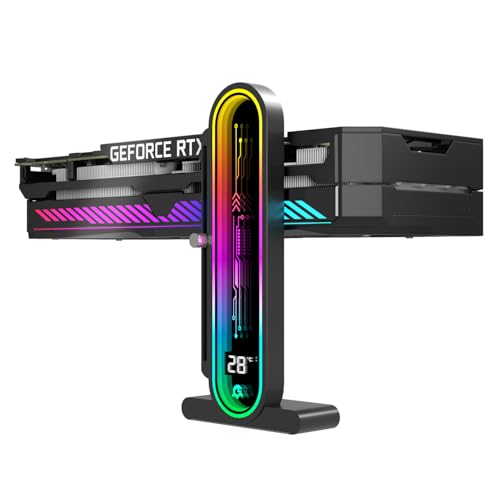
- You want lighting and a case temperature readout in one part TGDGAMER ARGB GPU Support Bracket with Temp Display 5V 3-pin ARGB plus an ambient readout, on a stand with a wide height range.
- You haven't measured the gap and want one stand that covers it JOYJOM Adjustable Aluminum GPU Bracket The longest reach of any pick, and a mini spirit level in the box.
- Your case floor won't hold a magnet, but a fan sits under the card upHere Aluminum Dual GPU Brace Screws to that fan and holds the card with two arms.
- You want a lit bar running along the underside of the card upHere ARGB GPU Brace Support Bracket Iron frame with a built-in 5V ARGB strip and two-way adjustment.
- The card sits only an inch or two above the shroud Nkomax Mini Aluminum GPU Support Bracket A short aluminum stand made for low gaps, at the lowest price in this group.
- You're turning a 2-slot card vertical XRIKUI Vertical GPU Mount Bracket Vertical mount with a magnetic base; pair it with your own PCIe x16 riser.
Our 7 picks

EZDIY-FAB VH90 ARGB GPU Support Bracket
8.1 / 10 spec-based score how we scored
Best for: Heavy, long graphics cards
View on Amazon: EZDIY-FAB VH90 ARGB GPU Support Bracket Affiliate link
A rail-and-lift support with a reinforcement plate at the PCIe slot and the group's only stated load rating. A metal knob at the front sets the height, so small corrections don't mean reaching behind the card. The white light blade syncs over 5V ARGB.
Pros
- Published card limits: 310 mm (12.2 in), 1.2 kg (2.6 lb)
- Metal front knob for fine height changes
- Reinforcement plate protects the PCIe slot
Cons
- No height range published
- The plate is offset from the slot on purpose, which can look like a fit error
- Lighting needs a free 5V ARGB header
Good fit if
- Your card is a long, heavy triple-fan model
- You want to fine-tune the height from the front
Skip if
- You need the exact height range first: take the JOYJOM stand
- You want no lighting cable at all: the upHere dual brace
Verdict: The heavy-card pick: the only one here with a stated load limit.
TGDGAMER ARGB GPU Support Bracket with Temp Display
7.9 / 10 spec-based score how we scored
Best for: Lit stand with temp readout
View on Amazon: TGDGAMER ARGB GPU Support Bracket with Temp Display Affiliate link
A floor stand that adjusts from 35 to 157 mm (1.4-6.2 in), with 5V 3-pin ARGB lighting and a small readout of case air temperature. Two recessed magnets hold the base, and a silicone pad sits where the card rests.
Pros
- Wide range covers most gaps
- ARGB and an ambient case readout in one part
- Silicone pad on the contact surface
Cons
- Magnets need a steel floor or shroud
- Readout shows case air, not the GPU core
- Doesn't say how the display is powered or what the frame is made of
Good fit if
- Your case floor or shroud is steel
- You want a visible case temperature
Skip if
- Your floor won't take a magnet: the upHere dual brace screws to a fan
- Your gap is under 35 mm: the nkomax mini goes lower
Verdict: Lighting plus a case thermometer on a stand with a wide range.

JOYJOM Adjustable Aluminum GPU Bracket
7.7 / 10 spec-based score how we scored
Best for: Widest height range
- Weight
- 6.88 ounces
View on Amazon: JOYJOM Adjustable Aluminum GPU Bracket Affiliate link
An anodized aluminum stand that adjusts from 10 to 190 mm (0.4-7.5 in), the widest range in this group. A hidden magnet in the base and rubber pads on the arm and foot keep it in place, and a mini spirit level comes in the box.
Pros
- Longest reach of any pick
- CNC-machined aluminum body
- Spirit level included
Cons
- No lighting
- Magnet needs steel, such as the PSU housing JOYJOM mentions
Good fit if
- You haven't measured the gap yet
- You want a plain stand with no cables
Skip if
- You want ARGB: the TGDGAMER DY7
- You have a glass floor: the upHere dual brace
Verdict: The safe bet on height: one stand covers almost any gap.

upHere Aluminum Dual GPU Brace
6.5 / 10 spec-based score how we scored
Best for: Cases with bottom fans
- Dimensions
- 5.39 × 0.75 × 4.72 inches
- Weight
- 5.61 ounces
View on Amazon: upHere Aluminum Dual GPU Brace Affiliate link
Instead of standing on the floor, this aluminum brace screws onto a 12 or 14 cm bottom fan and supports the card with two arms. Height slides up to 128 mm (5.04 in), and rubber pads keep the arms off the cooler's finish.
Pros
- Fan-mounted, so no magnet is needed
- Two support arms
- CNC anodized aluminum
Cons
- Needs a bottom fan of that size under the card
- Only the 128 mm maximum is given, no minimum
Good fit if
- Your case floor is glass or aluminum
- An intake fan sits below the card
Skip if
- No bottom fan: JOYJOM's stand
- You want lighting: the TGDGAMER DY7
Verdict: The answer for cases where a magnet has nothing to grip.

upHere ARGB GPU Brace Support Bracket
6.4 / 10 spec-based score how we scored
Best for: Lit horizontal brace
- Length
- 10.9 inches
- Width
- 1.97 inches
- Weight
- 7.05 ounces
View on Amazon: upHere ARGB GPU Brace Support Bracket Affiliate link
A horizontal brace with an iron frame and a built-in 5V 3-pin ARGB strip, adjustable in both length and height through a sliding design. upHere backs it with a 12-month warranty.
Pros
- 5V ARGB strip along the brace
- Two-way length and height adjustment
- 12-month warranty from upHere
Cons
- No height range or mounting method stated
- Lighting needs a 5V ARGB header
Good fit if
- You want a lit bar under the card's length
- You have a spare 5V ARGB header
Skip if
- You need a known height range: the TGDGAMER DY7
- Your board has only 12V RGB headers: the unlit JOYJOM
Verdict: A lit brace for builds where the look under the card matters.

Nkomax Mini Aluminum GPU Support Bracket
5.9 / 10 spec-based score how we scored
Best for: Tight gaps on a budget
- Weight
- 0.63 ounces
View on Amazon: Nkomax Mini Aluminum GPU Support Bracket Affiliate link
A small aluminum stand for tight gaps of 26 to 50 mm (1.0-2.0 in), and the cheapest pick here. A screw sets the height, and a magnet hidden in the base helps it stay put.
Pros
- Made for low gaps above a PSU shroud
- All-aluminum body
- Lowest price in this list
Cons
- Too short for a card high above a bare floor
- Magnet needs steel
Good fit if
- The card sits just above the shroud
- You want the least expensive fix
Skip if
- Your gap is bigger: the JOYJOM
- You want lighting: the TGDGAMER DY7
Verdict: Small gap, small price.

XRIKUI Vertical GPU Mount Bracket
5.5 / 10 spec-based score how we scored
Best for: Vertical GPU mounting
- Weight
- 1.06 pounds
View on Amazon: XRIKUI Vertical GPU Mount Bracket Affiliate link
A vertical GPU bracket for 2-slot cards with a magnetic base and an expandable base section; it weighs 1.06 lb (0.48 kg). It turns the card to show off its cooler, but the signal still runs through a PCIe x16 riser that XRIKUI doesn't list in the box.
Pros
- Vertical mount for 2-slot cards
- Magnetic base for quick placement
- Alloy construction
Cons
- Riser cable sold separately
- 2-slot cards only
- No side-panel clearance figures
Good fit if
- You want a vertical showcase build
- You already own a PCIe x16 riser
Skip if
- Your card is thicker than 2 slots
- You only want to stop sag: the EZDIY-FAB VH90
Verdict: For a vertical build, not a sag fix: budget for a riser too.
Specifications side by side
| Spec | EZDIY-FAB VH90 ARGB GPU Support Bracket | TGDGAMER ARGB GPU Support Bracket with Temp Display | JOYJOM Adjustable Aluminum GPU Bracket | upHere Aluminum Dual GPU Brace | upHere ARGB GPU Brace Support Bracket | Nkomax Mini Aluminum GPU Support Bracket | XRIKUI Vertical GPU Mount Bracket |
|---|---|---|---|---|---|---|---|
| Weight | not stated | not stated | 6.88 ounces | 5.61 ounces | 7.05 ounces | 0.63 ounces | 1.06 pounds |
| Dimensions | not stated | not stated | not stated | 5.39 × 0.75 × 4.72 inches | not stated | not stated | not stated |
| Length | not stated | not stated | not stated | not stated | 10.9 inches | not stated | not stated |
| Width | not stated | not stated | not stated | not stated | 1.97 inches | not stated | not stated |
| Color | White | not stated | Black | Black | BLACK 5V 3PIN ARGB | Black-Small | Black |
| Model | EZDPI264-1 | DY7 | JOYJOM- | parent GBS BRACE | G276ARGB | SSZJ-S | XIKSU00001502 |
| Size | not stated | not stated | 19cm | X2 Support | not stated | 26-50 mm | not stated |
How the picks score
Spec-based scores on the site's accessory rubric; the page adds up the totals. A published height range would lift the VH90's fit score, and a stated frame material would lift the DY7's build score.
| Product | Fit & compatibility (40%) | Build & load support (30%) | Features (30%) | Score |
|---|---|---|---|---|
| EZDIY-FAB VH90 ARGB GPU Support Bracket | 7.5 | 9.0 | 8.0 | 8.1 |
| TGDGAMER ARGB GPU Support Bracket with Temp Display | 8.5 | 6.5 | 8.5 | 7.9 |
| JOYJOM Adjustable Aluminum GPU Bracket | 9.0 | 8.0 | 5.5 | 7.7 |
| upHere Aluminum Dual GPU Brace | 6.5 | 8.0 | 5.0 | 6.5 |
| upHere ARGB GPU Brace Support Bracket | 5.5 | 7.0 | 7.0 | 6.4 |
| Nkomax Mini Aluminum GPU Support Bracket | 6.0 | 7.5 | 4.0 | 5.9 |
| XRIKUI Vertical GPU Mount Bracket | 5.0 | 6.5 | 5.0 | 5.5 |
- Fit & compatibility: published height range, card limits, mounting method, base type
- Build & load support: frame material, adjustment mechanism, load rating, pads
- Features: lighting standard, readout, level or tools included, warranty
What a support bracket can't do
A bracket holds the far end of the card level, and that's its whole job. It won't straighten a card or slot that has already bent, it adds no cooling, and the lit models stay dark without a free 5V ARGB header or hub. Apart from the VH90, no pick here states a weight limit, so on a very heavy triple-fan card you are relying on the design rather than a rating.
- No fix for a PCB or slot that is already bent
- No airflow or cooling benefit
- Lit models need a 5V header or hub to light up
- Only the VH90 publishes a card weight limit
Check before you buy
The VH90 gives no height range
EZDIY-FAB states card limits but not the lowest or highest support position. If your gap is unusually small or large, pick a stand that publishes its range, such as the TGDGAMER or the JOYJOM.
Lighting needs a 5V 3-pin header
The three lit picks run on 5V addressable RGB. Count your free ARGB headers before ordering; with none left, add a 5V ARGB hub rather than using a 12V RGB header.
upHere G276ARGB leaves out key fit data
Its size data, about 10.9 in long and 7.05 oz, lines up with the 276 in the model name, but upHere lists neither a height range nor how the brace fixes in the case.
XRIKUI fits 2-slot cards only
XRIKUI limits its vertical mount to 2-slot cards, so a thicker triple-slot cooler is out. Check your card's slot width on its maker page before buying.
How we picked and ranked
Every pick is a new unit priced under $30 and built to carry a graphics card's weight. We kept one product per model, since JOYJOM and nkomax sell several heights as separate items, and ranked on the site's accessory rubric: how much of the fit is published (height range, card limits, mounting method), what the frame is made of and how it adjusts, and extras such as lighting, a readout or an included level.
Riser cables, low-profile replacement brackets and fan mounts were left out because they don't hold a card up. Prices change, so the page lists only items that sit under $30 when it refreshes.
Supports we left out
- ASUS ROG Herculx Graphics Card Holder: Lists a 72-128 mm range, a spirit level and ARGB lighting, but it sells above $30.
- GPERHUAN GH3 PRO ARGB GPU Support: Same height range and temperature display as the TGDGAMER DY7, yet its features never state the ARGB header voltage.
- upHere GL05 aluminum GPU brace: upHere's own title warns it doesn't fit every large card, and it gives no adjustment range.
- lilila-ree PCIe 4.0 x16 riser cable (20 cm): A riser carries the PCIe signal to a vertically mounted card; it doesn't hold a card up, so it belongs with the riser cables.
Before you order a GPU support
-
Measure at the far end of the card
Hold the card level and measure from the case floor or PSU shroud to the underside of the cooler, at the end away from the slot. Choose a support whose range puts your number near the middle, not at an extreme: the nkomax mini is made for a card sitting just above the shroud, while the JOYJOM suits a card high above a bare floor.
-
Level it, don't lift it
Raise the support only until the card is straight. Pushing past level just moves the strain onto the slot from the other direction. JOYJOM puts a small spirit level in the box; with the VH90, use its knob in small turns and check the card's top edge as you go.
-
Check what sits under the card
Bottom intake fans, drive cages and cable bundles can leave no flat spot for a floor stand near the card's end. If a fan is the only thing below the card, the upHere dual brace turns it into the mount point instead of fighting it.
-
Plan a vertical build as a set
A vertical bracket such as the XRIKUI only positions the card; the PCIe signal still travels through a separate x16 riser, and its angle and length have to suit the bracket and your slot. Buy both together, and leave room between the card's fans and the side panel so they can still pull in air.
Frequently asked questions
Do I need a GPU support bracket?
If the far end of your card visibly droops, or it's a big triple-fan model, yes: a support takes that load off the PCIe slot. For heavy cards, the EZDIY-FAB VH90 is rated to 1.2 kg.
Will a magnetic GPU stand stick to a glass or aluminum case?
No. Magnets need steel. In those cases use the upHere dual brace, which screws to a bottom fan, or the VH90, which works from the slot area.
Can I plug an ARGB GPU bracket into a 12V RGB header?
No. The VH90, TGDGAMER DY7 and upHere G276ARGB use 5V 3-pin addressable lighting, and ENERMAX and NZXT both document that 12V RGB headers are 4-pin; NZXT warns the wrong header can permanently damage the device. Use a header labeled ARGB or ADD_HEADER, or a 5V hub.
Does the TGDGAMER temperature display show GPU temperature?
No. TGDGAMER calls it an ambient case temperature monitor, so it reads the air inside the case. Use your graphics driver or monitoring software for the GPU core figure.
What height GPU support do I need?
One that spans the gap between the floor or shroud and the card's far end. Under 50 mm points to the nkomax mini, up to 157 mm the TGDGAMER DY7 fits, and JOYJOM's stand goes to 190 mm.
Does the XRIKUI vertical bracket come with a riser cable?
XRIKUI says it pairs with a PCIe x16 extender but doesn't list one in the box, so plan on buying a riser separately.
Final verdict
Get the EZDIY-FAB VH90 for a long, heavy card when you want a stated load limit and a knob for fine adjustment. Pick the TGDGAMER DY7 for lighting and a case-air readout on a steel floor, or the JOYJOM if you simply need the widest range for the least fuss. With a glass or aluminum floor and a bottom fan, the upHere dual brace is the one that will hold.
Lit stand with temp readout
Sources
Fit and feature details for these GPU supports come from their product data; the lighting-header guidance comes from the NZXT and ENERMAX pages below. None of these brackets was installed for this guide.
- 5V ARGB vs 12V RGB: Differences and Header Guide (NZXT): 3-pin 5V vs 4-pin 12V headers, header labels, damage warning
- RGB and Addressable RGB lighting synchronization (ENERMAX): 12V 4-pin RGB and 5V 3-pin ARGB pin assignments
See also
- best graphics cards under 50
- best graphics cards under 100
- best graphics cards under 150
- Best Graphics Cards Under $200 in 2026: 7 Picks Ranked by Specs
- Best Graphics Cards Under $300: 8 Spec-Based Picks
- 7 Best Graphics Cards Under $500, Compared
- Best Graphics Cards Under $1000 in 2026: 8 Picks Ranked by Specs
- Best Graphics Cards Under $1500: 7 Spec-Based Picks
- fan under 30
- headphones under 30