Yeston GTX 1050 ti 4GB vs Yeston R7 350 4GB 6 (2026): Key Differences
As an Amazon Associate we earn from qualifying purchases. Links on this page are affiliate links.
When you compare the yeston gtx 1050 ti 4gb vs r7 350 4gb 6, you see two distinct approaches to budget graphics. Both cards feature 4GB of GDDR5 memory and a 128-bit interface. The main difference lies in their design and output capabilities. The GTX 1050 Ti offers a low profile form factor ideal for small cases. The R7 350 prioritizes multi-monitor setups with six HDMI ports. This choice depends on your case size and display needs.
Key differences
| Aspect | Yeston GTX 1050 Ti 4GB Low Profile | Yeston R7 350 4GB 6 HDMI |
|---|---|---|
| GPU Core | GP107 (768 shaders) | Radeon R7 350 (512 processors) |
| Form Factor | Low Profile | Standard Profile |
| Outputs | HDMI and DisplayPort | 6 HDMI ports |
| Dimensions | 178x120x22mm | 188x38x108mm |
| Boost Clock | 1392MHz | not listed |
Which one should you choose?
Choose Yeston GTX 1050 Ti 4GB Low Profile if
- You need a low profile card for a small form factor PC.
- You want higher boost clock speeds for better gaming performance.
- You require DisplayPort connectivity alongside HDMI.
Choose Yeston R7 350 4GB 6 HDMI if
- You need to connect up to six monitors simultaneously.
- You prefer a simpler installation without half-height brackets.
- You want a card that requires no external power supply.
Verdict: The GTX 1050 Ti is the better choice for users with compact cases who need standard gaming performance. The R7 350 suits those who need extensive multi-monitor setups and easy installation. Your decision should hinge on whether you prioritize physical size or display quantity.
GTX 1050 Ti vs R7 350 Specs
GPU architecture and performance
The Yeston GTX 1050 Ti 4GB Low Profile uses the GP107 core built on a 14nm process. It features 768 unified shaders with a base clock of 1291MHz and a boost clock reaching 1392MHz. This configuration targets efficient gaming performance. In contrast, the Yeston R7 350 4GB 6 HDMI relies on a core frequency of 800MHz and 512 processors. While both cards handle DirectX 12, the GTX 1050 Ti offers significantly higher clock speeds and more processing units. This architectural advantage allows the GTX 1050 Ti to deliver superior frame rates in modern titles compared to the older R7 350 design.
Memory specifications
Both graphics cards provide 4GB of GDDR5 memory with a 128-bit interface. The Yeston GTX 1050 Ti 4GB Low Profile runs its memory at 7Gbps. The Yeston R7 350 4GB 6 HDMI operates its GDDR5 memory at 4500MHz. Higher memory frequency generally contributes to better texture loading and multitasking capabilities. The GTX 1050 Ti maintains a clear lead in memory speed, which helps maintain smooth performance in graphics-heavy applications. The R7 350 offers adequate memory capacity for basic tasks but lacks the bandwidth efficiency of the newer card.
Display connectivity options
Connectivity differs significantly between these two models. The Yeston R7 350 4GB 6 HDMI stands out with six HDMI output interfaces. This allows you to connect up to six screens simultaneously for extensive multi-monitor setups. The Yeston GTX 1050 Ti 4GB Low Profile includes standard HDMI and DisplayPort outputs. While it supports G-Sync and DSR for enhanced visual quality, it does not match the sheer number of ports on the R7 350. If you need a multi-display workstation, the R7 350 provides the necessary physical connections.
Physical dimensions and form factor
Both cards are designed for compact builds but differ in profile. The Yeston GTX 1050 Ti 4GB Low Profile measures 178x120x22mm. It is explicitly a low-profile card with a slim form factor, suitable for mini PC builds. It includes a half-height bracket shifter for versatile installation. The Yeston R7 350 4GB 6 HDMI measures 188x38x108mm. While compact, it does not advertise a low-profile designation in the same way. The GTX 1050 Ti offers a more traditional low-profile solution for small cases, whereas the R7 350 offers a different compact footprint.
System compatibility and power
Both cards utilize a PCI-Express 3.0 x16 bus interface and require no external power supply. The Yeston GTX 1050 Ti 4GB Low Profile supports Windows 7, 8, 10, and 11, along with OpenGL 4.5 and 8K resolution support. The Yeston R7 350 4GB 6 HDMI supports Windows 7, Windows 10, and Ubuntu 16.04, with OpenGL 4.6 compatibility. Both are easy to install without extra power cables. The GTX 1050 Ti offers broader Windows support and newer graphics API versions, making it more compatible with current operating systems.
Which graphics card fits your build?
Small form factor PC builders
The Yeston GTX 1050 Ti 4GB Low Profile fits compact cases. It measures 178x120x22mm with a slim 0.1-inch height. You get 768 shaders and a 1392MHz boost clock. The card includes a half-height bracket for easy installation in mini PCs without sacrificing essential gaming performance.
Users needing multiple monitors
The Yeston R7 350 4GB 6 HDMI offers six HDMI ports. This allows you to connect up to six screens simultaneously. It supports Windows 10 and Ubuntu 16.04. The 512 processors and 800MHz core frequency handle basic multi-display tasks. No external power supply is required for this setup.
Gamers seeking higher performance
The GTX 1050 Ti provides superior gaming specs. It uses a 14nm GP107 core with 768 unified shaders. The boost clock reaches 1392MHz, higher than the R7 350. It supports DirectX 12 and G-Sync for smoother visuals. The 4GB GDDR5 memory runs at 7Gbps for efficient rendering.
The products compared
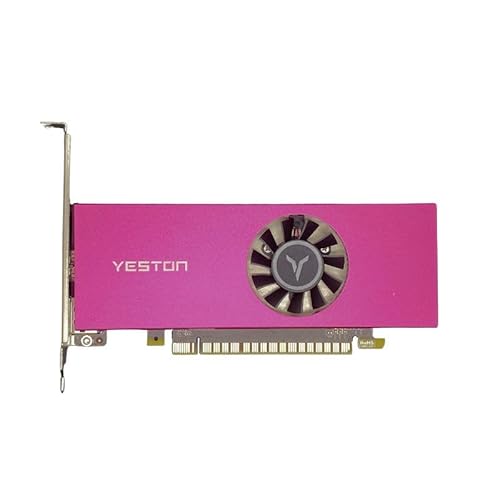
Yeston GTX 1050 Ti 4GB Low Profile
Best for: small form factor PCs
- Graphics Processor
- GTX 1050 Ti
- Memory Size
- 4 GB
- Memory Type
- GDDR5
- Boost Clock
- 1392 MHz
- Memory Bus Width
- 128-bit
- PCIe Interface
- PCIe 3.0
View on Amazon: Yeston GTX 1050 Ti 4GB Low Profile Affiliate link
The Yeston GTX 1050 Ti 4GB is a compact graphics card built for small form factor builds. It uses the GP107 core with 768 shaders and 4GB of GDDR5 memory on a 128-bit interface. The low profile design measures 178x120x22mm, fitting easily into mini PCs. You get support for DirectX 12 and G-Sync. This card suits users needing efficient performance in tight spaces.
Pros
- Compact 178x120x22mm low profile design fits mini PCs
- 4GB GDDR5 memory with 128-bit interface for multitasking
- Supports DirectX 12, G-Sync, and 8K resolution
- Includes half height bracket shifter for versatile installation
Cons
- Lower shader count and architecture compared to modern cards
- Limited to PCI-Express 3.0 bus interface
- Only includes HDMI and DisplayPort outputs
Good fit if
- You need a graphics card for a small form factor PC
- You want G-Sync support for smoother visuals
- You require 4GB VRAM for light gaming
Skip if
- You need high-end 4K gaming performance
- You require more than 4GB of video memory
- You need HDMI 2.1 or DisplayPort 2.0
Verdict: Yeston GTX 1050 Ti 4GB Low Profile is a practical option for small builds needing basic 1080p gaming. It fits users who prioritize compact size over raw power.

Yeston R7 350 4GB 6 HDMI
Best for: Multi-monitor office setups
- Graphics Processor
- Radeon R7 350
- Memory Size
- 4GB
- Memory Type
- GDDR5
- Memory Bus Width
- 128-bit
- PCIe Interface
- PCIe 3.0
- Dimensions
- 7.4 × 4.25 × 0.1 inches
View on Amazon: Yeston R7 350 4GB 6 HDMI Affiliate link
This Yeston Radeon R7 350 graphics card features 4GB of GDDR5 memory and a 128-bit interface. It includes six HDMI ports for multi-monitor setups. The card runs at a core frequency of 800MHz. It supports DirectX 12 and OpenGL 4.6. The compact design requires no external power. It suits users needing multiple displays for office tasks or light media viewing.
Pros
- Six HDMI outputs for extensive multi-monitor setups
- 4GB GDDR5 memory with 128-bit interface
- Compact dimensions of 188x38x108 mm
- No external power supply required
Cons
- Older Radeon R7 350 architecture limits gaming performance
- Low core frequency of 800MHz restricts speed
- No external power connector limits high-end stability
Good fit if
- You need to connect six monitors simultaneously
- You require a low-profile card for small cases
- You want a plug-and-play solution without extra cables
Skip if
- You need modern gaming performance
- You require PCIe 4.0 support
- You need advanced OpenGL features beyond 4.6
Verdict: Yeston R7 350 4GB 6 HDMI is a specialized card for multi-display office work. It fits users who prioritize screen count over graphical speed.
Specifications side by side
| Spec | Yeston GTX 1050 Ti 4GB Low Profile | Yeston R7 350 4GB 6 HDMI |
|---|---|---|
| Graphics Processor | GTX 1050 Ti | Radeon R7 350 |
| Memory Size | 4 GB | 4GB |
| Memory Type | GDDR5 | GDDR5 |
| Boost Clock | 1392 MHz | not stated |
| Memory Bus Width | 128-bit | 128-bit |
| PCIe Interface | PCIe 3.0 | PCIe 3.0 |
| Slot Width | Low Profile | not stated |
| Memory | 4GB | 4GB |
| Form Factor | Low Profile | not stated |
| Dimensions | 7.01 × 4.72 × 0.1 inches | 7.4 × 4.25 × 0.1 inches |
| Size | 178*120*22mm | 188*38*108 mm |
| Color | not stated | R7 350 4G 6HDMI GB |
Frequently asked questions
Which card is better for small form factor PCs?
The Yeston GTX 1050 Ti 4GB Low Profile is the better choice for compact builds. It measures 178x120x22mm with a slim 0.1-inch height. This low profile design fits into cases with limited space. The R7 350 is wider and taller, making it less suitable for tight enclosures.
Does the R7 350 support multiple monitors?
Yes, the Yeston R7 350 4GB 6 HDMI is designed for multi-display office setups. It includes six HDMI outputs to connect multiple screens. This makes it ideal for users who need to view different applications across several displays simultaneously. The GTX 1050 Ti does not list this specific output configuration.
What is the memory type on both cards?
Both graphics cards use 4GB of GDDR5 memory. This memory type provides sufficient bandwidth for basic gaming and office tasks. The GTX 1050 Ti and R7 350 share this specification, ensuring similar data handling capabilities for their respective use cases. You do not need to worry about memory speed differences here.
Can the GTX 1050 Ti fit in a mini ITX case?
Yes, the Yeston GTX 1050 Ti 4GB Low Profile is built for small builds. Its compact dimensions allow it to fit in mini ITX and other small form factor cases. The low height ensures it clears other components. This makes it a practical option when space is limited.
Is the R7 350 good for gaming?
The Yeston R7 350 4GB 6 HDMI is specialized for office work rather than gaming. It prioritizes screen count over graphical speed. If you need basic 1080p gaming performance, the GTX 1050 Ti is the more capable option. The R7 350 is better suited for multi-monitor productivity tasks.
What are the physical dimensions of the R7 350?
The Yeston R7 350 4GB 6 HDMI measures 188x38x108 mm. In inches, it is 7.4 inches long and 4.25 inches wide. The height is 0.1 inches. These dimensions make it a standard profile card that requires more space than the low profile GTX 1050 Ti.