LINKUP vs GLOTRENDS: Computer Cables Compared by Specs
As an Amazon Associate we earn from qualifying purchases. Links on this page are affiliate links.
We compare the LINKUP vs GLOTRENDS computer cable options to help you pick the right extension for your build. Both are PCIe x16 riser cables designed for vertical GPU mounting, offering right-angle connectors to fit standard cases. The main difference lies in their generation and length. GLOTRENDS provides a 200mm PCIe 4.0 cable with individual foil shielding. LINKUP offers a 15cm PCIe 5.0 cable with multilayer shielding and higher bandwidth potential. You should choose based on your motherboard's PCIe generation and case layout requirements.
Key differences
| Aspect | GLOTRENDS 200mm Right-Angle PCIe 4.0 Riser Cable | LINKUP 15cm PCIe 5.0 Right Angle Riser Cable |
|---|---|---|
| Interface Standard | PCIe 4.0 | PCIe 5.0 |
| Maximum Bandwidth | up to 32GB/s | 128GB/s |
| Cable Length | 200mm | 15cm |
| Shielding Type | individually foil-wrapped | multilayer shielding |
| Color | Black | All Black |
Which one should you choose?
Choose GLOTRENDS 200mm Right-Angle PCIe 4.0 Riser Cable if
- You need a longer 200mm reach for mid-tower cases with deep motherboard trays.
- Your system uses Intel 11th Gen or Ryzen 5000 CPUs with PCIe 4.0 slots.
- You prefer individually foil-wrapped shielding for specific EMI protection strategies.
Choose LINKUP 15cm PCIe 5.0 Right Angle Riser Cable if
- You have a next-gen motherboard with PCIe 5.0 x16 slots for 128GB/s bandwidth.
- You need a shorter 15cm cable for compact ITX or SFF case layouts.
- You want multilayer shielding and validated compatibility with high-end workstation boards.
Verdict: Choose GLOTRENDS if your case requires a longer 200mm extension and you are running a PCIe 4.0 system. Pick LINKUP if you have a PCIe 5.0 motherboard and need a shorter 15cm cable with higher theoretical bandwidth. Both provide stable connections for vertical GPU mounts.
PCIe Version and Bandwidth
interface speed
The LINKUP 15cm PCIe 5.0 Right Angle Riser Cable supports the latest PCIe 5.0 standard, delivering a maximum bandwidth of 128GB/s. This provides significant headroom for next-generation graphics cards and high-speed data transfers. In contrast, the GLOTRENDS 200mm PCIe 4.0 Riser Cable is built for the PCIe 4.0 interface, offering up to 32GB/s of bandwidth. While both are backward compatible with older generations, the LINKUP option offers four times the theoretical throughput of the GLOTRENDS cable. This makes the LINKUP choice superior if you plan to use future GPUs that leverage Gen5 speeds.
cable length
Length is critical for vertical GPU mounts in different case sizes. The GLOTRENDS cable measures 200mm, providing extra slack for routing behind the motherboard tray in standard mid-tower and ATX cases. This length accommodates thicker coolers and radiator setups comfortably. The LINKUP cable is shorter at 15cm (approximately 150mm). While sufficient for compact builds or open benches, it offers less reach than the GLOTRENDS option. If your case requires a longer extension to clear components or reach the slot comfortably, the GLOTRENDS 200mm length is the better fit. The LINKUP is ideal for tighter spaces.
shielding quality
Signal integrity depends heavily on shielding, especially at higher speeds. The LINKUP cable uses multilayer shielding to suppress crosstalk and EMI, targeting clean eye margins under load and tight bends. This design aims to maintain stability during high-FPS gaming or AI workloads. The GLOTRENDS cable features individually foil-wrapped differential signal pairs for EMI protection. It uses 30AWG silver-plated copper with Teflon insulation. While both offer robust protection, the LINKUP multilayer approach is specifically tuned for Gen5 performance stability. The GLOTRENDS foil wrapping is effective for Gen4, but the LINKUP shielding is more advanced for its higher bandwidth.
connector angle
Both products utilize a right-angle connector design, which is essential for vertical GPU mounting in standard cases. This orientation allows the graphics card to sit parallel to the motherboard, improving airflow and aesthetics. Neither product offers a straight connector in this specific comparison. Since both the LINKUP 15cm and the GLOTRENDS 200mm models feature the same 90-degree right-angle configuration, there is no functional difference in how they connect to your motherboard and GPU. You can choose based on length and speed needs without compromising on connector orientation.
compatibility
Compatibility varies based on your system's generation. The LINKUP cable is validated on ASUS WS WRX80SE WiFi II and WRX90E Gen5 boards, ensuring it works with next-gen cards like RTX 5090 and RX 9070. It is fully backward compatible with PCIe 4.0. The GLOTRENDS cable requires a direct CPU-connected PCIe 4.0 x16 slot for full speed, supporting Intel 11th Gen/Ryzen 5000 or newer CPUs. It also works with older setups but at PCIe 3.0 speeds. If you have a modern Gen5 motherboard, the LINKUP is the safer choice for full performance. The GLOTRENDS is optimized for established Gen4 platforms.
Choose the Right PCIe Riser Cable
User needing next-gen PCIe 5.0 bandwidth
The LINKUP cable supports PCIe 5.0 x16, delivering 128GB/s of bandwidth. This interface standard offers significantly higher throughput than PCIe 4.0, ensuring you have ample headroom for future graphics cards and high-speed data transfers without bottlenecking your system's performance potential.
Builder requiring longer reach for mid-tower
The GLOTRENDS cable features a 200mm length, which is longer than the LINKUP 15cm option. This extra reach provides more slack for routing behind the motherboard tray, making it easier to accommodate thicker CPU coolers and radiator setups in standard mid-tower cases.
User prioritizing individual signal shielding
GLOTRENDS uses individually foil-wrapped shielding for every differential signal pair. This specific construction method aims to protect against EMI and maintain stable 4K/8K output. The LINKUP uses multilayer shielding, so this choice depends on your preference for individual pair protection versus general layering.
The products compared

GLOTRENDS 200mm Right-Angle PCIe 4.0 Riser Cable
Best for: Standard mid-tower vertical GPU mounts
- Interface Standard
- PCIe 4.0
- Slot Configuration
- x16
- Cable Length
- 200mm
- Connector Angle
- 90 Degree Right Angle
- Maximum Bandwidth
- 32GB/s
- Shielding Type
- foil-wrapped
View on Amazon: GLOTRENDS 200mm Right-Angle PCIe 4.0 Riser Cable Affiliate link
This GLOTRENDS cable provides a 200mm length with a 90-degree right-angle connector for vertical GPU mounts. It supports PCIe 4.0 x16 bandwidth up to 32GB/s. The shielded design uses foil-wrapped pairs to maintain signal stability. It works with standard mid-tower cases and offers backward compatibility with PCIe 3.0. You get a straightforward solution for routing cables behind the motherboard tray.
Pros
- 200mm length fits standard mid-tower cases
- 90-degree right-angle connector for vertical mounts
- PCIe 4.0 x16 interface with 32GB/s bandwidth
- Individually foil-wrapped shielding for signal stability
Cons
- 200mm length may be short for deep cases
- No external power connector required but no hot swap support
- Requires direct CPU-connected PCIe 4.0 x16 slot for full speed
Good fit if
- You need a right-angle connector for vertical GPU mounting
- You have a standard mid-tower case with limited rear space
- You want a shielded cable for stable signal integrity
Skip if
- You require hot-swappable connections
- Your motherboard slot is not directly connected to the CPU
- You need a cable longer than 200mm for deep chassis routing
Verdict: GLOTRENDS 200mm PCIe 4.0 Riser suits users with standard mid-tower cases who need a right-angle connection for vertical GPU mounting. It delivers stable PCIe 4.0 bandwidth for setups with direct CPU-connected slots.
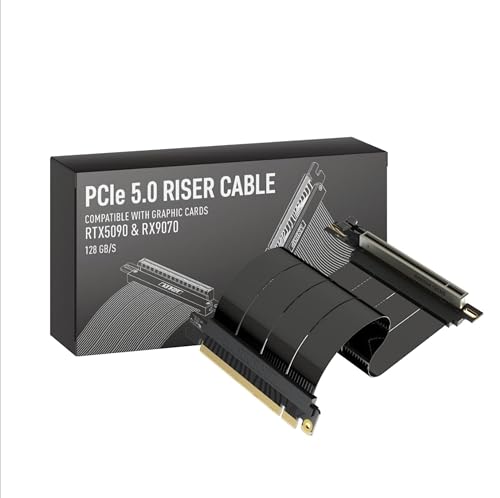
LINKUP 15cm PCIe 5.0 Right Angle Riser Cable
Best for: Vertical GPU mounts with limited space
- Interface Standard
- PCIe 5.0
- Slot Configuration
- x16
- Cable Length
- 15cm
- Connector Angle
- Right Angle
- Maximum Bandwidth
- 128GB/s
- Shielding Type
- multilayer shielding
View on Amazon: LINKUP 15cm PCIe 5.0 Right Angle Riser Cable Affiliate link
This LINKUP riser cable supports PCIe 5.0 x16 with a 128GB/s maximum bandwidth. It features multilayer shielding to reduce crosstalk and EMI. The 15cm length and right-angle connector suit vertical GPU mounts. It is backward-compatible with PCIe 4.0. You can use it for high-FPS gaming or AI workflows. The design helps improve airflow for thick shrouds.
Pros
- Supports PCIe 5.0 x16 interface
- 128GB/s maximum bandwidth
- Multilayer shielding for signal integrity
- Right-angle connector design
- Backward-compatible with PCIe 4.0
Cons
- Short 15cm cable length limits placement options
- Attributes list PCIe 4.0 interface despite Gen 5 claims
- Requires specific standoffs for stability
Good fit if
- You need a vertical GPU mount
- You want PCIe 5.0 performance
- You have limited space between slots
Skip if
- You need a longer cable
- You require a straight connector
- You are using PCIe 3.0 only
Verdict: LINKUP PCIe 5.0 Riser Cable 15cm Right Angle delivers high bandwidth for modern GPUs. It fits builders who need compact vertical mounting solutions.
Specifications side by side
| Spec | GLOTRENDS 200mm Right-Angle PCIe 4.0 Riser Cable | LINKUP 15cm PCIe 5.0 Right Angle Riser Cable |
|---|---|---|
| Interface Standard | PCIe 4.0 | PCIe 5.0 |
| Slot Configuration | x16 | x16 |
| Cable Length | 200mm | 15cm |
| Connector Angle | 90 Degree Right Angle | Right Angle |
| Maximum Bandwidth | 32GB/s | 128GB/s |
| Shielding Type | foil-wrapped | multilayer shielding |
| GPU | GeForce RTX 4090 | not stated |
| Interface | PCIe 4.0 | PCIe 4.0 |
| Dimensions | 9.84 × 4.72 × 4.72 inches | not stated |
| Weight | 4.97 ounces | 4.23 ounces |
| Size | 200mm | 15cm - v4 |
| Color | Black | All Black |
| Model | PCIE40-X16-200MM-0090D | AG-P5-33SR-015BK |
Frequently asked questions
Which riser cable is best for standard mid-tower cases?
The GLOTRENDS 200mm Right-Angle PCIe 4.0 Riser is the better choice for standard mid-tower vertical GPU mounts. Its 200mm length provides the necessary reach for typical case layouts. The right-angle connector ensures a secure fit without obstructing nearby components. This size accommodates most standard build configurations effectively.
Is the LINKUP cable suitable for tight spaces?
Yes, the LINKUP 15cm PCIe 5.0 Right Angle Riser Cable is ideal for vertical GPU mounts with limited space. Its compact 15cm length reduces the footprint within the chassis. This shorter design helps builders who need a more condensed setup while still maintaining a right-angle connection for proper alignment.
What is the difference in length between these two cables?
The GLOTRENDS cable measures 200mm, while the LINKUP cable is 15cm long. The GLOTRENDS option is longer, offering more reach for larger cases. The LINKUP option is shorter, making it suitable for smaller or more compact builds. You should choose based on the specific distance required in your case.
Does the GLOTRENDS cable support PCIe 4.0?
Yes, the GLOTRENDS 200mm Right-Angle PCIe 4.0 Riser Cable supports the PCIe 4.0 interface. This standard delivers stable bandwidth for setups with direct CPU-connected slots. It ensures reliable performance for graphics cards that utilize PCIe 4.0 lanes, providing a solid foundation for standard high-end builds.
Can I use the LINKUP cable for vertical mounting?
Yes, the LINKUP 15cm PCIe 5.0 Right Angle Riser Cable is designed for vertical GPU mounting. It features a right-angle connector that fits standard cases. This design allows you to mount your graphics card vertically while maintaining a compact profile, which is helpful for space-constrained builds.
Which cable is lighter?
The LINKUP 15cm PCIe 5.0 Right Angle Riser Cable is lighter. It weighs 4.23 ounces, compared to the GLOTRENDS cable which weighs 4.97 ounces. The difference is small, but the LINKUP option offers a slight weight advantage. This may be a minor factor for builders prioritizing minimal internal mass.
What color options are available for these risers?
The GLOTRENDS cable comes in black. The LINKUP cable is available in an all-black finish. Both options provide a neutral appearance that blends well with most internal components. You can choose either based on your preference for a consistent dark aesthetic within your computer case.