LINKUP vs ELECNEXUS: Computer Cables Compared by Specs
As an Amazon Associate we earn from qualifying purchases. Links on this page are affiliate links.
This LINKUP vs ELECNEXUS computer cable comparison focuses on two PCIe 5.0 riser cables for vertical GPU mounts. Both products support 128GB/s bandwidth and backward compatibility with older standards. The main difference lies in physical dimensions and connector design. You get a shorter, right-angle option from LINKUP and a longer, straight version from ELECNEXUS. Your choice depends on case layout and cable management needs.
Key differences
| Aspect | LINKUP 15cm PCIe 5.0 Right Angle Riser Cable | ELECNEXUS 200mm PCIe 5.0 Riser Cable |
|---|---|---|
| Cable Length | 15cm | 200mm |
| Connector Angle | Right Angle | Straight |
| Shielding Type | Multilayer shielding | Triple-Layer EMI Shielding |
| Weight | 4.23 ounces | 3.7 ounces |
| Power Delivery | Not listed | Up to 78W |
Which one should you choose?
Choose LINKUP 15cm PCIe 5.0 Right Angle Riser Cable if
- You need a compact 15cm length for tight ITX or SFF builds.
- Your case requires a right-angle connector to clear nearby components.
- You prefer a product with specific motherboard compatibility notes.
Choose ELECNEXUS 200mm PCIe 5.0 Riser Cable if
- You require a longer 200mm span for standard tower cases.
- You want a straight connector for easier routing in open layouts.
- You need explicit power delivery specifications for your GPU.
Verdict: Choose the LINKUP cable if your build space is limited or you need a right-angle connection. Pick the ELECNEXUS option if you need extra length or explicit power delivery details. Both cables deliver the same PCIe 5.0 performance for your graphics card.
LINKUP vs ELECNEXUS Cable Specs
Cable Length
The LINKUP riser cable measures 15cm in length. This compact size suits tight ITX builds or sandwich cases where space is limited. You can place the GPU close to the motherboard slot without excess slack. The ELECNEXUS option offers a 200mm length, which equals 20cm. This extra five centimeters provides more flexibility for standard ATX towers or open benches. Longer cables help you route wires away from hot components or fans. If your case layout requires distance between the PCIe slot and the GPU bracket, the ELECNEXUS length is more practical. For minimalist setups, the shorter LINKUP cable keeps things tidy.
Connector Angle
Connector geometry matters for cable management and physical fit. The LINKUP product features a right-angle connector design. This orientation allows the cable to exit the slot and turn ninety degrees, often reducing strain on the motherboard PCIe slot. It also helps the cable lie flat against the case wall or GPU shroud. The ELECNEXUS specification does not explicitly state the connector angle in the provided data. You must check the product images or detailed listings to confirm if it is straight or angled. Without explicit confirmation, the LINKUP right-angle design offers a clear advantage for specific mounting scenarios where space is constrained or airflow paths need to remain unobstructed.
Shielding Type
Signal integrity depends heavily on shielding quality. The LINKUP cable uses multilayer shielding to suppress crosstalk and electromagnetic interference. This design targets clean eye margins under load, which is critical for maintaining stability at PCIe 5.0 speeds. The ELECNEXUS cable specifies triple-layer EMI shielding. This construction includes a metal shield, foil-wrapped pairs, and tinned copper braiding. Both approaches aim to reduce interference and ensure reliable data transfer. The ELECNEXUS description details the specific layers, while LINKUP focuses on the performance outcome of its multilayer design. Both products provide robust protection against noise, ensuring that your GPU communicates efficiently with the motherboard without signal degradation.
Build Quality
Internal construction affects durability and performance. The ELECNEXUS cable highlights a 6-layer PCB and 5μm gold contacts. Gold plating resists corrosion and ensures consistent electrical conductivity over time. It also uses a flexible TPE jacket and dual-layer wiring for reliability. The LINKUP specification lists premium conductors and tuned impedance but does not specify the layer count or plating thickness. Both products use robust materials to handle the high bandwidth of PCIe 5.0. The ELECNEXUS details offer more transparency regarding its internal components, such as the PCB layers and contact plating. This specific information helps you assess long-term reliability, giving it a slight edge in documented build quality.
Power Delivery
Power delivery stability is crucial for high-end GPUs. The ELECNEXUS cable specifies up to 78W power delivery via a 40-pin connector. It includes dedicated 12V and 3.3V pins to support stable GPU operation. This explicit rating helps you verify compatibility with power-hungry graphics cards. The LINKUP data does not list a specific wattage rating or pin configuration for power delivery. While it mentions backward compatibility and general stability, the lack of explicit power specs leaves you guessing about its limits. If you are using a high-draw GPU, the ELECNEXUS stated 78W limit provides clearer assurance of safe operation.
Pick the right PCIe 5.0 riser cable
ITX builders needing compact vertical mounts
The LINKUP cable measures 15cm, making it ideal for tight ITX sandwich cases or small towers. Its right-angle connector simplifies routing in cramped spaces. You get full PCIe 5.0 x16 performance in a short span, preserving upgrade headroom without excess slack or complex cable management hurdles.
Users requiring longer reach for airflow
The ELECNEXUS cable offers 200mm length, providing extra distance for vertical GPU mounts in larger cases. This span helps clear thick shrouds and radiators for better airflow. You retain full 128GB/s bandwidth over the longer run, ensuring stable performance while maintaining clean aesthetics in standard tower builds.
Those prioritizing detailed shielding specs
ELECNEXUS specifies triple-layer EMI shielding with metal shields, foil-wrapped pairs, and tinned copper braiding. It also features a 6-layer PCB and 5μm gold contacts. These detailed construction specs target low-loss performance and interference reduction, offering you robust signal integrity for high-FPS gaming and AI workflows.
Buyers wanting flexible connector options
LINKUP provides a wide variety of connector angles, including right, left, straight, and reverse options across multiple lengths. This flexibility allows you to match specific case layouts and bracket requirements precisely. You can choose the exact geometry needed for clean cable management in diverse build styles.
The products compared
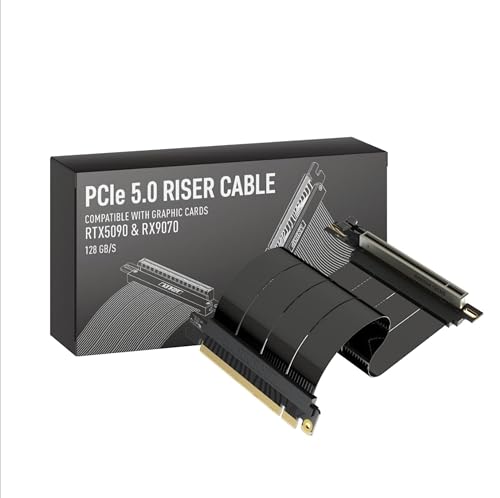
LINKUP 15cm PCIe 5.0 Right Angle Riser Cable
Best for: vertical GPU mounts in compact cases
- Interface Standard
- PCIe 5.0
- Slot Configuration
- x16
- Cable Length
- 15cm
- Connector Angle
- Right Angle
- Maximum Bandwidth
- 128GB/s
- Shielding Type
- multilayer shielding
View on Amazon: LINKUP 15cm PCIe 5.0 Right Angle Riser Cable Affiliate link
The LINKUP 15cm riser cable supports PCIe 5.0 x16 for 128GB/s bandwidth. It features multilayer shielding and a right-angle connector for vertical GPU mounts. The design is backward compatible with PCIe 4.0. You get a black cable that fits standard tower and ITX cases. This cable suits builders needing clean routing and stable signal integrity for high-end graphics cards.
Pros
- Supports PCIe 5.0 x16 with 128GB/s bandwidth
- Multilayer shielding reduces crosstalk and EMI
- Right-angle connector for vertical mounting
- Backward compatible with PCIe 4.0
Cons
- Limited to 15cm length option
- Only available in black color
- Requires additional standoffs for support
Good fit if
- You need a right-angle connector for vertical GPU mounts
- You want PCIe 5.0 bandwidth for future-proofing
- You are building in a case with tight routing needs
Skip if
- You require a white cable for your build
- You need a cable longer than 15cm
- You are using a PCIe 3.0 motherboard without upgrade plans
Verdict: LINKUP PCIe 5.0 Riser Cable 15cm Right Angle is a solid choice for vertical GPU setups. It delivers full PCIe 5.0 speed with reliable shielding. It fits builders who prioritize signal integrity and clean aesthetics in compact cases.

ELECNEXUS 200mm PCIe 5.0 Riser Cable
Best for: vertical GPU builds needing PCIe 5.0 bandwidth
- Interface Standard
- PCIe 5.0
- Slot Configuration
- x16
- Cable Length
- 200mm
- Maximum Bandwidth
- 128GB/s
- Shielding Type
- Triple EMI Shield
- GPU
- Radeon RX 7900 XT
View on Amazon: ELECNEXUS 200mm PCIe 5.0 Riser Cable Affiliate link
This ELECNEXUS riser cable supports PCIe 5.0 x16 with a maximum bandwidth of 128GB/s. It features a 200mm length and triple-layer EMI shielding to reduce interference. The 40-pin connector delivers up to 78W of power for stable operation. You should choose this cable if you need a vertical GPU mount that maintains signal integrity for modern graphics cards.
Pros
- PCIe 5.0 x16 interface with 128GB/s bandwidth
- Triple-layer EMI shielding for reduced interference
- Up to 78W power delivery via 40-pin connector
- 6-layer PCB with 5μm gold contacts
Cons
- Fixed 200mm length limits flexibility for larger cases
- Only supports vertical GPU mounting configurations
- Heavier build at 3.7 ounces compared to lighter alternatives
Good fit if
- You require PCIe 5.0 bandwidth for future-proofing
- You are building a vertical GPU setup
- You need robust EMI shielding for signal stability
Skip if
- You need a cable longer than 200mm
- You prefer horizontal GPU mounting only
- You want a lighter cable under 3 ounces
Verdict: ELECNEXUS PCIe 5.0 200mm Riser Cable delivers high bandwidth and shielding for vertical builds. It fits users prioritizing signal integrity and PCIe 5.0 support in constrained vertical spaces.
Specifications side by side
| Spec | LINKUP 15cm PCIe 5.0 Right Angle Riser Cable | ELECNEXUS 200mm PCIe 5.0 Riser Cable |
|---|---|---|
| Interface Standard | PCIe 5.0 | PCIe 5.0 |
| Slot Configuration | x16 | x16 |
| Cable Length | 15cm | 200mm |
| Connector Angle | Right Angle | not stated |
| Maximum Bandwidth | 128GB/s | 128GB/s |
| Shielding Type | multilayer shielding | Triple EMI Shield |
| GPU | not stated | Radeon RX 7900 XT |
| Interface | PCIe 4.0 | PCIe 4.0 |
| Weight | 4.23 ounces | 3.7 ounces |
| Length | not stated | 9.8 inches |
| Width | not stated | 5.3 inches |
| Size | 15cm - v4 | 200mm |
| Color | All Black | 200mm |
| Model | AG-P5-33SR-015BK | PCIE5.0X16-200-H |
Frequently asked questions
Which riser cable is better for small ITX cases?
The LINKUP 15cm PCIe 5.0 Right Angle Riser Cable is the better choice for small ITX cases. Its compact 15cm length and right-angle connector simplify cable routing in tight spaces. This design reduces slack and fits well in sandwich-style builds where vertical clearance is limited.
What is the maximum bandwidth these cables support?
Both the LINKUP and ELECNEXUS riser cables support PCIe 5.0 standards. This allows for a theoretical maximum bandwidth of 128GB/s. You get full speed for modern GPUs, with backward compatibility for PCIe 4.0 and older devices if your system requires it.
Does the LINKUP cable use a right-angle connector?
Yes, the LINKUP model features a right-angle connector design. This specific orientation helps direct the cable away from the motherboard slot. It is particularly useful for vertical GPU mounts where straight cables might interfere with adjacent components or case walls.
How long is the ELECNEXUS riser cable?
The ELECNEXUS cable measures 200mm in length. This provides more reach than the 15cm LINKUP option. You can use it for vertical builds that require greater distance between the motherboard slot and the GPU bracket, offering more flexibility in cable management.
Which cable is lighter in weight?
The ELECNEXUS cable is lighter, weighing 3.7 ounces. The LINKUP version weighs 4.23 ounces. This difference is minor but may matter if you are building a very lightweight PC. Both cables use shielding to maintain signal integrity during data transfer.
Can I use these cables with PCIe 4.0 motherboards?
Yes, both cables are backward compatible with PCIe 4.0 motherboards. The LINKUP unit even lists PCIe 4.0 as its interface attribute. You can safely use either cable with older systems while still benefiting from the robust shielding and reliable connection quality.