Best Msi Graphics Cards with Pcie 5.0: 3 Spec-Based Picks
As an Amazon Associate we earn from qualifying purchases. Links on this page are affiliate links.
Finding the best msi graphics cards with pcie 5.0 requires a careful look at published specifications. We compared 3 models to help you choose based on data, not hype. The MSI GeForce RTX 5060 Ventus 2X OC leads as the best overall pick. Its 8GB memory and compact 7.76-inch length make it ideal for small builds. Each card in this list meets the PCIe 5.0 interface requirement. This guide helps you decide which MSI GPU fits your system size and performance needs.
Quick picks
| # | Product | Best for | Price |
|---|---|---|---|
| 1 | MSI GeForce RTX 5060 Ventus 2X OC Best overall | compact 1080p gaming builds | Check price of MSI GeForce RTX 5060 Ventus 2X OC on Amazon |
| 2 | MSI GeForce RTX 5080 Ventus 3X White Also great | White-themed PCIe 5.0 builds | Check price of MSI GeForce RTX 5080 Ventus 3X White on Amazon |
| 3 | MSI GeForce RTX 5060 Ti Ventus 2X 8GB Best budget | compact builds needing PCIe 5.0 | Check price of MSI GeForce RTX 5060 Ti Ventus 2X 8GB on Amazon |
The best fit for you
- You want the most compact model on the list MSI GeForce RTX 5060 Ventus 2X OC It measures 7.76 inches long, making it the shortest card here.
- You need a white-themed PCIe 5.0 build MSI GeForce RTX 5080 Ventus 3X White This card features a white chassis and 16GB of GDDR7 memory.
- You need a compact model with PCIe 5.0 MSI GeForce RTX 5060 Ti Ventus 2X 8GB It is 8.94 inches long and supports the PCIe 5.0 interface.
Our 3 picks
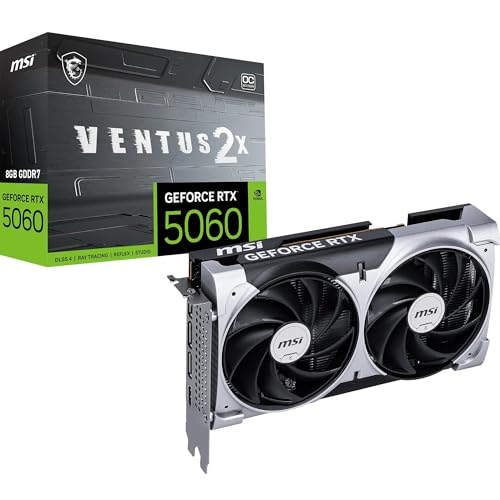
MSI GeForce RTX 5060 Ventus 2X OC
Best for: compact 1080p gaming builds
- Interface
- PCIe 5.0 (what this guide is about)
- Graphics Processor
- GeForce RTX 5060
- Memory Size
- 8 GB
- Memory Type
- GDDR7
- Memory Bus Width
- 128-bit
- PCIe Interface
- PCIe 5.0
View on Amazon: MSI GeForce RTX 5060 Ventus 2X OC Affiliate link
This MSI card uses the RTX 5060 GPU with 8GB of GDDR7 memory. It connects via PCIe 5.0 x8 and includes DisplayPort 2.1b and HDMI 2.1b outputs. The dual-fan design keeps temperatures low with a 0 RPM mode. It fits in two slots and weighs 1.13 pounds. You should choose this if you want a compact card with modern memory speeds for 1080p gaming.
Pros
- 8GB GDDR7 memory with 28 Gbps speed
- PCIe 5.0 interface for high bandwidth
- Dual Torx Fan 5.0 cooling with 0 RPM mode
- Compact 2-slot design at 197mm length
Cons
- 128-bit memory bus limits high-resolution performance
- PCIe 5.0 x8 lane count may bottleneck in some systems
- 550W recommended PSU is higher than entry-level standards
Good fit if
- You need a short graphics card for small cases
- You want GDDR7 memory for faster texture loading
- You play games at 1080p resolution
Skip if
- You require 1440p or 4K gaming performance
- You need more than 8GB of video memory
- You prefer a triple-fan cooler for lower temps
Verdict: MSI RTX 5060 VENTUS 2X OC offers efficient cooling and modern memory for 1080p gamers. Its compact size suits small builds, but the 128-bit bus restricts higher resolution use.
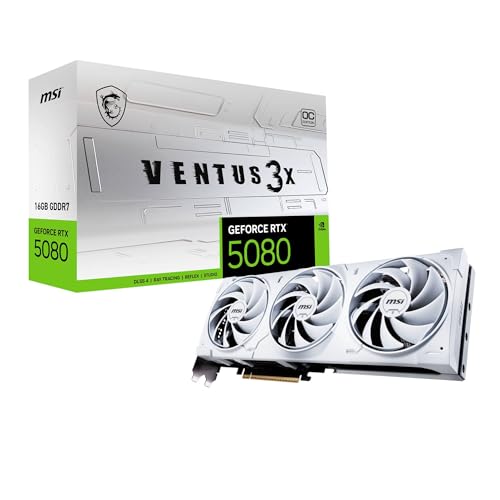
MSI GeForce RTX 5080 Ventus 3X White
Best for: White-themed PCIe 5.0 builds
- Graphics Processor
- GeForce RTX 5080
- Memory Size
- 16GB
- Memory Type
- GDDR7
- Boost Clock
- 2640 MHz
- Memory Bus Width
- 256-bit
- PCIe Interface
- PCIe 5
View on Amazon: MSI GeForce RTX 5080 Ventus 3X White Affiliate link
This MSI graphics card features the GeForce RTX 5080 GPU and 16GB of GDDR7 memory. It connects via PCIe 5.0, offering high bandwidth for modern workloads. The 256-bit memory bus supports efficient data transfer. You get a white VENTUS 3X OC model that fits well in builds where aesthetics matter. It is a solid option for users who want high-end performance with a specific color scheme.
Pros
- GeForce RTX 5080 GPU for high performance
- 16GB GDDR7 memory for large textures
- PCIe 5.0 interface for future-proofing
- White VENTUS 3X OC design
Cons
- 256-bit memory bus is narrower than top-tier competitors
- 11.9-inch length requires a spacious case
- 3.31-pound weight needs sturdy mounting support
Good fit if
- You want a white graphics card for your build
- You need PCIe 5.0 compatibility
- You prefer the RTX 5080 performance tier
Skip if
- You need more than 16GB of VRAM
- You have a small form factor case
- You are on a strict budget
Verdict: MSI RTX 5080 16GB VENTUS 3X OC White delivers strong 16GB GDDR7 performance in a white chassis. It suits builders who prioritize aesthetics and PCIe 5.0 support over maximum memory bandwidth.

MSI GeForce RTX 5060 Ti Ventus 2X 8GB
Best for: compact builds needing PCIe 5.0
- Interface
- PCIe 5.0 (what this guide is about)
- Graphics Processor
- GeForce RTX 5060 Ti
- Memory Size
- 8GB
- Memory Type
- GDDR7
- Memory Bus Width
- 128-bit
- PCIe Interface
- PCIe 5.0
View on Amazon: MSI GeForce RTX 5060 Ti Ventus 2X 8GB Affiliate link
The MSI GeForce RTX 5060 Ti 8G Ventus 2X OC Plus features the RTX 5060 Ti GPU with 8GB of GDDR7 memory. It connects via PCIe 5.0 over a 128-bit bus. This card measures 8.94 inches long and weighs 1.26 pounds. It suits you if you want modern memory speeds in a compact form factor for standard gaming.
Pros
- GDDR7 memory for high bandwidth
- PCIe 5.0 interface support
- Compact 8.94-inch length
- Lightweight at 1.26 pounds
Cons
- Only 8GB of video memory
- 128-bit memory bus width
- Black color only
Good fit if
- You need PCIe 5.0 connectivity
- You have a small case
- You play at 1080p or 1440p
Skip if
- You require more than 8GB VRAM
- You prefer a white build
- You need a triple-fan cooler
Verdict: MSI RTX 5060 Ti 8G Ventus 2X OC Plus delivers GDDR7 speed in a small package. It fits you if you prioritize compact size and modern interface standards over maximum memory capacity.
Specifications side by side
| Spec | MSI GeForce RTX 5060 Ventus 2X OC | MSI GeForce RTX 5080 Ventus 3X White | MSI GeForce RTX 5060 Ti Ventus 2X 8GB |
|---|---|---|---|
| Graphics Processor | GeForce RTX 5060 | GeForce RTX 5080 | GeForce RTX 5060 Ti |
| Memory Size | 8 GB | 16GB | 8GB |
| Memory Type | GDDR7 | GDDR7 | GDDR7 |
| Boost Clock | not stated | 2640 MHz | not stated |
| Memory Bus Width | 128-bit | 256-bit | 128-bit |
| PCIe Interface | PCIe 5.0 | PCIe 5 | PCIe 5.0 |
| Recommended PSU | 550W | 850W | not stated |
| Slot Width | 2-slot | not stated | not stated |
| Memory | 8GB | 16GB | 8GB |
| Interface | PCIe 5.0 | not stated | PCIe 5.0 |
| Use | not stated | Gaming | not stated |
| Length | 7.76 inches | 11.9 inches | 8.94 inches |
| Width | 4.72 inches | 4.76 inches | 4.96 inches |
| Weight | 1.13 pounds | 3.31 pounds | 1.26 pounds |
| Color | Multicolour | Multicolour | black |
| Model | V537-002R | V531-062R | V536-001R |
| Size | not stated | not stated | 8 GB |
Choosing the Right MSI PCIe 5.0 Card
-
Match Memory to Resolution
You must decide between 8GB and 16GB of video memory based on your target resolution. The MSI RTX 5060 models use 8GB, which is sufficient for compact 1080p gaming setups. If you plan to game at higher resolutions or use more demanding applications, the RTX 5080 offers 16GB of capacity. This larger buffer helps manage complex textures and data without slowing down. Select the memory size that aligns with your specific display output and software requirements to ensure smooth performance over time.
-
Check Physical Dimensions
Measure your case space before buying, as card length varies significantly. The RTX 5060 Ventus 2X OC is the shortest option at 7.76 inches, making it ideal for small form factor builds. In contrast, the RTX 5080 Ventus 3X White measures 11.9 inches long, requiring a larger chassis. You should verify that your computer case can accommodate the longest card in your shortlist. Checking these dimensions prevents installation issues and ensures proper airflow around the graphics card during operation.
-
Consider Aesthetic Preferences
If you have a specific color scheme for your build, check the chassis finish. The RTX 5080 Ventus 3X White features a white design, which suits builders prioritizing aesthetics. Most other models listed here come in standard black or multicolour variations. You should choose a card that matches your case panels or theme. This decision does not affect performance but ensures your hardware looks cohesive. Select the color that best complements your existing components for a unified visual experience.
-
Verify PCIe 5.0 Support
All cards in this guide feature PCIe 5.0 interfaces, ensuring modern connectivity standards. You should confirm your motherboard supports this interface to utilize the full bandwidth potential. While backward compatibility exists, using a PCIe 5.0 card on an older slot may limit performance. Check your motherboard specifications to ensure it has the necessary slots. This step guarantees that your graphics card communicates efficiently with your system, avoiding potential bottlenecks during high-speed data transfer tasks.
-
Evaluate Weight and Support
Heavier cards may require additional support to prevent stress on the motherboard slot. The RTX 5080 weighs 3.31 pounds, which is significantly heavier than the RTX 5060 at 1.13 pounds. You should consider using a GPU support bracket for heavier models to maintain stability. This precaution helps protect the PCIe slot from sagging over time. Check the weight specifications in the product data to determine if your setup needs extra reinforcement for long-term durability and safe operation.
Frequently asked questions
Which MSI graphics card with PCIe 5.0 is the most compact?
The MSI GeForce RTX 5060 Ventus 2X OC is the shortest option on this list. It measures 7.76 inches in length. This small footprint makes it ideal for mini-ITX cases or small form factor builds where space is limited. It also weighs only 1.13 pounds.
Does the MSI RTX 5080 Ventus 3X White support PCIe 5.0?
Yes, the MSI GeForce RTX 5080 Ventus 3X White features a PCIe 5.0 interface. It is designed for builders who want a white-themed aesthetic alongside modern connectivity standards. The card includes 16GB of memory and fits well in cases that accommodate its 11.9-inch length.
What memory capacity do the MSI RTX 5060 models have?
Both the MSI GeForce RTX 5060 Ventus 2X OC and the RTX 5060 Ti Ventus 2X 8GB come with 8GB of memory. This capacity is suitable for 1080p gaming. The 128-bit memory bus on the standard 5060 model may restrict performance at higher resolutions.
Is there an MSI PCIe 5.0 card with 16GB of VRAM?
The MSI GeForce RTX 5080 Ventus 3X White is the only card on this list with 16GB of memory. It uses GDDR7 technology to deliver strong performance. This option suits users who prioritize higher memory capacity and white aesthetics over the compact size of the RTX 5060 series.
How wide are the MSI graphics cards with PCIe 5.0?
All listed models are approximately 4.7 to 4.96 inches wide. The RTX 5060 Ventus 2X OC is 4.72 inches wide. The RTX 5080 Ventus 3X White is 4.76 inches wide. The RTX 5060 Ti is 4.96 inches wide. These dimensions fit standard mid-tower cases.
Which MSI PCIe 5.0 card is best for white builds?
The MSI GeForce RTX 5080 Ventus 3X White is the best choice for white-themed builds. It features a white chassis and includes 16GB of GDDR7 memory. While it is longer than the other options at 11.9 inches, it provides the aesthetic appeal requested by builders with white cases.
What is the weight of the MSI RTX 5060 Ventus 2X OC?
The MSI GeForce RTX 5060 Ventus 2X OC weighs 1.13 pounds. This light weight is due to its compact Ventus 2X cooler design. It is one of the lightest options available, making it easy to install in smaller cases without requiring heavy bracket support.