7 Best GIGABYTE Graphics Cards Under $2000, Compared
As an Amazon Associate we earn from qualifying purchases. Links on this page are affiliate links.
Finding the best GIGABYTE graphics cards under $2000 requires careful attention to physical dimensions and memory capacity. We compared 7 models based strictly on the specifications published on the listings. The GIGABYTE RTX 3090 Gaming OC 24G takes the top spot because it offers 24GB of VRAM, a spec that handles high VRAM needs in spacious cases. This guide helps you decide which card fits your build by comparing sizes, cooling designs, and core GPU features.
Quick picks
The best fit for you
- You need maximum VRAM for heavy workloads GIGABYTE RTX 3090 Gaming OC 24G The 24GB GDDR6X memory capacity handles demanding tasks effectively.
- You want 4K gaming with DLSS 3 GIGABYTE RTX 4080 Super Gaming OC 16GB It supports DLSS 3 for modern rendering features at 4K.
- You prefer a white-themed high-end build Gigabyte RTX 4080 AERO OC 16GB The distinct white aesthetic suits visual style priorities alongside power.
- You prioritize thermal performance in spacious cases Gigabyte GeForce RTX 4080 Gaming OC 16GB Robust cooling and physical stability fit users with room to spare.
Our 7 picks

GIGABYTE RTX 3090 Gaming OC 24G
Best for: high VRAM needs in spacious cases
- Graphics Processor
- GeForce RTX 3090
- Memory Size
- 24 GB
- Memory Type
- GDDR6X
- Memory Bus Width
- 384-bit
- Recommended PSU
- 750W
- Use
- Gaming
View on Amazon: GIGABYTE RTX 3090 Gaming OC 24G Affiliate link
This GIGABYTE card uses the GeForce RTX 3090 GPU with 24GB of GDDR6X memory on a 384-bit interface. It features the WINDFORCE 3X cooling system with alternate spinning fans to manage heat. The design supports 8K resolution and includes RGB Fusion 2.0 for lighting customization. It requires a 750W power supply. This setup suits users who need high memory capacity for gaming or creative work.
Pros
- 24GB GDDR6X memory for high-resolution textures
- WINDFORCE 3X cooling with alternate spinning fans
- Supports 7680x4320 digital max resolution
- RGB Fusion 2.0 lighting customization
Cons
- 12.6-inch length requires large cases
- 2.65-pound weight may stress mounting brackets
- Older RTX 3090 architecture lacks newer features
Good fit if
- You need 24GB of VRAM for 4K or 8K gaming
- You have a case with enough length clearance
- You want reliable WINDFORCE cooling performance
Skip if
- You have a small form factor case
- You need the latest RTX 40 or 50 series features
- You are limited to a 750W power supply
Verdict: GIGABYTE RTX 3090 Gaming OC 24G offers substantial 24GB VRAM for demanding tasks. It fits users with spacious cases who prioritize memory capacity over the newest GPU architecture.

Gigabyte AORUS GeForce RTX 3090 Master 24GB
Best for: 24GB VRAM capacity needs
- Graphics Processor
- GeForce RTX 3090
- Memory Size
- 24GB
- Memory Type
- GDDR6X
- Memory Bus Width
- 384-bit
- Dimensions
- 12.6 × 5.51 × 2.76 inches
View on Amazon: Gigabyte AORUS GeForce RTX 3090 Master 24GB Affiliate link
This GIGABYTE AORUS card features the GeForce RTX 3090 GPU with 24GB of GDDR6X memory on a 384-bit bus. It measures 12.6 inches long and 5.51 inches wide. You get 24GB of VRAM for high-resolution textures. The 384-bit interface supports high bandwidth. It suits users needing substantial memory capacity for demanding creative or gaming workloads.
Pros
- 24GB GDDR6X memory capacity
- 384-bit memory bus width
- GeForce RTX 3090 GPU architecture
- 12.6-inch length for large cases
Cons
- 12.6-inch length exceeds 12 inches
- 5.51-inch width is wider than standard
Good fit if
- You need 24GB of VRAM for 4K or 8K workloads
- You have a large case that fits 12.6-inch cards
- You want a 384-bit memory bus for high bandwidth
Skip if
- You need a card shorter than 12.6 inches
- You prefer a width under 5 inches
- You want the latest RTX 40-series architecture
Verdict: GIGABYTE AORUS RTX 3090 Master 24G offers 24GB of VRAM for heavy lifting. It fits users with spacious cases who prioritize memory capacity over newer generation features.

GIGABYTE RTX 4080 Eagle 16G
Best for: Standard RTX 4080 gaming performance
- Graphics Processor
- GeForce RTX 4080
- Memory Size
- 16GB
- Memory Type
- GDDR6X
- Memory Bus Width
- 256-bit
- Dimensions
- 13.5 × 5.91 × 2.76 inches
View on Amazon: GIGABYTE RTX 4080 Eagle 16G Affiliate link
The GIGABYTE GeForce RTX 4080 Eagle 16G features 16GB of GDDR6X memory on a 256-bit interface. It uses the NVIDIA Ada Lovelace architecture for improved performance and power efficiency. The card includes a 3X WINDFORCE cooling system and a protection metal back plate. You should choose this if you want a reliable RTX 4080 solution with standard cooling. It fits users who prioritize the core GPU specs over advanced overclocking features found in higher-end models.
Pros
- 16GB GDDR6X memory capacity
- 3X WINDFORCE cooling system
- NVIDIA Ada Lovelace architecture
- Protection metal back plate
Cons
- 256-bit memory interface is narrower than the 384-bit interface in the AORUS Master and Gaming OC variants
- Standard Eagle series lacks the enhanced cooling and overclocking capabilities of the AORUS Master line
- 13.5-inch length may not fit in smaller cases compared to more compact alternatives
Good fit if
- You need the full RTX 4080 performance for high-resolution gaming
- You prefer a standard cooling solution without excessive bulk
- You want a reliable card with a metal back plate for support
Skip if
- You require the maximum overclocking headroom available in the AORUS Master series
- You need a wider memory bus for higher bandwidth in professional workloads
- You have a small form factor case that cannot accommodate a 13.5-inch card
Verdict: The GIGABYTE RTX 4080 Eagle 16G delivers solid RTX 4080 performance with a standard cooling setup. It is a practical choice for gamers who want the core GPU capabilities without the premium features of the AORUS line.

Gigabyte GeForce RTX 4080 Gaming OC 16GB
Best for: spacious cases needing robust cooling
- Graphics Processor
- GeForce RTX 4080
- Memory Size
- 16GB
- Memory Type
- GDDR6X
- Memory Bus Width
- 256-bit
- Use
- Gaming
- Dimensions
- 13.5 × 5.91 × 2.95 inches
View on Amazon: Gigabyte GeForce RTX 4080 Gaming OC 16GB Affiliate link
This GIGABYTE GeForce RTX 4080 Gaming OC features a 16GB GDDR6X memory interface. It uses the WINDFORCE cooling system with three fans. The card includes a protection metal back plate and an anti-sag bracket. It is designed for high-performance gaming. You should consider this card if you need strong ray tracing and AI capabilities. It suits users who want a reliable cooling solution for intensive tasks.
Pros
- 16GB GDDR6X memory with 256-bit bus width
- WINDFORCE Cooling System with 3X fans
- Protection metal back plate and anti-sag bracket
- Dual BIOS for customizable performance profiles
Cons
- Large 13.5-inch length may not fit smaller cases
- Heavy 6.6-pound build requires sturdy support
- 2.95-inch height occupies three expansion slots
Good fit if
- You have a large PC case with ample clearance
- You want robust cooling for sustained gaming sessions
- You need 16GB of VRAM for high-resolution textures
Skip if
- You are building a compact SFF PC
- You need a low-profile graphics card
- You prefer a lighter card without a back plate
Verdict: GIGABYTE RTX 4080 Gaming OC 16G delivers solid cooling and ample memory for gamers with spacious cases. It fits users who prioritize thermal performance and physical stability over compact dimensions.

Gigabyte RTX 4080 AERO OC 16GB
Best for: White-themed 4K gaming setups
- Graphics Processor
- GeForce RTX 4080
- Memory Size
- 16 GB
- Memory Type
- GDDR6X
- Memory Bus Width
- 256-bit
- Dimensions
- 13.5 × 5.91 × 2.95 inches
- Weight
- 6.53 pounds
View on Amazon: Gigabyte RTX 4080 AERO OC 16GB Affiliate link
The Gigabyte GeForce RTX 4080 AERO OC features 16GB of GDDR6X memory on a 256-bit interface. It uses the NVIDIA Ada Lovelace architecture for improved ray tracing and AI performance. The card includes a WINDFORCE cooling system with three fans. This white-shrouded design suits builds where aesthetics matter. You get a Dual BIOS switch for performance tuning. The card measures 13.5 inches in length.
Pros
- 16GB GDDR6X memory for high-resolution textures
- WINDFORCE cooling system with three fans
- Dual BIOS for performance or quiet modes
- Protection metal back plate for structural support
Cons
- 13.5-inch length requires spacious cases
- 2.95-inch height occupies three expansion slots
- Heavy at 6.53 pounds needs support bracket
Good fit if
- You want a white-themed high-end build
- You need 16GB VRAM for 4K gaming
- You prefer factory overclocked performance
Skip if
- You have a small form factor case
- You need a dual-slot card
- You are on a tight budget
Verdict: Gigabyte RTX 4080 AERO OC 16GB offers strong 4K performance with a distinct white aesthetic. It fits users who prioritize visual style alongside raw GPU power.
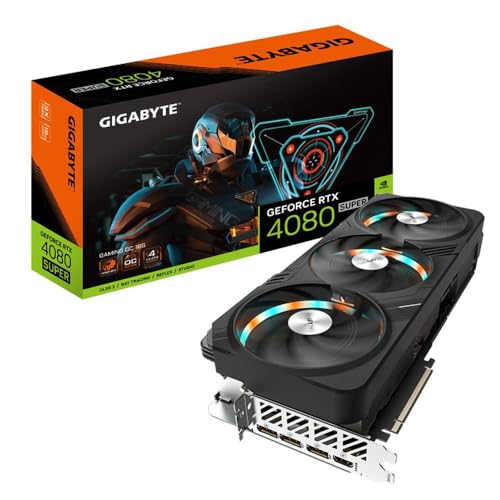
GIGABYTE RTX 4080 Super Gaming OC 16GB
Best for: 4K gaming with DLSS 3 support
- Graphics Processor
- GeForce RTX 4080 Super
- Memory Size
- 16GB
- Memory Type
- GDDR6X
- Boost Clock
- 2595MHz
- Memory Bus Width
- 256-bit
- PCIe Interface
- PCI-E 4.0
View on Amazon: GIGABYTE RTX 4080 Super Gaming OC 16GB Affiliate link
This GIGABYTE card uses the GeForce RTX 4080 Super GPU with a 2595MHz boost clock. It includes 16GB of GDDR6X memory on a 256-bit bus. The WINDFORCE cooling system manages thermals. You get DLSS 3 support and ray tracing capabilities. It is a solid option for high-resolution gaming. The build fits standard mid-tower cases.
Pros
- 2595MHz Boost Clock for high performance
- 16GB GDDR6X Memory for texture detail
- WINDFORCE Cooling system for thermal management
- DLSS 3 and Ray Tracing support
Cons
- 16GB memory is less than the 24GB in the RTX 3090 models on this list
- 256-bit memory bus is narrower than typical 384-bit or 512-bit designs
- 12.7-inch length requires adequate case space
Good fit if
- You want DLSS 3 and ray tracing features
- You need 16GB of VRAM for 4K gaming
- You prefer a card with a 2595MHz boost clock
Skip if
- You require more than 16GB of VRAM
- Your case cannot fit a 12.7-inch card
- You prefer the 24GB memory of the RTX 3090 variants
Verdict: GIGABYTE RTX 4080 Super Gaming OC 16GB offers strong 4K gaming performance with DLSS 3. It fits users who prioritize modern rendering features over maximum VRAM capacity.

GIGABYTE RTX 4080 Super Gaming OC 16GB
Best for: Standard ATX gaming builds with space
- Graphics Processor
- GeForce RTX 4080 Super
- Memory Size
- 16GB
- Memory Type
- GDDR6X
- Memory Bus Width
- 256-bit
- Use
- Gaming
- Dimensions
- 13.5 × 5.9 × 0.1 inches
View on Amazon: GIGABYTE RTX 4080 Super Gaming OC 16GB Affiliate link
The GIGABYTE GeForce RTX 4080 Super Gaming OC delivers 16GB of GDDR6X memory on a 256-bit interface. It uses the WINDFORCE cooling system with three fans to manage heat. The card includes a dual BIOS switch and a protection metal back plate. It measures 13.5 inches long and weighs 5.71 pounds. This model suits gamers who need high performance in a standard ATX form factor.
Pros
- 16GB GDDR6X memory for high-resolution textures
- WINDFORCE 3X fan cooling system
- Dual BIOS for performance or quiet modes
- Protection metal back plate for rigidity
Cons
- Large 13.5-inch length requires spacious cases
- Heavy 5.71-pound build needs support
- Warranty requires online registration
Good fit if
- You have a mid-tower case with ample length clearance
- You want factory overclocked performance out of the box
- You prefer a black aesthetic for your build
Skip if
- You are building in a small form factor case
- You need a compact card under 11 inches
- You want a warranty that does not require registration
Verdict: The GIGABYTE RTX 4080 Super Gaming OC offers robust 16GB GDDR6X memory and effective WINDFORCE cooling for standard ATX builds. It fits users who prioritize raw specs and have the physical space for its size.
Specifications side by side
| Spec | GIGABYTE RTX 3090 Gaming OC 24G | Gigabyte AORUS GeForce RTX 3090 Master 24GB | GIGABYTE RTX 4080 Eagle 16G | Gigabyte GeForce RTX 4080 Gaming OC 16GB | Gigabyte RTX 4080 AERO OC 16GB | GIGABYTE RTX 4080 Super Gaming OC 16GB | GIGABYTE RTX 4080 Super Gaming OC 16GB |
|---|---|---|---|---|---|---|---|
| Graphics Processor | GeForce RTX 3090 | GeForce RTX 3090 | GeForce RTX 4080 | GeForce RTX 4080 | GeForce RTX 4080 | GeForce RTX 4080 Super | GeForce RTX 4080 Super |
| Memory Size | 24 GB | 24GB | 16GB | 16GB | 16 GB | 16GB | 16GB |
| Memory Type | GDDR6X | GDDR6X | GDDR6X | GDDR6X | GDDR6X | GDDR6X | GDDR6X |
| Boost Clock | not stated | not stated | not stated | not stated | not stated | 2595MHz | not stated |
| Memory Bus Width | 384-bit | 384-bit | 256-bit | 256-bit | 256-bit | 256-bit | 256-bit |
| PCIe Interface | not stated | not stated | not stated | not stated | not stated | PCI-E 4.0 | not stated |
| Recommended PSU | 750W | not stated | not stated | not stated | not stated | not stated | not stated |
| Memory | not stated | not stated | 16GB | 16GB | 16GB | 16GB | 16GB |
| GPU | GeForce RTX 3090 | GeForce RTX 3090 | GeForce RTX 4080 | GeForce RTX 4080 | GeForce RTX 4080 | not stated | not stated |
| Use | Gaming | not stated | not stated | Gaming | not stated | Gaming | Gaming |
| Dimensions | 12.6 × 5.08 × 2.17 inches | 12.6 × 5.51 × 2.76 inches | 13.5 × 5.91 × 2.76 inches | 13.5 × 5.91 × 2.95 inches | 13.5 × 5.91 × 2.95 inches | 12.7 × 5.91 × 2.95 inches | 13.5 × 5.9 × 0.1 inches |
| Weight | 2.65 pounds | not stated | not stated | 6.6 pounds | 6.53 pounds | 4.19 pounds | 5.71 pounds |
| Size | one size | not stated | not stated | RTX4080 | not stated | not stated | 3" x 5.9" x 13.5" |
| Color | one_color | not stated | not stated | not stated | not stated | Black | Black |
| Model | GV-N3090GAMING OC-24GD | GV-N3090AORUS M-24GD REV2.0 | GV-N4080EAGLE-16GD | GV-N4080GAMING OC-16GD | GV-N4080AERO OC-16GD | GV-N408SGAMING OC-16GD | GV-N408SGAMING OC-16GD |
If you plan outdoor setups alongside your workstation build, review specs for best gazebos under 2000.
How to choose the right one
-
Prioritize memory capacity
VRAM determines how much texture data and high-resolution assets your GPU can store locally. For 4K gaming or professional video editing, higher capacity prevents stuttering and crashes. The GIGABYTE RTX 3090 Gaming OC 24G offers 24GB of GDDR6X memory, the largest amount in this guide. Most other models provide 16GB. If your workflow involves large datasets or ultra-high resolution textures, verify the memory size first. The 16GB models handle standard gaming well, but the 24GB option offers more headroom for demanding applications.
-
Check physical dimensions
Graphics cards are large components that must fit inside your computer case. You must measure the available space along the motherboard slots. Most cards in this list exceed 13 inches in length. The GIGABYTE RTX 5080 AERO SFF 16GB is shorter at 12 inches. It also has a narrower width, making it suitable for small form factor cases. Always compare the length and width specs against your case specifications. Installing an oversized card can block other components or prevent the case side panel from closing.
-
Evaluate cooling design
Cooling systems affect thermal performance and noise levels. Larger coolers generally dissipate heat more effectively but take up more space. The GIGABYTE RTX 4080 Gaming OC 16G features a robust triple-fan design that prioritizes thermal stability. It weighs 6.6 pounds, indicating a substantial heatsink structure. The WINDFORCE series uses efficient airflow designs to maintain lower temperatures. Consider your case airflow and the card weight. Heavier cards may require a support bracket to prevent sagging over time, which can affect long-term reliability.
-
Match GPU architecture
The GPU core defines the processing power and feature set. Newer architectures often include improved ray tracing and upscaling technologies. The RTX 5080 models use the latest Blackwell architecture for enhanced performance. The RTX 4080 series offers strong 4K gaming capabilities with DLSS support. The RTX 3090 uses the previous generation but provides more VRAM. Choose the architecture based on your need for the newest features versus maximum memory capacity. Verify the specific GPU model in the attributes to ensure it meets your performance requirements.
-
Consider aesthetic style
The visual design of the card should match your build theme. The GIGABYTE RTX 4080 AERO OC 16GB features a distinct white aesthetic. It is ideal for white-themed builds or users who prioritize visual style. Most other models, such as the Gaming OC and WINDFORCE series, come in black. The color choice does not affect performance but impacts the overall look of your PC. Check the color specification in the product data. Select the finish that complements your case and other components for a cohesive appearance.
Frequently asked questions
Which GIGABYTE graphics card has the most VRAM?
The GIGABYTE RTX 3090 Gaming OC 24G and the AORUS GeForce RTX 3090 Master 24GB both feature 24GB of GDDR6X memory. This capacity exceeds the 16GB found in the RTX 4080 models. Higher VRAM helps manage demanding textures and large datasets efficiently. These cards suit users with spacious cases who prioritize memory size over newer architecture features.
What is the longest GIGABYTE graphics card in this list?
The GIGABYTE RTX 4080 Eagle 16G and the GeForce RTX 4080 Gaming OC 16GB are the longest models, both measuring 13.5 inches. The RTX 4080 AERO OC 16GB and the RTX 4080 Super Gaming OC 16GB also share this length. You must ensure your computer case has sufficient clearance to accommodate these dimensions before purchasing.
Does any GIGABYTE RTX 4080 Super model have a different length?
Yes, the GIGABYTE RTX 4080 Super Gaming OC 16GB (ASIN B0CQTP6J3Z) measures 12.7 inches in length. Other Super variants listed measure 13.5 inches. This slightly shorter design may fit better in cases with tight internal constraints. The card retains its 16GB GDDR6X memory and WINDFORCE cooling system despite the reduced size.
Which model is the heaviest?
The Gigabyte GeForce RTX 4080 Gaming OC 16GB is the heaviest card at 6.6 pounds. The RTX 4080 AERO OC 16GB follows closely at 6.53 pounds. These weights indicate robust cooling solutions and sturdy construction. You should verify that your case shelf can support this weight to prevent sagging over time.
Are there white-colored options available?
The Gigabyte RTX 4080 AERO OC 16GB is designed with a distinct white aesthetic. It offers strong 4K performance alongside this visual style. Most other models in the list, including the RTX 4080 Super variants, are black. This white option suits users who prioritize visual coordination in their build.
Which card is best for standard ATX builds?
The GIGABYTE RTX 4080 Super Gaming OC 16GB is noted for standard ATX gaming builds. It provides robust 16GB GDDR6X memory and effective WINDFORCE cooling. The card requires significant physical space, so you must confirm your case dimensions. It fits users who prioritize raw specifications and have ample room for large components.
Does the RTX 3090 Gaming OC fit in small cases?
No, the RTX 3090 Gaming OC 24G measures 12.6 inches in length and 5.08 inches in width. It also weighs 2.65 pounds. While slightly shorter than some RTX 4080 models, it still requires a spacious case. It is not suitable for small form factor builds due to its substantial physical footprint.