11 Best ASUS Graphics Cards Under $500, Compared
As an Amazon Associate we earn from qualifying purchases. Links on this page are affiliate links.
Choosing the best ASUS graphics cards under $500 requires careful attention to physical dimensions and memory capacity. The ASUS Phoenix GeForce RTX 3060 12GB leads this list because its 12GB GDDR6 buffer handles high texture settings at 1080p effectively. We compared 11 models using only the specifications published on their listings. This approach ensures you get accurate data on slot width, length, and interface type. You can use these details to verify fitment in your specific chassis. The guide helps you decide which card matches your case size and VRAM needs.
Quick picks
The best fit for you
- You need the most memory for high texture settings ASUS Phoenix GeForce RTX 3060 12GB It provides 12GB of GDDR6 VRAM, which is the highest capacity in this list.
- You want the latest Blackwell architecture in a small case ASUS Dual GeForce RTX 5050 8GB This card uses Blackwell architecture and DLSS 4 support in a compact 8-inch design.
- You prefer GDDR7 memory for future-proofing ASUS Prime GeForce RTX 5060 8GB It features modern GDDR7 memory and DLSS 4 support inside a 2.5-slot enclosure.
- You need a durable card with only 4GB of memory ASUS TUF Gaming Radeon RX 6500 XT 4GB It delivers AMD RDNA 2 architecture in a heavily built 2.7-slot form factor.
Our 11 picks
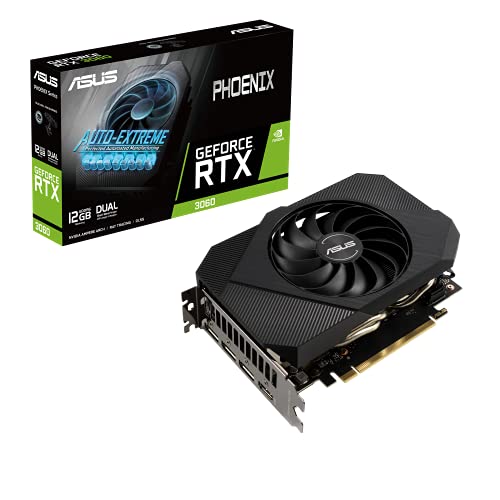
ASUS Phoenix GeForce RTX 3060 12GB
Best for: 1080p gaming with high texture settings
- Graphics Processor
- GeForce RTX 3060
- Memory Size
- 12GB
- Memory Type
- GDDR6
- PCIe Interface
- PCIe 4.0
- Use
- Gaming
- Length
- 7 inches
View on Amazon: ASUS Phoenix GeForce RTX 3060 12GB Affiliate link
The ASUS Phoenix RTX 3060 features 12GB of GDDR6 memory on a PCIe 4.0 interface. This extra VRAM distinguishes it from the 8GB models in this list. It measures 7 inches long and weighs 12 ounces. The card supports HDMI and DisplayPort 1.4a. You should consider it if you need more video memory for texture-heavy games or creative workloads.
Pros
- 12GB GDDR6 memory capacity
- Compact 7-inch length
- Lightweight 12-ounce build
- PCIe 4.0 interface
Cons
- Older RTX 3060 architecture lacks DLSS 3
- No RGB lighting or advanced cooling features
- Only two display outputs available
Good fit if
- You need 12GB of VRAM for 1080p gaming
- You have a small form factor case
- You want a compact card without RGB
Skip if
- You require DLSS 3 Frame Generation
- You want 8GB memory cards only
- You need more than two display outputs
Verdict: ASUS Phoenix RTX 3060 12GB offers 12GB of VRAM for users who prioritize memory capacity over newer features. It fits small builds well but lacks the latest generation tech found in other options.

ASUS Dual GeForce RTX 4060 8GB
Best for: compact builds needing DLSS 3 support
- Graphics Processor
- GeForce RTX 4060
- Memory Size
- 8GB
- Memory Type
- GDDR6
- PCIe Interface
- PCIe 4.0
- Slot Width
- 2-slot
- Dimensions
- 7.96 × 4.74 × 0.1 inches
View on Amazon: ASUS Dual GeForce RTX 4060 8GB Affiliate link
This ASUS Dual GeForce RTX 4060 8GB graphics card features a GeForce RTX 4060 graphics processor paired with 8GB of GDDR6 memory. It runs on a PCIe 4.0 interface and uses a 2-slot design measuring 7.96 inches long. Display connectivity includes HDMI 2.1a and DisplayPort 1.4a ports with DLSS 3 support. You will find it fits setups where you need compact two-slot dimensions.
Pros
- Compact 7.96-inch length fits smaller enclosures
- Standard 2-slot profile saves motherboard space
- Supports DLSS 3 technology
- Modern video outputs with HDMI 2.1a and DisplayPort 1.4a
Cons
- Memory capacity capped at 8GB GDDR6
- Limited to PCIe 4.0 interface
Good fit if
- You need a compact card under 8 inches long for tight PC cases.
- You want DLSS 3 support on a standard 2-slot motherboard layout.
Skip if
- You require more than 8GB of video memory for heavy workloads.
- You need newer PCIe standards beyond PCIe 4.0.
Verdict: ASUS Dual GeForce RTX 4060 8GB delivers a compact 2-slot design with DLSS 3 and 8GB of GDDR6 memory. It provides modern HDMI 2.1a and DisplayPort 1.4a connectivity for space-conscious systems.
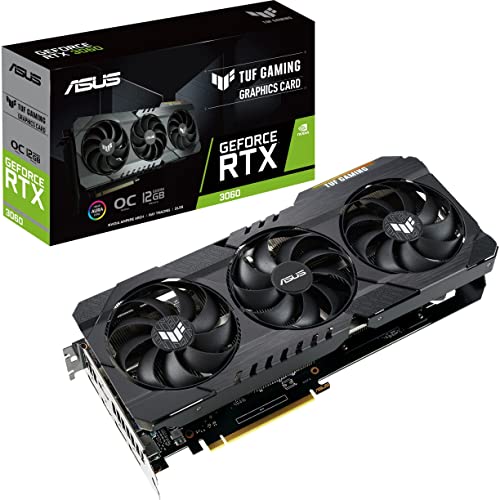
ASUS TUF Gaming GeForce RTX 3060 OC 12GB
Best for: gamers needing 12GB of GDDR6 memory
- Graphics Processor
- GeForce RTX 3060
- Memory Size
- 12GB
- Memory Type
- GDDR6
- Boost Clock
- 1882 MHz
- PCIe Interface
- PCIe 4.0
- Use
- Gaming
View on Amazon: ASUS TUF Gaming GeForce RTX 3060 OC 12GB Affiliate link
This ASUS TUF Gaming card features an NVIDIA GeForce RTX 3060 graphics processor paired with 12GB of GDDR6 memory. It runs at an 1882 MHz boost clock in OC mode across a PCIe 4.0 interface. The 12GB frame buffer gives you extra video memory for asset-heavy games, while 2nd generation RT Cores and 3rd generation Tensor Cores handle ray tracing and DLSS. It suits you if you prioritize memory capacity.
Pros
- 12GB GDDR6 memory buffer
- 1882 MHz boost clock in OC mode
- Reinforced SafeSlot PCIe structural design
- 3rd Generation Tensor Cores supporting up to 8K resolution
Cons
- Clock drops to 1852 MHz in standard Gaming mode
- Uses older 2nd generation RT Cores
Good fit if
- You need 12GB of VRAM for memory-intensive game textures.
- You want DLSS upscaling and ray tracing support.
- You use a motherboard with a PCIe 4.0 slot.
Skip if
- You want newer generation GPU architecture.
- You prefer peak clock speeds without engaging an OC software mode.
Verdict: ASUS TUF Gaming GeForce RTX 3060 12GB pairs a generous 12GB GDDR6 memory buffer with reinforced SafeSlot hardware for reliable everyday gaming. Its 1882 MHz OC clock and Ampere architecture deliver solid performance for memory-heavy titles.

ASUS ROG Strix RTX 3060 OC
Best for: Large cases needing 12GB VRAM
- Graphics Processor
- NVIDIA GeForce RTX 3060
- Memory Size
- 12GB
- Memory Type
- GDDR6
- PCIe Interface
- PCIe 4.0
- Slot Width
- 2.7-Slot
- Use
- Gaming
View on Amazon: ASUS ROG Strix RTX 3060 OC Affiliate link
The ASUS ROG Strix RTX 3060 OC Edition delivers 12GB of GDDR6 memory on a PCIe 4.0 interface. This card targets gamers who need extra video memory for modern titles. Its dimensions are 11.8 inches long, 5.26 inches wide, and 2.11 inches high. It weighs 12 ounces. You should choose this model if your case accommodates large cards and you want a robust cooling solution from the ROG Strix line.
Pros
- 12GB GDDR6 memory capacity
- PCIe 4.0 interface support
- ROG Strix build quality
- OC Edition clock speeds
Cons
- 11.8-inch length requires spacious cases
- 12-ounce weight adds chassis load
- Older RTX 3060 architecture lacks DLSS 3
Good fit if
- You need 12GB VRAM for high-resolution textures
- You have a full-tower case with ample length clearance
- You prefer the ROG Strix aesthetic and cooling design
Skip if
- You require DLSS 3 frame generation support
- You have a small form-factor case under 12 inches
- You want the latest RTX 50-series architecture
Verdict: ASUS ROG Strix RTX 3060 12GB suits users with large cases who prioritize 12GB VRAM over newer features. It is a solid choice for 1080p and 1440p gaming where memory capacity matters more than the latest generation tech.

ASUS TUF Gaming Radeon RX 6500 XT 4GB
Best for: systems needing a durable 4GB card
- Graphics Processor
- AMD Radeon RX 6500 XT
- Memory Size
- 4GB
- Memory Type
- GDDR6
- PCIe Interface
- PCIe 4.0
- Slot Width
- 2.7-slot
- Use
- Gaming
View on Amazon: ASUS TUF Gaming Radeon RX 6500 XT 4GB Affiliate link
The ASUS TUF Gaming Radeon RX 6500 XT 4GB is a graphics card built on AMD RDNA 2 architecture. It features 4GB of GDDR6 memory and a PCIe 4.0 interface. Its 2.7-slot profile houses Axial-tech fans with dual ball bearings, an aluminum shroud, and a metal backplate. You will find this card suits gaming setups where you prioritize heavy-duty cooling over high video memory capacity.
Pros
- Axial-tech fan design with dual ball bearings
- Thick 2.7-slot heatsink for increased cooling surface area
- Durable all-aluminum shroud and rigid metal backplate
- PCIe 4.0 interface support
Cons
- Limited to 4GB GDDR6 memory capacity
- 2.7-slot thickness blocks adjacent expansion slots
Good fit if
- You need a dedicated card with 4GB of GDDR6 memory.
- You have case space for a 2.7-slot wide cooler.
Skip if
- You require more than 4GB of VRAM for your games.
- You need a slim card for tight expansion spaces.
Verdict: ASUS TUF Gaming Radeon RX 6500 XT 4GB delivers AMD RDNA 2 architecture in a heavily built 2.7-slot form factor. It provides durable construction if you specifically require a 4GB configuration.

ASUS Dual GeForce RTX 3060 12GB
Best for: 12GB VRAM needs on a budget
- Graphics Processor
- GeForce RTX 3060
- Memory Size
- 12GB
- Memory Type
- GDDR6
- Boost Clock
- OC: 1867MHz, Gaming: 1837MHz
- Memory Bus Width
- 192-bit
- PCIe Interface
- PCI Express 4.0
View on Amazon: ASUS Dual GeForce RTX 3060 12GB Affiliate link
This ASUS Dual GeForce RTX 3060 graphics card features 12GB of GDDR6 memory on a 192-bit bus. It supports PCIe 4.0 and includes ray tracing and DLSS capabilities. The OC mode boosts the clock to 1867MHz. You get a black dual-fan design that fits standard cases. This card suits gamers who need extra video memory for modern titles or creative work without exceeding a moderate budget.
Pros
- 12GB GDDR6 memory for high-resolution textures
- PCIe 4.0 interface for faster data transfer
- OC mode reaches 1867MHz boost clock
- Supports ray tracing and DLSS
Cons
- Older RTX 3060 architecture lacks DLSS 3
- 192-bit memory bus limits bandwidth
- No HDMI 2.1 support listed
Good fit if
- You need 12GB VRAM for 1080p or 1440p gaming
- You want a reliable dual-fan cooling solution
- You are building a budget-friendly RTX system
Skip if
- You require the latest DLSS 3 frame generation
- You need 16GB or more of video memory
- You want the newest RTX 40 or 50 series features
Verdict: ASUS Dual RTX 3060 12GB is a solid option for users prioritizing VRAM capacity over the newest architectural features. It fits well in builds where 12GB of memory is the main requirement.
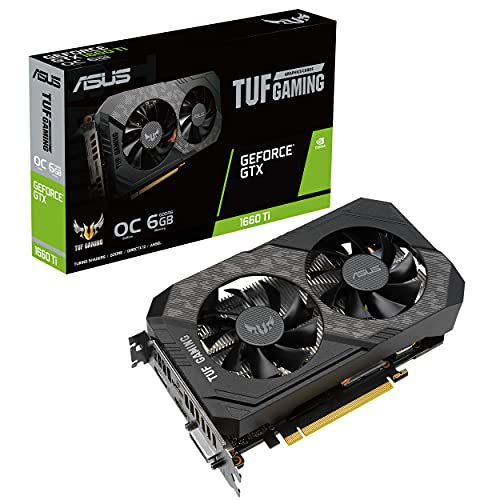
ASUS TUF Gaming GeForce GTX 1660 Ti 6GB
Best for: compact 1080p gaming builds
- Graphics Processor
- GeForce GTX 1660 Ti
- Memory Size
- 6GB
- Memory Type
- GDDR6
- Boost Clock
- 1845 MHz
- PCIe Interface
- PCIe 3.0
- Use
- Gaming
View on Amazon: ASUS TUF Gaming GeForce GTX 1660 Ti 6GB Affiliate link
This ASUS TUF Gaming card uses the NVIDIA GeForce GTX 1660 Ti processor with 6GB of GDDR6 memory. It features a boost clock of 1845 MHz in OC mode and connects via PCIe 3.0. The build includes dual ball bearings and space-grade lubricant for durability. It measures 8.1 inches in length and weighs 1.41 pounds. You should choose this card if you need a reliable 1080p gaming solution with a compact form factor.
Pros
- 6GB GDDR6 memory capacity
- 1845 MHz boost clock in OC mode
- Dual ball bearing design with space-grade lubricant
- Compact 8.1-inch length fits smaller cases
Cons
- PCIe 3.0 interface limits bandwidth compared to newer PCIe 4.0 or 5.0 models
- 6GB memory size is smaller than the 8GB or 12GB options in this guide
- GTX 1660 Ti lacks the DLSS 3 and newer architecture features found in RTX cards
Good fit if
- You are building a budget PC for 1080p gaming
- You need a short graphics card that fits in a small case
- You want a durable card with sleeve bearing technology
Skip if
- You require ray tracing capabilities for modern titles
- You plan to play games at 1440p or 4K resolution
- You need the latest PCIe 4.0 or 5.0 connectivity
Verdict: ASUS TUF GTX 1660 Ti EVO OC 6GB offers solid 1080p performance for users who prioritize physical size and reliability over cutting-edge specs. It fits well in compact builds where newer, larger cards will not.

ASUS Dual GeForce RTX 4060 OC Edition
Best for: compact cases needing DLSS 3
- Graphics Processor
- GeForce RTX 4060
- Memory Size
- 8GB
- Memory Type
- GDDR6
- PCIe Interface
- PCIe 4.0
- Slot Width
- 2.5-slot
- Dimensions
- 8.9 × 4.9 × 2 inches
View on Amazon: ASUS Dual GeForce RTX 4060 OC Edition Affiliate link
The ASUS Dual GeForce RTX 4060 OC Edition delivers 8GB of GDDR6 memory on a PCIe 4.0 interface. Its 2.5-slot design fits well in smaller chassis while providing cooling efficiency. You get DLSS 3 support and ray tracing capabilities for modern gaming. This card offers a balanced performance tier for 1080p and 1440p tasks without requiring excessive space in your build.
Pros
- 2.5-slot width for compact chassis compatibility
- 8GB GDDR6 memory capacity
- PCIe 4.0 interface support
- DLSS 3 technology integration
Cons
- 2.5-slot width limits airflow compared to 3-slot designs
- 8GB VRAM is lower than the 12GB found on competing RTX 3060 models
- 2.47-pound weight adds load to the motherboard slot
Good fit if
- You have a small form factor case
- You want DLSS 3 support
- You prefer a compact 2.5-slot design
Skip if
- You need more than 8GB of VRAM
- You require PCIe 5.0 connectivity
- You want a 3-slot card for better cooling
Verdict: ASUS Dual RTX 4060 OC fits users who need a compact card with modern features. It suits builders prioritizing size and efficiency over maximum memory capacity.

ASUS Dual GeForce RTX 4060 Ti V2
Best for: compact small-form-factor Ada Lovelace system builds
- Graphics Processor
- GeForce RTX 4060 Ti
- Memory Size
- 8GB
- Memory Type
- GDDR6
- Boost Clock
- 2595MHz
- Slot Width
- 2-slot
View on Amazon: ASUS Dual GeForce RTX 4060 Ti V2 Affiliate link
This graphics card pairs an NVIDIA GeForce RTX 4060 Ti GPU with 8GB of GDDR6 memory. It runs at a 2595MHz boost clock in OC mode and fits into compact builds thanks to its standard 2-slot thickness. You get Axial-tech dual fans with dual ball bearings and 0dB silent operation. This setup suits you if you need modern Ada Lovelace architecture inside a small-form-factor case.
Pros
- Boost clock reaches 2595MHz in OC mode
- Compact 2-slot profile fits small-form-factor cases
- Dual ball fan bearings engineered for longer lifespan
- 0dB technology enables quiet operation during low loads
Cons
- Limited to 8GB of video memory
- Uses GDDR6 memory rather than newer GDDR7
Good fit if
- You need a 2-slot graphics card for a small-form-factor enclosure.
- You want NVIDIA DLSS 3 support via Ada Lovelace architecture.
- You prioritize dual ball bearing fans with a 0dB idle mode.
Skip if
- You need more than 8GB of VRAM for heavy workloads.
- You want graphics hardware featuring next-generation GDDR7 memory.
Verdict: ASUS Dual RTX 4060 Ti V2 OC 8GB delivers a 2595MHz boost clock and DLSS 3 support in a compact 2-slot footprint. It provides reliable Ada Lovelace processing for space-constrained cases without occupying excess PCIe clearance.

ASUS Prime GeForce RTX 5060 8GB
Best for: SFF gaming builds using GDDR7 architecture
- Graphics Processor
- GeForce RTX 5060
- Memory Size
- 8GB
- Memory Type
- GDDR7
- Boost Clock
- 2527 MHz (OC) / 2497 MHz
- PCIe Interface
- PCIe 5.0
- Slot Width
- 2.5-slot
View on Amazon: ASUS Prime GeForce RTX 5060 8GB Affiliate link
This card features NVIDIA Blackwell architecture with 8GB GDDR7 memory and a 2527 MHz boost clock in OC mode. Its 2.5-slot cooler measures 10.6 inches long and includes dual-ball bearing Axial-tech fans with a dual BIOS switch and 0dB mode. You get 630 AI TOPS and DLSS 4 support, making it suitable if you want modern graphics features in an SFF-ready build.
Pros
- Fast 8GB GDDR7 memory
- Dual BIOS switch for Quiet and Performance profiles
- 0dB mode stops fans under light loads
- SFF-ready dimensions at 10.6 inches long
Cons
- 2.5-slot profile covers adjacent expansion slots
- 8GB VRAM capacity restricts memory-heavy workloads
Good fit if
- You need an SFF-ready card with a 10.6-inch case clearance.
- You want DLSS 4 support and 8GB GDDR7 memory.
- You prefer hardware dual BIOS switches for fan tuning.
Skip if
- You require more than 8GB of memory for demanding creative apps.
- You need a strict two-slot card to fit compact PCIe layouts.
Verdict: ASUS Prime GeForce RTX 5060 8GB delivers modern GDDR7 memory and DLSS 4 support inside a compact 2.5-slot enclosure. It provides efficient cooling with switchable hardware BIOS profiles.

ASUS Dual GeForce RTX 5050 8GB
Best for: compact small-form-factor NVIDIA Blackwell builds
- Graphics Processor
- GeForce RTX 5050
- Memory Size
- 8GB
- Memory Type
- GDDR6
- Boost Clock
- 2602 MHz
- PCIe Interface
- PCIe 5.0
- Slot Width
- 2-slot
View on Amazon: ASUS Dual GeForce RTX 5050 8GB Affiliate link
The ASUS Dual GeForce RTX 5050 8GB is a compact graphics card built on NVIDIA Blackwell architecture. You get an 8GB GDDR6 memory configuration, a 2602 MHz boost clock in OC mode, and DLSS 4 support. Measuring 8 inches long with a 2-slot profile, it fits small cases cleanly. This hardware suits you if you prioritize dual-BIOS flexibility, 0dB silent operation, and long-lasting dual ball fan bearings in a small setup.
Pros
- Compact 8-inch length and 2-slot design fit small-form-factor builds
- Dual BIOS switch lets you toggle between Quiet and Performance modes
- Axial-tech fans feature dual-ball bearings and 0dB silent mode
- Rated at 433 AI TOPS with DLSS 4 capability
Cons
- Equipped with standard GDDR6 instead of GDDR7 memory
- Limited to 8GB of VRAM capacity
Good fit if
- You build in a small chassis requiring an 8-inch, 2-slot card.
- You want hardware dual-BIOS toggles and quiet 0dB fan operation.
- You want NVIDIA Blackwell architecture with DLSS 4 support.
Skip if
- You need more than 8GB of video memory for your setup.
- You want a card equipped with newer GDDR7 memory.
Verdict: ASUS Dual GeForce RTX 5050 8GB delivers Blackwell architecture, dual-BIOS flexibility, and DLSS 4 support in a compact 8-inch design. It provides reliable cooling and silent low-load operation for space-conscious systems.
Specifications side by side
| Spec | ASUS Phoenix GeForce RTX 3060 12GB | ASUS Dual GeForce RTX 4060 8GB | ASUS TUF Gaming GeForce RTX 3060 OC 12GB | ASUS ROG Strix RTX 3060 OC | ASUS TUF Gaming Radeon RX 6500 XT 4GB | ASUS Dual GeForce RTX 3060 12GB | ASUS TUF Gaming GeForce GTX 1660 Ti 6GB | ASUS Dual GeForce RTX 4060 OC Edition | ASUS Dual GeForce RTX 4060 Ti V2 | ASUS Prime GeForce RTX 5060 8GB | ASUS Dual GeForce RTX 5050 8GB |
|---|---|---|---|---|---|---|---|---|---|---|---|
| Graphics Processor | GeForce RTX 3060 | GeForce RTX 4060 | GeForce RTX 3060 | NVIDIA GeForce RTX 3060 | AMD Radeon RX 6500 XT | GeForce RTX 3060 | GeForce GTX 1660 Ti | GeForce RTX 4060 | GeForce RTX 4060 Ti | GeForce RTX 5060 | GeForce RTX 5050 |
| Memory Size | 12GB | 8GB | 12GB | 12GB | 4GB | 12GB | 6GB | 8GB | 8GB | 8GB | 8GB |
| Memory Type | GDDR6 | GDDR6 | GDDR6 | GDDR6 | GDDR6 | GDDR6 | GDDR6 | GDDR6 | GDDR6 | GDDR7 | GDDR6 |
| Boost Clock | not stated | not stated | 1882 MHz | not stated | not stated | OC: 1867MHz, Gaming: 1837MHz | 1845 MHz | not stated | 2595MHz | 2527 MHz (OC) / 2497 MHz | 2602 MHz |
| Memory Bus Width | not stated | not stated | not stated | not stated | not stated | 192-bit | not stated | not stated | not stated | not stated | not stated |
| PCIe Interface | PCIe 4.0 | PCIe 4.0 | PCIe 4.0 | PCIe 4.0 | PCIe 4.0 | PCI Express 4.0 | PCIe 3.0 | PCIe 4.0 | not stated | PCIe 5.0 | PCIe 5.0 |
| Slot Width | not stated | 2-slot | not stated | 2.7-Slot | 2.7-slot | not stated | not stated | 2.5-slot | 2-slot | 2.5-slot | 2-slot |
| Memory | 12GB | 8GB | 12GB | 12GB | 4GB | 12GB | 6GB | 8GB | 8GB | 8GB | 8GB |
| GPU | GeForce RTX 3060 | not stated | GeForce RTX 3060 | GeForce RTX 3060 | not stated | GeForce RTX 3060 | not stated | GeForce RTX 4060 | GeForce RTX 4060 Ti | not stated | not stated |
| Interface | PCIe 4.0 | PCIe 4.0 | PCIe 4.0 | PCIe 4.0 | PCIe 4.0 | not stated | PCIe 3.0 | PCIe 4.0 | not stated | PCIe 5.0 | PCIe 5.0 |
| Use | Gaming | not stated | Gaming | Gaming | Gaming | Gaming | Gaming | not stated | not stated | Gaming | Gaming |
| Length | 7 inches | not stated | not stated | not stated | not stated | not stated | not stated | not stated | not stated | not stated | not stated |
| Width | 5 inches | not stated | not stated | not stated | not stated | not stated | not stated | not stated | not stated | not stated | not stated |
| Weight | 12 ounces | 1.2 pounds | 12 ounces | 12 ounces | 2.2 pounds | 11.3 ounces | 1.41 pounds | 2.47 pounds | not stated | 3 pounds | 1.1 pounds |
| Dimensions | not stated | 7.96 × 4.74 × 0.1 inches | 5 × 5 × 5 inches | 11.8 × 5.26 × 2.11 inches | 16 × 3.5 × 9.2 inches | 7.87 × 4.84 × 0.1 inches | 8.1 × 4.9 × 1.8 inches | 8.9 × 4.9 × 2 inches | not stated | 10.6 × 4.7 × 2 inches | 8 × 4.7 × 1.6 inches |
| Size | 2"x5"x7" | RTX4060|V2|OC | not stated | not stated | RX6500XT|4G | OC Edition 12GB | not stated | RTX4060|OC | not stated | RTX5060|8GB | 8GB (Pack of 1) |
| Color | not stated | BLACK | not stated | not stated | not stated | black / black | not stated | not stated | not stated | BLACK | BLACK |
| Model | not stated | not stated | TUF-RTX3060-O12G-V2-GAMING | not stated | TUF-RX6500XT-O4G-GAMING | 90YV0GB2-M0NA10 | TUF-GTX1660TI-O6G-EVO-GAMING | DUAL-RTX4060-O8G | not stated | PRIME-RTX5060-8G | DUAL-RTX5050-8G |
You should also review the best processors under 500 to complete your system build comparison.
How to choose the right one
-
Check Memory Capacity
You must verify the VRAM amount before purchasing. The ASUS Phoenix RTX 3060 provides 12GB of GDDR6 memory, which suits users prioritizing texture quality. Most other listed cards offer 8GB. Higher memory prevents stuttering in modern titles. You should match this spec to your intended resolution. If you play at 1080p with high settings, 8GB is often sufficient. For higher resolutions, the extra capacity in the Phoenix model offers a clear advantage for future-proofing your system.
-
Match Memory Type
The type of memory affects bandwidth and efficiency. You should look for GDDR6, GDDR6X, or GDDR7 specifications. The ASUS ROG Strix RTX 3080 uses GDDR6X for high throughput. The ASUS Prime RTX 5060 features newer GDDR7 architecture. Standard GDDR6 is common across the Dual and TUF series. You need to understand that newer types generally offer better performance per watt. Select the memory type that aligns with your performance goals and budget constraints without overpaying for unneeded speed.
-
Verify Physical Dimensions
You must measure your case before buying. Length is the most critical dimension. The ASUS Dual RTX 4060 Ti V2 is compact at 8 inches. The ASUS Prime RX 9060 XT is longer at 12 inches. You need to ensure your chassis has enough clearance. The ASUS Phoenix RTX 3060 is also short at 7 inches. Check width and height for slot usage. The ROG Strix RTX 3080 is thick and long. You should always compare the listed length against your internal space to avoid installation failures.
-
Confirm Interface Compatibility
You need to ensure your motherboard supports the card interface. Most listed cards use PCIe 4.0. This includes the Dual RTX 4060 and the TUF RX 6500 XT. You should check your motherboard manual for PCIe generation support. While PCIe 4.0 cards work in PCIe 3.0 slots, bandwidth may be limited. You do not need to worry about backward compatibility for most builds. However, verifying the slot type ensures optimal data transfer speeds between your CPU and the graphics processor.
-
Assess Cooling and BIOS
You should consider thermal management and control features. The ASUS Prime RTX 5060 includes switchable hardware BIOS profiles. This allows you to adjust fan curves or performance modes. The ASUS Dual RTX 5050 offers silent low-load operation. You need to decide if you prefer passive silence or active cooling. Some cards like the TUF series emphasize durability. You should read the specific cooling description for each model. This helps you choose a card that matches your acoustic and thermal preferences.
Frequently asked questions
Which ASUS card has the most VRAM for high texture settings?
The ASUS Phoenix GeForce RTX 3060 12GB offers 12GB of GDDR6 memory. This capacity suits users prioritizing texture quality over newer features. It fits small builds well but lacks the latest generation tech found in other options. You should match your memory needs to your resolution and texture settings.
What is the most compact ASUS graphics card for small cases?
The ASUS Dual GeForce RTX 4060 8GB measures 7.96 inches in length. It provides a compact 2-slot design with DLSS 3 support. This model delivers modern HDMI 2.1a and DisplayPort 1.4a connectivity for space-conscious systems. You can install it in cases with limited clearance.
Does the ASUS ROG Strix RTX 3080 use GDDR6X memory?
Yes, the ASUS ROG Strix GeForce RTX 3080 10GB uses GDDR6X memory. It brings 10GB of this memory type and high boost clocks to your gaming rig. Its thick 2.9-slot profile demands ample chassis space but provides dedicated Ampere hardware for 8K-capable visuals.
Which ASUS card supports the latest DLSS 4 technology?
The ASUS Prime GeForce RTX 5060 8GB supports DLSS 4. It delivers modern GDDR7 memory inside a compact 2.5-slot enclosure. The card provides efficient cooling with switchable hardware BIOS profiles. You get Blackwell architecture performance in a form factor suitable for small-form-factor gaming builds.
Is there an ASUS Radeon card with dual BIOS control?
The ASUS Prime Radeon RX 9060 XT 8GB features dual-profile cooling for flexible acoustic control. It delivers high clock speeds in a robust 2.5-slot form factor. You must ensure your PC case can accommodate its 12-inch length before purchasing this specific AMD-based option.
Which ASUS graphics card is best for compact SFF builds?
The ASUS Dual GeForce RTX 4060 Ti V2 OC 8GB is ideal for compact SFF builds. It delivers a 2595MHz boost clock and DLSS 3 support in a compact 2-slot footprint. You get reliable Ada Lovelace processing without occupying excess PCIe clearance in space-constrained cases.
Does the ASUS TUF Gaming RX 6500 XT have a large footprint?
The ASUS TUF Gaming Radeon RX 6500 XT 4GB has a 16-inch length. It delivers AMD RDNA 2 architecture in a heavily built 2.7-slot form factor. You should verify case compatibility before buying, as it provides durable construction if you specifically require a 4GB configuration.