15 Best Graphics Cards Under $500, Compared
As an Amazon Associate we earn from qualifying purchases. Links on this page are affiliate links.
Finding the right graphics card under 500 depends on your display setup, case space, and memory needs. This guide compares 15 products based on the specifications published on their listings. The ZOTAC GeForce RTX 3070 Twin Edge OC 8GB leads because its 256-bit memory bus and 1755 MHz boost clock provide high data throughput for multi-display gaming.
Other options feature larger 12GB memory capacities or compact card lengths down to seven inches. This guide helps you identify the ideal balance of physical dimensions, memory bandwidth, and display connectivity for your desktop build.
Our top pick: MSI GeForce RTX 3060 Ventus 12GB.
Quick picks
The best fit for you
- You want high VRAM and multiple DisplayPort monitors MSI GeForce RTX 3060 Ventus 12GB It provides 12GB of memory and three DisplayPort connections for multi-display setups.
- You need the highest video memory capacity available Sapphire Radeon RX 6800 16GB Renewed It features 16GB of GDDR6 memory on a PCIe 4.0 interface.
- You need professional workstation computing with ECC memory support PNY NVIDIA RTX A2000 6GB It delivers optional ECC memory and 104 Tensor Cores for specialized productivity tasks.
- You need the shortest dual-fan card for tight cases Gigabyte GeForce RTX 4060 Windforce 8GB It measures 7.56 inches long, offering dual-fan cooling for cases with limited clearance.
Our 15 picks

MSI GeForce RTX 3060 Ventus 12GB
Best for: High-VRAM gaming on multiple DisplayPort monitors
- Graphics Processor
- GeForce RTX 3060
- Memory Size
- 12GB
- Memory Type
- GDDR6
- Boost Clock
- 1807MHz
- Memory Bus Width
- 192-bit
- PCIe Interface
- PCIe 4
View on Amazon: MSI GeForce RTX 3060 Ventus 12GB (paid link)
This MSI GeForce RTX 3060 features 12GB of GDDR6 memory on a 192-bit bus. It runs at an 1807MHz boost clock with 15Gbps memory speed across a PCIe 4.0 interface. Dual Torx 3.0 fans handle cooling alongside Zero Frozr fan-stop technology. It includes three DisplayPort outputs and one HDMI port. This card suits you if you need generous video memory and multi-display connectivity for gaming.
Pros
- 12GB GDDR6 memory with 192-bit bus
- 1807MHz boost clock with 15Gbps memory speed
- Three DisplayPort outputs and one HDMI port
- Zero Frozr stops fans during low-load operation
Cons
- Only one HDMI output provided
- 192-bit memory interface is narrower than 256-bit alternatives
Good fit if
- You need 12GB of VRAM for memory-heavy gaming.
- You run up to three monitors using DisplayPort.
- You prefer zero fan noise under light workloads.
Skip if
- You require more than one native HDMI port.
- You want a wider 256-bit memory bus.
Verdict: MSI GeForce RTX 3060 Ventus 12GB delivers high VRAM capacity and silent fan-stop operation in a compact dual-fan form factor. It gives you flexible multi-monitor connectivity across three DisplayPort connections.

ASUS Dual GeForce RTX 4060 8GB
Best for: compact desktop builds requiring DLSS 3
- Graphics Processor
- GeForce RTX 4060
- Memory Size
- 8GB
- Memory Type
- GDDR6
- PCIe Interface
- PCIe 4.0
- Slot Width
- 2-Slot
- Dimensions
- 7.96 × 4.73 × 0.1 inches
View on Amazon: ASUS Dual GeForce RTX 4060 8GB (paid link)
The ASUS Dual GeForce RTX 4060 8GB is a compact graphics card designed for modern desktop setups. It features 8GB of GDDR6 memory, a PCIe 4.0 interface, and a 2-slot design measuring 7.96 inches long. Connectivity includes HDMI 2.1a and DisplayPort 1.4a ports alongside DLSS 3 support. This card suits you if you need modern display outputs and current-generation rendering features inside a smaller PC case.
Pros
- Compact 7.96-inch length fits smaller computer cases
- Equipped with modern HDMI 2.1a and DisplayPort 1.4a ports
- Supports DLSS 3 technology
- Standard 2-slot profile maintains compatibility with space-restricted builds
Cons
- Offers 8GB of VRAM, which is less memory than 12GB cards on this list
- Provides only one HDMI and one DisplayPort connection listed
Good fit if
- You need a card under 8 inches long for a space-constrained case.
- You want DLSS 3 and modern HDMI 2.1a video output.
Skip if
- You need more than 8GB of GDDR6 memory for your workload.
- You require more than two total display outputs.
Verdict: ASUS Dual GeForce RTX 4060 8GB provides a compact dual-slot footprint with DLSS 3 and modern video ports. It delivers current-generation PCIe 4.0 performance for cases with limited card clearance.

GIGABYTE RTX 4060 Ti WINDFORCE 8GB
Best for: compact builds wanting an RTX 4060 Ti
- Graphics Processor
- GeForce RTX 4060 Ti
- Memory Size
- 8GB
- Memory Type
- GDDR6
- Memory Bus Width
- 128-bit
- Dimensions
- 7.91 × 4.72 × 1.61 inches
View on Amazon: GIGABYTE RTX 4060 Ti WINDFORCE 8GB (paid link)
The GIGABYTE GeForce RTX 4060 Ti Windforce 8GB pairs NVIDIA's RTX 4060 Ti GPU with 8GB of GDDR6 memory across a 128-bit bus. At 7.91 inches long, 4.72 inches wide, and 1.61 inches high, its dual WINDFORCE fan setup provides dedicated cooling in a restrained profile. It suits you if you need modern RTX 40-series architecture sized for tighter desktop chassis clearance.
Pros
- Dual WINDFORCE cooling fan configuration
- Compact 7.91-inch total card length
- 8GB GDDR6 video memory capacity
Cons
- 128-bit memory bus width
- 8GB VRAM ceiling limits memory-heavy tasks
Good fit if
- You need a dual-fan graphics card under 8 inches in length.
- You want an RTX 4060 Ti GPU with 8GB of GDDR6 memory.
Skip if
- You require a memory bus wider than 128-bit.
- You need more than 8GB of video memory.
Verdict: GIGABYTE GeForce RTX 4060 Ti Windforce 8GB packages the RTX 4060 Ti and 8GB of GDDR6 memory into a sub-8-inch frame. It is a solid choice if you need dual-fan cooling in a compact build.

Gigabyte GeForce RTX 4060 Windforce 8GB
Best for: compact PC cases needing dual-fan cooling
- Graphics Processor
- GeForce RTX 4060
- Memory Size
- 8GB
- Memory Type
- GDDR6
- Memory Bus Width
- 128-bit
- Dimensions
- 7.56 × 4.72 × 1.61 inches
View on Amazon: Gigabyte GeForce RTX 4060 Windforce 8GB (paid link)
The Gigabyte GeForce RTX 4060 Windforce 8GB is a compact graphics card built on the GeForce RTX 4060 GPU. It features 8GB of GDDR6 memory across a 128-bit bus and two Windforce cooling fans. Measuring 7.56 inches long and 1.61 inches thick, it fits into smaller enclosures. This suits you if you want modern processing in a space-saving chassis.
Pros
- Short 7.56-inch length fits smaller enclosures
- Dual Windforce cooling fan system
- 8GB GDDR6 video memory
- Slim 1.61-inch dual-slot height profile
Cons
- Narrower 128-bit memory interface
- 8GB memory limit for VRAM-intensive workloads
Good fit if
- You have a compact case with clearance constraints under 8 inches.
- You want an RTX 4060 GPU with a dual-fan cooling layout.
Skip if
- You need more than 8GB of video memory for demanding software.
- You require a wider 192-bit or 256-bit memory bus width.
Verdict: Gigabyte GeForce RTX 4060 Windforce 8GB provides solid modern GPU specifications in a compact 7.56-inch dual-fan package. It is an efficient choice when space inside your PC chassis is strictly limited.

ZOTAC GeForce RTX 3060 Twin Edge 12GB
Best for: compact builds needing 12GB video memory
- Graphics Processor
- GeForce RTX 3060
- Memory Size
- 12GB
- Memory Type
- GDDR6
- Memory Bus Width
- 192-bit
- PCIe Interface
- PCIe 4.0
- Use
- Gaming
View on Amazon: ZOTAC GeForce RTX 3060 Twin Edge 12GB (paid link)
The ZOTAC GeForce RTX 3060 Twin Edge 12GB is a dedicated gaming graphics card built on the PCIe 4.0 interface. It pairs a GeForce RTX 3060 processor with 12GB of GDDR6 memory on a 192-bit bus operating at 15 Gbps. Measuring 8.8 inches long, 4.6 inches wide, and 1.5 inches high, it fits compact builds easily. This card suits you if you need generous video memory in a modest physical footprint.
Pros
- 12GB GDDR6 memory capacity
- Compact 8.8-inch total card length
- 15 Gbps memory speed on a 192-bit bus
- PCIe 4.0 system interface support
Cons
- 192-bit memory bus is narrower than 256-bit designs
- Uses standard GDDR6 instead of GDDR6X memory
Good fit if
- You need 12GB of VRAM for gaming workloads.
- You have a compact case limited to cards under nine inches long.
- You run a motherboard equipped with PCIe 4.0 expansion slots.
Skip if
- You require a wider 256-bit memory interface.
- You prefer hardware configured with GDDR6X memory.
Verdict: ZOTAC GeForce RTX 3060 Twin Edge 12GB provides 12GB of GDDR6 memory and a 192-bit bus inside an 8.8-inch dual-slot frame. It is a practical PCIe 4.0 graphics solution for smaller desktop configurations.

EVGA GeForce RTX 3060 XC Dual-Fan 12GB
Best for: compact gaming builds needing 12GB memory
- Graphics Processor
- GeForce RTX 3060
- Memory Size
- 12GB
- Memory Type
- GDDR6
- Boost Clock
- 1882 Mhz
- Use
- Gaming
- Dimensions
- 7.94 × 1.54 × 4.33 inches
View on Amazon: EVGA GeForce RTX 3060 XC Dual-Fan 12GB (paid link)
The EVGA GeForce RTX 3060 XC Dual-Fan 12GB is a renewed gaming graphics card designed for compact PC builds. It features 12GB of GDDR6 memory and an 1882 MHz boost clock to run games with real-time ray tracing. At 7.94 inches long and 1.54 inches wide, it fits smaller cases easily while using a dual-fan setup and a metal backplate. This card suits you if you need generous video memory in a compact space.
Pros
- 12GB GDDR6 memory capacity
- 1882 MHz boost clock speed
- Compact 7.94-inch overall length
- Dual-fan cooling and metal backplate
Cons
- Sold as a renewed product
- Display output port types are not specified
Good fit if
- You need a card under 8 inches long for a compact case.
- You want 12GB of GDDR6 memory for gaming with ray tracing.
Skip if
- You prefer brand-new hardware rather than a renewed unit.
- You need confirmed monitor port types before ordering.
Verdict: EVGA GeForce RTX 3060 XC Dual-Fan 12GB provides 12GB of GDDR6 memory and an 1882 MHz boost clock inside a sub-8-inch frame. It is a solid choice if you need ray tracing capability in a space-restricted gaming build.
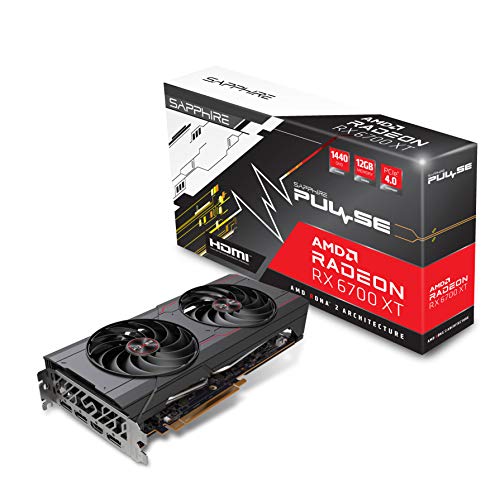
Sapphire Pulse Radeon RX 6700 XT 12GB
Best for: gamers wanting 12GB VRAM and AMD architecture
- Graphics Processor
- AMD Radeon RX 6700 XT
- Memory Size
- 12GB
- Memory Type
- GDDR6
- Use
- Gaming
- Dimensions
- 12.5 × 8.5 × 2.75 inches
- Weight
- 2.31 pounds
View on Amazon: Sapphire Pulse Radeon RX 6700 XT 12GB (paid link)
The Sapphire Pulse Radeon RX 6700 XT 12GB is a dedicated gaming graphics card built on AMD RDNA 2 architecture. It features 12GB of GDDR6 memory to handle modern gaming textures and assets. Measuring 12.5 inches long and 2.75 inches thick, this card demands substantial case space. It suits you if you need a high-VRAM AMD GPU for gaming and have a computer chassis large enough to fit its dimensions.
Pros
- 12GB GDDR6 video memory
- AMD Radeon RX 6700 XT processor
- Built on AMD RDNA 2 architecture
- Card weight of 2.31 pounds
Cons
- Length of 12.5 inches limits compatibility with smaller PC cases
- Thickness of 2.75 inches takes up multiple expansion slots
Good fit if
- You want 12GB of GDDR6 memory for gaming setups.
- You have a PC case that fits a 12.5-inch graphics card.
Skip if
- You use a compact or small-form-factor computer case.
- You need a card thinner than 2.75 inches for expansion slot clearance.
Verdict: Sapphire Pulse Radeon RX 6700 XT 12GB delivers 12GB of GDDR6 memory on AMD RDNA 2 hardware for dedicated gaming setups. Ensure your PC case can accommodate its 12.5-inch length and 2.75-inch thickness before installing.
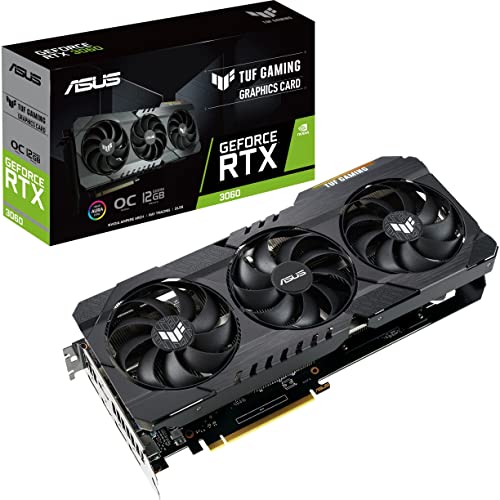
ASUS TUF Gaming GeForce RTX 3060 OC 12GB
Best for: 12GB VRAM gaming on PCIe 4.0
- Graphics Processor
- GeForce RTX 3060
- Memory Size
- 12GB
- Memory Type
- GDDR6
- Boost Clock
- 1882 MHz
- PCIe Interface
- PCIe 4.0
- Use
- Gaming
View on Amazon: ASUS TUF Gaming GeForce RTX 3060 OC 12GB (paid link)
The ASUS TUF Gaming GeForce RTX 3060 12GB is a PCIe 4.0 graphics card built on NVIDIA Ampere architecture. You get 12GB of GDDR6 video memory, an 1882 MHz boost clock in OC mode, and 2nd generation RT cores for hardware ray tracing. It suits you if you run memory-heavy workloads or modern games needing extra VRAM headroom without switching to a different platform.
Pros
- 12GB GDDR6 video memory
- 1882 MHz boost clock in OC mode
- ASUS SafeSlot metal reinforcement for PCIe retention
- 3rd generation Tensor cores with support up to 8K resolution
Cons
- Default Gaming mode runs at a lower 1852 MHz boost clock
- Requires avoiding unofficial software to maintain factory operation
Good fit if
- You need 12GB of GDDR6 memory for texture-heavy gaming.
- You want reinforced PCIe hardware mounting via SafeSlot.
Skip if
- You prefer not having to use official software profiles to reach 1882 MHz.
- You require newer generation RT cores than Ampere provides.
Verdict: ASUS TUF Gaming GeForce RTX 3060 12GB delivers 12GB of GDDR6 memory and reinforced SafeSlot construction on a PCIe 4.0 interface. It gives you dependable Ampere performance with high VRAM capacity.

PNY GeForce RTX 4060 8GB Dual Fan
Best for: two-slot PCIe 4.0 gaming systems
- Graphics Processor
- GeForce RTX 4060
- Memory Size
- 8GB
- Memory Type
- GDDR6
- Memory Bus Width
- 128-bit
- PCIe Interface
- PCIe 4.0
- Slot Width
- 2 Slot
View on Amazon: PNY GeForce RTX 4060 8GB Dual Fan (paid link)
The PNY GeForce RTX 4060 8GB Dual Fan is a two-slot graphics card built for gaming on modern systems. It features 8GB of GDDR6 memory on a 128-bit bus and connects across a PCIe 4.0 interface. It also includes DLSS 3 support and a dual-fan thermal design. If you need a standard two-slot graphics card with current-generation hardware specifications for gaming, this card fits your setup.
Pros
- 8GB GDDR6 memory
- PCIe 4.0 interface
- Compact 2-slot width
- Dual-fan cooling configuration
Cons
- 128-bit memory bus width
- 8GB memory capacity limits room for higher-memory workloads
Good fit if
- You need a 2-slot graphics card with a PCIe 4.0 interface.
- You want 8GB of GDDR6 memory for gaming.
Skip if
- You need a graphics card with a memory bus wider than 128-bit.
- You require more than 8GB of onboard VRAM.
Verdict: PNY GeForce RTX 4060 8GB Dual Fan delivers PCIe 4.0 connectivity and 8GB of GDDR6 memory in a standard 2-slot format.

PNY NVIDIA RTX A2000 6GB
Best for: professional workstation tasks needing ECC memory
- Graphics Processor
- NVIDIA RTX A2000
- Memory Size
- 6GB
- Memory Type
- GDDR6
- Dimensions
- 9.69 × 5.35 × 0.1 inches
View on Amazon: PNY NVIDIA RTX A2000 6GB (paid link)
The PNY NVIDIA RTX A2000 6GB is a workstation graphics card built on NVIDIA Ampere architecture. It features 6GB of GDDR6 memory with optional ECC support, 26 RT Cores, and 104 Tensor Cores for AI workflows and ray-traced rendering. You get four DisplayPort adapters and ISV software certifications out of the box. This card suits you if you need certified drivers, hardware ray tracing, and error-checking memory in a full-height ATX slot.
Pros
- 26 RT Cores and 104 Tensor Cores for ray tracing and AI tasks
- 6GB GDDR6 memory with optional ECC error correction
- Comes with four DisplayPort adapters and full-height ATX bracket
- ISV certified with support for CUDA, DirectX, Vulkan, and OpenGL
Cons
- Limited to 6GB GDDR6 memory capacity
- ECC memory support is turned off by default
Good fit if
- You need professional ISV certified drivers for CUDA and professional graphics APIs
- You require ECC memory support for error-free computing tasks
- You want dedicated RT and Tensor cores for ray tracing and AI workflows
Skip if
- You require more than 6GB of video memory for larger datasets
- You need native full-size display ports without using adapters
Verdict: PNY NVIDIA RTX A2000 6GB provides workstation-grade Ampere computing with 104 Tensor Cores, ray tracing, and optional ECC memory. It delivers professional ISV certifications in a package suited for specialized productivity workflows.

ZOTAC Gaming GeForce RTX 4060 Twin Edge OC
Best for: compact PC cases with tight clearance limits
- Graphics Processor
- GeForce RTX 4060
- Memory Size
- 8GB
- Memory Type
- GDDR6
- Memory Bus Width
- 128-bit
- PCIe Interface
- PCIE 4.0
- Use
- Gaming
View on Amazon: ZOTAC Gaming GeForce RTX 4060 Twin Edge OC (paid link)
The ZOTAC GeForce RTX 4060 Twin Edge 8GB is a compact graphics card built for gaming. It features a GeForce RTX 4060 graphics processor paired with 8GB of GDDR6 memory running on a 128-bit bus. Measuring 8.7 inches in length and 1.7 inches wide, it operates on a PCIe 4.0 interface. This model suits you if you require an 8.7-inch card for a small computer chassis.
Pros
- Compact 8.7-inch length for tight chassis clearances
- Fast 17 Gbps GDDR6 memory speed
- PCIe 4.0 interface support
Cons
- Narrow 128-bit memory bus width
- 8GB memory capacity limits larger memory allocations
Good fit if
- You need a card under nine inches long for a compact case.
- You want a GeForce RTX 4060 GPU with PCIe 4.0 connectivity.
Skip if
- You need more than 8GB of video memory.
- You require a wider memory bus than 128-bit.
Verdict: ZOTAC GeForce RTX 4060 Twin Edge 8GB delivers PCIe 4.0 gaming hardware in an 8.7-inch form factor. Its 8GB GDDR6 configuration fits compact builds without demanding extra clearance.

Sapphire Radeon RX 6800 16GB Renewed
Best for: gamers needing 16GB GDDR6 VRAM
- Graphics Processor
- Radeon RX 6800
- Memory Size
- 16GB
- Memory Type
- GDDR6
- PCIe Interface
- PCIe 4.0
- Use
- Gaming
- Dimensions
- 17 × 9.5 × 3.5 inches
View on Amazon: Sapphire Radeon RX 6800 16GB Renewed (paid link)
The Sapphire Nitro+ Radeon RX 6800 is a gaming graphics card built around the Radeon RX 6800 processor and a PCIe 4.0 interface. You get 16GB of GDDR6 memory, giving you substantial memory capacity for demanding gaming workloads compared to smaller capacity models. This renewed unit measures 17 inches long, 9.5 inches wide, and 3.5 inches high. It suits you if you need large VRAM capacity and have a spacious PC case.
Pros
- 16GB GDDR6 memory capacity
- Radeon RX 6800 graphics processor
- PCIe 4.0 interface support
Cons
- Renewed condition rather than brand new
- Large card length listed at 17 inches
Good fit if
- You need 16GB of GDDR6 memory for gaming workloads.
- You have a PC chassis that fits a 17-inch card.
- You use a system with a PCIe 4.0 expansion slot.
Skip if
- You want a brand-new card rather than a renewed unit.
- You have a compact case with clearance under 17 inches.
Verdict: Sapphire Nitro+ Radeon RX 6800 16GB delivers a large 16GB GDDR6 memory buffer on a PCIe 4.0 connection. It is a capable choice if your case accommodates its listed 17-inch length and renewed condition fits your requirements.

ASUS TUF Gaming Radeon RX 6500 XT 4GB
Best for: durable entry-level 4GB gaming builds
- Graphics Processor
- AMD Radeon RX 6500 XT
- Memory Size
- 4GB
- Memory Type
- GDDR6
- PCIe Interface
- PCIe 4.0
- Slot Width
- 2.7-slot
- Use
- Gaming
View on Amazon: ASUS TUF Gaming Radeon RX 6500 XT 4GB (paid link)
This ASUS TUF Gaming card features an AMD Radeon RX 6500 XT processor paired with 4GB of GDDR6 memory on a PCIe 4.0 interface. It utilizes a 2.7-slot heatsink with dual Axial-tech fans, dual ball bearings, and an all-aluminum shroud. You get basic gaming capability with heavy-duty cooling construction. It suits you if you need a dedicated 4GB desktop card built for durability in a case that fits thick coolers.
Pros
- All-aluminum shroud and protective metal backplate
- Dual ball fan bearings designed for extended operational life
- 2.7-slot cooling design equipped with Axial-tech fans
- PCIe 4.0 interface support
Cons
- 4GB GDDR6 memory capacity provides limited buffer headroom
- 2.7-slot thickness takes up more chassis space than standard dual-slot cards
Good fit if
- You want an entry-level AMD Radeon RX 6500 XT GPU with durable metal build quality.
- You have adequate space in your PC case for a 2.7-slot cooler.
- You prefer dual ball bearing fans engineered for longer lifespan.
Skip if
- You need more than 4GB of VRAM for your games.
- You are building inside a compact PC case restricted to 2-slot cards.
Verdict: ASUS TUF Gaming Radeon RX 6500 XT 4GB delivers sturdy metal construction and a large 2.7-slot cooling setup around an entry-level AMD processor. Its 4GB GDDR6 memory capacity limits headroom for demanding games, but the hardware design prioritizes durability.

ASUS Dual GeForce RTX 4060 8GB
Best for: compact DLSS 3 gaming builds
- Graphics Processor
- GeForce RTX 4060
- Memory Size
- 8GB
- Memory Type
- GDDR6
- Boost Clock
- 2535 MHz
- PCIe Interface
- PCIe 4.0
- Dimensions
- 8.94 × 4.85 × 0.1 inches
View on Amazon: ASUS Dual GeForce RTX 4060 8GB (paid link)
The ASUS Dual GeForce RTX 4060 EVO OC 8GB is a dual-fan graphics card built on NVIDIA's Ada Lovelace architecture. It features 8GB of GDDR6 memory, a PCIe 4.0 interface, and a factory boost clock reaching up to 2535 MHz in OC mode. With HDMI 2.1a and DisplayPort 1.4a outputs, it suits you if you need hardware-level DLSS 3 capability and compact 8.94-inch dimensions.
Pros
- Factory boost clock reaches up to 2535 MHz in OC mode
- Supports NVIDIA DLSS 3 with 4th generation Tensor Cores
- Axial-tech fan design with protective barrier rings
- Compact 8.94-inch length fits smaller enclosures
Cons
- Video memory limited to 8GB GDDR6
- Only includes HDMI 2.1a and DisplayPort 1.4a connection standards
Good fit if
- You want DLSS 3 frame generation support
- You need a card under 9 inches in length for your chassis
- You prefer a dual-fan design with factory overclocking
Skip if
- You require more than 8GB of VRAM for heavy workloads
- You need older legacy display outputs like DVI
Verdict: ASUS Dual GeForce RTX 4060 EVO OC 8GB delivers a 2535 MHz boost clock and DLSS 3 support inside an 8.94-inch frame. It provides a solid PCIe 4.0 option for systems requiring compact dimensions and modern display connectivity.

Sonnet eGFX Breakaway Box 650 Thunderbolt 3 Enclosure
Best for: external Thunderbolt 3 graphics card expansion
- Dimensions
- 17.7 × 11.8 × 12.2 inches
- Weight
- 7.5 pounds
View on Amazon: Sonnet eGFX Breakaway Box 650 Thunderbolt 3 Enclosure (paid link)
You use the Sonnet eGFX Breakaway Box 650 to connect a PCIe graphics card to a computer through Thunderbolt 3. Unlike standard internal cards on this list, this chassis serves as external expansion. It measures 17.7 inches long, 11.8 inches wide, and 12.2 inches high with a weight of 7.5 pounds. This unit suits you if you need dedicated desktop graphics power on a Thunderbolt 3 laptop or compact system.
Pros
- Thunderbolt 3 external connectivity
- Houses a full PCIe graphics card externally
- Dedicated expansion chassis weighing 7.5 pounds
Cons
- Does not include an internal graphics card
- Large desktop footprint at 17.7 inches long
- Requires a host system with Thunderbolt 3
Good fit if
- You need external PCIe expansion over Thunderbolt 3.
- You have desk space for a 17.7-inch enclosure.
Skip if
- You need an internal desktop graphics card.
- You lack a Thunderbolt 3 port on your computer.
Verdict: Sonnet eGFX Breakaway Box 650 Thunderbolt 3 Enclosure provides external PCIe expansion in a 7.5-pound chassis. It delivers a dedicated housing for users connecting a graphics card via Thunderbolt 3.
Specifications side by side
| Spec | MSI GeForce RTX 3060 Ventus 12GB | ASUS Dual GeForce RTX 4060 8GB | GIGABYTE RTX 4060 Ti WINDFORCE 8GB | Gigabyte GeForce RTX 4060 Windforce 8GB | ZOTAC GeForce RTX 3060 Twin Edge 12GB | EVGA GeForce RTX 3060 XC Dual-Fan 12GB | Sapphire Pulse Radeon RX 6700 XT 12GB | ASUS TUF Gaming GeForce RTX 3060 OC 12GB | PNY GeForce RTX 4060 8GB Dual Fan | PNY NVIDIA RTX A2000 6GB | ZOTAC Gaming GeForce RTX 4060 Twin Edge OC | Sapphire Radeon RX 6800 16GB Renewed | ASUS TUF Gaming Radeon RX 6500 XT 4GB | ASUS Dual GeForce RTX 4060 8GB | Sonnet eGFX Breakaway Box 650 Thunderbolt 3 Enclosure |
|---|---|---|---|---|---|---|---|---|---|---|---|---|---|---|---|
| Graphics Processor | GeForce RTX 3060 | GeForce RTX 4060 | GeForce RTX 4060 Ti | GeForce RTX 4060 | GeForce RTX 3060 | GeForce RTX 3060 | AMD Radeon RX 6700 XT | GeForce RTX 3060 | GeForce RTX 4060 | NVIDIA RTX A2000 | GeForce RTX 4060 | Radeon RX 6800 | AMD Radeon RX 6500 XT | GeForce RTX 4060 | not specified |
| Memory Size | 12GB | 8GB | 8GB | 8GB | 12GB | 12GB | 12GB | 12GB | 8GB | 6GB | 8GB | 16GB | 4GB | 8GB | not specified |
| Memory Type | GDDR6 | GDDR6 | GDDR6 | GDDR6 | GDDR6 | GDDR6 | GDDR6 | GDDR6 | GDDR6 | GDDR6 | GDDR6 | GDDR6 | GDDR6 | GDDR6 | not specified |
| Boost Clock | 1807MHz | not specified | not specified | not specified | not specified | 1882 Mhz | not specified | 1882 MHz | not specified | not specified | not specified | not specified | not specified | 2535 MHz | not specified |
| Memory Bus Width | 192-bit | not specified | 128-bit | 128-bit | 192-bit | not specified | not specified | not specified | 128-bit | not specified | 128-bit | not specified | not specified | not specified | not specified |
| PCIe Interface | PCIe 4 | PCIe 4.0 | not specified | not specified | PCIe 4.0 | not specified | not specified | PCIe 4.0 | PCIe 4.0 | not specified | PCIE 4.0 | PCIe 4.0 | PCIe 4.0 | PCIe 4.0 | not specified |
| Slot Width | not specified | 2-Slot | not specified | not specified | not specified | not specified | not specified | not specified | 2 Slot | not specified | not specified | not specified | 2.7-slot | not specified | not specified |
| Memory | 12GB | 8GB | 8GB | 8GB | 12GB | 12GB | 12GB | 12GB | 8GB | 6GB | 8GB | 16GB | 4GB | 8GB | not specified |
| GPU | GeForce RTX 3060 | not specified | GeForce RTX 4060 Ti | GeForce RTX 4060 | GeForce RTX 3060 | GeForce RTX 3060 | Radeon RX 6700 XT | GeForce RTX 3060 | not specified | not specified | GeForce RTX 4060 | not specified | not specified | GeForce RTX 4060 | not specified |
| Interface | PCIe 4.0 | PCIe 4.0 | not specified | not specified | PCIe 4.0 | not specified | not specified | PCIe 4.0 | PCIe 4.0 | not specified | PCIe 4.0 | PCIe 4.0 | PCIe 4.0 | PCIe 4.0 | not specified |
| Use | Gaming | not specified | not specified | not specified | Gaming | Gaming | Gaming | Gaming | Gaming | not specified | Gaming | Gaming | Gaming | not specified | not specified |
| Length | 9.25 inches | not specified | not specified | not specified | not specified | not specified | not specified | not specified | not specified | not specified | not specified | not specified | not specified | not specified | not specified |
| Width | 4.88 inches | not specified | not specified | not specified | not specified | not specified | not specified | not specified | not specified | not specified | not specified | not specified | not specified | not specified | not specified |
| Weight | 12 ounces | 1.2 pounds | not specified | not specified | not specified | 12 ounces | 2.31 pounds | 12 ounces | not specified | not specified | not specified | not specified | 2.2 pounds | 1.36 pounds | 7.5 pounds |
| Dimensions | not specified | 7.96 × 4.73 × 0.1 inches | 7.91 × 4.72 × 1.61 inches | 7.56 × 4.72 × 1.61 inches | 8.8 × 4.6 × 1.5 inches | 7.94 × 1.54 × 4.33 inches | 12.5 × 8.5 × 2.75 inches | 5 × 5 × 5 inches | 16.2 × 8.3 × 6.7 inches | 9.69 × 5.35 × 0.1 inches | 8.7 × 1.7 × 4.8 inches | 17 × 9.5 × 3.5 inches | 16 × 3.5 × 9.2 inches | 8.94 × 4.85 × 0.1 inches | 17.7 × 11.8 × 12.2 inches |
| Size | RTX | RTX4060|V2|OC | not specified | not specified | not specified | not specified | not specified | not specified | not specified | not specified | not specified | not specified | RX6500XT|4G | not specified | not specified |
| Model | MSI GeForce RTX 3060 VENTUS 2X 12G OC | not specified | not specified | GV-N4060WF2OC-8GD-cr | not specified | not specified | not specified | TUF-RTX3060-O12G-V2-GAMING | not specified | VCNRTXA2000ATX | not specified | not specified | TUF-RX6500XT-O4G-GAMING | 90YV0JC7-M0NA00 | GPU-650W-TB3 |
| Color | not specified | BLACK | not specified | not specified | not specified | not specified | not specified | not specified | not specified | not specified | Gun Metal | not specified | not specified | Black/White | not specified |
Hardware Trade-Offs Under $500
Cards in this category share specific hardware limits across their spec sheets. Memory capacity tops out at 12GB on models like the GeForce RTX 3060 and Radeon RX 6700 XT, while dipping to 6GB on compact options like the RTX A2000. Memory type remains standard GDDR6 across the board, with no cards providing higher-bandwidth memory standards. System interfaces reach PCIe 4.0, while some options run on PCIe 4X. You also balance form factor clearance, as card lengths span from 6.57 inches up to 23.11 inches.
- Memory capacity: Capped between 6GB and 12GB, with no options above 12GB.
- Memory type: Limited strictly to standard GDDR6 across all listed products.
- Interface: Restricted to PCIe 4.0 or narrower PCIe 4X connections.
- Form factor: Card length varies widely, requiring up to 23.11 inches of clearance.
If you plan to upgrade your audio gear as well, you can examine driver sizes and impedance ratings across headphones under 500.
How We Picked These Cards
To build this guide, we evaluate graphics cards qualifying Under $500. We compare hardware strictly through published specifications and feature lists on Amazon listings. We do not physically handle or test products. To keep the comparison straightforward, you see only one size or variant from each product family.
We order products in stock first, then by Amazon sales rank, placing better-selling products first. Stock status updates at least daily on the live page. Because products move into or out of the Under $500 range as current figures change, the lineup adjusts automatically to maintain an accurate list.
How to Choose the Right Graphics Card
-
Check Memory Bus Width
A wider memory bus transfers more data per clock cycle between the GPU and VRAM. When you run bandwidth-heavy tasks or high-resolution textures, look closely at this number. Models like the ZOTAC GeForce RTX 3070 Twin Edge OC 8GB feature a 256-bit bus, offering broader data pathways than standard 128-bit or 192-bit designs. Choosing a 256-bit interface benefits games requiring fast texture streaming. Compare the published bus width across card specifications before deciding, especially if raw memory bandwidth is your main priority.
-
Review Video Port Types
Display connectors vary across models and dictate what monitors you can plug in directly. Most gaming units feature full-size DisplayPort and HDMI ports, but compact cards may use different standards. The HP Nvidia Quadro T1000 8GB utilizes Mini Display outputs, which require specialized cables or adapters to link with standard desktop displays. Check your existing monitor inputs and cables before purchasing. Matching your display connectors to the graphics card outputs avoids the need to purchase additional display adapters later.
-
Verify PCIe Slot Requirements
Graphics cards require specific PCIe slot configurations to seat and communicate properly on your motherboard. Modern desktop cards like the ASUS Dual GeForce RTX 4060 8GB run on PCIe 4.0 interfaces, delivering fast data transfer with compatible motherboards. Check your motherboard manual to ensure your PCIe slot matches the card generation for optimal throughput. Verifying both the physical slot clearance and interface generation ensures the card operates at its full rated communication speeds without motherboard bus bottlenecks.
-
Look for Fan Stop Features
Acoustic control features determine how quiet your system stays during everyday use. Many dual-fan coolers now include zero-RPM modes that completely halt the cooling fans when the card remains below a designated temperature threshold. The MSI GeForce RTX 3060 Ventus 12GB includes silent fan-stop operation during low-load tasks like web browsing. If you value a silent desktop environment during light computing, inspect the cooler specifications to confirm the presence of idle fan-stop or zero-decibel cooling modes.
-
Compare Factory Boost Clocks
Boost clock frequencies indicate the maximum speed a graphics processor targets during active gaming loads. While base speeds offer steady operation, higher boost speeds provide extra processing throughput in demanding scenes. The EVGA GeForce RTX 3060 XC Dual-Fan 12GB lists a boost clock of 1882 MHz, exceeding standard reference clock rates. When choosing between multiple cards sharing the identical graphics chip, compare published boost clock numbers. Higher factory clock ratings generally deliver faster processing speeds straight out of the packaging.
-
Evaluate Ray Tracing Support
Dedicated hardware acceleration changes how games render lighting and shadows in supported software titles. If you intend to run modern game engines, verify whether the card supports hardware-based ray tracing and modern API standards. The Sapphire Pulse AMD Radeon RX 6600 8GB (Renewed) supports DirectX 12 Ultimate ray tracing. Review the published GPU architecture details to ensure your selected card includes the specific graphic features and hardware-level rendering capabilities needed for your target gaming library.
Frequently asked questions
Which graphics card has the highest VRAM capacity on this list?
The Sapphire Radeon RX 6800 16GB Renewed delivers the highest video memory capacity on this list with 16GB of GDDR6 memory. This large memory buffer pairs with a PCIe 4.0 interface to support demanding graphical assets. You should confirm your computer chassis can accommodate its listed length of 17 inches before planning an installation.
Which graphics cards support DLSS 3 technology?
NVIDIA 40-series options like the ASUS Dual GeForce RTX 4060 8GB models support DLSS 3 technology. The ASUS Dual GeForce RTX 4060 EVO OC combines DLSS 3 support with a 2535 MHz boost clock and 8GB of GDDR6 memory on a PCIe 4.0 interface. This architectural feature lets you use newer frame generation techniques in supported games.
What is the shortest graphics card for compact PC cases?
The Gigabyte GeForce RTX 4060 Windforce 8GB is the shortest card on this list, measuring 7.56 inches long. It uses a dual-fan cooling layout alongside 8GB of GDDR6 memory. If you require an RTX 4060 Ti instead, the GIGABYTE RTX 4060 Ti WINDFORCE 8GB measures 7.91 inches, fitting compact cases with restricted horizontal clearance.
Is there a graphics card designed specifically for professional workstations?
Yes, the PNY NVIDIA RTX A2000 6GB is configured specifically for professional workstation workloads rather than dedicated gaming. It features 104 Tensor Cores, hardware ray tracing, and optional ECC memory support. It also includes independent software vendor (ISV) certifications, providing validated stability if you run professional design, modeling, or precision compute applications.
How do the RTX 3060 and RTX 4060 memory configurations compare?
RTX 3060 cards on this list offer 12GB of GDDR6 memory, whereas RTX 4060 options come equipped with 8GB of GDDR6 memory. Models such as the MSI Ventus and ZOTAC Twin Edge give you higher raw memory capacity. Meanwhile, the 8GB RTX 4060 models introduce newer architecture updates, such as DLSS 3 compatibility and PCIe 4.0 connectivity.
Can you run an external graphics card over Thunderbolt 3?
Yes, you can run an external setup using the Sonnet eGFX Breakaway Box 650 Thunderbolt 3 Enclosure. This unit provides a dedicated external PCIe housing weighing 7.5 pounds with dimensions of 17.7 by 11.8 by 12.2 inches. It allows you to connect a compatible PCIe desktop graphics card to a computer via a Thunderbolt 3 cable.
Which GeForce RTX 4060 offers the highest boost clock speed?
The ASUS Dual GeForce RTX 4060 EVO OC specifies the highest listed frequency with a 2535 MHz boost clock. It operates on a PCIe 4.0 interface with 8GB of GDDR6 memory. Measuring 8.94 inches in length and weighing 1.36 pounds, this dual-fan model gives you higher default core clocks alongside modern DLSS 3 frame generation support.